


SewIconz 64-bit for Windows 7 - "Enhance embroidery icons with ease." - Windows 7 Download


SewIconz 64-bit 1.9.0
"SewIconz 64-bit: Transform embroidery files into vivid thumbnails."
Introducing SewIconz 64-bit software - the perfect embroidery iconizer and thumbnailer tool from S & S Computing. With its user-friendly interface, you can easily organize and categorize your embroidery designs to streamline your workflow. The software is compatible with Windows 7 and higher, ensuring a seamless experience for all users. Enhance your embroidery projects with SewIconz 64-bit, the ultimate embroidery organization solution.
SewIconz 64-bit 1.9.0 full details

| File Size: | 6.40 MB |
|---|---|
| License: | Trialware |
| Price: | $25.00 |
| Released: | 2020-04-02 |
| Downloads: | Total: 703 | This Month: 70 |
| Publisher: | S & S Computing |
| Publisher URL: | https://www.sandscomputing.com/ |

Download SewIconz 64-bit 1.9.0
Save SewIconz 64-bit to My Stuff
Tweet
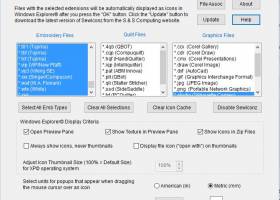
SewIconz 64-bit 1.9.0 full screenshots

SewIconz 64-bit - Windows 7 Download awards

SewIconz 64-bit 1.9.0 full description
SewIconz is software for viewing the contents of embroidery files, quilting files, and certain common image files as icons from within Windows File Explorer© or from the File->Open dialog of embroidery software. With SewIconz, the stitch pattern contained in embroidery files and some cross-stitch files will appear as icons as you scroll through your Windows folders. Information about the number of stitches, colors and pattern size (in either mm. or in.) will appear as your cursor moves over the icons. SewIconz is fully UNICODE compatible, so that folder and file names for any set of keyboard characters are now displayed correctly.
SewIconz can display icons for many home and commercial embroidery file formats. In addition, numerous quilting formats and common image formats can also be displayed. Below is a list (by category) of the file types supported by SewIconz:
Embroidery File Types - .art .art42 .art50 .art60 .c2s .clf .cnd .csd .dem .dsb .dst .dsz .emb .emd .exp .gen .gnc .hus .jan .jef .jef+ .krz .ksm .ngs .pat .pcd .pcm .pcq .pcs .pec .pes .phb .phc .sew .shv .sst .sti .tap .t01 .tbf .tcf .vip .vp3 .xxx .waf .wte .zsk
Quilting File Types - .4qb .cqp .hqf .iqp .plt .qli
Image File Types - .bmp .cdr .cmx .draw .dxf .gif .jpg .png .studio .svg .emf .wmf
Setting Up and Using SewIconz:
SewIconz is unlike our other software. After the initial installation and the setup are complete, it requires no further user interact to perform its tasks. It is a class of software known as an icon handler, which means it interacts with the Windows© Operating System rather than directly with the user.
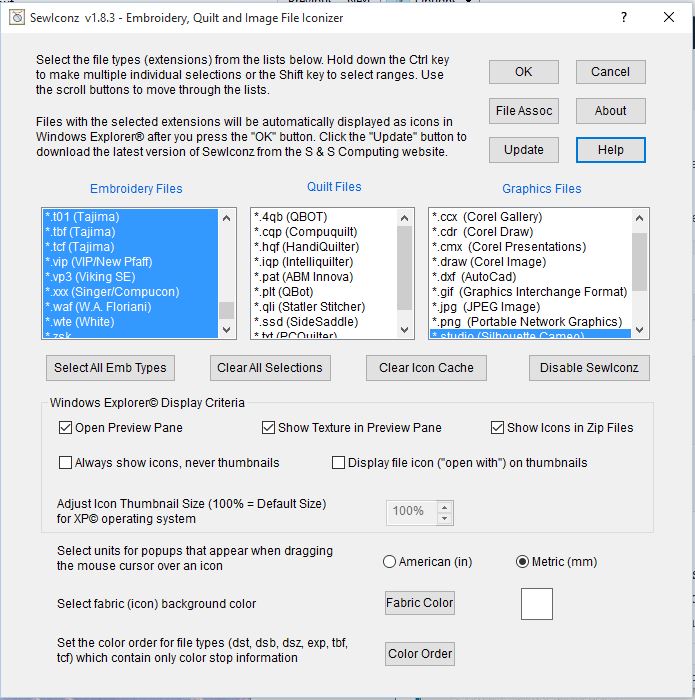
After SewIconz is installed, you need to configure it by double-clicking its desktop icon to select the file types to iconize. This will open the setup dialog shown in the figure below. The setup dialog contains lists of embroidery and graphics file extensions (types) that you select to be handled (iconized) by SewIconz. Click on the types you want to iconize (hold down the Ctrl key to select multiple types). You may select the units (mm or in) for displaying file information. Also, for file types (like *.dst and *.exp) with no internal color palette, you can select the color palette by clicking on the Color Order button and following the steps on the palette dialog. You may also change the background, or fabric, color by pressing the Fabric Color button. This is useful, for example, when viewing white lace patterns which would otherwise be invisible on a white fabric background.
Finally, press the OK button to complete the setup process. This is the last time you need to interact with SewIconz– until you want to change the types of embroidery and graphics files to iconize or to uninstall the application. You will be given the option to reboot your system at this time. Most modern operating systems do not need to do this, but on some older (XP) systems, you may need to reboot to see icons for the selected files.
Once SewIconz has been installed and you have selected the various viewing options, you will now see “icons” (or thumbnails) displayed when you open a folder (using Windows File Explorer) that contains embroidery files (see the figure below). These images represent the stitch pattern contained in each file. The figure shows an Explorer folder containing embroidery files with large-sized thumbnails displayed in the middle pane. The file “Assortment.PES” has been “selected” by clicking on it, and its magnified textured thumbnail is displayed in the right Preview Pane (available in VISTA and later versions of Windows).
SewIconz can display icons for many home and commercial embroidery file formats. In addition, numerous quilting formats and common image formats can also be displayed. Below is a list (by category) of the file types supported by SewIconz:
Embroidery File Types - .art .art42 .art50 .art60 .c2s .clf .cnd .csd .dem .dsb .dst .dsz .emb .emd .exp .gen .gnc .hus .jan .jef .jef+ .krz .ksm .ngs .pat .pcd .pcm .pcq .pcs .pec .pes .phb .phc .sew .shv .sst .sti .tap .t01 .tbf .tcf .vip .vp3 .xxx .waf .wte .zsk
Quilting File Types - .4qb .cqp .hqf .iqp .plt .qli
Image File Types - .bmp .cdr .cmx .draw .dxf .gif .jpg .png .studio .svg .emf .wmf
Setting Up and Using SewIconz:
SewIconz is unlike our other software. After the initial installation and the setup are complete, it requires no further user interact to perform its tasks. It is a class of software known as an icon handler, which means it interacts with the Windows© Operating System rather than directly with the user.
After SewIconz is installed, you need to configure it by double-clicking its desktop icon to select the file types to iconize. This will open the setup dialog shown in the figure below. The setup dialog contains lists of embroidery and graphics file extensions (types) that you select to be handled (iconized) by SewIconz. Click on the types you want to iconize (hold down the Ctrl key to select multiple types). You may select the units (mm or in) for displaying file information. Also, for file types (like *.dst and *.exp) with no internal color palette, you can select the color palette by clicking on the Color Order button and following the steps on the palette dialog. You may also change the background, or fabric, color by pressing the Fabric Color button. This is useful, for example, when viewing white lace patterns which would otherwise be invisible on a white fabric background.
Finally, press the OK button to complete the setup process. This is the last time you need to interact with SewIconz– until you want to change the types of embroidery and graphics files to iconize or to uninstall the application. You will be given the option to reboot your system at this time. Most modern operating systems do not need to do this, but on some older (XP) systems, you may need to reboot to see icons for the selected files.
Once SewIconz has been installed and you have selected the various viewing options, you will now see “icons” (or thumbnails) displayed when you open a folder (using Windows File Explorer) that contains embroidery files (see the figure below). These images represent the stitch pattern contained in each file. The figure shows an Explorer folder containing embroidery files with large-sized thumbnails displayed in the middle pane. The file “Assortment.PES” has been “selected” by clicking on it, and its magnified textured thumbnail is displayed in the right Preview Pane (available in VISTA and later versions of Windows).
SewIconz 64-bit 1.9.0 download tags
Bookmark SewIconz 64-bit
SewIconz 64-bit for Windows 7 - Copyright information
All SewIconz 64-bit reviews, submitted ratings and written comments become the sole property of Windows 7 download. You acknowledge that you, not windows7download, are responsible for the contents of your submission. However, windows7download reserves the right to remove or refuse to post any submission for any reason.
Windows 7 Download periodically updates pricing and software information of SewIconz 64-bit full version from the publisher, but some information may be out-of-date. You should confirm all information.
Using warez version, crack, warez passwords, patches, serial numbers, registration codes, key generator, pirate key, keymaker or keygen for SewIconz 64-bit license key is illegal and prevent future development of SewIconz 64-bit. Download links are directly from our mirrors or publisher's website, SewIconz 64-bit torrent or shared files from free file sharing and free upload services, including Rapidshare, MegaUpload, YouSendIt, SendSpace, DepositFiles, DivShare, HellShare, HotFile, FileServe or MediaFire, are not used.
Windows 7 Download periodically updates pricing and software information of SewIconz 64-bit full version from the publisher, but some information may be out-of-date. You should confirm all information.
Using warez version, crack, warez passwords, patches, serial numbers, registration codes, key generator, pirate key, keymaker or keygen for SewIconz 64-bit license key is illegal and prevent future development of SewIconz 64-bit. Download links are directly from our mirrors or publisher's website, SewIconz 64-bit torrent or shared files from free file sharing and free upload services, including Rapidshare, MegaUpload, YouSendIt, SendSpace, DepositFiles, DivShare, HellShare, HotFile, FileServe or MediaFire, are not used.
Post SewIconz 64-bit review


Windows 7 SewIconz 64-bit related downloads
SewIconz is software for viewing the contents of embroidery files, quilting files, and certain common image files ...
Quick Slideshow Creator by Aleksey Taranov is the perfect tool for ... photo slideshows with personalized effects and music. This Windows 7 software download allows you to select your photos ...
... for Windows 8" by Wondersoft. Designed exclusively for Windows 7, this exceptional software offers an unmissable opportunity to ...
Looking for a reliable PDF preview tool that works seamlessly on your Windows 10 device? Look ...
As a PDF lover, finding the perfect software can be a challenge. Fortunately, Wondersoft's PDF Previewer ...
My Account
Help
Windows 7 Software Coupons
-
WinX DVD Ripper
50% Off -
WinX MediaTrans
63% Off -
WinX DVD Copy Pro
42% Off -
Media Player Morpher
85% Off -
MacX Video Converter Pro
56% Off
My Saved Stuff
You have not saved any software.
Click "Save" next to each software.
Click "Save" next to each software.
Would you like to receive announcements of new versions of your software by email or by RSS reader? Register for FREE!
Windows 7 Downloads Picks
- Alternate Pic View 3.650
- ACDSee Photo Manager 27.0.2.2553
- PDF-XChange Viewer 2.5.322.10
- IrfanView 4.67
- Secondary Viewer Photo Viewer 1.0.90.276
- Portable Universal Viewer 5.7.3
- Image Viewer CP Gold ActiveX 22.5
- 3D Photo Browser Light 17.81
- 3D Picture Viewer 1.3
- Faststone Image Viewer 8.2
- Irfan View 4.57
- Photo Mechanic 6.0 B4538
- Exif Data Viewer 1.0
- M3 Manager 6.0
- Alternate Pic View Lite 3.530
- EDFbrowser 2.14
- ExifTool GUI for Windows 6.3.11
- MIView x64 0.7 Build 53
- Black Ice TIFF Viewer 14.86
- Portable JPEGView 1.3.46.2
Popular Tags
png
multimedia
thumbnail
edit
picture
jpg
image
windows
pdf
bmp
picture viewer
zoom
image viewer
slideshow
photo
view
jpeg
viewer
pcx
tif
digital
photo viewer
rotate
graphic viewer
tiff
images
graphic
free
gif
photos
Popular Windows 7 Software
- CorelDRAW X7 (x32 bit) 17.4.0.887
- CorelDRAW X7 (x64 bit) 17.4.0.887
- CorelDRAW X5 15.2.0.686
- CorelDRAW X4
- iTop Screenshot 1.2.3.544
- CorelDRAW 2017 19.1.0.419
- CorelDRAW X6 16.4.0.1280
- Blender - 32 bit 2.80
- Adobe InDesign CS5 CS5.5 7.5.3
- CorelDRAW X8 18.0.0.450
- Graphic Workshop Professional 15.0a rev11
- Model Air Design 2.4
- Blender Portable 4.1.1
- Model Air Design 2.4
- Paint.NET 5.0.13
© 2026 Windows7Download.com - All logos, trademarks, art and other creative works are and remain copyright and property of their respective owners. Microsoft Windows is a registered trademarks of Microsoft Corporation. Microsoft Corporation in no way endorses or is affiliated with windows7download.com.