


IrfanView for Windows 7 - Fast image viewing, conversion and batch editing - Windows 7 Download


IrfanView 4.76
View, convert and batch-edit images with broad format support and a compact interface.
IrfanView is a compact image viewer and converter for browsing folders, inspecting pictures and handling everyday image tasks. It supports a wide range of formats, including common files such as JPEG, PNG, GIF and TIFF, plus many camera RAW and specialized formats. Tools include thumbnails, slideshows, cropping, effects and batch conversion, while plugins extend format support. Freeware for non-commercial use.
IrfanView 4.76 full details

| File Size: | 4.31 MB |
|---|---|
| License: | Freeware |
| Price: | FREE |
| Released: | 2026-09-18 |
| Downloads: | Total: 21105 | This Month: 11 |
| Publisher: | Irfan Skiljan |
| Publisher URL: | http://www.irfanview.com |

Download IrfanView 4.76
Save IrfanView to My Stuff
Tweet
IrfanView - Windows 7 Download awards



IrfanView 4.76 full description
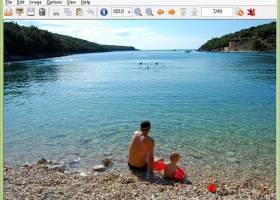
IrfanView is a compact image viewer and converter for people who need to browse, inspect and make practical changes to image files without using a full graphics suite. Its fast directory browsing and low resource use make it suitable for opening individual pictures as well as reviewing folders of images. The interface is designed to support straightforward viewing while providing editing and conversion tools for more involved tasks.
The program handles a broad range of image formats, including JPEG, PNG, GIF, TIFF, BMP, WebP, PSD and many camera RAW types. It also supports formats used for documents, graphics and specialized image data, with additional multimedia format support available through plugins. Thumbnail view helps locate files visually, while slideshow mode presents a selected set of images in sequence. Users can search for files and move through directories without opening each picture separately.
For routine image work, IrfanView can crop, cut, straighten and resize images, adjust color depth, apply effects such as sharpening or blur, and perform lossless operations on JPEG files. Its batch tools process multiple files in one operation, making it useful for converting image collections or applying common changes across a folder. The program can also edit IPTC metadata, work with color profiles, scan images, capture screen content, print or email files, and use OCR where supported. A paint plugin adds simple annotations such as lines, circles and arrows.
Multipage editing, command-line options and hotkeys provide additional ways to handle repetitive tasks or fit the viewer into an established workflow. Users can create slideshows and package them as executable or screen-saver files. Plugin support extends format handling and adds functions; multimedia plugins can enable playback or viewing of supported audio and video formats. The available tools make IrfanView useful for photographers sorting images, office users reviewing graphics, and anyone who needs quick conversion or basic editing.
IrfanView is freeware for non-commercial use and supports multiple interface languages, including English, French, German and Russian, as well as Unicode. It is intended for Windows systems, including Windows 7 and later versions. Some formats and functions depend on optional plugins, and professional or commercial use should be checked against the program’s licensing terms.
IrfanView 4.76 download tags
Bookmark IrfanView
IrfanView for Windows 7 - Copyright information
All IrfanView reviews, submitted ratings and written comments become the sole property of Windows 7 download. You acknowledge that you, not windows7download, are responsible for the contents of your submission. However, windows7download reserves the right to remove or refuse to post any submission for any reason.
Windows 7 Download periodically updates pricing and software information of IrfanView full version from the publisher, but some information may be out-of-date. You should confirm all information.
Using warez version, crack, warez passwords, patches, serial numbers, registration codes, key generator, pirate key, keymaker or keygen for IrfanView license key is illegal and prevent future development of IrfanView. Download links are directly from our mirrors or publisher's website, IrfanView torrent or shared files from free file sharing and free upload services, including Rapidshare, MegaUpload, YouSendIt, SendSpace, DepositFiles, DivShare, HellShare, HotFile, FileServe or MediaFire, are not used.
IrfanView users' reviews
IrfanView 4.37
review by Elbantary (Feb 1, 2014)

Thanks, your software is excellent.
Post IrfanView review


Windows 7 IrfanView related downloads
IrfanView is a compact image viewer and editor for ... avoids repeating the same steps on each image. IrfanView can also capture screenshots, display multipage image files, ...
My Account
Help
Windows 7 Software Coupons
-
FREE VPN PROXY by SEED4.ME WINDOWS
Free VPN by Seed4Me -
MacX DVD Ripper Pro
50% Off -
MacX Video Converter Pro
56% Off -
WinX MediaTrans
63% Off -
WinX HD Video Converter
56% Off
My Saved Stuff
You have not saved any software.
Click "Save" next to each software.
Click "Save" next to each software.
Would you like to receive announcements of new versions of your software by email or by RSS reader? Register for FREE!
Windows 7 Downloads Picks
- 3D Photo Browser Light 17.81
- Fresh View 8.40
- IrfanView 4.76
- Faststone Image Viewer 8.4
- EDFbrowser 2.14
- ExifTool GUI for Windows 6.3.11
- NifSkope 1.0.21.4886
- Image Viewer CP Gold ActiveX 22.5
- Black Ice TIFF Viewer 14.86
- M3 Manager 6.0
- Alternate Pic View 3.650
- PDF-XChange Viewer 2.5.322.10
- Irfan View 4.57
- 3D Picture Viewer 1.3
- ACDSee Photo Manager 27.0.2.2553
- Portable Universal Viewer 5.7.3
- Secondary Viewer Photo Viewer 1.0.90.276
- FastStone MaxView 3.4
- RadiAnt Viewer 2020.2.2
- Imagine 1.0.9
Popular Tags
viewer
graphic
photos
png
pcx
tiff
picture
pdf
view
digital
windows
gif
photo viewer
jpeg
bmp
multimedia
jpg
free
image
slideshow
zoom
images
thumbnail
rotate
tif
picture viewer
graphic viewer
edit
image viewer
photo
Popular Windows 7 Software
- CorelDRAW X7 (x32 bit) 17.4.0.887
- PSRemote 3.3
- CorelDRAW 2017 19.1.0.419
- WizFlow Professional 7.58 Build 2228
- QCAD Portable 3.29.3
- FotoWorks XL 2026 26.2.6
- Contenta Converter PREMIUM 7.1
- Inpaint 11.0
- FreeVimager 9.9.27
- HDR Expose 2.1.1 build 9804
- Cut'n'Mix 6.0
- 3D Page Flip Book Templates of Colorful Eggs 1.0
- Icecream Image Resizer 2.14
- Icons from File 5.1.1
- Photoshop Search Multiple Files By Layer Name Software 7.0
© 2026 Windows7Download.com - All logos, trademarks, art and other creative works are and remain copyright and property of their respective owners. Microsoft Windows is a registered trademarks of Microsoft Corporation. Microsoft Corporation in no way endorses or is affiliated with windows7download.com.