


SpeedFan for Windows 7 - "Boost PC performance with SpeedFan" - Windows 7 Download


SpeedFan 4.52
"Get the ultimate control over your PC's performance - download SpeedFan!"
SpeedFan, developed by Almico, is an essential software for Windows 7 users who want to keep track of their system's temperature, voltage, and fan speeds. With a user-friendly interface, this utility allows you to easily monitor and adjust the temperature and fan speed of your computer, keeping it running optimally. Whether you're a gamer, overclocker or just want to ensure your PC runs smoothly, SpeedFan is a must-have tool. Download it now and experience the benefits of a cooler and faster system.
SpeedFan 4.52 full details

| File Size: | 2.94 MB |
|---|---|
| License: | Freeware |
| Price: | FREE |
| Released: | 2015-10-30 |
| Downloads: | Total: 51919 | This Month: 119 |
| Publisher: | Almico |
| Publisher URL: | http://www.almico.com/ |

Download SpeedFan 4.52
Save SpeedFan to My Stuff
Tweet
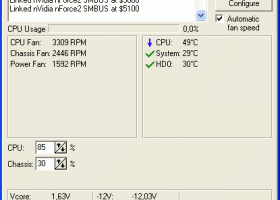
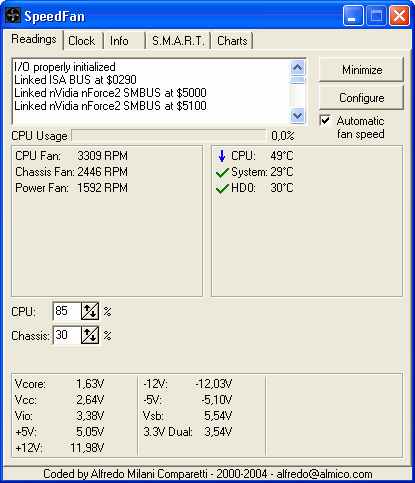
SpeedFan 4.52 full screenshots
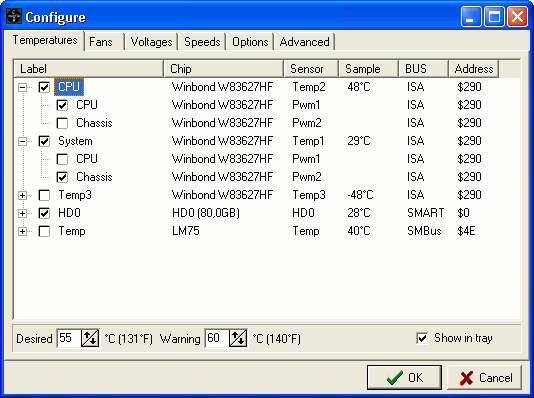
SpeedFan - Windows 7 Download awards


SpeedFan 4.52 full description
SpeedFan is a program that monitors voltages, fan speeds and temperatures in computers with hardware monitor chips. SpeedFan can even access S.M.A.R.T. info and show hard disk temperatures. SpeedFan supports SCSI disks too. SpeedFan can even change the FSB on some hardware (but this should be considered a bonus feature). SpeedFan can access digital temperature sensors and can change fan speeds accordingly, thus reducing noise. SpeedFan works fine with Windows 9x, ME, NT, 2000, 2003, XP, Vista, Windows 7, 2008, Windows 8 and Windows Server 2012. It works with Windows 64 bit too.
SpeedFan 4.51 Final is now online! It adds support for a lot of new hardware. This version defaults to no SCSI access if the Intel Storage Driver is found. ITE IT8620E (used on several Gigabyte boards) support has been greatly enhanced (now SpeedFan can control up to 5 fans and report voltages too). PWM4 and PWM5 on ITE IT8620E are now disabled by default (please, read this article). Added full support for Windows 10. Bug fixes and more, as always.
How fan speed changing works
SpeedFan monitor temperatures from several sources. By properly configuring SpeedFan, you can let it change fan speeds based on system temperatures. When choosing parameters for the minimum and maximum fan speed, try to set them by hand (disable all the VARIATE FANs checkboxes) and listen to the noise. When you hear no noise from the fan then you can set that value as the minimum fan speed for that fan. I suggest to use 100 as the maximum value, unless you hear a lot of noise from it, in which case you might reduce the maximum speed to 95 or 90. You can set, say, 60 as the maximum value and, sometimes, I myself set it that way. Consider that when the WARNING temperature is reached, the program sets the fan speed to 100, whatever maximum speed you selected. One last word should be said regarding the USE FAN x listbox. In my pc, more than one temperature changes when a fan runs faster. You can configure on which fan every temperature should rely. On my system, TEMP1 and TEMP3 are both influenced by FAN1.
A few numbers...
SpeedFan can handle:
* almost any number of South Bridges
* almost any number of hardware monitor chips
* almost any number of hard disks
* almost any number of temperature readings
* almost any number of voltage readings
* almost any number of fan speed readings
* almost any number of PWMs
Disclaimer
This program is aimed at the power user. At those who know what they're doing. I've known of no real problem caused by SpeedFan, but may be it's due to the fact that once it made the PC explode and the user disappeared in the blast, thus being unable to report :-) Anyway: SpeedFan can be extremely useful, but you should first watch its behavior before setting and forgetting it.
Credits
* The first one to thank is Alexander Van Kaam, for letting me discover the wonderful world of sensors
* Carlo Adami, for his great work on AS99127F
* Massimiliano Battaglia, for his infinite patience debugging and reporting
* Istvan Dercze, for his help testing VIA686 support
SpeedFan 4.51 Final is now online! It adds support for a lot of new hardware. This version defaults to no SCSI access if the Intel Storage Driver is found. ITE IT8620E (used on several Gigabyte boards) support has been greatly enhanced (now SpeedFan can control up to 5 fans and report voltages too). PWM4 and PWM5 on ITE IT8620E are now disabled by default (please, read this article). Added full support for Windows 10. Bug fixes and more, as always.
How fan speed changing works
SpeedFan monitor temperatures from several sources. By properly configuring SpeedFan, you can let it change fan speeds based on system temperatures. When choosing parameters for the minimum and maximum fan speed, try to set them by hand (disable all the VARIATE FANs checkboxes) and listen to the noise. When you hear no noise from the fan then you can set that value as the minimum fan speed for that fan. I suggest to use 100 as the maximum value, unless you hear a lot of noise from it, in which case you might reduce the maximum speed to 95 or 90. You can set, say, 60 as the maximum value and, sometimes, I myself set it that way. Consider that when the WARNING temperature is reached, the program sets the fan speed to 100, whatever maximum speed you selected. One last word should be said regarding the USE FAN x listbox. In my pc, more than one temperature changes when a fan runs faster. You can configure on which fan every temperature should rely. On my system, TEMP1 and TEMP3 are both influenced by FAN1.
A few numbers...
SpeedFan can handle:
* almost any number of South Bridges
* almost any number of hardware monitor chips
* almost any number of hard disks
* almost any number of temperature readings
* almost any number of voltage readings
* almost any number of fan speed readings
* almost any number of PWMs
Disclaimer
This program is aimed at the power user. At those who know what they're doing. I've known of no real problem caused by SpeedFan, but may be it's due to the fact that once it made the PC explode and the user disappeared in the blast, thus being unable to report :-) Anyway: SpeedFan can be extremely useful, but you should first watch its behavior before setting and forgetting it.
Credits
* The first one to thank is Alexander Van Kaam, for letting me discover the wonderful world of sensors
* Carlo Adami, for his great work on AS99127F
* Massimiliano Battaglia, for his infinite patience debugging and reporting
* Istvan Dercze, for his help testing VIA686 support
SpeedFan 4.52 download tags
SpeedFan 4.52 Windows 7 release notes
New Release
4.52
-added full IPMI support
-added full support for IT IT8771E
-added full support for Intel Sunrise Point (Z170) SMBus
-added full support for STMicro STTS2004
-added full support for NCT6793D
-added full support for Giantec GT34TS04 and GT34TS02
-added support for Atom E3800 SMBus
-added support for Atom C2000 SMBus
-added support for Fintek F71878A/F71868A at non standard addresses
-enabled SMBus on Intel 6 Series / C20x, if needed
-fixed SCSI_PASS_THROUGH access on some systems
-skipped accessing those hard disks that return the ID Sector from another disk
-fixed Nuvoton NCT6791D and NCT6792D sixth fan readings
-added support for alternate registers of NCT6793D
-fixed German translation for CPU Usage
[ SpeedFan release history ]
4.52
-added full IPMI support
-added full support for IT IT8771E
-added full support for Intel Sunrise Point (Z170) SMBus
-added full support for STMicro STTS2004
-added full support for NCT6793D
-added full support for Giantec GT34TS04 and GT34TS02
-added support for Atom E3800 SMBus
-added support for Atom C2000 SMBus
-added support for Fintek F71878A/F71868A at non standard addresses
-enabled SMBus on Intel 6 Series / C20x, if needed
-fixed SCSI_PASS_THROUGH access on some systems
-skipped accessing those hard disks that return the ID Sector from another disk
-fixed Nuvoton NCT6791D and NCT6792D sixth fan readings
-added support for alternate registers of NCT6793D
-fixed German translation for CPU Usage
[ SpeedFan release history ]
Bookmark SpeedFan
SpeedFan for Windows 7 - Copyright information
All SpeedFan reviews, submitted ratings and written comments become the sole property of Windows 7 download. You acknowledge that you, not windows7download, are responsible for the contents of your submission. However, windows7download reserves the right to remove or refuse to post any submission for any reason.
Windows 7 Download periodically updates pricing and software information of SpeedFan full version from the publisher, but some information may be out-of-date. You should confirm all information.
Using warez version, crack, warez passwords, patches, serial numbers, registration codes, key generator, pirate key, keymaker or keygen for SpeedFan license key is illegal and prevent future development of SpeedFan. Download links are directly from our mirrors or publisher's website, SpeedFan torrent or shared files from free file sharing and free upload services, including Rapidshare, MegaUpload, YouSendIt, SendSpace, DepositFiles, DivShare, HellShare, HotFile, FileServe or MediaFire, are not used.
Windows 7 Download periodically updates pricing and software information of SpeedFan full version from the publisher, but some information may be out-of-date. You should confirm all information.
Using warez version, crack, warez passwords, patches, serial numbers, registration codes, key generator, pirate key, keymaker or keygen for SpeedFan license key is illegal and prevent future development of SpeedFan. Download links are directly from our mirrors or publisher's website, SpeedFan torrent or shared files from free file sharing and free upload services, including Rapidshare, MegaUpload, YouSendIt, SendSpace, DepositFiles, DivShare, HellShare, HotFile, FileServe or MediaFire, are not used.
SpeedFan users' reviews
SpeedFan 4.46
review by James (Jul 29, 2012)


Well, the program works like a charm, but it seems that it will not find my fan... So I can't change any settings regarding my fan speeds, and that is why I got the program. If anyone of you know a possible sollution mail me at: jamesp0078@hotmail.be
Thank you in advance
Thank you in advance
SpeedFan 4.41
review by Ron Ahearn (Oct 30, 2010)
Speedfan4.41 will not show SMART details on my new win7 Pro install,worked OK on XP Pro last week, all hardware same.Beltec Adviser Idents.disks & gives Report ofHealthy.
Post SpeedFan review


Windows 7 SpeedFan related downloads
... statistics from CPU temperature meter readings measured by SpeedFan and other tools. WebTemp provides (server) hardware ...
My Account
Help
Windows 7 Software Coupons
-
Media Player Morpher
85% Off -
WinX MediaTrans
63% Off -
MacX DVD Ripper Pro
50% Off -
MacX Video Converter Pro
56% Off -
WinX DVD Ripper
50% Off
My Saved Stuff
You have not saved any software.
Click "Save" next to each software.
Click "Save" next to each software.
Would you like to receive announcements of new versions of your software by email or by RSS reader? Register for FREE!
Windows 7 Downloads Picks
- Network Monitor II 31.7
- Windows 7
- iTop Easy Desktop 4.2.0.312
- Windows 7 DreamScene Activator 1.1
- Windows XP Mode (Windows Virtual PC) 1.3.7600.16423
- Windows 7 Little Tweaker 1.2
- Windows Elapsed Running Time 1.6.0
- Windows 7 Enterprise
- User Account Manager 6.03
- Secunia Personal Software Inspector 3.0.0.11005
- PDF-XChange Standard 9.5.368
- System Monitor II 31.3
- Realtek High Definition Audio driver 2.82
- Windows 7 x64
- Microsoft Security Essentials Definition Updates x64 1.67.7.0
- System Explorer 7.1.0.5359
- GPU Monitor 12.9
- Total PC Care 3.0.648.7830
- Lupo PenSuite (x64 bit) 2016
- Microsoft Virtual PC 2007 SP1 6.0.192
Popular Tags
search
monitor
editor
keyboard
optimize
utilities
tool
manager
convert
free
desktop
shareware
data
download
system
utility
windows
text
password
file
video
security
time
database
image
files
edit
software
print
web
Popular Windows 7 Software
- Network Monitor II 31.7
- Avro Keyboard 5.6.0.0
- Media Creation Tool x64 22H2
- Ghostscript (x64 bit) 10.03.1
- Windows 7
- iTop Data Recovery 6.1.0.936
- Windows 7 Service Pack 1 7601.17514.1011
- iTop Easy Desktop 4.2.0.312
- Advanced SystemCare 19.3.0.200
- Smart Game Booster 5.3.1.692
- iTop PDF 3.6.0.4
- GoodSync2Go 12.9.29.9
- The Dude 7.22.2 Stable
- IObit Uninstaller 15.4.0.1
- Atlantis Word Processor 5.0.4
© 2026 Windows7Download.com - All logos, trademarks, art and other creative works are and remain copyright and property of their respective owners. Microsoft Windows is a registered trademarks of Microsoft Corporation. Microsoft Corporation in no way endorses or is affiliated with windows7download.com.