


System Explorer for Windows 7 - Explore and manage Windows system activity - Windows 7 Download


System Explorer 7.1.0.5359
Inspect Windows processes, startup items, services and system activity.
System Explorer is a Windows utility for inspecting and managing running processes, startup entries, services, drivers and network connections. It adds performance graphs, process history and system snapshots for troubleshooting changes over time. Users can research files through online databases and check suspicious items with VirusTotal or Jotti. Its customizable tabs bring system details and management tools into one interface.
System Explorer 7.1.0.5359 full details

| File Size: | 1.90 MB |
|---|---|
| License: | Freeware |
| Price: | FREE |
| Released: | 2016-04-22 |
| Downloads: | Total: 2791 | This Month: 7 |
| Publisher: | Mister Group |
| Publisher URL: | http://systemexplorer.net/ |

Download System Explorer 7.1.0.5359
Save System Explorer to My Stuff
Tweet

System Explorer 7.1.0.5359 full screenshots



System Explorer - Windows 7 Download awards



System Explorer 7.1.0.5359 full description
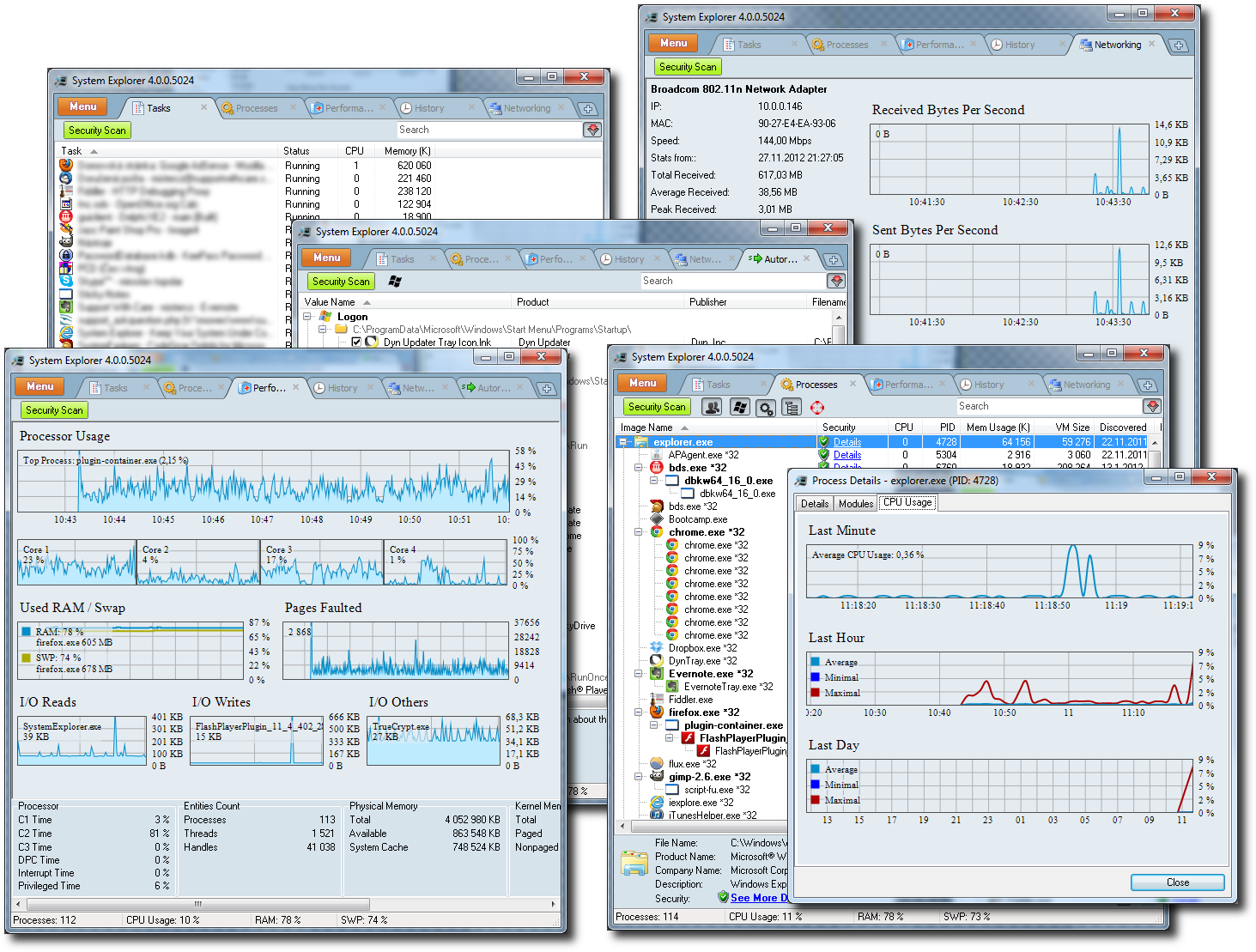
System Explorer is a Windows utility for examining and managing the processes, services, startup items and other components active on a computer. It is useful for people who want more detail than a basic task manager provides, whether they are investigating unusual activity, reviewing what launches with Windows or checking how system resources are being used. Its tabbed interface brings monitoring and administration tools together, and the visible tabs can be customized to focus on the information needed most often.
The Tasks and Processes views show running programs and related details, while modules and opened-file views help trace components associated with active processes. Startup entries, services and drivers can be reviewed to understand what runs in the background or loads when Windows starts. Connections and networking views help inspect network activity, and the performance graphs track resource use over time. These views support troubleshooting by giving users several ways to examine a program or system component rather than relying on its name alone.
For file research, System Explorer can check suspicious files through VirusTotal or Jotti and search online databases for information about files and processes. A security extension can automatically check processes, modules and selected files. The program also includes an action history for monitoring process activity and system snapshots that help identify changes between recorded system states. Its report feature gathers key system information into a rich-text document, which can be useful when documenting a configuration or sharing details for support.
Additional tools cover installed applications and uninstallers, Internet Explorer add-ons, Windows components, users, security information and WMI. A New Task dialog includes search and autocomplete, while settings let users adjust the interface and monitoring behavior, including fractional CPU readings, graphs and history monitoring. System Explorer can be set as the default task manager, giving its process and performance views a direct role in routine system checks. Plugin support and multilingual interface options extend its use across different workflows.
System Explorer is freeware and is available as an installer or a portable edition, so it can be run from a local installation or carried for use on compatible Windows systems. It supports Windows 7 as well as several earlier and later Windows releases. The utility is intended for users comfortable inspecting system internals; changing or stopping processes and services can affect running applications or Windows, so those controls are best used with care. Online file-checking features depend on the availability of the referenced services.
The Tasks and Processes views show running programs and related details, while modules and opened-file views help trace components associated with active processes. Startup entries, services and drivers can be reviewed to understand what runs in the background or loads when Windows starts. Connections and networking views help inspect network activity, and the performance graphs track resource use over time. These views support troubleshooting by giving users several ways to examine a program or system component rather than relying on its name alone.
For file research, System Explorer can check suspicious files through VirusTotal or Jotti and search online databases for information about files and processes. A security extension can automatically check processes, modules and selected files. The program also includes an action history for monitoring process activity and system snapshots that help identify changes between recorded system states. Its report feature gathers key system information into a rich-text document, which can be useful when documenting a configuration or sharing details for support.
Additional tools cover installed applications and uninstallers, Internet Explorer add-ons, Windows components, users, security information and WMI. A New Task dialog includes search and autocomplete, while settings let users adjust the interface and monitoring behavior, including fractional CPU readings, graphs and history monitoring. System Explorer can be set as the default task manager, giving its process and performance views a direct role in routine system checks. Plugin support and multilingual interface options extend its use across different workflows.
System Explorer is freeware and is available as an installer or a portable edition, so it can be run from a local installation or carried for use on compatible Windows systems. It supports Windows 7 as well as several earlier and later Windows releases. The utility is intended for users comfortable inspecting system internals; changing or stopping processes and services can affect running applications or Windows, so those controls are best used with care. Online file-checking features depend on the availability of the referenced services.
System Explorer 7.1.0.5359 download tags
System Explorer 7.1.0.5359 Windows 7 release notes
Bookmark System Explorer
System Explorer for Windows 7 - Copyright information
All System Explorer reviews, submitted ratings and written comments become the sole property of Windows 7 download. You acknowledge that you, not windows7download, are responsible for the contents of your submission. However, windows7download reserves the right to remove or refuse to post any submission for any reason.
Windows 7 Download periodically updates pricing and software information of System Explorer full version from the publisher, but some information may be out-of-date. You should confirm all information.
Using warez version, crack, warez passwords, patches, serial numbers, registration codes, key generator, pirate key, keymaker or keygen for System Explorer license key is illegal and prevent future development of System Explorer. Download links are directly from our mirrors or publisher's website, System Explorer torrent or shared files from free file sharing and free upload services, including Rapidshare, MegaUpload, YouSendIt, SendSpace, DepositFiles, DivShare, HellShare, HotFile, FileServe or MediaFire, are not used.
Windows 7 Download periodically updates pricing and software information of System Explorer full version from the publisher, but some information may be out-of-date. You should confirm all information.
Using warez version, crack, warez passwords, patches, serial numbers, registration codes, key generator, pirate key, keymaker or keygen for System Explorer license key is illegal and prevent future development of System Explorer. Download links are directly from our mirrors or publisher's website, System Explorer torrent or shared files from free file sharing and free upload services, including Rapidshare, MegaUpload, YouSendIt, SendSpace, DepositFiles, DivShare, HellShare, HotFile, FileServe or MediaFire, are not used.
Post System Explorer review


Windows 7 System Explorer related downloads
System Explorer is free, awards winning software for exploration and management of System Internals. This small software includes many usefull tools ...
... Instrumentation (WMI) information with ease. From remotely retrieving system hardware and software information to monitoring system performance, ...
... your computing experience. One such application is "Madly System Care" - an exceptional software tool developed by ...
My Account
Help
Windows 7 Software Coupons
-
Media Player Morpher
85% Off -
WinX MediaTrans
63% Off -
MacX DVD Ripper Pro
50% Off -
WinX DVD Copy Pro
42% Off -
FREE VPN PROXY by SEED4.ME WINDOWS
Free VPN by Seed4Me
My Saved Stuff
You have not saved any software.
Click "Save" next to each software.
Click "Save" next to each software.
Would you like to receive announcements of new versions of your software by email or by RSS reader? Register for FREE!
Windows 7 Downloads Picks
- Windows 7
- Lubbo's Fan Control 1.2.3
- Windows Elapsed Running Time 1.6.0
- Windows 7 DreamScene Activator 1.1
- iTop Easy Desktop 4.5.0.349
- Secunia Personal Software Inspector 3.0.0.11005
- Windows 7 x64
- DNC Precision 3.0.2 Build 513
- CatchUp 4.3
- Fresh UI 8.85
- PDF-XChange Standard 9.5.368
- Windows 7 Little Tweaker 1.2
- Windows 7 Enterprise
- Aldo's Free Memory 1.4
- Windows XP Mode (Windows Virtual PC) 1.3.7600.16423
- Automatic Mouse Switcher 0.5.1
- CPU-Z 2.09
- Ascetic 0.51
- Downline Organizer 4.0 HD
- Speccy 1.32.740
Popular Tags
windows
file
keyboard
monitor
convert
shareware
security
database
print
text
free
optimize
data
time
desktop
files
editor
tool
web
system
download
image
software
password
edit
manager
search
utility
utilities
video
Popular Windows 7 Software
- Auslogics Registry Cleaner 11.2.0.6
- Driver Easy 7.2.3 Build 6590
- Don't Sleep 10.44
- ALTRun 2026.10.26
- WinTools.one Professional 26.10.1
- Ashampoo UnInstaller Pro 27 27.0.1
- Free iPhone Backup Extractor 3.8.0.2725
- File Juggler 3.1.9
- System Mechanic Professional 23.1
- NSClient++ 0.26.0
- Oracle-to-Access 3.1
- CompanionLink for Outlook 11 Build 11024
- ExtraDisks x64 26.10.1
- Windows 7
- UFS Explorer Professional Recovery 10.23.0
© 2026 Windows7Download.com - All logos, trademarks, art and other creative works are and remain copyright and property of their respective owners. Microsoft Windows is a registered trademarks of Microsoft Corporation. Microsoft Corporation in no way endorses or is affiliated with windows7download.com.