


Network Monitor II for Windows 7 - Desktop network and IP address monitor - Windows 7 Download


Network Monitor II 33.0
A desktop gadget for monitoring network activity, connection status and IP details.
Network Monitor II is a Windows desktop gadget for checking Internet connectivity, transfer speeds and traffic totals at a glance. It displays incoming and outgoing rates, bandwidth graphs, internal and external IP addresses, gateway and DNS details, plus Wi-Fi signal information. Users can save traffic counts, log changing IP addresses, disable external IP checks for privacy, and set a program or sound alert to respond to connection changes.
Network Monitor II 33.0 full details

| File Size: | 2.70 MB |
|---|---|
| License: | Freeware |
| Price: | FREE |
| Released: | 2026-10-18 |
| Downloads: | Total: 24680 | This Month: 10 |
| Publisher: | Igor "Igogo" Bushyn |
| Publisher URL: | https://windows10gadgets.pro/ |

Download Network Monitor II 33.0
Save Network Monitor II to My Stuff
Tweet
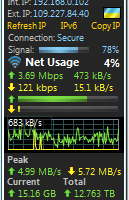
Network Monitor II 33.0 full screenshots


Network Monitor II - Windows 7 Download awards



Network Monitor II 33.0 full description
Network Monitor II is a Windows desktop gadget for checking an Internet connection and viewing network details at a glance. It suits users who want connection status, traffic activity and IP addresses visible on the desktop without opening a separate monitoring application. Its compact panel brings together live readings and connection information for routine checks or basic troubleshooting.
The gadget tracks incoming and outgoing transfer speeds alongside download and upload traffic totals. Graphs show bandwidth usage over time, helping users spot periods of heavier activity and compare current transfer rates with recent traffic. A traffic counter can save its accumulated data automatically when the gadget closes, so totals need not be lost between sessions.
Network details include the computer’s internal and external IP addresses, gateway and DNS information. For Wi-Fi connections, it also displays signal level and the connection source. The external address is shown with a country flag, and hovering over the flag while the gadget is in focus reveals information about the provider associated with that address. External IP checking can be disabled for privacy. The gadget updates IP addresses after a server restart or a new Internet connection, and it can record address changes in a log file.
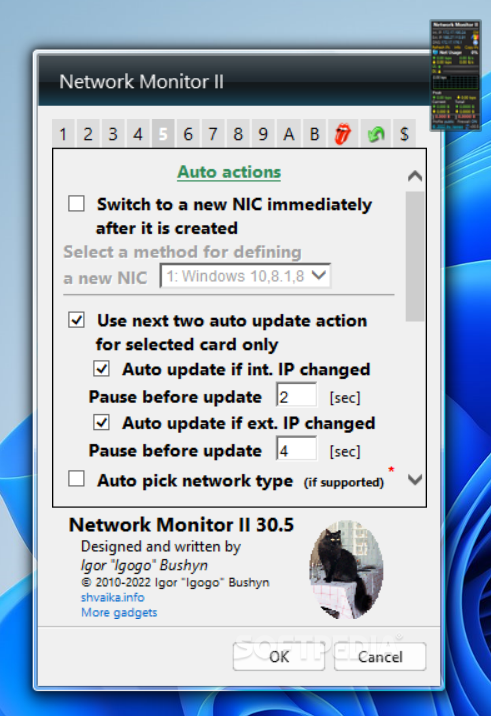
Network Monitor II can run a chosen program when the connection is lost or restored, and sound notifications can alert users to network-related events. These options make it useful for noticing interruptions while working, keeping a record of changing addresses, or responding automatically when connectivity changes. The displayed internal address can also help when accessing a router’s web interface, while the external address is useful when configuring a server hosted on the PC.
The program is freeware and is built as a desktop sidebar gadget rather than a standalone network suite. Its listed Windows compatibility includes Windows Vista, Windows 7, Windows 8 and Windows 10, in both 32-bit and 64-bit editions. Users should check that a compatible gadget environment is available on their Windows installation. Its monitoring focuses on connection status, traffic and addressing, rather than advanced diagnostics or network administration.
The gadget tracks incoming and outgoing transfer speeds alongside download and upload traffic totals. Graphs show bandwidth usage over time, helping users spot periods of heavier activity and compare current transfer rates with recent traffic. A traffic counter can save its accumulated data automatically when the gadget closes, so totals need not be lost between sessions.
Network details include the computer’s internal and external IP addresses, gateway and DNS information. For Wi-Fi connections, it also displays signal level and the connection source. The external address is shown with a country flag, and hovering over the flag while the gadget is in focus reveals information about the provider associated with that address. External IP checking can be disabled for privacy. The gadget updates IP addresses after a server restart or a new Internet connection, and it can record address changes in a log file.
Network Monitor II can run a chosen program when the connection is lost or restored, and sound notifications can alert users to network-related events. These options make it useful for noticing interruptions while working, keeping a record of changing addresses, or responding automatically when connectivity changes. The displayed internal address can also help when accessing a router’s web interface, while the external address is useful when configuring a server hosted on the PC.
The program is freeware and is built as a desktop sidebar gadget rather than a standalone network suite. Its listed Windows compatibility includes Windows Vista, Windows 7, Windows 8 and Windows 10, in both 32-bit and 64-bit editions. Users should check that a compatible gadget environment is available on their Windows installation. Its monitoring focuses on connection status, traffic and addressing, rather than advanced diagnostics or network administration.
Network Monitor II 33.0 download tags
Network Monitor II 33.0 Windows 7 release notes
New Release
NetLib now runs on .NET 4 with 64-bit counters and no longer needs .NET 3.5. Fixed the graph spike when switching to NetLib. Replaced the country flag and IPv6 services, so all flag servers work again. Fixed a wrong external IPv6 address and the country flag showing in IPv6 mode. Fixed DPI auto-scaling without 8GadgetPack and the Wi-Fi library choice for 32-bit Sidebar. Cancel in settings now discards color changes. Settings files are saved in Unicode. “Copy IPs” no longer adds the DNS number.
[ Network Monitor II release history ]
NetLib now runs on .NET 4 with 64-bit counters and no longer needs .NET 3.5. Fixed the graph spike when switching to NetLib. Replaced the country flag and IPv6 services, so all flag servers work again. Fixed a wrong external IPv6 address and the country flag showing in IPv6 mode. Fixed DPI auto-scaling without 8GadgetPack and the Wi-Fi library choice for 32-bit Sidebar. Cancel in settings now discards color changes. Settings files are saved in Unicode. “Copy IPs” no longer adds the DNS number.
[ Network Monitor II release history ]
Bookmark Network Monitor II
Network Monitor II for Windows 7 - Copyright information
All Network Monitor II reviews, submitted ratings and written comments become the sole property of Windows 7 download. You acknowledge that you, not windows7download, are responsible for the contents of your submission. However, windows7download reserves the right to remove or refuse to post any submission for any reason.
Windows 7 Download periodically updates pricing and software information of Network Monitor II full version from the publisher, but some information may be out-of-date. You should confirm all information.
Using warez version, crack, warez passwords, patches, serial numbers, registration codes, key generator, pirate key, keymaker or keygen for Network Monitor II license key is illegal and prevent future development of Network Monitor II. Download links are directly from our mirrors or publisher's website, Network Monitor II torrent or shared files from free file sharing and free upload services, including Rapidshare, MegaUpload, YouSendIt, SendSpace, DepositFiles, DivShare, HellShare, HotFile, FileServe or MediaFire, are not used.
Windows 7 Download periodically updates pricing and software information of Network Monitor II full version from the publisher, but some information may be out-of-date. You should confirm all information.
Using warez version, crack, warez passwords, patches, serial numbers, registration codes, key generator, pirate key, keymaker or keygen for Network Monitor II license key is illegal and prevent future development of Network Monitor II. Download links are directly from our mirrors or publisher's website, Network Monitor II torrent or shared files from free file sharing and free upload services, including Rapidshare, MegaUpload, YouSendIt, SendSpace, DepositFiles, DivShare, HellShare, HotFile, FileServe or MediaFire, are not used.
Post Network Monitor II review


Windows 7 Network Monitor II related downloads
Windows 7 Service Pack 1 is a maintenance package for Windows 7 computers, bringing together previously released updates in one ...
... accessing such programs. It has been tested on Windows 7 & Windows Vista – but works on Windows ...
Windows Logon Notfier is a handy software designed to enable you to create logon messages for ...
If you have already started using Windows 7 its time you should be ready for all ...
Windows 7 Manager is an all-in-one system cleaner, tweaker, and ... them difficult for ordinary users to access. Windows 7 Manager Features: Information Optimizer Cleaner Customization Security ...
My Account
Help
Windows 7 Software Coupons
-
Media Player Morpher
85% Off -
WinX MediaTrans
63% Off -
MacX DVD Ripper Pro
50% Off -
WinX DVD Copy Pro
42% Off -
FREE VPN PROXY by SEED4.ME WINDOWS
Free VPN by Seed4Me
My Saved Stuff
You have not saved any software.
Click "Save" next to each software.
Click "Save" next to each software.
Would you like to receive announcements of new versions of your software by email or by RSS reader? Register for FREE!
Windows 7 Downloads Picks
- Windows Access Panel 1.0
- Windows 7 Service Pack 1 7601.17514.1011
- Argente Utilities 3.1.0.8
- Cygwin 3.6.12
- Smart Game Booster 6.0.1.1231
- Windows Logon Notifier 1.0
- AutoHotkey 2.0.31
- Advanced SystemCare 20.0.1.256
- Windows 7 Manager (x64bit) 5.2.0
- Windows 7 Manager (x32bit) 5.2.0
- Autoruns for Windows 14.11
- Mz Cpu Accelerator 4.1.0
- Portable Wise Registry Cleaner 11.3.2 Build 734
- Ultimate Windows Tweaker 2.2
- CCleaner 7.13.1573.0 Ad-suppo
- Microsoft Fix it Center beta
- Notepad++ Plugin Manager 2.7.0
- Advanced SystemCare Professional 20.0.1.256
- Disk CleanUp Wizard 2.1
- Portable Glary Utilities 6.49.0.53
Popular Tags
clean
startup
tweak
remove
disk
boost
defrag
registry cleaner
repair
registry
cleaner
driver
speed
performance
faster
memory
optimize
vista
optimizer
ram
windows
tune
system
spyware
security
disk cleaner
cpu
backup
utility
uninstall
Popular Windows 7 Software
- Auslogics Registry Cleaner 11.2.0.6
- Driver Easy 7.2.3 Build 6590
- Don't Sleep 10.44
- ALTRun 2026.10.26
- WinTools.one Professional 26.10.1
- Ashampoo UnInstaller Pro 27 27.0.1
- Free iPhone Backup Extractor 3.8.0.2725
- File Juggler 3.1.9
- System Mechanic Professional 23.1
- NSClient++ 0.26.0
- Oracle-to-Access 3.1
- CompanionLink for Outlook 11 Build 11024
- ExtraDisks x64 26.10.1
- Windows 7
- UFS Explorer Professional Recovery 10.23.0
© 2026 Windows7Download.com - All logos, trademarks, art and other creative works are and remain copyright and property of their respective owners. Microsoft Windows is a registered trademarks of Microsoft Corporation. Microsoft Corporation in no way endorses or is affiliated with windows7download.com.