


WebTemp for Windows 7 - "Track your PC temperature with ease." - Windows 7 Download


WebTemp 3.38
"Optimize Your PC's Performance with WebTemp"
WebTemp is a must-have tool for Windows 7 users who want to monitor their computer's temperature and fan speed. Developed by Daniel Karsubka, this software offers an intuitive user interface, real-time temperature readings and customizable alarms. With WebTemp, users can quickly identify potential hardware issues and prevent system overheating. Get your hands on WebTemp today and experience a smoother, more efficient computing experience.
WebTemp 3.38 full details

| File Size: | 1.78 MB |
|---|---|
| License: | Freeware |
| Price: | FREE |
| Released: | 2014-11-03 |
| Downloads: | Total: 1298 | This Month: 108 |
| Publisher: | Daniel Karsubka |
| Publisher URL: | http://www.webtemp.org/ |

Download WebTemp 3.38
Save WebTemp to My Stuff
Tweet
WebTemp - Windows 7 Download awards


WebTemp 3.38 full description
The WebTemp application was designed to be a tool that will help you create statistics from CPU temperature meter readings measured by SpeedFan and other tools.
WebTemp provides (server) hardware remote monitoring features. WebTemp displays temperatures like CPU temperature as well as voltages and fan speeds measured by SpeedFan or other hardware.
Monitoring tools and together with CPU and memory load, network traffic and notebook battery status it creates statistics which can be saved, uploaded to FTP servers or emailed at any time. WebTemp can also set off an alarm on high CPU temperature or low fan speeds by sending emails and/or powering off the system.
To provide CPU temperature, voltage and fan speed readings WebTemp needs an external hardware monitoring tool like SpeedFan. Other tools are possible, please see the FAQ. On its own, WebTemp reads out all other data and provides the statistical features.
FEATURES:
· WebTemp reads temperatures, voltages and fan speeds from several hardware monitoring tools,
· it can read RAM and CPU usage, CPU frequency, network traffic, hard disk memory and battery capacity on its own,
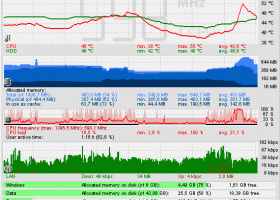
· it creates an image which enables you getting an overview of all the values and their condition in the past few hours,
· furthermore there is a display mode for the past 24 hours,
· a banner-style display which only displays temperatures or network traffic over time,
· another small display called "Light" which just shows you current temperatures and fan speeds,
· both of these images can be displayed transparently on top of your desktop,
· additionally they can be uploaded to any FTP server of yours,
· it is possible to customize the colors and names of statistics and sensors,
· there is an extra window which provides you with system information like real time CPU frequency,
· WebTemp consumes very little processor time and memory, beyond that the setup package fits on one(!) old floppy disk,
· you can choose to get notifications when new versions become available,
· setup does not copy any files into your windows or system directory nor does uninstall leave behind any of WebTemp's registry settings.
WebTemp provides (server) hardware remote monitoring features. WebTemp displays temperatures like CPU temperature as well as voltages and fan speeds measured by SpeedFan or other hardware.
Monitoring tools and together with CPU and memory load, network traffic and notebook battery status it creates statistics which can be saved, uploaded to FTP servers or emailed at any time. WebTemp can also set off an alarm on high CPU temperature or low fan speeds by sending emails and/or powering off the system.
To provide CPU temperature, voltage and fan speed readings WebTemp needs an external hardware monitoring tool like SpeedFan. Other tools are possible, please see the FAQ. On its own, WebTemp reads out all other data and provides the statistical features.
FEATURES:
· WebTemp reads temperatures, voltages and fan speeds from several hardware monitoring tools,
· it can read RAM and CPU usage, CPU frequency, network traffic, hard disk memory and battery capacity on its own,
· it creates an image which enables you getting an overview of all the values and their condition in the past few hours,
· furthermore there is a display mode for the past 24 hours,
· a banner-style display which only displays temperatures or network traffic over time,
· another small display called "Light" which just shows you current temperatures and fan speeds,
· both of these images can be displayed transparently on top of your desktop,
· additionally they can be uploaded to any FTP server of yours,
· it is possible to customize the colors and names of statistics and sensors,
· there is an extra window which provides you with system information like real time CPU frequency,
· WebTemp consumes very little processor time and memory, beyond that the setup package fits on one(!) old floppy disk,
· you can choose to get notifications when new versions become available,
· setup does not copy any files into your windows or system directory nor does uninstall leave behind any of WebTemp's registry settings.
WebTemp 3.38 download tags
WebTemp 3.38 Windows 7 release notes
New Release
· Added support for CPUID Hardware Monitor (unfortunately only the free version of it has a shared memory area),
· added individual "Path" entries in WTClient.ini under [Light], [Banner], [Stats]*,
· Stats24]*, [Stats7]*, [Stats31]*, [Stats365]* and [Textuploader]* to specify
· separate custom remote (FTP) directories,
· fixed network traffic display,
· fixed issues related to standby / hibernation / wakeup.
[ WebTemp release history ]
· Added support for CPUID Hardware Monitor (unfortunately only the free version of it has a shared memory area),
· added individual "Path" entries in WTClient.ini under [Light], [Banner], [Stats]*,
· Stats24]*, [Stats7]*, [Stats31]*, [Stats365]* and [Textuploader]* to specify
· separate custom remote (FTP) directories,
· fixed network traffic display,
· fixed issues related to standby / hibernation / wakeup.
[ WebTemp release history ]
Bookmark WebTemp
WebTemp for Windows 7 - Copyright information
All WebTemp reviews, submitted ratings and written comments become the sole property of Windows 7 download. You acknowledge that you, not windows7download, are responsible for the contents of your submission. However, windows7download reserves the right to remove or refuse to post any submission for any reason.
Windows 7 Download periodically updates pricing and software information of WebTemp full version from the publisher, but some information may be out-of-date. You should confirm all information.
Using warez version, crack, warez passwords, patches, serial numbers, registration codes, key generator, pirate key, keymaker or keygen for WebTemp license key is illegal and prevent future development of WebTemp. Download links are directly from our mirrors or publisher's website, WebTemp torrent or shared files from free file sharing and free upload services, including Rapidshare, MegaUpload, YouSendIt, SendSpace, DepositFiles, DivShare, HellShare, HotFile, FileServe or MediaFire, are not used.
Windows 7 Download periodically updates pricing and software information of WebTemp full version from the publisher, but some information may be out-of-date. You should confirm all information.
Using warez version, crack, warez passwords, patches, serial numbers, registration codes, key generator, pirate key, keymaker or keygen for WebTemp license key is illegal and prevent future development of WebTemp. Download links are directly from our mirrors or publisher's website, WebTemp torrent or shared files from free file sharing and free upload services, including Rapidshare, MegaUpload, YouSendIt, SendSpace, DepositFiles, DivShare, HellShare, HotFile, FileServe or MediaFire, are not used.
Post WebTemp review


Windows 7 WebTemp related downloads
... (l/h). It also hands over these values to WebTemp, a visualization tool which is available on these ...
My Account
Help
Windows 7 Software Coupons
-
WinX MediaTrans
63% Off -
Media Player Morpher
85% Off -
MacX DVD Ripper Pro
50% Off -
MacX Media Management Bundle
70% Off -
WinX HD Video Converter
56% Off
My Saved Stuff
You have not saved any software.
Click "Save" next to each software.
Click "Save" next to each software.
Would you like to receive announcements of new versions of your software by email or by RSS reader? Register for FREE!
Windows 7 Downloads Picks
- Network Monitor II 31.7
- Windows 7
- iTop Easy Desktop 4.2.0.312
- Windows 7 DreamScene Activator 1.1
- Windows XP Mode (Windows Virtual PC) 1.3.7600.16423
- Windows 7 Little Tweaker 1.2
- Windows Elapsed Running Time 1.6.0
- Windows 7 Enterprise
- User Account Manager 6.03
- Secunia Personal Software Inspector 3.0.0.11005
- PDF-XChange Standard 9.5.368
- System Monitor II 31.3
- Realtek High Definition Audio driver 2.82
- Windows 7 x64
- Microsoft Security Essentials Definition Updates x64 1.67.7.0
- System Explorer 7.1.0.5359
- GPU Monitor 12.9
- Total PC Care 3.0.648.7830
- Lupo PenSuite (x64 bit) 2016
- Microsoft Virtual PC 2007 SP1 6.0.192
Popular Tags
manager
print
monitor
free
tool
security
optimize
database
edit
keyboard
system
windows
image
editor
file
text
time
web
files
search
download
software
shareware
desktop
password
convert
video
utility
utilities
data
Popular Windows 7 Software
- Network Monitor II 31.7
- Avro Keyboard 5.6.0.0
- Media Creation Tool x64 22H2
- Ghostscript (x64 bit) 10.03.1
- Windows 7
- iTop Data Recovery 6.1.0.936
- Windows 7 Service Pack 1 7601.17514.1011
- iTop Easy Desktop 4.2.0.312
- Advanced SystemCare 19.3.0.200
- Smart Game Booster 5.3.1.692
- iTop PDF 3.6.0.4
- GoodSync2Go 12.9.29.9
- The Dude 7.22.2 Stable
- IObit Uninstaller 15.4.0.1
- Atlantis Word Processor 5.0.4
© 2026 Windows7Download.com - All logos, trademarks, art and other creative works are and remain copyright and property of their respective owners. Microsoft Windows is a registered trademarks of Microsoft Corporation. Microsoft Corporation in no way endorses or is affiliated with windows7download.com.