


WinContig for Windows 7 - Portable defragmentation for selected files - Windows 7 Download


WinContig 5.0.3.3
A portable Windows tool for defragmenting selected files and saving file groups as profiles.
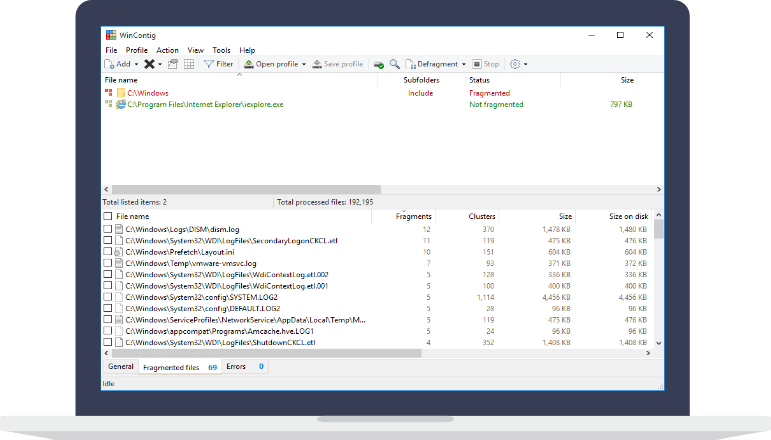
WinContig is a portable Windows defragmentation utility for users who want to process selected files rather than an entire disk. It lets users group files into profiles for repeat operations and offers optional command-line switches to control its behavior. The standalone executable runs after extracting the ZIP archive, with no installation or extra DLLs required. It is freeware for personal and commercial use.
WinContig 5.0.3.3 full details

| File Size: | 1.40 MB |
|---|---|
| License: | Freeware |
| Price: | FREE |
| Released: | 2026-01-08 |
| Downloads: | Total: 699 | This Month: 0 |
| Publisher: | Marco D'Amato |
| Publisher URL: | https://www.mdtzone.it/sw/wincontig/en/index.html |

Download WinContig 5.0.3.3
Save WinContig to My Stuff
Tweet

WinContig 5.0.3.3 full screenshots


WinContig - Windows 7 Download awards



WinContig 5.0.3.3 full description
WinContig is a standalone file defragmentation utility for Windows users who want to target particular files instead of running a defragmentation across an entire disk. It is useful when a small set of frequently used files has become fragmented, or when a user wants a portable tool that can be launched without installing a full application. The program focuses on selected files and can organize them into profiles for repeat operations.
A targeted defragmentation workflow lets users choose which files to process rather than spending time on the whole volume. This can be practical when a specific collection of files needs attention, such as work documents or files used by a particular task. Defragmentation rearranges file fragments so that each file is stored in a more continuous area of the disk. WinContig’s file-level approach gives users control over what is included, while avoiding a full-disk operation when that is not needed.
Profiles provide a way to group files and return to the same selection later. Instead of rebuilding a file list for each run, users can keep related items together and use that grouping as a repeatable basis for maintenance. Optional command-line switches let more experienced users control how the program operates from scripts or command prompts. This can fit WinContig into a simple maintenance routine without requiring users to navigate the graphical interface for every run.
The program is distributed as a standalone executable and does not need an installation process, additional DLL files, installation directories or Registry entries. To use it, the ZIP archive is extracted to a chosen folder and the executable is run from there. This portable setup is convenient for keeping the utility in a dedicated tools folder or carrying it between computers, subject to the user's access and system permissions. Its multilingual interface supports use in more than one language.
WinContig is freeware for personal and commercial use and supports Windows versions from Vista through Windows 11, including Windows 7 in both 32-bit and 64-bit editions. It is intended for users who want selective file defragmentation and profile-based file grouping, rather than a general-purpose disk management suite. As with other defragmentation tools, its main role is maintenance of files on conventional hard disk storage; users should follow the storage device and Windows guidance when deciding whether defragmentation is appropriate.
A targeted defragmentation workflow lets users choose which files to process rather than spending time on the whole volume. This can be practical when a specific collection of files needs attention, such as work documents or files used by a particular task. Defragmentation rearranges file fragments so that each file is stored in a more continuous area of the disk. WinContig’s file-level approach gives users control over what is included, while avoiding a full-disk operation when that is not needed.
Profiles provide a way to group files and return to the same selection later. Instead of rebuilding a file list for each run, users can keep related items together and use that grouping as a repeatable basis for maintenance. Optional command-line switches let more experienced users control how the program operates from scripts or command prompts. This can fit WinContig into a simple maintenance routine without requiring users to navigate the graphical interface for every run.
The program is distributed as a standalone executable and does not need an installation process, additional DLL files, installation directories or Registry entries. To use it, the ZIP archive is extracted to a chosen folder and the executable is run from there. This portable setup is convenient for keeping the utility in a dedicated tools folder or carrying it between computers, subject to the user's access and system permissions. Its multilingual interface supports use in more than one language.
WinContig is freeware for personal and commercial use and supports Windows versions from Vista through Windows 11, including Windows 7 in both 32-bit and 64-bit editions. It is intended for users who want selective file defragmentation and profile-based file grouping, rather than a general-purpose disk management suite. As with other defragmentation tools, its main role is maintenance of files on conventional hard disk storage; users should follow the storage device and Windows guidance when deciding whether defragmentation is appropriate.
WinContig 5.0.3.3 download tags
WinContig 5.0.3.3 Windows 7 release notes
New Release
If one or more filter criteria are set, the filter icon may fail to display the expected small green notification dot on the toolbar. Fixed.
If WinContig is run from the command-line with the '/close', '/closeifok' or '/nogui' parameters specified, the 'Critical Stop' sound notification is played upon exit. Fixed. Thanks to MacMacMac for reporting this.
Even when the settings have been configured to take no action when a computer is running on battery power, WinContig stops processing files when a computer is running on battery power. Fixed.
The execution speed of some operations has been improved.
[ WinContig release history ]
If one or more filter criteria are set, the filter icon may fail to display the expected small green notification dot on the toolbar. Fixed.
If WinContig is run from the command-line with the '/close', '/closeifok' or '/nogui' parameters specified, the 'Critical Stop' sound notification is played upon exit. Fixed. Thanks to MacMacMac for reporting this.
Even when the settings have been configured to take no action when a computer is running on battery power, WinContig stops processing files when a computer is running on battery power. Fixed.
The execution speed of some operations has been improved.
[ WinContig release history ]
Bookmark WinContig
WinContig for Windows 7 - Copyright information
All WinContig reviews, submitted ratings and written comments become the sole property of Windows 7 download. You acknowledge that you, not windows7download, are responsible for the contents of your submission. However, windows7download reserves the right to remove or refuse to post any submission for any reason.
Windows 7 Download periodically updates pricing and software information of WinContig full version from the publisher, but some information may be out-of-date. You should confirm all information.
Using warez version, crack, warez passwords, patches, serial numbers, registration codes, key generator, pirate key, keymaker or keygen for WinContig license key is illegal and prevent future development of WinContig. Download links are directly from our mirrors or publisher's website, WinContig torrent or shared files from free file sharing and free upload services, including Rapidshare, MegaUpload, YouSendIt, SendSpace, DepositFiles, DivShare, HellShare, HotFile, FileServe or MediaFire, are not used.
Windows 7 Download periodically updates pricing and software information of WinContig full version from the publisher, but some information may be out-of-date. You should confirm all information.
Using warez version, crack, warez passwords, patches, serial numbers, registration codes, key generator, pirate key, keymaker or keygen for WinContig license key is illegal and prevent future development of WinContig. Download links are directly from our mirrors or publisher's website, WinContig torrent or shared files from free file sharing and free upload services, including Rapidshare, MegaUpload, YouSendIt, SendSpace, DepositFiles, DivShare, HellShare, HotFile, FileServe or MediaFire, are not used.
Post WinContig review


Windows 7 WinContig related downloads
cdrtfe is a Win32 frontend for some functions of Jörg Schilling's cdrtools. With VCDImager VideoCDs can ...
Ultra File Search Portable is a Search Utility which is able to find quickly Files, ...
... 70 different sources, and much more. Give Portable WhereIsIt a try to see what it's all ...
Portable EF Commander is an easy-to-use yet complex and multi-featured file manager for a wide ...
Defraggler is a defragmentation tool designed to work on files, folders or the entire disk drive. After analysis, Defraggler will list all the fragmented files on the ...
My Account
Help
Windows 7 Software Coupons
-
MacX MediaTrans
63% Off -
FREE VPN PROXY by SEED4.ME WINDOWS
Free VPN by Seed4Me -
WinX DVD Copy Pro
42% Off -
MacX DVD Video Converter
58% Off -
WinX HD Video Converter
56% Off
My Saved Stuff
You have not saved any software.
Click "Save" next to each software.
Click "Save" next to each software.
Would you like to receive announcements of new versions of your software by email or by RSS reader? Register for FREE!
Windows 7 Downloads Picks
- FilePro 1.0.0.347
- File Defragger 2.1
- SpaceSniffer 1.3.0.2
- Disk Pulse x64 16.1.28
- Portable FastCopy 5.11.3
- DuplicateDestroyer
- FileSearch 0.3.1
- Disk2vhd 2.02
- STDU Explorer 1.2
- Portable Xinorbis 8.3.1
- Double Commander 0.9.8 B9296 Beta
- Disk Pulse Server 18.3.14
- NexusFile 5.4.1
- SpeedCommander 22.40 Build 12100
- UltraDefrag x64 7.1.4
- Portable EF Commander 23.12
- WinDirStat 2.9.3
- Portable cdrtfe 1.5.9.1
- Multi Path Files Finder 1.0
- Disk Savvy 16.1.28
Popular Tags
music
hard
tool
file recovery
search
delete
utility
find
files
data
folder
recovery
lotus notes to outlook
software
data recovery software
nsf to pst
data recovery
duplicate files
cleaner
erase
file
duplicate
drive
remove
mp3
undelete
disk
directory
folders
file manager
Popular Windows 7 Software
- Auslogics Registry Cleaner 11.2.0.6
- Driver Easy 7.2.3 Build 6590
- Don't Sleep 10.44
- WinTools.one Professional 26.10.1
- ALTRun 2026.10.26
- Datavare EML to Gmail Importer 1.0
- AutoHotkey 2.0.31
- System Mechanic Professional 23.1
- Ashampoo UnInstaller Pro 27 27.0.1
- Oracle-to-Access 3.1
- Free iPhone Backup Extractor 3.8.0.2725
- ExtraDisks x64 26.10.1
- File Juggler 3.1.9
- NSClient++ 0.26.0
- CompanionLink for Outlook 11 Build 11024
© 2026 Windows7Download.com - All logos, trademarks, art and other creative works are and remain copyright and property of their respective owners. Microsoft Windows is a registered trademarks of Microsoft Corporation. Microsoft Corporation in no way endorses or is affiliated with windows7download.com.