


SpeedCommander for Windows 7 - Speed up file management with this Windows 7 software. - Windows 7 Download


SpeedCommander 22.20 Build 11900
"Rev up your file management with SpeedCommander. Maximize efficiency and speed!"
SpeedCommander is a powerful and feature-packed file manager software developed by Sven Ritter. This Windows 7 compatible tool provides a modern and intuitive user interface, making it easier to manage files and folders. It offers many useful features such as parallel file operations, support for multiple tabbed views, integration with cloud services, and a powerful search engine. With its proven track record, SpeedCommander is undoubtedly a must-have tool for all Windows 7 users who need to manage their files efficiently. It's fast, reliable, and offers great value for your money.
SpeedCommander 22.20 Build 11900 full details

| File Size: | 20.80 MB |
|---|---|
| License: | Trialware |
| Price: | $46.95 |
| Released: |
2026-03-30
 |
| Downloads: | Total: 1376 | This Month: 285 |
| Publisher: | Sven Ritte |
| Publisher URL: | https://www.speedproject.de/ |

Download SpeedCommander 22.20 Build 11900
Save SpeedCommander to My Stuff
Serial Key for SpeedCommander 22.20 Build 11900
Tweet
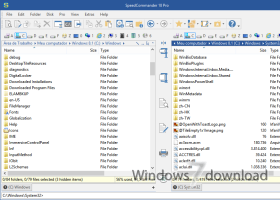
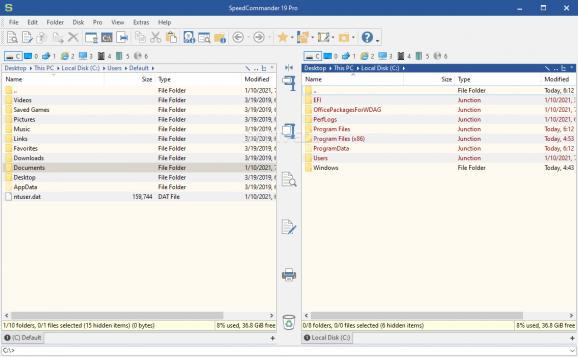
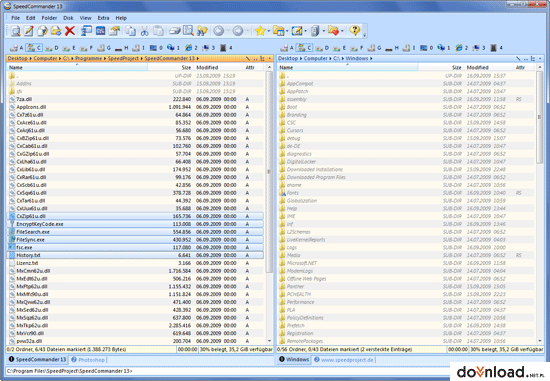
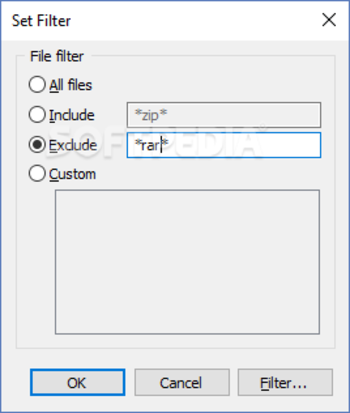
SpeedCommander 22.20 Build 11900 full screenshots


SpeedCommander - Windows 7 Download awards


SpeedCommander 22.20 Build 11900 full description
SpeedCommander is a comfortable file manager. It builds on the proven two window technology and offers a multitude of exclusive features. You will be able to copy, sort, move or erase your files using the keyboard or your mouse. SpeedCommander also lets you copy or format a disk, map a network drive, connect to FTP, use a built-in web browser, as well as customize the interface when it comes to toolbars, commands, keyboard shortcuts, font, and others, backup and restore settings, and much more. The file manager takes up a moderate amount of system resources and includes a help file. Unfortunately, it is only available in German and this is the biggest disadvantage of the tool. Otherwise, we strongly recommend it to all users, since it clearly comes bundled with some very interesting features.
Proven Two Window Technology:
· SpeedCommander displays files and folders in the proven two window technology - source and target of operations are therefore always visible. This ensures a higher productivity compared to Windows Explorer and an extremely fast navigation through files, folders and FTP sites.
· SpeedCommander will offer you many options for moving and copying files. Besides the usual deletion SpeedCommander has a secure deletion compliant to governmental standards. With the integrated Quick View SpeedCommander shows you the content of many file formats. Pictures, videos or music files - SpeedCommander gives you a fast overview for every kind of files. FileSync synchronizes folders, FileSearch finds files and folders on all data mediums.
Extensive Archive Support:
· SpeedCommander makes handling compressed files easy, because they are treated like ordinary folders. Experience direct support for many archive formats as well as compressing and decompressing them without the need for further software. Compression profiles can sum up settings and self-extracting archives make additional software superfluous. Recovery data offers protection against damaged archives.
Add-In Interface:
· SpeedCommander has a modern Add-In interface, so that additional plugins can be used, enhancing the original functionality. SpeedCommander communicates with the Add-In via the component object model (COM). An Add-In can add functionality in the menu or the toolbars. The Add-Ins also have full access to SpeedCommander's object model. They can open and alter folder windows, as well access their content.
· Add further file systems via the interface for file system Add-Ins into SpeedCommander. Use the WinCeFS Add-In to access PDA devices with ActiveSync. The WfxWrapper Add-In integrates the many file system plugins from Total Commander (wfx).
Macros:
· Simple tasks can be automated with macros. Macros can use the different objects of SpeedCommander too, also all script capable components (e.g. several shell objects) can be included. Edit macros easily with the integrated macro editor and check them for possible errors with a script debugger (like Visual Studio).
Enhanced FTP Functions:
· SpeedCommander supports various FTP types like FTP via SSH (SFTP) and SSL encrypted FTP. The user just needs to choose a protocol, everything else is done by Speedcommander in a transparent way. The support for proxies was expanded noticeably. SpeedCommander supports Socks 4/4a/5 and HTTP connections. The user can choose to compress directory listing and file transfers with MODE Z. Band width limiting keeps your line responsive, if required.
Native 64-bit Version for Windows XP/2003 x64 Edition:
· SpeedCommander is also available as native 64-bit version for Windows XP x64. Only a real 64-bit file manager can access all files on Windows x64. 32-bit applications are rerouted to "WindowsSysWow64" and can't access the folder "WindowsSystem32
Proven Two Window Technology:
· SpeedCommander displays files and folders in the proven two window technology - source and target of operations are therefore always visible. This ensures a higher productivity compared to Windows Explorer and an extremely fast navigation through files, folders and FTP sites.
· SpeedCommander will offer you many options for moving and copying files. Besides the usual deletion SpeedCommander has a secure deletion compliant to governmental standards. With the integrated Quick View SpeedCommander shows you the content of many file formats. Pictures, videos or music files - SpeedCommander gives you a fast overview for every kind of files. FileSync synchronizes folders, FileSearch finds files and folders on all data mediums.
Extensive Archive Support:
· SpeedCommander makes handling compressed files easy, because they are treated like ordinary folders. Experience direct support for many archive formats as well as compressing and decompressing them without the need for further software. Compression profiles can sum up settings and self-extracting archives make additional software superfluous. Recovery data offers protection against damaged archives.
Add-In Interface:
· SpeedCommander has a modern Add-In interface, so that additional plugins can be used, enhancing the original functionality. SpeedCommander communicates with the Add-In via the component object model (COM). An Add-In can add functionality in the menu or the toolbars. The Add-Ins also have full access to SpeedCommander's object model. They can open and alter folder windows, as well access their content.
· Add further file systems via the interface for file system Add-Ins into SpeedCommander. Use the WinCeFS Add-In to access PDA devices with ActiveSync. The WfxWrapper Add-In integrates the many file system plugins from Total Commander (wfx).
Macros:
· Simple tasks can be automated with macros. Macros can use the different objects of SpeedCommander too, also all script capable components (e.g. several shell objects) can be included. Edit macros easily with the integrated macro editor and check them for possible errors with a script debugger (like Visual Studio).
Enhanced FTP Functions:
· SpeedCommander supports various FTP types like FTP via SSH (SFTP) and SSL encrypted FTP. The user just needs to choose a protocol, everything else is done by Speedcommander in a transparent way. The support for proxies was expanded noticeably. SpeedCommander supports Socks 4/4a/5 and HTTP connections. The user can choose to compress directory listing and file transfers with MODE Z. Band width limiting keeps your line responsive, if required.
Native 64-bit Version for Windows XP/2003 x64 Edition:
· SpeedCommander is also available as native 64-bit version for Windows XP x64. Only a real 64-bit file manager can access all files on Windows x64. 32-bit applications are rerouted to "WindowsSysWow64" and can't access the folder "WindowsSystem32
SpeedCommander 22.20 Build 11900 download tags
SpeedCommander 22.20 Build 11900 Windows 7 release notes
New Release
Single filters can be added as buttons to the menu or toolbars
Keyboard shortcuts can be assigned to single filters
When using PowerShell as the command interpreter, UNC paths can be passed as the working directory for the external command prompt
List view: User-friendly display of video compression (System.Video.Compression) as FourCC text instead of the GUID returned by the shell
Searching in the settings did not work if parts of the search text in the dialog element were separated by an &
After searching in the settings dialog, the font for the tag list had changed
Pro version: Signing in to OneDrive may no longer have worked
FTP: Folder and file names with Unicode characters were not correctly interpreted when connecting via SFTP
FileSearch: When opening the context menu for a single file, the ‘Open with’ command was not displayed
FileSearch: When using *.* as the search string, Everything did not return folders without dots
[ SpeedCommander release history ]
Single filters can be added as buttons to the menu or toolbars
Keyboard shortcuts can be assigned to single filters
When using PowerShell as the command interpreter, UNC paths can be passed as the working directory for the external command prompt
List view: User-friendly display of video compression (System.Video.Compression) as FourCC text instead of the GUID returned by the shell
Searching in the settings did not work if parts of the search text in the dialog element were separated by an &
After searching in the settings dialog, the font for the tag list had changed
Pro version: Signing in to OneDrive may no longer have worked
FTP: Folder and file names with Unicode characters were not correctly interpreted when connecting via SFTP
FileSearch: When opening the context menu for a single file, the ‘Open with’ command was not displayed
FileSearch: When using *.* as the search string, Everything did not return folders without dots
[ SpeedCommander release history ]
Bookmark SpeedCommander
SpeedCommander for Windows 7 - Copyright information
All SpeedCommander reviews, submitted ratings and written comments become the sole property of Windows 7 download. You acknowledge that you, not windows7download, are responsible for the contents of your submission. However, windows7download reserves the right to remove or refuse to post any submission for any reason.
Windows 7 Download periodically updates pricing and software information of SpeedCommander full version from the publisher, but some information may be out-of-date. You should confirm all information.
Using warez version, crack, warez passwords, patches, serial numbers, registration codes, key generator, pirate key, keymaker or keygen for SpeedCommander license key is illegal and prevent future development of SpeedCommander. Download links are directly from our mirrors or publisher's website, SpeedCommander torrent or shared files from free file sharing and free upload services, including Rapidshare, MegaUpload, YouSendIt, SendSpace, DepositFiles, DivShare, HellShare, HotFile, FileServe or MediaFire, are not used.
Windows 7 Download periodically updates pricing and software information of SpeedCommander full version from the publisher, but some information may be out-of-date. You should confirm all information.
Using warez version, crack, warez passwords, patches, serial numbers, registration codes, key generator, pirate key, keymaker or keygen for SpeedCommander license key is illegal and prevent future development of SpeedCommander. Download links are directly from our mirrors or publisher's website, SpeedCommander torrent or shared files from free file sharing and free upload services, including Rapidshare, MegaUpload, YouSendIt, SendSpace, DepositFiles, DivShare, HellShare, HotFile, FileServe or MediaFire, are not used.
Post SpeedCommander review


Windows 7 SpeedCommander related downloads
SpeedCommander is a comfortable file manager. It builds on ... interesting features. Proven Two Window Technology: · SpeedCommander displays files and folders in the proven two ...
My Account
Help
Windows 7 Software Coupons
-
WinX DVD Ripper
50% Off -
Media Player Morpher
85% Off -
MacX Video Converter Pro
56% Off -
MacX DVD Ripper Pro
50% Off -
MacX DVD Video Converter
58% Off
My Saved Stuff
You have not saved any software.
Click "Save" next to each software.
Click "Save" next to each software.
Would you like to receive announcements of new versions of your software by email or by RSS reader? Register for FREE!
Windows 7 Downloads Picks
- Portable XYplorer 28.30.0600 x64
- xplorer² 5.1.0.1
- FRSFileList 1.7.0
- File Defragger 2.1
- Disk Savvy Pro x64 17.7.18
- SpeedCommander 22.20 Build 11900
- Data Igloo standard 2.0
- BestSync Portable 2010 x64 5.4.34
- Portable cdrtfe 1.5.9.1
- Sync Breeze Server x64 17.8.26
- file@home 4.1.4
- Portable WhereIsIt 2012 Build 522
- BestSync Portable x64 2024 (19.0.1.5)
- SuperCopier x64 2.2.6.6
- EMDB 5.41
- WinDirStat 2.5.0
- Extended File Details 1.0
- Drives Monitor 18.1
- Filmotech 3.11.2
- xplorer² x64 5.1.0.1
Popular Tags
search
find
music
folder
files
lotus notes to outlook
data recovery software
file manager
drive
mp3
disk
file
tool
file recovery
utility
undelete
erase
data
software
remove
folders
recovery
cleaner
nsf to pst
duplicate
delete
duplicate files
data recovery
directory
hard
Popular Windows 7 Software
- Network Monitor II 31.7
- Avro Keyboard 5.6.0.0
- Media Creation Tool x64 22H2
- Ghostscript (x64 bit) 10.03.1
- Windows 7
- iTop Data Recovery 6.1.0.936
- Windows 7 Service Pack 1 7601.17514.1011
- iTop Easy Desktop 4.2.0.312
- Advanced SystemCare 19.3.0.200
- Smart Game Booster 5.3.1.692
- iTop PDF 3.6.0.4
- GoodSync2Go 12.9.29.9
- The Dude 7.22.2 Stable
- IObit Uninstaller 15.4.0.1
- Atlantis Word Processor 5.0.4
© 2026 Windows7Download.com - All logos, trademarks, art and other creative works are and remain copyright and property of their respective owners. Microsoft Windows is a registered trademarks of Microsoft Corporation. Microsoft Corporation in no way endorses or is affiliated with windows7download.com.