


Video Snapshots Genius for Windows 7 - Capture memorable video moments with ease. - Windows 7 Download


Video Snapshots Genius 4.2
"Capture breathtaking moments with Video Snapshots Genius - your ultimate video companion!"
Introducing Video Snapshots Genius - the powerful and versatile software from Lonking Software, LLC that lets you capture frames from your favorite videos and turn them into stunning pictures. With easy-to-use editing tools, you can enhance your shots with filters, effects, and more. Whether you're a professional photographer or just looking to spice up your social media feed, Video Snapshots Genius is the perfect tool for you. Download now for seamless video-to-image conversion experience on Windows 7.
Video Snapshots Genius 4.2 full details

| File Size: | 16.80 MB |
|---|---|
| License: | Trialware |
| Price: | $29.95 |
| Released: | 2019-10-28 |
| Downloads: | Total: 1670 | This Month: 217 |
| Publisher: | Lonking Software, LLC |
| Publisher URL: | https://www.lonking.com/ |

Download Video Snapshots Genius 4.2
Save Video Snapshots Genius to My Stuff
Tweet
Video Snapshots Genius - Windows 7 Download awards


Video Snapshots Genius 4.2 full description
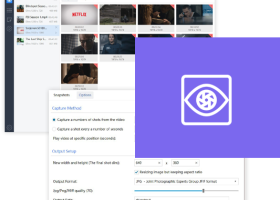
Video Snapshots Genius, the video snapshot software for capturing movie scenes to a single image files or a thumbnail gallery. The program supports almost all popular formats, such as MPEG, AVI, WMV, DivX, Flash video (*.flv), RealMedia, QuickTime, DVD and can open a video without any other player for preview playback.
Video Snapshots Genius provides users with a simple point-and-click interface to take snapshots directly from a movie. Snapshots can be taken manually by browsing through a movie to snag the frames you need or you can have snapshots taken automatically at the time intervals you’ve predefined. The number of snapshots can be configured to users’ preference.
The output format is configurable. With just a few clicks, users can set width and height, choose a folder to save files, specify the name prefix for automatic naming of files and choose image format: BMP, JPEG, GIF, PNG and TIFF. Some adjustments of brightness and contrast are possible in the built-in Picture Editor, the results can be viewed in Picture Viewer. Besides, the program can create thumbnails of snapshots and add a timestamp to these snapshots.
Users can find Video Snapshots Genius useful in many ways.
1. Make snapshots of your home video. If you are like any digital camera owner, you have plenty of videos that you would like to preserve your family holidays, birthdays, weddings, not only as movies but also as photos. To do it, you can use Video Snapshots Genius. Digital snapshots can be shared via email or through web sites like Flickr.
2. Make your own DVD/VCD menus with title slides. Home movie enthusiasts can use the program to add snapshots of key scenes to their own custom DVD menu. Simply choose the scene that you think symbolizes the portion of a movie and capture it. Then make some enhancements to the snapshot and add it to a DVD menu creation editor.
3. Make snapshots of a video to make a compelling video web site. You could take snapshots of a video to add to a video-themed web site, to a catalog of videos or to a presentation. This will make your content immediately interesting and visually nice. Besides, a series of snapshots can be made into an animated banner.
4. Create your own avatar for a forum or ICQ. Users may consider using Video Snapshots Genius to make a snapshot of their favorite actor like Brad Pitt or Angelina Jolly to be used as a personal avatar on a forum or ICQ.
Video Snapshots Genius provides users with a simple point-and-click interface to take snapshots directly from a movie. Snapshots can be taken manually by browsing through a movie to snag the frames you need or you can have snapshots taken automatically at the time intervals you’ve predefined. The number of snapshots can be configured to users’ preference.
The output format is configurable. With just a few clicks, users can set width and height, choose a folder to save files, specify the name prefix for automatic naming of files and choose image format: BMP, JPEG, GIF, PNG and TIFF. Some adjustments of brightness and contrast are possible in the built-in Picture Editor, the results can be viewed in Picture Viewer. Besides, the program can create thumbnails of snapshots and add a timestamp to these snapshots.
Users can find Video Snapshots Genius useful in many ways.
1. Make snapshots of your home video. If you are like any digital camera owner, you have plenty of videos that you would like to preserve your family holidays, birthdays, weddings, not only as movies but also as photos. To do it, you can use Video Snapshots Genius. Digital snapshots can be shared via email or through web sites like Flickr.
2. Make your own DVD/VCD menus with title slides. Home movie enthusiasts can use the program to add snapshots of key scenes to their own custom DVD menu. Simply choose the scene that you think symbolizes the portion of a movie and capture it. Then make some enhancements to the snapshot and add it to a DVD menu creation editor.
3. Make snapshots of a video to make a compelling video web site. You could take snapshots of a video to add to a video-themed web site, to a catalog of videos or to a presentation. This will make your content immediately interesting and visually nice. Besides, a series of snapshots can be made into an animated banner.
4. Create your own avatar for a forum or ICQ. Users may consider using Video Snapshots Genius to make a snapshot of their favorite actor like Brad Pitt or Angelina Jolly to be used as a personal avatar on a forum or ICQ.
Video Snapshots Genius 4.2 download tags
Bookmark Video Snapshots Genius
Video Snapshots Genius for Windows 7 - Copyright information
All Video Snapshots Genius reviews, submitted ratings and written comments become the sole property of Windows 7 download. You acknowledge that you, not windows7download, are responsible for the contents of your submission. However, windows7download reserves the right to remove or refuse to post any submission for any reason.
Windows 7 Download periodically updates pricing and software information of Video Snapshots Genius full version from the publisher, but some information may be out-of-date. You should confirm all information.
Using warez version, crack, warez passwords, patches, serial numbers, registration codes, key generator, pirate key, keymaker or keygen for Video Snapshots Genius license key is illegal and prevent future development of Video Snapshots Genius. Download links are directly from our mirrors or publisher's website, Video Snapshots Genius torrent or shared files from free file sharing and free upload services, including Rapidshare, MegaUpload, YouSendIt, SendSpace, DepositFiles, DivShare, HellShare, HotFile, FileServe or MediaFire, are not used.
Windows 7 Download periodically updates pricing and software information of Video Snapshots Genius full version from the publisher, but some information may be out-of-date. You should confirm all information.
Using warez version, crack, warez passwords, patches, serial numbers, registration codes, key generator, pirate key, keymaker or keygen for Video Snapshots Genius license key is illegal and prevent future development of Video Snapshots Genius. Download links are directly from our mirrors or publisher's website, Video Snapshots Genius torrent or shared files from free file sharing and free upload services, including Rapidshare, MegaUpload, YouSendIt, SendSpace, DepositFiles, DivShare, HellShare, HotFile, FileServe or MediaFire, are not used.
Post Video Snapshots Genius review


Windows 7 Video Snapshots Genius related downloads
Video Snapshots Genius, the video snapshot software for capturing movie scenes to a ... formats, such as MPEG, AVI, WMV, DivX, Flash video (*.flv), RealMedia, QuickTime, DVD and can open a ...
My Account
Help
Windows 7 Software Coupons
-
WinX MediaTrans
63% Off -
MacX MediaTrans
63% Off -
MacX DVD Ripper Pro
50% Off -
MacX Media Management Bundle
70% Off -
FREE VPN PROXY by SEED4.ME WINDOWS
Free VPN by Seed4Me
My Saved Stuff
You have not saved any software.
Click "Save" next to each software.
Click "Save" next to each software.
Would you like to receive announcements of new versions of your software by email or by RSS reader? Register for FREE!
Windows 7 Downloads Picks
- iTop Screenshot 1.2.3.544
- Gyazo 5.9.2
- PicPick 7.4.1
- Video Snapshots Genius Business 4.2
- Video Snapshots Genius 4.2
- VueScan 9.8.53
- FastStone Capture 11.2
- iuVCS Deluxe x64 0.14.0.63
- Simple Webpage Capture 1.0.0
- Roxio PhotoShow Premium Service
- VueScan x64 9.8.34
- imgKlone 1.1
- Screen Grab Pro Deluxe 2.03
- HyperCam (x64 bit) 2.29.00
- Lightscreen Portable 2.4
- iuVCS Deluxe 0.14.0.63
- SupervisionCam 3.2.2.2
- Yascu 1.0.525
- Lightscreen 1.01
- ScreenShooter 2.4.5.1859
Popular Tags
printscreen
image
screenshot
screen shot
screen
recording
desktop
video screen capture
screen recording
webcam
software
video
record
capture screen
free
print screen
freeware
grab
screen recorder
print
capture
screen capture
avi
recorder
screen capture software
wmv
cam
window
audio
snapshot
Popular Windows 7 Software
- CorelDRAW X7 (x32 bit) 17.4.0.887
- CorelDRAW X7 (x64 bit) 17.4.0.887
- CorelDRAW X5 15.2.0.686
- CorelDRAW X4
- iTop Screenshot 1.2.3.544
- CorelDRAW 2017 19.1.0.419
- CorelDRAW X6 16.4.0.1280
- Blender - 32 bit 2.80
- Adobe InDesign CS5 CS5.5 7.5.3
- CorelDRAW X8 18.0.0.450
- Graphic Workshop Professional 15.0a rev11
- Model Air Design 2.4
- Blender Portable 4.1.1
- Model Air Design 2.4
- Paint.NET 5.0.13
© 2026 Windows7Download.com - All logos, trademarks, art and other creative works are and remain copyright and property of their respective owners. Microsoft Windows is a registered trademarks of Microsoft Corporation. Microsoft Corporation in no way endorses or is affiliated with windows7download.com.