


Nomad.NET for Windows 7 - "Efficient File Manager for Windows 7: Nomad.NET" - Windows 7 Download


Nomad.NET 3.2.0.2890
"Experience powerful file management with Nomad.NET - a game changer for Windows 7."
Nomad.NET, developed by Eugene Sichkar, is an all-in-one file manager for Windows 7. With its intuitive interface, advanced file search feature, and support for multiple file transfer protocols, Nomad.NET makes managing your files a breeze. It also features plugins for popular file formats, such as images and archives, making it a versatile tool for any computer user. Download Nomad.NET now and take your file management to the next level.
Nomad.NET 3.2.0.2890 full details

| File Size: | 3.80 MB |
|---|---|
| License: | Freeware |
| Price: | FREE |
| Released: | 2016-06-21 |
| Downloads: | Total: 675 | This Month: 118 |
| Publisher: | Eugene Sichkar |
| Publisher URL: | http://www.nomad-net.info/ |

Download Nomad.NET 3.2.0.2890
Save Nomad.NET to My Stuff
Tweet
Nomad.NET - Windows 7 Download awards


Nomad.NET 3.2.0.2890 full description
Nomad.NET is the successor of Nomad, a powerful file manager written by me a couple of years ago. It is completely rewritten (no single line of code was taken from previous Nomad) using best ideas and algorithms and implementing everything in a completely new way.
Several years ago I changed my employer and moved to Microsoft new technology called ".Net". For better understanding of many hidden areas, techniques and classes from new framework I started to write small simple applications that did what I knew the best - how to work with OS in file manager way. When I had dozens of such simple applications an idea to completely rewrite old Nomad on new framework had come. So in 2008 the work began.
New Nomad was developed with multi-threading in mind, so almost all long operations can take advantage of multi-core cpu (comparing, copying, searching, detecting archive format and so on - too many to list all of them here).
I do not want to create all-in-one mega monster that plays mp3, shows movies, etc, as many other file managers do. My goal is to build only file manager functionality, but do it very good, or even best of all. For other purposes there are dedicated programs that always do things better than such jack-of-all-trades programs.
Features Overview
As for features of original Nomad, you can take a look at them on appropriate page. Here I describe the features that are significantly changed or just are new:
* Full Unicode support.[screenshot]
* Tabbed interface. But in contrast to almost every other file manager tabs are not panel based.
* Powerful bookmarks system. You can bookmark you favorite folders, ftp sites or even searches (yes, you can create virtual search folders).
* One of the most powerful search engines on market (if I can say market, project is freeware). You can create very complex search rules, with ability to search in different encoding (complete encodings auto detect), use IFilter filters, apply custom text search rules (including regular expressions), search in hex, duplicates search and so on... For novices there is a simplified search that is not so scary at first sight.[screenshot]
* Powerful filtering system, based on the same core as search. You can use dedicated advanced filter dialog, or use simple toolstrip for quick filtering.[screenshot]
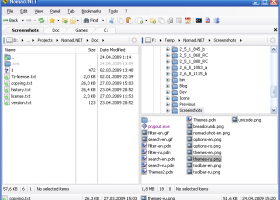
* Much simpler, elegant and polished UI (program must look nice, right?)[screenshot]
* Customizable visual themes[screenshot] and icon packs. And you can even create your own themes and icon packs.
* The most powerful toolbar you can even find in file manager.[screenshot]
* Improved main form layout. You can use single panel or dual panel mode (horizontal or vertical). Each panel can have its own tree view that can be hidden or displayed horizontally or vertically. And you can even store your customized layouts for future use.
* Ability to customize selected folders view and options (filter, sort, etc). This is unique feature and you cannot find it in other managers.[screenshot]
* Program is highly customizable via Options dialog[screenshot], including simple UI scaling according to your current system DPI settings (or manually).
* Breadcrumb folder toolstrip on every panel is much more powerful than simple folder name.[screenshot]
* Full internal support for many archive types (using 7-Zip libraries). Program can also handle WCX Total Commander plug-in, even in more powerful way than Total Commander did. You can view, create and edit archives.
* FTP folders support (with limitations yet, for example, only one http proxy allowed with no UI to configure).
* Many things were done more correctly - drag'n'drop from explorer, clipboard handling, shell file menus and so on.
* Support for shell shortcuts, url shortcuts (ftp only) and even shell folder shortcuts (rarely supported in other file managers).
* And last, Nomad is the first and only file manager written on .net. This is not advantag
Several years ago I changed my employer and moved to Microsoft new technology called ".Net". For better understanding of many hidden areas, techniques and classes from new framework I started to write small simple applications that did what I knew the best - how to work with OS in file manager way. When I had dozens of such simple applications an idea to completely rewrite old Nomad on new framework had come. So in 2008 the work began.
New Nomad was developed with multi-threading in mind, so almost all long operations can take advantage of multi-core cpu (comparing, copying, searching, detecting archive format and so on - too many to list all of them here).
I do not want to create all-in-one mega monster that plays mp3, shows movies, etc, as many other file managers do. My goal is to build only file manager functionality, but do it very good, or even best of all. For other purposes there are dedicated programs that always do things better than such jack-of-all-trades programs.
Features Overview
As for features of original Nomad, you can take a look at them on appropriate page. Here I describe the features that are significantly changed or just are new:
* Full Unicode support.[screenshot]
* Tabbed interface. But in contrast to almost every other file manager tabs are not panel based.
* Powerful bookmarks system. You can bookmark you favorite folders, ftp sites or even searches (yes, you can create virtual search folders).
* One of the most powerful search engines on market (if I can say market, project is freeware). You can create very complex search rules, with ability to search in different encoding (complete encodings auto detect), use IFilter filters, apply custom text search rules (including regular expressions), search in hex, duplicates search and so on... For novices there is a simplified search that is not so scary at first sight.[screenshot]
* Powerful filtering system, based on the same core as search. You can use dedicated advanced filter dialog, or use simple toolstrip for quick filtering.[screenshot]
* Much simpler, elegant and polished UI (program must look nice, right?)[screenshot]
* Customizable visual themes[screenshot] and icon packs. And you can even create your own themes and icon packs.
* The most powerful toolbar you can even find in file manager.[screenshot]
* Improved main form layout. You can use single panel or dual panel mode (horizontal or vertical). Each panel can have its own tree view that can be hidden or displayed horizontally or vertically. And you can even store your customized layouts for future use.
* Ability to customize selected folders view and options (filter, sort, etc). This is unique feature and you cannot find it in other managers.[screenshot]
* Program is highly customizable via Options dialog[screenshot], including simple UI scaling according to your current system DPI settings (or manually).
* Breadcrumb folder toolstrip on every panel is much more powerful than simple folder name.[screenshot]
* Full internal support for many archive types (using 7-Zip libraries). Program can also handle WCX Total Commander plug-in, even in more powerful way than Total Commander did. You can view, create and edit archives.
* FTP folders support (with limitations yet, for example, only one http proxy allowed with no UI to configure).
* Many things were done more correctly - drag'n'drop from explorer, clipboard handling, shell file menus and so on.
* Support for shell shortcuts, url shortcuts (ftp only) and even shell folder shortcuts (rarely supported in other file managers).
* And last, Nomad is the first and only file manager written on .net. This is not advantag
Nomad.NET 3.2.0.2890 download tags
Nomad.NET 3.2.0.2890 Windows 7 release notes
New Release
Draw submenu arrows with corresponding theme color (instead of black)
Italian localization updated:
Show full version info when available (not only numbers but text too)
[ Nomad.NET release history ]
Draw submenu arrows with corresponding theme color (instead of black)
Italian localization updated:
Show full version info when available (not only numbers but text too)
[ Nomad.NET release history ]
Bookmark Nomad.NET
Nomad.NET for Windows 7 - Copyright information
All Nomad.NET reviews, submitted ratings and written comments become the sole property of Windows 7 download. You acknowledge that you, not windows7download, are responsible for the contents of your submission. However, windows7download reserves the right to remove or refuse to post any submission for any reason.
Windows 7 Download periodically updates pricing and software information of Nomad.NET full version from the publisher, but some information may be out-of-date. You should confirm all information.
Using warez version, crack, warez passwords, patches, serial numbers, registration codes, key generator, pirate key, keymaker or keygen for Nomad.NET license key is illegal and prevent future development of Nomad.NET. Download links are directly from our mirrors or publisher's website, Nomad.NET torrent or shared files from free file sharing and free upload services, including Rapidshare, MegaUpload, YouSendIt, SendSpace, DepositFiles, DivShare, HellShare, HotFile, FileServe or MediaFire, are not used.
Windows 7 Download periodically updates pricing and software information of Nomad.NET full version from the publisher, but some information may be out-of-date. You should confirm all information.
Using warez version, crack, warez passwords, patches, serial numbers, registration codes, key generator, pirate key, keymaker or keygen for Nomad.NET license key is illegal and prevent future development of Nomad.NET. Download links are directly from our mirrors or publisher's website, Nomad.NET torrent or shared files from free file sharing and free upload services, including Rapidshare, MegaUpload, YouSendIt, SendSpace, DepositFiles, DivShare, HellShare, HotFile, FileServe or MediaFire, are not used.
Post Nomad.NET review


Windows 7 Nomad.NET related downloads
Discover the ultimate solution for hassle-free file management with "MP3 Move Files" - a groundbreaking software ...
A easier and more graceful way to manage your documents. We call document preview page collection ...
"Looking for a reliable file management solution for your Windows 7 machine? Look no further than Windows File Manager, ...
How to copy Windows Mail to Thunderbird? If you are also ... that is completely safe and easy utility to copy EML files to Thunderbird from Windows Mail in ...
Looking for an easy and efficient way to transfer your Windows Mail emails to Outlook? Look no further than Copy EML to Outlook. Developed by the highly-regarded Copy ...
My Account
Help
Windows 7 Software Coupons
-
WinX HD Video Converter
56% Off -
MacX DVD Ripper Pro
50% Off -
MacX MediaTrans
63% Off -
WinX DVD Copy Pro
42% Off -
WinX MediaTrans
63% Off
My Saved Stuff
You have not saved any software.
Click "Save" next to each software.
Click "Save" next to each software.
Would you like to receive announcements of new versions of your software by email or by RSS reader? Register for FREE!
Windows 7 Downloads Picks
- Portable XYplorer 28.30.0600 x64
- xplorer² 5.1.0.1
- FRSFileList 1.7.0
- File Defragger 2.1
- Disk Savvy Pro x64 17.7.18
- SpeedCommander 22.20 Build 11900
- Data Igloo standard 2.0
- BestSync Portable 2010 x64 5.4.34
- Portable cdrtfe 1.5.9.1
- Sync Breeze Server x64 17.8.26
- file@home 4.1.4
- Portable WhereIsIt 2012 Build 522
- BestSync Portable x64 2024 (19.0.1.5)
- SuperCopier x64 2.2.6.6
- EMDB 5.41
- WinDirStat 2.5.0
- Extended File Details 1.0
- Drives Monitor 18.1
- Filmotech 3.11.2
- xplorer² x64 5.1.0.1
Popular Tags
nsf to pst
software
undelete
hard
duplicate files
delete
lotus notes to outlook
mp3
drive
recovery
erase
file
disk
data
files
folder
data recovery software
remove
music
find
folders
search
duplicate
directory
tool
data recovery
cleaner
utility
file recovery
file manager
Popular Windows 7 Software
- Network Monitor II 31.7
- Avro Keyboard 5.6.0.0
- Media Creation Tool x64 22H2
- Ghostscript (x64 bit) 10.03.1
- Windows 7
- iTop Data Recovery 6.1.0.936
- Windows 7 Service Pack 1 7601.17514.1011
- iTop Easy Desktop 4.2.0.312
- Advanced SystemCare 19.3.0.200
- Smart Game Booster 5.3.1.692
- iTop PDF 3.6.0.4
- GoodSync2Go 12.9.29.9
- The Dude 7.22.2 Stable
- IObit Uninstaller 15.4.0.1
- Atlantis Word Processor 5.0.4
© 2026 Windows7Download.com - All logos, trademarks, art and other creative works are and remain copyright and property of their respective owners. Microsoft Windows is a registered trademarks of Microsoft Corporation. Microsoft Corporation in no way endorses or is affiliated with windows7download.com.