


My Screen Capture for Windows 7 - Capture Your Screen Perfectly - Windows 7 Download


My Screen Capture 1.71
Capture, edit, and share your screen effortlessly with My Screen Capture—the ultimate Windows 7 software for visuals.
Discover the perfect tool to capture every memorable moment on your Windows 7 screen! Developed by My Portable Software, "My Screen Capture" boasts an intuitive interface and robust features, ensuring a seamless experience for users. From capturing screenshots to recording high-quality videos, this software offers unmatched versatility. Effortlessly save, edit, and share your captures with just a few clicks. Download "My Screen Capture" now and elevate your multimedia experience on Windows 7!
My Screen Capture 1.71 full details

| File Size: | 92 kB |
|---|---|
| License: | Freeware |
| Price: | FREE |
| Released: | 2015-09-17 |
| Downloads: | Total: 605 | This Month: 6 |
| Publisher: | My Portable Software |
| Publisher URL: | http://www.myportablesoftware.com/ |

Download My Screen Capture 1.71
Save My Screen Capture to My Stuff
Tweet
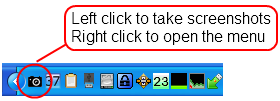
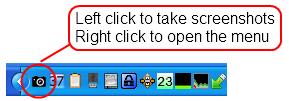
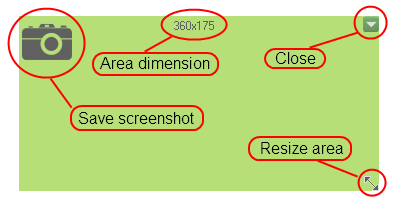
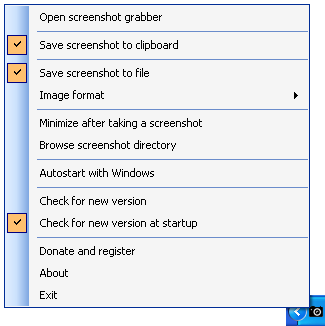
My Screen Capture 1.71 full screenshots
My Screen Capture - Windows 7 Download awards

My Screen Capture 1.71 full description
Welcome to the world of My Screen Capture, the ultimate software for capturing and editing screenshots on your Windows 7 system. Developed by the renowned team at My Portable Software, this versatile tool allows you to effortlessly capture any portion of your screen with unparalleled precision and clarity.
My Screen Capture's intuitive interface offers a seamless user experience, making it accessible to both novice and expert users alike. Whether you're creating instructional tutorials, documenting software bugs, or simply preserving memorable moments, this software has got you covered.
With its array of powerful editing features, My Screen Capture enables you to enhance your screenshots to perfection. From cropping and rotating to adding text and annotations, you have complete control over the final result. Gone are the days of using multiple software applications for your screen capturing needs – My Screen Capture does it all.
Designed specifically for Windows 7, this software is optimized to produce stunning screenshots without compromising on performance. It seamlessly integrates into your system, providing lightning-fast capturing capabilities that won't slow you down. Plus, its small file size ensures a swift installation and minimal impact on your system resources.
Experience the convenience of My Screen Capture by downloading it today from the official website. Join the ranks of countless satisfied users who rely on this exceptional software for all their screen capturing needs. Embrace efficiency, precision, and creativity – make My Screen Capture your go-to Windows 7 software companion.
My Screen Capture 1.71 download tags
My Screen Capture 1.71 Windows 7 release notes
New Release
- (fixed, bug present in v1.70) image captured has a wrong size
- added hotkey: screenshot grabber can be invoked using CTRL + F12
- updated license module
- recompiled with Vistual Studio 2015
[ My Screen Capture release history ]
- (fixed, bug present in v1.70) image captured has a wrong size
- added hotkey: screenshot grabber can be invoked using CTRL + F12
- updated license module
- recompiled with Vistual Studio 2015
[ My Screen Capture release history ]
Bookmark My Screen Capture
My Screen Capture for Windows 7 - Copyright information
All My Screen Capture reviews, submitted ratings and written comments become the sole property of Windows 7 download. You acknowledge that you, not windows7download, are responsible for the contents of your submission. However, windows7download reserves the right to remove or refuse to post any submission for any reason.
Windows 7 Download periodically updates pricing and software information of My Screen Capture full version from the publisher, but some information may be out-of-date. You should confirm all information.
Using warez version, crack, warez passwords, patches, serial numbers, registration codes, key generator, pirate key, keymaker or keygen for My Screen Capture license key is illegal and prevent future development of My Screen Capture. Download links are directly from our mirrors or publisher's website, My Screen Capture torrent or shared files from free file sharing and free upload services, including Rapidshare, MegaUpload, YouSendIt, SendSpace, DepositFiles, DivShare, HellShare, HotFile, FileServe or MediaFire, are not used.
Post My Screen Capture review


Windows 7 My Screen Capture related downloads
Looking for a Windows 7 software that simplifies capturing screenshots? Look no further than "Capture Screenshot lite" by ...
... for an easy and fast way to take screenshots on your Windows 7 computer? Look no further ...
Screen Grab Pro Deluxe features One click grab of any screen for ease of use, timer operation, current window ...
iTop Screenshot is a Windows screen-capture utility for people who need to record what is visible on their desktop and prepare images for reference, explanation, or sharing. ...
Introducing "Screen Capture Free" – a cutting-edge software developed by "Screen Capturer" exclusively for Windows 7. Designed to simplify the ...
My Account
Help
Windows 7 Software Coupons
-
MacX MediaTrans
63% Off -
WinX HD Video Converter
56% Off -
MacX DVD Video Converter
58% Off -
WinX DVD Ripper
50% Off -
FREE VPN PROXY by SEED4.ME WINDOWS
Free VPN by Seed4Me
My Saved Stuff
You have not saved any software.
Click "Save" next to each software.
Click "Save" next to each software.
Would you like to receive announcements of new versions of your software by email or by RSS reader? Register for FREE!
Windows 7 Downloads Picks
- iTop Screenshot 1.2.3.544
- Lightscreen 1.01
- RasterVect 15.8 15.8
- SnapaShot Pro Portable 5.0.5.1
- Portable Greenshot 1.2.10.6
- PicPick 7.6.2
- Video Snapshots Genius Business 4.2
- Screen Grab Pro Deluxe 2.03
- Yascu 1.0.525
- AutoScreenShot Portable 1.0.5.10
- AutoScreenShot 1.0.5.10
- WebShot 1.9.3.1
- Roxio PhotoShow Premium Service
- Screeny Professional 4.9.3
- FastStone Capture 11.2
- ScreenShooter 2.4.5.1859
- Gyazo 6.0.2
- Simple Webpage Capture 1.0.0
- VueScan 9.8.54
- VueScan x64 9.8.34
Popular Tags
wmv
record
window
video
recording
recorder
screenshot
screen recorder
audio
webcam
grab
screen shot
capture
screen capture
video screen capture
screen
avi
freeware
print
software
capture screen
free
image
printscreen
desktop
screen capture software
cam
snapshot
print screen
screen recording
Popular Windows 7 Software
- CorelDRAW X7 (x32 bit) 17.4.0.887
- CorelDRAW 2017 19.1.0.419
- WizFlow Professional 7.58 Build 2228
- QCAD Portable 3.29.3
- Contenta Converter PREMIUM 7.1
- FotoWorks XL 2026 26.2.6
- Jsoft Easy ID Photo 6.1
- Photoshop Search Multiple Files By Layer Name Software 7.0
- 3D Page Flip Book Templates of Colorful Eggs 1.0
- FreeVimager 9.9.27
- HDR Expose 2.1.1 build 9804
- CorelDRAW X7 (x64 bit) 17.4.0.887
- Inpaint 11.0
- PSRemote 3.3
- Ashampoo 3D CAD Architecture 14 14.0.0
© 2026 Windows7Download.com - All logos, trademarks, art and other creative works are and remain copyright and property of their respective owners. Microsoft Windows is a registered trademarks of Microsoft Corporation. Microsoft Corporation in no way endorses or is affiliated with windows7download.com.