


Bandicam Screen Recorder for Windows 7 - "Fast & Easy Screen Recorder - Bandicam" - Windows 7 Download


Bandicam Screen Recorder 7.1.0.2151
"Capture high-quality screen recordings, effortlessly."
Bandicam Screen Recorder is a powerful, lightweight software that allows you to capture high-quality images, video and audio on your Windows 7 computer. Developed by Bandicam Company, this software is the perfect tool for recording gameplay, creating video tutorials, or capturing online streams. With an easy-to-use interface, Bandicam Screen Recorder enables you to customize your recording settings and capture areas, providing you with full control over your recordings. Whether you're an avid gamer, content creator, or just looking to capture video on your computer, Bandicam Screen Recorder is the go-to software for all your recording needs.
Bandicam Screen Recorder 7.1.0.2151 full details

| File Size: | 31.28 MB |
|---|---|
| License: | Free To Try |
| Price: | $33.26 |
| Released: | 2024-02-19 |
| Downloads: | Total: 2819 | This Month: 126 |
| Publisher: | Bandicam Company |
| Publisher URL: | https://www.bandicam.com |

Download Bandicam Screen Recorder 7.1.0.2151
Save Bandicam Screen Recorder to My Stuff
Serial Key for Bandicam Screen Recorder 7.1.0.2151
Tweet
Bandicam Screen Recorder - Windows 7 Download awards


Bandicam Screen Recorder 7.1.0.2151 full description
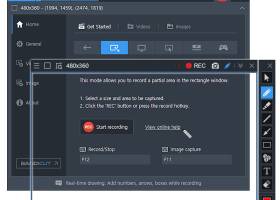
Bandicam is a lightweight screen recorder for Windows that can capture anything on your PC screen as a high-quality video. It also allows you to record a certain area on a PC screen, or capture a game that uses the DirectX/OpenGL/Vulkan graphics technologies. Bandicam will help you carry out a game capture with high compression ratio, while preserving the video quality of the original work, and provide performance far superior to other screen capture software that provide similar functions. Bandicam compresses the video while recording and uses fewer CPU/GPU/RAM resources. It also fully supports the hardware accelerated h.264 encoder of Nvidia NVENC/CUDA, Intel Quick Sync video, and AMD VCE which allow videos to be recorded with high speed, high compression ratio, and excellent quality. As a result, there is less lag, and you can save your HDD and CPU. Bandicam displays the FPS number in the corner of the screen while it is active in the 'Game Recording' mode. It also can record video at resolutions of up to 3840x2160 in high quality (2160P UHD video can be made), allowing your webcam stream to be simultaneously recorded and merged with the game / screen recording (Picture-in-Picture, Video-in-Video). In addition, Bandicam supports mouse click effects and a real-time drawing function that allows users to draw lines, boxes, or highlights while recording their computer screen. You can upload the recorded file to YouTube without converting because the recorded file size is 20% to 95% smaller than files created by other software. Furthermore, Bandicam can simply remove the background of a webcam and make a Chroma Key video in real-time while recording. With the Chroma Key and webcam overlay function being used in conjunction with microphone recording, Bandicam has become the ideal screen recorder for making video tutorials or Let's Play videos.
Bandicam Screen Recorder 7.1.0.2151 download tags
Bandicam Screen Recorder 7.1.0.2151 Windows 7 release notes
Major Update
1. Added the 'All display' option in the scheduled recording settings window.
2. Added an option to exclude Bandicam windows in the recorded video.
3. The Bandicam window size now automatically changes when moving according to the monitor DPI scaling.
[ Bandicam Screen Recorder release history ]
1. Added the 'All display' option in the scheduled recording settings window.
2. Added an option to exclude Bandicam windows in the recorded video.
3. The Bandicam window size now automatically changes when moving according to the monitor DPI scaling.
[ Bandicam Screen Recorder release history ]
Bandicam Screen Recorder 7.1.0.2151 Windows 7 requirements
Windows 11/10/8/7 (64-bit)
Bookmark Bandicam Screen Recorder
Bandicam Screen Recorder for Windows 7 - Copyright information
All Bandicam Screen Recorder reviews, submitted ratings and written comments become the sole property of Windows 7 download. You acknowledge that you, not windows7download, are responsible for the contents of your submission. However, windows7download reserves the right to remove or refuse to post any submission for any reason.
Windows 7 Download periodically updates pricing and software information of Bandicam Screen Recorder full version from the publisher, but some information may be out-of-date. You should confirm all information.
Using warez version, crack, warez passwords, patches, serial numbers, registration codes, key generator, pirate key, keymaker or keygen for Bandicam Screen Recorder license key is illegal and prevent future development of Bandicam Screen Recorder. Download links are directly from our mirrors or publisher's website, Bandicam Screen Recorder torrent or shared files from free file sharing and free upload services, including Rapidshare, MegaUpload, YouSendIt, SendSpace, DepositFiles, DivShare, HellShare, HotFile, FileServe or MediaFire, are not used.
Windows 7 Download periodically updates pricing and software information of Bandicam Screen Recorder full version from the publisher, but some information may be out-of-date. You should confirm all information.
Using warez version, crack, warez passwords, patches, serial numbers, registration codes, key generator, pirate key, keymaker or keygen for Bandicam Screen Recorder license key is illegal and prevent future development of Bandicam Screen Recorder. Download links are directly from our mirrors or publisher's website, Bandicam Screen Recorder torrent or shared files from free file sharing and free upload services, including Rapidshare, MegaUpload, YouSendIt, SendSpace, DepositFiles, DivShare, HellShare, HotFile, FileServe or MediaFire, are not used.
Bandicam Screen Recorder users' reviews
Bandicam Screen Recorder 1.6.1.113
review by Desperate Times... And No Money. (Apr 28, 2011)

I have to say without a doubt I'm very impressed.
I didn't even think it was recording when I started, I didn't have to wait for anything to compress, just did it on the fly.
I will be purchasing a license for this.
Thank you, this worked much better than the other "TOP 10 RATED" softwares that I've tried.
Its so nice to have something done without headaches and fiery hoops.
I didn't even think it was recording when I started, I didn't have to wait for anything to compress, just did it on the fly.
I will be purchasing a license for this.
Thank you, this worked much better than the other "TOP 10 RATED" softwares that I've tried.
Its so nice to have something done without headaches and fiery hoops.
Post Bandicam Screen Recorder review


Windows 7 Bandicam Screen Recorder related downloads
Appnimi Auto Screen Capture lets you capture screenshots of your desktop at regular intervals of time. ...
Introducing "Screen Capture Free" – a cutting-edge software developed by "Screen Capturer" exclusively for Windows 7. ...
... capturing and enhancing your desktop activity with PC Screen Capture. Developed by the leading team behind pcscreencapture.com, ...
JingWei Screen Capture tool for Window 2000/XP/Vista/7( maybe more ). Save ... etc.). Features: * 3 ways to capture screen * 3 file formats to store image ...
Free screen capture software to capture screen area, full screen or single window. The freeware software supports desktops ...
My Account
Help
Windows 7 Software Coupons
-
MacX MediaTrans
63% Off -
WinX DVD Ripper
50% Off -
MacX Media Management Bundle
70% Off -
WinX MediaTrans
63% Off -
MacX Video Converter Pro
56% Off
My Saved Stuff
You have not saved any software.
Click "Save" next to each software.
Click "Save" next to each software.
Would you like to receive announcements of new versions of your software by email or by RSS reader? Register for FREE!
Windows 7 Downloads Picks
- iTop Screenshot 1.2.3.544
- Gyazo 5.9.2
- PicPick 7.4.1
- Video Snapshots Genius Business 4.2
- Video Snapshots Genius 4.2
- VueScan 9.8.53
- FastStone Capture 11.2
- iuVCS Deluxe x64 0.14.0.63
- Simple Webpage Capture 1.0.0
- Roxio PhotoShow Premium Service
- VueScan x64 9.8.34
- imgKlone 1.1
- Screen Grab Pro Deluxe 2.03
- HyperCam (x64 bit) 2.29.00
- Lightscreen Portable 2.4
- iuVCS Deluxe 0.14.0.63
- SupervisionCam 3.2.2.2
- Yascu 1.0.525
- Lightscreen 1.01
- ScreenShooter 2.4.5.1859
Popular Tags
audio
recorder
recording
snapshot
printscreen
desktop
screen shot
screenshot
screen recorder
screen capture
window
screen recording
avi
print screen
software
free
print
record
image
screen
freeware
video
video screen capture
screen capture software
capture
cam
grab
webcam
wmv
capture screen
Popular Windows 7 Software
- CorelDRAW X7 (x32 bit) 17.4.0.887
- CorelDRAW X7 (x64 bit) 17.4.0.887
- CorelDRAW X5 15.2.0.686
- CorelDRAW X4
- iTop Screenshot 1.2.3.544
- CorelDRAW 2017 19.1.0.419
- CorelDRAW X6 16.4.0.1280
- Blender - 32 bit 2.80
- Adobe InDesign CS5 CS5.5 7.5.3
- CorelDRAW X8 18.0.0.450
- Graphic Workshop Professional 15.0a rev11
- Model Air Design 2.4
- Blender Portable 4.1.1
- Model Air Design 2.4
- Paint.NET 5.0.13
© 2026 Windows7Download.com - All logos, trademarks, art and other creative works are and remain copyright and property of their respective owners. Microsoft Windows is a registered trademarks of Microsoft Corporation. Microsoft Corporation in no way endorses or is affiliated with windows7download.com.