


WinStep Xtreme for Windows 7 - Revolutionize desktop with Winstep Xtreme. - Windows 7 Download


WinStep Xtreme 26.4
Transform your desktop with Winstep Xtreme - an intuitive, customizable Windows 7 software.
Winstep Xtreme, developed by Winstep Software Technologies, is a game-changing software designed to enhance your Windows 7 experience. With its sleek and intuitive interface, Winstep Xtreme is the ultimate customization tool for your desktop. Transform your desktop into a personalized control center with easy access to your favorite apps, files, and updates. Its unparalleled performance and reliability make it a must-have for anyone seeking to streamline their daily workflow. Download Winstep Xtreme today and take your Windows 7 experience to the next level.
WinStep Xtreme 26.4 full details

| File Size: | 47.30 MB |
|---|---|
| License: | Trialware |
| Price: | $44.95 |
| Released: |
2026-04-07
 |
| Downloads: | Total: 4258 | This Month: 176 |
| Publisher: | Winstep Software Technologies |
| Publisher URL: | http://www.winstep.net/ |

Download WinStep Xtreme 26.4
Save WinStep Xtreme to My Stuff
Serial Key for WinStep Xtreme 26.4
Tweet
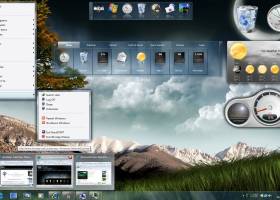
WinStep Xtreme 26.4 full screenshots


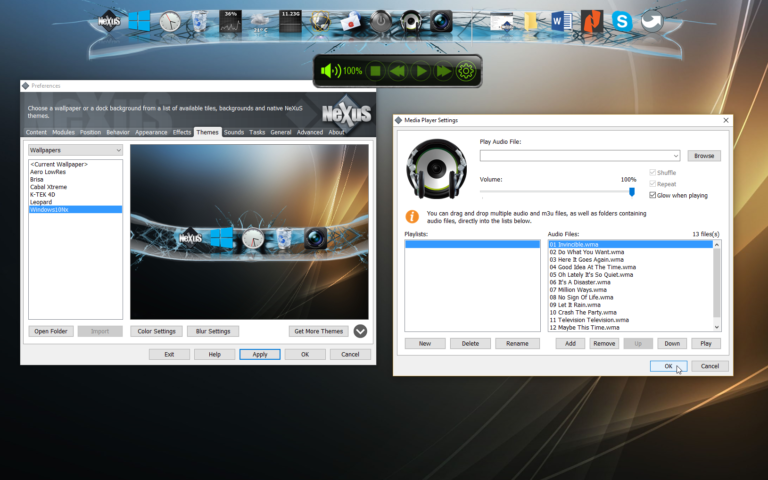
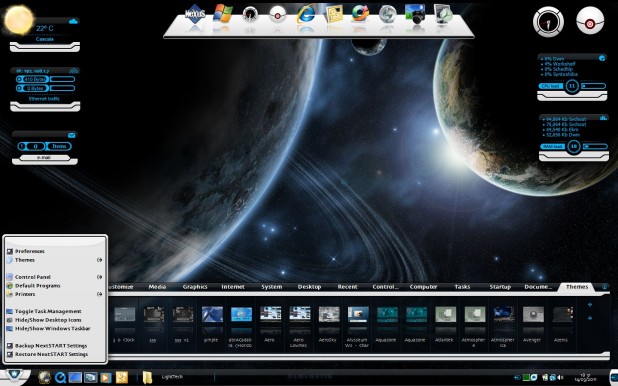
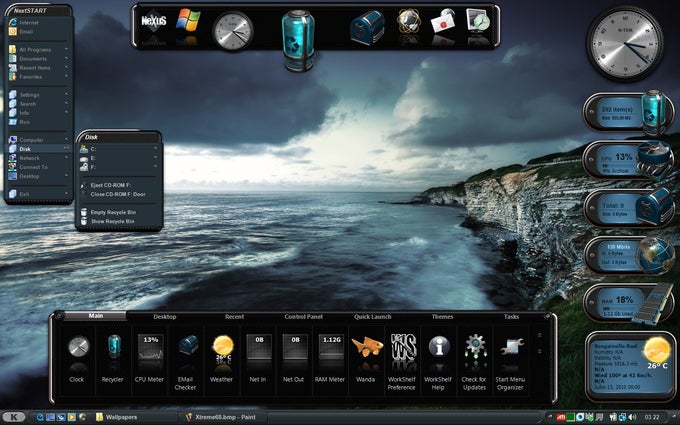
WinStep Xtreme - Windows 7 Download awards


WinStep Xtreme 26.4 full description
Winstep Xtreme is a powerful suite of User Interface replacement applications that merge incredible usability and performance with breathtaking eye candy: NeXuS is the dock system, and is just perfect for super fast access to your most used applications. You can have as many docks as you want, and each can have multiple sub-docks! When not in use, docks can hide behind your screen edges, taking virtually no screen space. WorkShelf is a tabbed dock, better suited to complex organizational duties like organizing documents, URLs, movies, work projects, etc... If a dock is the top of your desk, then Workshelf is all the drawers below it. NextSTART is the menu system - and takes care of all your task management needs as well. Menus are great for accessing infrequently used files and system related commands that aren't easily reachable in the file system or that have no readily user-recognizable graphic representation. You can create as many menus as you want, and, with NextSTART hotspots, you can invoke each of these menus by a super fast screen edge/corner bump with the mouse pointer. The task management part of NextSTART allows you to efficiently organize and manipulate running tasks and windows. Using nothing but drag & drop, you can re-organize the items in your taskbar so that all your related documents are together (thus easier to find) and where you expect them to be, instead of where Windows decided to put them. Modules, widgets, gadgets, docklets, desklets, are all different words to describe the same thing: mini-applications that usually live on your desktop and provide a staggering amount of information regarding your system, the weather, etc... Winstep Xtreme currently includes the following modules: a speaking Atomic Clock, Recycle Bin, Email Checker, Weather Monitor, CPU, Net and RAM Meters and the amazing 'fortune cookie' Wanda. New modules are constantly being added. The Winstep Start Menu Organizer cleans and organizes the Start Menu.
WinStep Xtreme 26.4 download tags
WinStep Xtreme 26.4 Windows 7 release notes
New Release
A Faster, Smarter Way to Launch Apps:
The new All Programs tab provides a powerful new way to browse and launch applications from shelves, drawers and Grid Stacks. Instead of navigating through nested Start Menu folders, all applications are displayed together in a single alphabetically sorted list with letter separators, making it much easier to find what you want at a glance.
Just start typing and the Search Box will appear automatically, filtering the list in real time as you type. This makes the All Programs tab especially effective for quickly locating installed applications without the distractions of the Windows Start Menu. Version 26.4 also introduces a new Programs tab type that displays the contents of the Start Menu All Programs folder with program groups opening as Grid Stacks. A shortcut to a 7x5 All Programs Grid Stack is now included by default on the dock, giving new users immediate access to this feature.
Full Hotkey Control at Your Fingertips:
Hotkeys are now more powerful and easier to manage than ever. You can assign hotkeys to sub-docks, Grid Stacks and LaunchPads, making it possible to instantly open them wherever the mouse pointer is, or close them again if they are already open.
Version 26.4 adds a new Hotkey Manager to the Troubleshooting Options dialog. It provides a convenient overview of all defined hotkeys, including their location, current status and any conflicts, and also allows hotkeys to be edited or removed directly from a single place.
Significantly Improved Search Performance:
Search is now much faster and more responsive across shelves, drawers and Grid Stacks. Instead of retrieving items from disk every time the search filter changes, the application now keeps using the existing in-memory data unless a file system change is detected in the source folder or tab.
Simply start typing to activate search - items that don't match are automatically filtered out.
The result is a smoother and more fluid experience while typing, especial
[ WinStep Xtreme release history ]
A Faster, Smarter Way to Launch Apps:
The new All Programs tab provides a powerful new way to browse and launch applications from shelves, drawers and Grid Stacks. Instead of navigating through nested Start Menu folders, all applications are displayed together in a single alphabetically sorted list with letter separators, making it much easier to find what you want at a glance.
Just start typing and the Search Box will appear automatically, filtering the list in real time as you type. This makes the All Programs tab especially effective for quickly locating installed applications without the distractions of the Windows Start Menu. Version 26.4 also introduces a new Programs tab type that displays the contents of the Start Menu All Programs folder with program groups opening as Grid Stacks. A shortcut to a 7x5 All Programs Grid Stack is now included by default on the dock, giving new users immediate access to this feature.
Full Hotkey Control at Your Fingertips:
Hotkeys are now more powerful and easier to manage than ever. You can assign hotkeys to sub-docks, Grid Stacks and LaunchPads, making it possible to instantly open them wherever the mouse pointer is, or close them again if they are already open.
Version 26.4 adds a new Hotkey Manager to the Troubleshooting Options dialog. It provides a convenient overview of all defined hotkeys, including their location, current status and any conflicts, and also allows hotkeys to be edited or removed directly from a single place.
Significantly Improved Search Performance:
Search is now much faster and more responsive across shelves, drawers and Grid Stacks. Instead of retrieving items from disk every time the search filter changes, the application now keeps using the existing in-memory data unless a file system change is detected in the source folder or tab.
Simply start typing to activate search - items that don't match are automatically filtered out.
The result is a smoother and more fluid experience while typing, especial
[ WinStep Xtreme release history ]
Bookmark WinStep Xtreme
WinStep Xtreme for Windows 7 - Copyright information
All WinStep Xtreme reviews, submitted ratings and written comments become the sole property of Windows 7 download. You acknowledge that you, not windows7download, are responsible for the contents of your submission. However, windows7download reserves the right to remove or refuse to post any submission for any reason.
Windows 7 Download periodically updates pricing and software information of WinStep Xtreme full version from the publisher, but some information may be out-of-date. You should confirm all information.
Using warez version, crack, warez passwords, patches, serial numbers, registration codes, key generator, pirate key, keymaker or keygen for WinStep Xtreme license key is illegal and prevent future development of WinStep Xtreme. Download links are directly from our mirrors or publisher's website, WinStep Xtreme torrent or shared files from free file sharing and free upload services, including Rapidshare, MegaUpload, YouSendIt, SendSpace, DepositFiles, DivShare, HellShare, HotFile, FileServe or MediaFire, are not used.
Windows 7 Download periodically updates pricing and software information of WinStep Xtreme full version from the publisher, but some information may be out-of-date. You should confirm all information.
Using warez version, crack, warez passwords, patches, serial numbers, registration codes, key generator, pirate key, keymaker or keygen for WinStep Xtreme license key is illegal and prevent future development of WinStep Xtreme. Download links are directly from our mirrors or publisher's website, WinStep Xtreme torrent or shared files from free file sharing and free upload services, including Rapidshare, MegaUpload, YouSendIt, SendSpace, DepositFiles, DivShare, HellShare, HotFile, FileServe or MediaFire, are not used.
Post WinStep Xtreme review


Windows 7 WinStep Xtreme related downloads
... powerful software tool to tweak, optimize, maintain and tune up your Windows 7, it includes over thirty different ...
The Windows 7 and Windows Server 2008 R2 Service Pack 1 (SP1) package includes all previously publicly released updates for Windows 7 and Windows Server 2008 R2. It is ...
Winstep Start Menu Organizer is a freeware program designed to rapidly help you clean and organize your Microsoft Windows Start Menu. Over time, as more and more ...
Winstep Start Menu Organizer is a freeware program designed to rapidly help you clean and organize your Microsoft Windows Start Menu. Over time, as more and more ...
Windows Access Panel v 1.0 is meant to minimize ... accessing such programs. It has been tested on Windows 7 & Windows Vista – but works on ...
My Account
Help
Windows 7 Software Coupons
-
WinX DVD Ripper
50% Off -
WinX MediaTrans
63% Off -
Media Player Morpher
85% Off -
MacX Video Converter Pro
56% Off -
MacX MediaTrans
63% Off
My Saved Stuff
You have not saved any software.
Click "Save" next to each software.
Click "Save" next to each software.
Would you like to receive announcements of new versions of your software by email or by RSS reader? Register for FREE!
Windows 7 Downloads Picks
- Windows 7 Service Pack 1 7601.17514.1011
- Advanced SystemCare 19.3.0.200
- Smart Game Booster 5.3.1.692
- The Dude 7.22.2 Stable
- Windows Access Panel 1.0
- Windows 7 Manager 5.2.0
- Windows 7 Manager (x64bit) 5.2.0
- Windows 7 Manager (x32bit) 5.2.0
- Argus Monitor 7.3.4 Build 3142
- Windows Logon Notifier 1.0
- Portable Wise Registry Cleaner 11.3.2 Build 734
- Autoruns for Windows 14.11
- Argente Utilities 3.0.6.9
- Windows 7 Logon Changer 1.1
- Advanced SystemCare Professional 14.2.0
- AVG-PC Tuneup 24.4 Build 17418
- CCleaner 7.7.1313.0 Ad-suppor
- Advanced Serial Data Logger Enterprise 5.1.4 build 310
- Portable Glary Utilities 6.41.0.45
- Advanced Driver Updater 4.6.1086.8539
Popular Tags
speed
system
clean
repair
registry cleaner
tune
optimizer
defrag
driver
cleaner
startup
security
remove
memory
ram
optimize
backup
disk
disk cleaner
vista
spyware
utility
performance
windows
cpu
registry
tweak
faster
uninstall
boost
Popular Windows 7 Software
- Network Monitor II 31.7
- Avro Keyboard 5.6.0.0
- Media Creation Tool x64 22H2
- Ghostscript (x64 bit) 10.03.1
- Windows 7
- iTop Data Recovery 6.1.0.936
- Windows 7 Service Pack 1 7601.17514.1011
- iTop Easy Desktop 4.2.0.312
- Advanced SystemCare 19.3.0.200
- Smart Game Booster 5.3.1.692
- iTop PDF 3.6.0.4
- GoodSync2Go 12.9.29.9
- The Dude 7.22.2 Stable
- IObit Uninstaller 15.4.0.1
- Atlantis Word Processor 5.0.4
© 2026 Windows7Download.com - All logos, trademarks, art and other creative works are and remain copyright and property of their respective owners. Microsoft Windows is a registered trademarks of Microsoft Corporation. Microsoft Corporation in no way endorses or is affiliated with windows7download.com.