


SmartClose for Windows 7 - SmartClose: Your Ultimate PC Companion. - Windows 7 Download


SmartClose 1.3
"Effortlessly close all running programs with SmartClose - a must-have utility for Windows 7 users."
Looking for an easy way to close all unnecessary programs running on your Windows 7 PC? Look no further than SmartClose from BM-productions. This handy utility allows you to close down everything from background processes to unused services with just a few clicks. The result? A faster, more efficient and streamlined computer experience that's perfect for gamers, home users and professionals alike. So why wait? Download SmartClose today and experience the benefits for yourself!
SmartClose 1.3 full details

| File Size: | 707 kB |
|---|---|
| License: | Freeware |
| Price: | FREE |
| Released: | 2012-07-03 |
| Downloads: | Total: 550 | This Month: 59 |
| Publisher: | BM-productions |
| Publisher URL: | https://bmproductions.fixnum.org/ |

Download SmartClose 1.3
Save SmartClose to My Stuff
Tweet
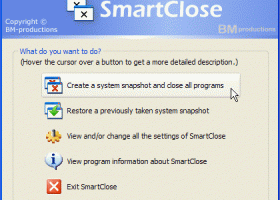
SmartClose 1.3 full screenshots


SmartClose - Windows 7 Download awards

SmartClose 1.3 full description
Many tasks that can be performed on PC's these days require you to close all currently running programs. For example, almost every installer asks you to close all other applications to minimize conflicts and to avoid replacing in-use files. Other high-end tasks, such as burning CDs and defragmenting or scanning hard drives can slow down or even fail when other processes 'kick in', like background programs, the screen saver or a scheduled task.
Of course, you could manually close each program one by one, disable the screen saver…, but that is where SmartClose comes in. SmartClose will automatically close all running programs, disable the screen saver and halt all other processes that can interrupt without asking.
But what when the task is finished and you want to restore everything that was disabled by SmartClose? Restart the computer? No, because before SmartClose closes or disables anything, it will save the current state of the system (running programs, screen saver…) to a 'system snapshot', that can be opened and restored again later.
Other features:
Two wizards: the Close Programs wizard, for closing all the programs, and the Restore wizard, to restore a system snapshot. Both provide an intuitive and clear interface, and assist you step by step.
Thanks to its SmartClose-technology, most programs can be properly closed, so that the program can still save its settings and return memory and resources to the system.
In the rare cases that a program can't be properly closed, SmartClose can use SmartKill to kill the program. Still, all the memory and resources used by the program will be freed.
If you don't want a program to be closed or killed by SmartClose, you can add it to a list of 'Protected Programs'.
Besides closing programs, SmartClose also closes Explorer and Internet Explorer windows and saves their current location, so they can be restored properly later.
Disables and restores the screen saver.
On modern Windows versions, SmartClose stops and restarts Windows services that can interrupt other processes, such as the Task Scheduler. On Windows 9x/Millennium, the Task Scheduler can also be disabled and re-enabled.
And finally, you get all of these features for free. SmartClose is 100% freeware without any nag screens, trial periods, ads, spyware etc.
Of course, you could manually close each program one by one, disable the screen saver…, but that is where SmartClose comes in. SmartClose will automatically close all running programs, disable the screen saver and halt all other processes that can interrupt without asking.
But what when the task is finished and you want to restore everything that was disabled by SmartClose? Restart the computer? No, because before SmartClose closes or disables anything, it will save the current state of the system (running programs, screen saver…) to a 'system snapshot', that can be opened and restored again later.
Other features:
Two wizards: the Close Programs wizard, for closing all the programs, and the Restore wizard, to restore a system snapshot. Both provide an intuitive and clear interface, and assist you step by step.
Thanks to its SmartClose-technology, most programs can be properly closed, so that the program can still save its settings and return memory and resources to the system.
In the rare cases that a program can't be properly closed, SmartClose can use SmartKill to kill the program. Still, all the memory and resources used by the program will be freed.
If you don't want a program to be closed or killed by SmartClose, you can add it to a list of 'Protected Programs'.
Besides closing programs, SmartClose also closes Explorer and Internet Explorer windows and saves their current location, so they can be restored properly later.
Disables and restores the screen saver.
On modern Windows versions, SmartClose stops and restarts Windows services that can interrupt other processes, such as the Task Scheduler. On Windows 9x/Millennium, the Task Scheduler can also be disabled and re-enabled.
And finally, you get all of these features for free. SmartClose is 100% freeware without any nag screens, trial periods, ads, spyware etc.
SmartClose 1.3 download tags
SmartClose 1.3 Windows 7 release notes
New Release
Version 1.3 fixes: in some cases, SmartClose didn't save the closed/killed programs to the system snapshot; after running the Close Programs wizard more than once in the same SmartClose instance, the closed/killed programs and stopped services didn't get saved to the system snapshot correctly anymore.
[ SmartClose release history ]
Version 1.3 fixes: in some cases, SmartClose didn't save the closed/killed programs to the system snapshot; after running the Close Programs wizard more than once in the same SmartClose instance, the closed/killed programs and stopped services didn't get saved to the system snapshot correctly anymore.
[ SmartClose release history ]
Bookmark SmartClose
SmartClose for Windows 7 - Copyright information
All SmartClose reviews, submitted ratings and written comments become the sole property of Windows 7 download. You acknowledge that you, not windows7download, are responsible for the contents of your submission. However, windows7download reserves the right to remove or refuse to post any submission for any reason.
Windows 7 Download periodically updates pricing and software information of SmartClose full version from the publisher, but some information may be out-of-date. You should confirm all information.
Using warez version, crack, warez passwords, patches, serial numbers, registration codes, key generator, pirate key, keymaker or keygen for SmartClose license key is illegal and prevent future development of SmartClose. Download links are directly from our mirrors or publisher's website, SmartClose torrent or shared files from free file sharing and free upload services, including Rapidshare, MegaUpload, YouSendIt, SendSpace, DepositFiles, DivShare, HellShare, HotFile, FileServe or MediaFire, are not used.
Windows 7 Download periodically updates pricing and software information of SmartClose full version from the publisher, but some information may be out-of-date. You should confirm all information.
Using warez version, crack, warez passwords, patches, serial numbers, registration codes, key generator, pirate key, keymaker or keygen for SmartClose license key is illegal and prevent future development of SmartClose. Download links are directly from our mirrors or publisher's website, SmartClose torrent or shared files from free file sharing and free upload services, including Rapidshare, MegaUpload, YouSendIt, SendSpace, DepositFiles, DivShare, HellShare, HotFile, FileServe or MediaFire, are not used.
Post SmartClose review


Windows 7 SmartClose related downloads
System Monitor II will shows you all core CPU ... will have to spend some time on it. System Monitor II works on both 32-bit and 64-bit ...
System Explorer is free, awards winning software for exploration and management of System Internals. This small software includes many usefull tools ...
Windows 7 Little Tweaker is a small and simple to ... easily activate a few useful extras for Microsoft Windows 7 32bit platforms. Windows 7 Little Tweaker is a ...
Portable Windows Elapsed Running Time is a small utility designed to enable you to view the ...
Introducing Windows 7. Your PC, simplified. Windows 7 is more than Vista done right, but you ...
... XP Mode and Windows Virtual PC, available on Windows 7 Professional and Windows 7 Ultimate, allow you to ...
My Account
Help
Windows 7 Software Coupons
-
WinX MediaTrans
63% Off -
Media Player Morpher
85% Off -
MacX DVD Video Converter
58% Off -
MacX DVD Ripper Pro
50% Off -
FREE VPN PROXY by SEED4.ME WINDOWS
Free VPN by Seed4Me
My Saved Stuff
You have not saved any software.
Click "Save" next to each software.
Click "Save" next to each software.
Would you like to receive announcements of new versions of your software by email or by RSS reader? Register for FREE!
Windows 7 Downloads Picks
- Network Monitor II 31.7
- Windows 7
- iTop Easy Desktop 4.2.0.312
- Windows 7 DreamScene Activator 1.1
- Windows XP Mode (Windows Virtual PC) 1.3.7600.16423
- Windows 7 Little Tweaker 1.2
- Windows Elapsed Running Time 1.6.0
- Windows 7 Enterprise
- User Account Manager 6.03
- Secunia Personal Software Inspector 3.0.0.11005
- PDF-XChange Standard 9.5.368
- System Monitor II 31.3
- Realtek High Definition Audio driver 2.82
- Windows 7 x64
- Microsoft Security Essentials Definition Updates x64 1.67.7.0
- System Explorer 7.1.0.5359
- GPU Monitor 12.9
- Total PC Care 3.0.648.7830
- Lupo PenSuite (x64 bit) 2016
- Microsoft Virtual PC 2007 SP1 6.0.192
Popular Tags
monitor
keyboard
utilities
optimize
shareware
desktop
system
password
files
software
database
video
tool
print
web
convert
utility
image
editor
edit
file
text
security
free
windows
download
search
data
time
manager
Popular Windows 7 Software
- Network Monitor II 31.7
- Avro Keyboard 5.6.0.0
- Media Creation Tool x64 22H2
- Ghostscript (x64 bit) 10.03.1
- Windows 7
- iTop Data Recovery 6.1.0.936
- Windows 7 Service Pack 1 7601.17514.1011
- iTop Easy Desktop 4.2.0.312
- Advanced SystemCare 19.3.0.200
- Smart Game Booster 5.3.1.692
- iTop PDF 3.6.0.4
- GoodSync2Go 12.9.29.9
- The Dude 7.22.2 Stable
- IObit Uninstaller 15.4.0.1
- Atlantis Word Processor 5.0.4
© 2026 Windows7Download.com - All logos, trademarks, art and other creative works are and remain copyright and property of their respective owners. Microsoft Windows is a registered trademarks of Microsoft Corporation. Microsoft Corporation in no way endorses or is affiliated with windows7download.com.