


PhotoScape for Windows 7 - Photo editing, layouts and printing tools - Windows 7 Download


PhotoScape 3.7
A free photo editor for image fixes, batch work, photo layouts and printing.
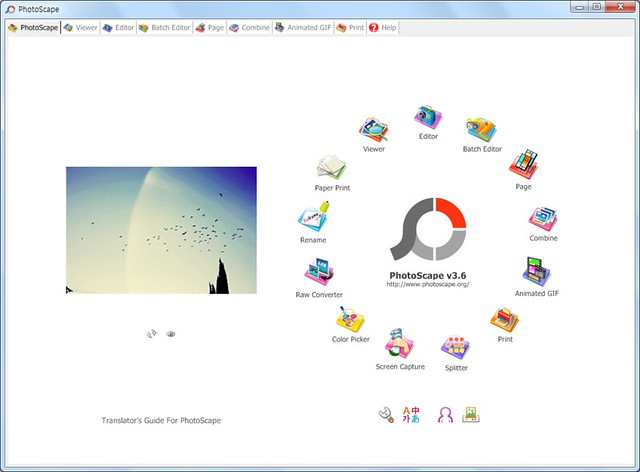
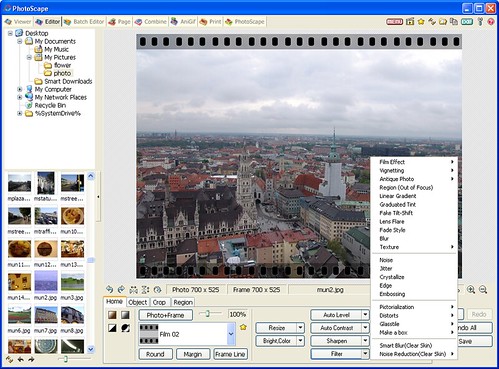
PhotoScape is a free photo editor and utility suite for everyday image adjustments, batch work and printing. Its Editor provides resizing, cropping, color and brightness controls, white balance, red-eye removal, filters and text or drawing tools. Other workspaces browse folders, combine photos into layouts, create animated GIFs, convert RAW files to JPG and prepare common photo prints.
PhotoScape 3.7 full details

| File Size: | 20.10 MB |
|---|---|
| License: | Freeware |
| Price: | FREE |
| Released: | 2014-09-11 |
| Downloads: | Total: 84279 | This Month: 148 |
| Publisher: | Mooii |
| Publisher URL: | http://www.photoscape.org |

Download PhotoScape 3.7
Save PhotoScape to My Stuff
Tweet

PhotoScape 3.7 full screenshots

PhotoScape - Windows 7 Download awards



PhotoScape 3.7 full description
PhotoScape is a free photo editor and utility suite for people who want to make everyday image adjustments, organize pictures and prepare photos for sharing or printing. Its tools are arranged around common tasks, including viewing, editing, combining, batch processing and printing, so users can choose a focused workspace rather than relying on a single editing screen for everything.
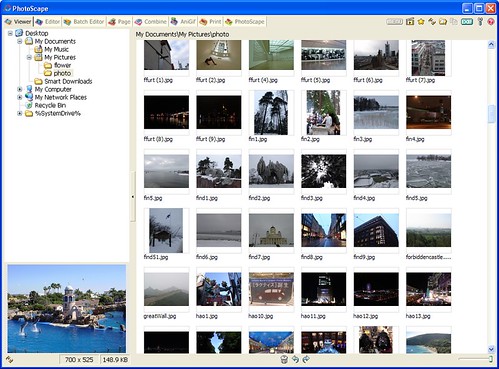
The Editor handles individual photos with controls for resizing, brightness, color and white balance, along with backlight correction and red-eye removal. Cropping and filters help adjust composition and appearance, while frames, text, balloons, drawing tools and mosaic effects add simple graphic treatments. These options suit routine fixes and light creative work; the program also includes a blooming effect for altering the look of an image. The Viewer browses photos in a folder and can play them as a slideshow, making it useful for reviewing a collection before editing.
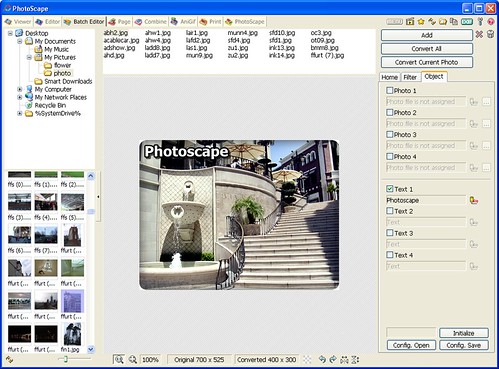
For repeated or multi-image work, Batch Editor applies changes to multiple photos, and the batch Rename tool changes several filenames in one operation. Page lays out multiple pictures in a frame to make a single composed image, while Combine joins photos vertically or horizontally. Animated GIF creates an animation from a set of photos, and Splitter divides one photo into several pieces. A color picker can zoom into an image to help locate and select a color, while Screen Capture saves screenshots for later editing.
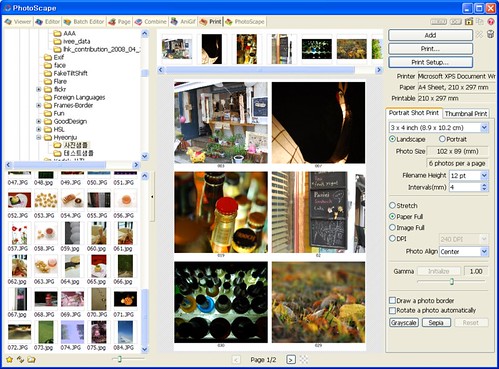
PhotoScape also includes output tools for common home and office tasks. Its Print function prepares portrait shots, business-card-sized photos and passport photos; Paper Print produces lined, graph, music or calendar paper. The RAW Converter changes RAW files into JPG images, providing a straightforward way to make those files more convenient to view or share. Face Search can look for similar faces on the Internet, extending the program beyond local image editing.
The range of utilities makes PhotoScape suitable for basic photo correction, preparing prints, assembling picture layouts and handling batches of files without a complex professional workflow. It is freeware and supports Windows 7, including 64-bit editions, as well as several earlier and later Windows releases. The interface is available in multiple languages, including English, Korean, Chinese, German and Dutch. Individual tools address specific jobs, so users can move from browsing and editing to combining or printing images within the same application.
The Editor handles individual photos with controls for resizing, brightness, color and white balance, along with backlight correction and red-eye removal. Cropping and filters help adjust composition and appearance, while frames, text, balloons, drawing tools and mosaic effects add simple graphic treatments. These options suit routine fixes and light creative work; the program also includes a blooming effect for altering the look of an image. The Viewer browses photos in a folder and can play them as a slideshow, making it useful for reviewing a collection before editing.
For repeated or multi-image work, Batch Editor applies changes to multiple photos, and the batch Rename tool changes several filenames in one operation. Page lays out multiple pictures in a frame to make a single composed image, while Combine joins photos vertically or horizontally. Animated GIF creates an animation from a set of photos, and Splitter divides one photo into several pieces. A color picker can zoom into an image to help locate and select a color, while Screen Capture saves screenshots for later editing.
PhotoScape also includes output tools for common home and office tasks. Its Print function prepares portrait shots, business-card-sized photos and passport photos; Paper Print produces lined, graph, music or calendar paper. The RAW Converter changes RAW files into JPG images, providing a straightforward way to make those files more convenient to view or share. Face Search can look for similar faces on the Internet, extending the program beyond local image editing.
The range of utilities makes PhotoScape suitable for basic photo correction, preparing prints, assembling picture layouts and handling batches of files without a complex professional workflow. It is freeware and supports Windows 7, including 64-bit editions, as well as several earlier and later Windows releases. The interface is available in multiple languages, including English, Korean, Chinese, German and Dutch. Individual tools address specific jobs, so users can move from browsing and editing to combining or printing images within the same application.
PhotoScape 3.7 download tags
PhotoScape 3.7 Windows 7 release notes
New Release
Added 'Black & White' and 'Bandicoot' filters (Editor > Home)
Added a 'Smart Blur' brush (Editor > Tools > Effect Brush)
Brush sizes increase from 3 to 4 and become bigger.
Added 29 more film effects so totally 35 film effects now. (Editor > Home)
Improved the 'Film Effect' UI
Improved Editor, Page, Combine and AniGif UI
Fixed minor bugs
[ PhotoScape release history ]
Added 'Black & White' and 'Bandicoot' filters (Editor > Home)
Added a 'Smart Blur' brush (Editor > Tools > Effect Brush)
Brush sizes increase from 3 to 4 and become bigger.
Added 29 more film effects so totally 35 film effects now. (Editor > Home)
Improved the 'Film Effect' UI
Improved Editor, Page, Combine and AniGif UI
Fixed minor bugs
[ PhotoScape release history ]
Bookmark PhotoScape
PhotoScape for Windows 7 - Copyright information
All PhotoScape reviews, submitted ratings and written comments become the sole property of Windows 7 download. You acknowledge that you, not windows7download, are responsible for the contents of your submission. However, windows7download reserves the right to remove or refuse to post any submission for any reason.
Windows 7 Download periodically updates pricing and software information of PhotoScape full version from the publisher, but some information may be out-of-date. You should confirm all information.
Using warez version, crack, warez passwords, patches, serial numbers, registration codes, key generator, pirate key, keymaker or keygen for PhotoScape license key is illegal and prevent future development of PhotoScape. Download links are directly from our mirrors or publisher's website, PhotoScape torrent or shared files from free file sharing and free upload services, including Rapidshare, MegaUpload, YouSendIt, SendSpace, DepositFiles, DivShare, HellShare, HotFile, FileServe or MediaFire, are not used.
Windows 7 Download periodically updates pricing and software information of PhotoScape full version from the publisher, but some information may be out-of-date. You should confirm all information.
Using warez version, crack, warez passwords, patches, serial numbers, registration codes, key generator, pirate key, keymaker or keygen for PhotoScape license key is illegal and prevent future development of PhotoScape. Download links are directly from our mirrors or publisher's website, PhotoScape torrent or shared files from free file sharing and free upload services, including Rapidshare, MegaUpload, YouSendIt, SendSpace, DepositFiles, DivShare, HellShare, HotFile, FileServe or MediaFire, are not used.
PhotoScape users' reviews
PhotoScape 3.7
review by aganyo (Sep 30, 2014)


it works just fine even for printing lined paper for handwriting.wow
PhotoScape 3.6.5
review by muhammadali (Mar 29, 2014)
This is wonderful, I am a novice and find this program so simple to use thank you Photoscape for the use of this handy little tool
PhotoScape 3.6.3
review by Gopesh (Feb 12, 2013)
to consider something in order to make changes to it, If critics review a picture, play animations, film, etc.
PhotoScape 3.6.2
review by polyy rashid (Oct 4, 2012)
This is wonderful, I am a novice and find this program so simple to use thank you Photoscape for the use of this handy little tool :-)}
PhotoScape 3.5
review by Patti (Feb 21, 2011)
This is wonderful, I am a novice and find this program so simple to use thank you Photoscape for the use of this handy little tool :-)}
Post PhotoScape review


Windows 7 PhotoScape related downloads
Raw Therapee is a free RAW converter and digital photo processing software. Main features : * ...
Photo Pos Pro photo editor is the ultimate tool to turn you digital photos into stunning artworks, create eye-catching graphics and take ...
Photo Stamper is a powerful tool that allows you ... (full screen slide show), manage, edit and master photos. It is designed to work with .JPG and ...
Enhance your photos in the usual environment! Photo Toolkit is powerful multifunctional software offering a complete ...
Photo-Brush 5 is image editor, painting program, picture retouching tool, photo enhancer and RAW Image Browser for Windows. ...
My Account
Help
Windows 7 Software Coupons
-
MacX Media Management Bundle
70% Off -
MacX DVD Ripper Pro
50% Off -
MacX Video Converter Pro
56% Off -
MacX MediaTrans
63% Off -
MacX DVD Video Converter
58% Off
My Saved Stuff
You have not saved any software.
Click "Save" next to each software.
Click "Save" next to each software.
Would you like to receive announcements of new versions of your software by email or by RSS reader? Register for FREE!
Windows 7 Downloads Picks
- CorelDRAW X7 (x32 bit) 17.4.0.887
- CorelDRAW X7 (x64 bit) 17.4.0.887
- CorelDRAW X5 15.2.0.686
- CorelDRAW X4
- CorelDRAW 2017 19.1.0.419
- CorelDRAW X6 16.4.0.1280
- Blender - 32 bit 2.80
- CorelDRAW X8 18.0.0.450
- Graphic Workshop Professional 18.0a revision 2
- Paint.NET 5.0.13
- Adobe Illustrator CS6 16.0.5
- Adobe PhotoShop CS6 Extended CC 2024 25.11
- Adobe After Effects CC 2024 24.5.0
- PDFill PDF Editor 15.0 Build 2
- Corel PaintShop Photo Pro X3 2023 25.2.0.58
- Adobe Illustrator CC CC 2024 28.5.0
- Synfig Studio 1.5.5
- Google SketchUp Pro 2020
- Image Analyzer 1.43
- Video Slideshow Maker 1.0.60
Popular Tags
photoshop
texture
desktop
free
editor
edit
software
resize
paint
photos
digital
watermark
jpeg
picture
photo editor
wallpaper
generator
photo
plugin
graphics
batch
image
graphic
styles
image editor
image editing
background
seamless
images
jpg
Popular Windows 7 Software
- CorelDRAW X7 (x32 bit) 17.4.0.887
- CorelDRAW X7 (x64 bit) 17.4.0.887
- CorelDRAW X5 15.2.0.686
- CorelDRAW X4
- iTop Screenshot 1.2.3.544
- CorelDRAW 2017 19.1.0.419
- CorelDRAW X6 16.4.0.1280
- Blender - 32 bit 2.80
- Adobe InDesign CS5 CS5.5 7.5.3
- CorelDRAW X8 18.0.0.450
- Graphic Workshop Professional 18.0a revision 2
- Model Air Design 2.5
- Blender Portable 4.1.1
- Model Air Design 2.4
- Paint.NET 5.0.13
© 2026 Windows7Download.com - All logos, trademarks, art and other creative works are and remain copyright and property of their respective owners. Microsoft Windows is a registered trademarks of Microsoft Corporation. Microsoft Corporation in no way endorses or is affiliated with windows7download.com.