


PC De-Crapifier for Windows 7 - Boost PC performance: De-crapify! - Windows 7 Download


PC De-Crapifier 3.0.1
Uninstall bloatware with ease. Improve PC's speed and performance. Get it now!
Introducing PC De-Crapifier, the ultimate software to clean up your PC and unleash its full potential. Developed by Pcdecrapifier.com, this innovative tool removes all the unwanted software and programs that slow down your computer. Say goodbye to annoying pop-ups and enjoy a faster, smoother machine. With PC De-Crapifier, you're in control of your PC once again. Experience the ultimate level of performance and productivity with this game-changing software. Get your copy today!
PC De-Crapifier 3.0.1 full details

| File Size: | 1.90 MB |
|---|---|
| License: | Freeware |
| Price: | FREE |
| Released: | 2016-08-01 |
| Downloads: | Total: 1011 | This Month: 2 |
| Publisher: | Pcdecrapifier.com |
| Publisher URL: | https://www.pcdecrapifier.com/ |

Download PC De-Crapifier 3.0.1
Save PC De-Crapifier to My Stuff
Tweet
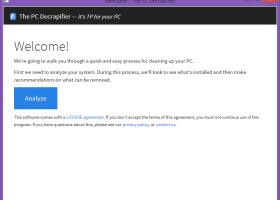
PC De-Crapifier 3.0.1 full screenshots


PC De-Crapifier - Windows 7 Download awards


PC De-Crapifier 3.0.1 full description
Simply download the file and run the EXE. There is no installer. If you have anti-virus software installed, it may complain about this program because it is written with a scripting language. These warnings can be safely ignored. Please see the FAQ for more details.
Running the Program
After you run the EXE you will be guided through the process with a "wizard" style series of questions. You will have the choice to pick and choose what you want to remove. It will not begin removing anything without prompting you first!
Click the images below to see a screen shot of various parts of the process.
Additional Commercial Version Features
The commercial version has the additional ability to automate itself. If you would like to include the PC Decrapifier in another script, you can pass additional parameters on the command line. The parameters are as follows: Usage: pc-decrapifier-CU.exe [/h] [--verbose] [/autoremove ] [/autoremovespecific ] [/l] [/f]
/h, --help show this help message
/autoremove: Specify to remove either ALL or DEFAULT only items that were detected. BE CAREFUL! Specifying ALL may remove anti-virus, security and office software! Example: --autoremove default
/autoremovespecific: Automatically removes all items specified in
/l, --list Outputs possible programs to remove to pc-decrapifier-list.txt. To be used as input for autoremovespecific
/f, --feedback Automatically provide feedback to pcdecrapifier.com without prompting
Example
To create a list of specific programs to remove first run:
pc-decrapifier-CU.exe --list
Next, open up pc-decrapifier-list.txt with a text editor and remove anything you do NOT want the PC Decrapifier to look for. The file should only contain items you wish to remove if present.
Finally, run the PC Decrapifier with your modified list file:
pc-decrapifier-CU.exe /autoremovespecific:pc-decrapifier-list.txt
PC De-Crapifier 3.0.1 download tags
Bookmark PC De-Crapifier
PC De-Crapifier for Windows 7 - Copyright information
All PC De-Crapifier reviews, submitted ratings and written comments become the sole property of Windows 7 download. You acknowledge that you, not windows7download, are responsible for the contents of your submission. However, windows7download reserves the right to remove or refuse to post any submission for any reason.
Windows 7 Download periodically updates pricing and software information of PC De-Crapifier full version from the publisher, but some information may be out-of-date. You should confirm all information.
Using warez version, crack, warez passwords, patches, serial numbers, registration codes, key generator, pirate key, keymaker or keygen for PC De-Crapifier license key is illegal and prevent future development of PC De-Crapifier. Download links are directly from our mirrors or publisher's website, PC De-Crapifier torrent or shared files from free file sharing and free upload services, including Rapidshare, MegaUpload, YouSendIt, SendSpace, DepositFiles, DivShare, HellShare, HotFile, FileServe or MediaFire, are not used.
Post PC De-Crapifier review


Windows 7 PC De-Crapifier related downloads
... It's a fast, secure and convenient way to remove unneeded applications and improve your computer efficiency. You ...
Uninstall Manager is a revolutionary software developed by Martin ... for Windows 7 users who have had issues uninstalling applications from their computers. This software provides an ...
Total Uninstall utility removes any program easily. Accurate analyzes installed programs to uninstall them completely. With "Installed Programs" module Total ...
As the deadline for Windows XP support drew near, users were frantically searching for ways to ...
... intuitive free utility detects and reports severe fragmentation-related performance loss across networked systems from one access point. ...
My Account
Help
Windows 7 Software Coupons
-
MacX Media Management Bundle
70% Off -
Media Player Morpher
85% Off -
MacX DVD Video Converter
58% Off -
WinX DVD Copy Pro
42% Off -
MacX Video Converter Pro
56% Off
My Saved Stuff
You have not saved any software.
Click "Save" next to each software.
Click "Save" next to each software.
Would you like to receive announcements of new versions of your software by email or by RSS reader? Register for FREE!
Windows 7 Downloads Picks
- AutoHotkey 2.0.31
- Smart Game Booster 6.0.1.1231
- Argente Utilities 3.1.0.8
- Cygwin 3.6.12
- Windows Access Panel 1.0
- Windows 7 Service Pack 1 7601.17514.1011
- Windows Logon Notifier 1.0
- Mz Cpu Accelerator 4.1.0
- Advanced SystemCare 20.0.1.256
- Microsoft Fix it Center beta
- Windows 7 Manager (x64bit) 5.2.0
- Autoruns for Windows 14.11
- Ultimate Windows Tweaker 2.2
- Windows 7 Manager (x32bit) 5.2.0
- Portable Wise Registry Cleaner 11.3.2 Build 734
- Portable Glary Utilities 6.49.0.53
- Advanced SystemCare Professional 20.0.1.256
- Windows 7 Logon Changer 1.1
- Notepad++ Plugin Manager 2.7.0
- CCleaner 7.13.1573.0 Ad-suppo
Popular Tags
faster
defrag
ram
cleaner
memory
tune
startup
utility
performance
security
vista
disk
optimize
cpu
uninstall
remove
optimizer
speed
backup
windows
boost
tweak
driver
registry
registry cleaner
repair
clean
disk cleaner
spyware
system
Popular Windows 7 Software
- Auslogics Registry Cleaner 11.2.0.6
- Driver Easy 7.2.3 Build 6590
- Don't Sleep 10.44
- WinTools.one Professional 26.10.1
- ALTRun 2026.10.26
- Datavare EML to Gmail Importer 1.0
- AutoHotkey 2.0.31
- System Mechanic Professional 23.1
- Ashampoo UnInstaller Pro 27 27.0.1
- Oracle-to-Access 3.1
- Free iPhone Backup Extractor 3.8.0.2725
- ExtraDisks x64 26.10.1
- File Juggler 3.1.9
- NSClient++ 0.26.0
- CompanionLink for Outlook 11 Build 11024
© 2026 Windows7Download.com - All logos, trademarks, art and other creative works are and remain copyright and property of their respective owners. Microsoft Windows is a registered trademarks of Microsoft Corporation. Microsoft Corporation in no way endorses or is affiliated with windows7download.com.