


CCleaner for Windows 7 - Boost PC performance - CCleaner - Windows 7 Download


CCleaner 7.13.1573.0 Ad-suppo
Optimize and clean your PC with this top-rated Windows 7 software.
CCleaner, developed by Piriform Ltd., is a powerful optimization tool for Windows 7. It can easily clean up your system, removing junk files and improving overall performance. Not only that, it also includes a registry cleaner and a startup manager to help speed up your PC's boot time. With a user-friendly interface, CCleaner is a must-have for anyone looking to optimize their Windows 7 computer. Download it now and see the difference it can make!
CCleaner 7.13.1573.0 Ad-suppo full details

| File Size: | 1.70 MB |
|---|---|
| License: | Adware |
| Price: | $29.95 |
| Released: | 2026-10-21 |
| Downloads: | Total: 58372 | This Month: 10 |
| Publisher: | Piriform Ltd |
| Publisher URL: | https://www.ccleaner.com/ccleaner |

Download CCleaner 7.13.1573.0 Ad-suppo
Save CCleaner to My Stuff
Tweet
CCleaner 7.13.1573.0 Ad-suppo full screenshots

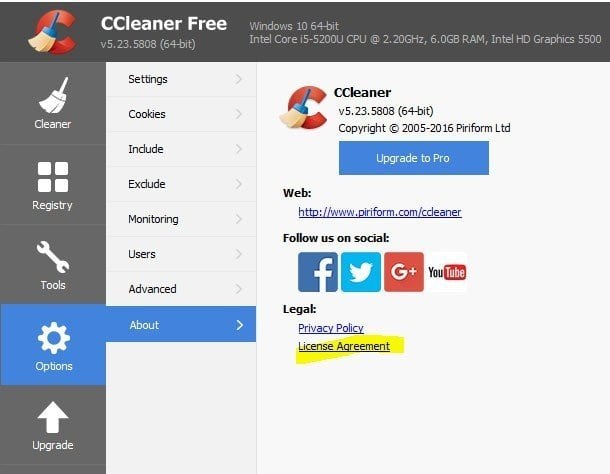
CCleaner - Windows 7 Download awards


CCleaner 7.13.1573.0 Ad-suppo full description
CCleaner is the number-one tool for cleaning your PC.
It protects your privacy and makes your computer faster and more secure!
CCleaner is a freeware system optimization, privacy and cleaning tool. It removes unused files from your system - allowing Windows to run faster and freeing up valuable hard disk space. It also cleans traces of your online activities such as your Internet history. Additionally it contains a fully featured registry cleaner. But the best part is that it's fast (normally taking less than a second to run) and contains NO Spyware or Adware! :)
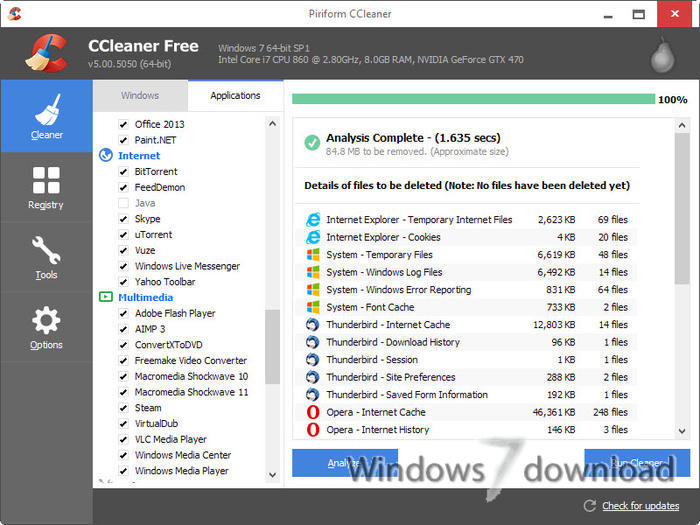
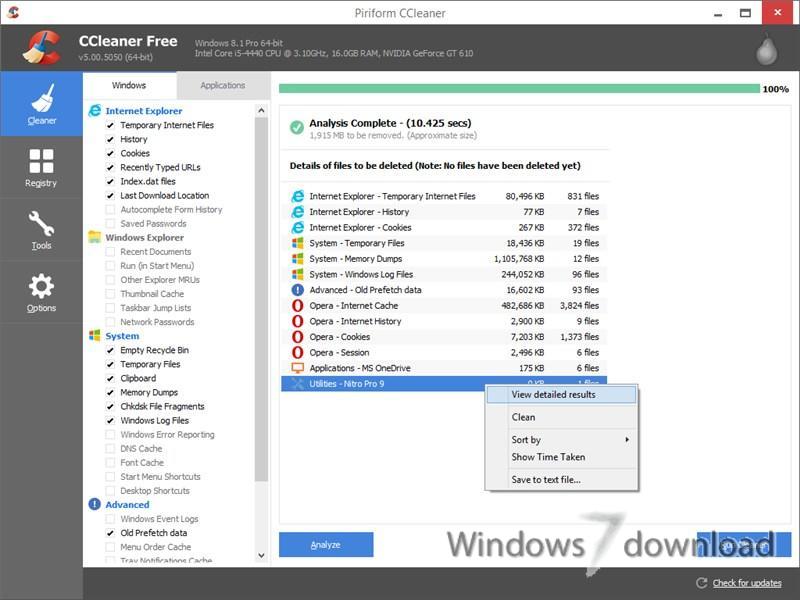
CCleaner's simple and intuitive layout will appeal to users of all skill levels. Its four features -- Cleaner, Registry, Tools, and Options -- are prominently displayed on the left side of the window. We started with the Cleaner first, which breaks down your cleaning options into two tabs: Windows and Applications. The program works by first analyzing your system and then running the cleaner itself. By selecting the appropriate check boxes, we were able to clean our temporary Internet files, cookies, history, and cache in both Internet Explorer and Firefox at the same time, as well as empty our Recycle Bin and rid our computer of Windows log files.
CCleaner on all your PCs
The world's favorite PC optimization tool now available in the cloud!
Clean locally or remotely
Defrag your drives
Fix problems in the Windows Registry
Speedy setup
Get started with CCleaner Cloud in less than 1 minute!
Add and remove software
Optimize the software installed on every machine.
Monitor from anywhere!
Clean, optimize and monitor your home computers wherever you are or manage an entire campus-wide IT network.
Run or schedule your optimization
Bug fix remotely
Control your startup programs
System information
View CPU load, memory usage, full disks and over a 100 more essential stats!
Predictive email alerts
CCleaner Cloud warns you before problems occur!
Cleans the following:
* Internet Explorer
* Firefox
* Google Chrome
* Opera
* Safari
* Windows - Recycle Bin, Recent Documents, Temporary files and Log files.
* Registry cleaner
* Third-party applications
* 100% Spyware FREE
Features:
Faster Computer
Is your computer running slow? As it gets older it collects unused files and settings which take up hard drive space making it slower and slower. CCleaner cleans up these files and makes it faster instantly.
Safer Browsing
Advertisers and websites track your behavior online with cookies that stay on your computer. CCleaner erases your browser search history and cookies so any internet browsing you do stays confidential and your identity remains anonymous
Fewer Errors & Crashes
Over time your registry can become cluttered with errors and broken settings which lead to crashes. CCleaner’s patented registry cleaner clears out this clutter to make your PC more stable.
Quicker Startup
Many programs run silently in the background when you start up your computer. CCleaner helps you get to work, or play faster by letting you disable unneeded programs.
CCleaner 7.13.1573.0 Ad-suppo download tags
CCleaner 7.13.1573.0 Ad-suppo Windows 7 release notes
New Release
Expanding our cleaning:
New AI Tools category in Custom Clean We've added a new AI Tools category to Custom Clean. You can now find, analyze, and clean junk files from popular AI apps including ChatGPT, Claude, Cursor, Codex, Antigravity, Gemini, and LM Studio.
Keeping you safe:
Improved file-write security We've fixed a security issue found during an internal audQit that could have allowed unauthorized file writes under certain conditions.
Fixed a crash that stopped the CCleaner service from starting Resolved a startup crash caused by an internal lookup error that affected over 1,000 users.
Better handling of browser runtime updates CCleaner now properly detects when the Edge WebView2 runtime has been updated or removed, preventing crashes when opening in-app content.
Smoother app shutdown We've fixed a timing issue during shutdown that could cause a crash when background tasks were still running.
Fixing bugs:
Installer now verifies WebView2 before launch The installer checks that the WebView2 runtime is actually present on disk, not just registered, and re-installs it if needed. This prevents launch failures some users experienced after installation.
Fixed an error when updating CCleaner Resolved an issue where some users saw a 0x404 error during the update process.
Faster app launch and no more duplicate windows CCleaner now opens roughly 3–6× faster. Launching CCleaner while it's already running correctly brings the existing window to the front instead of opening a second one.
Performance Optimizer no longer mislabels programs Fixed an issue where the WSL Service was incorrectly shown as "Microsoft GameInput" in Performance Optimizer.
Startup Manager shows the correct program names again Fixed an issue introduced in 7.09 where Startup Manager displayed wrong names for several common programs.
Your chosen landing page is now respected CCleaner now opens to the page you've set in Settings, instead of always defaulting to Health Check.
Health Check bro
[ CCleaner release history ]
Bookmark CCleaner
CCleaner for Windows 7 - Copyright information
All CCleaner reviews, submitted ratings and written comments become the sole property of Windows 7 download. You acknowledge that you, not windows7download, are responsible for the contents of your submission. However, windows7download reserves the right to remove or refuse to post any submission for any reason.
Windows 7 Download periodically updates pricing and software information of CCleaner full version from the publisher, but some information may be out-of-date. You should confirm all information.
Using warez version, crack, warez passwords, patches, serial numbers, registration codes, key generator, pirate key, keymaker or keygen for CCleaner license key is illegal and prevent future development of CCleaner. Download links are directly from our mirrors or publisher's website, CCleaner torrent or shared files from free file sharing and free upload services, including Rapidshare, MegaUpload, YouSendIt, SendSpace, DepositFiles, DivShare, HellShare, HotFile, FileServe or MediaFire, are not used.
CCleaner users' reviews
CCleaner 4.06.4324
review by maureen carroll (Oct 4, 2013)


i'm using tune up utilities and really have confidence in it.
CCleaner 3.21.1767
review by Catherine K (Aug 19, 2012)
i had my reservations because the sofware I tried before for free would just scan and then you had to pay to get the problems fixed.
My computer was so so slow to start up to open Internet etc. I had ruled out virus or spyware. One of my friend suggested that I clean my registry. I went ahead and used ccleaner.
It was truely free ( although you can purchased a better version)
The scan was fast and it gave me a detail list of all the issues with my registry. After cleaning all the files I was truely AMAZED! my computer is fast again like new ! I just wish microsoft would advice more of their users to take avantage of free software like this one.
I highly recommend this sofware.
CCleaner 3.03.1366
review by K. Van Morrison (Feb 9, 2011)
Amazing Performance-boosting Software :)-
CCleaner 2.34.1200
review by karthick (Aug 15, 2010)
my system speed increased . most of my unwanted datas r deleted . it's really fantastic . is there any softwares to delete empty folders tat v unable to see in our system
Post CCleaner review


Windows 7 CCleaner related downloads
... utility for extending the cleanup options available in CCleaner. It adds program-specific cleaning rules through CCleaner’s winapp2.ini ...
Welcome to the home of Asoftis PC Cleaner, a top-notch Windows 7 software developed by the ...
... scripts, free-to-use third-party apps such as McAfee Stinger, CCleaner, and Kaspersky Removal Tool, and custom scripts. Users ...
My Account
Help
Windows 7 Software Coupons
-
MacX MediaTrans
63% Off -
WinX MediaTrans
63% Off -
MacX DVD Video Converter
58% Off -
MacX Video Converter Pro
56% Off -
WinX DVD Copy Pro
42% Off
My Saved Stuff
You have not saved any software.
Click "Save" next to each software.
Click "Save" next to each software.
Would you like to receive announcements of new versions of your software by email or by RSS reader? Register for FREE!
Windows 7 Downloads Picks
- Windows Access Panel 1.0
- Windows 7 Service Pack 1 7601.17514.1011
- Argente Utilities 3.1.0.8
- Cygwin 3.6.12
- Smart Game Booster 6.0.1.1231
- Windows Logon Notifier 1.0
- AutoHotkey 2.0.31
- Advanced SystemCare 20.0.1.256
- Windows 7 Manager (x64bit) 5.2.0
- Windows 7 Manager (x32bit) 5.2.0
- Autoruns for Windows 14.11
- Mz Cpu Accelerator 4.1.0
- Portable Wise Registry Cleaner 11.3.2 Build 734
- Ultimate Windows Tweaker 2.2
- CCleaner 7.13.1573.0 Ad-suppo
- Microsoft Fix it Center beta
- Notepad++ Plugin Manager 2.7.0
- Advanced SystemCare Professional 20.0.1.256
- Disk CleanUp Wizard 2.1
- Portable Glary Utilities 6.49.0.53
Popular Tags
cpu
driver
startup
optimize
boost
disk
ram
security
backup
performance
clean
memory
tune
remove
tweak
speed
spyware
vista
optimizer
faster
defrag
registry cleaner
repair
uninstall
cleaner
windows
system
utility
registry
disk cleaner
Popular Windows 7 Software
- Auslogics Registry Cleaner 11.2.0.6
- Driver Easy 7.2.3 Build 6590
- Don't Sleep 10.44
- ALTRun 2026.10.26
- WinTools.one Professional 26.10.1
- Ashampoo UnInstaller Pro 27 27.0.1
- Free iPhone Backup Extractor 3.8.0.2725
- File Juggler 3.1.9
- System Mechanic Professional 23.1
- NSClient++ 0.26.0
- Oracle-to-Access 3.1
- CompanionLink for Outlook 11 Build 11024
- ExtraDisks x64 26.10.1
- Windows 7
- UFS Explorer Professional Recovery 10.23.0
© 2026 Windows7Download.com - All logos, trademarks, art and other creative works are and remain copyright and property of their respective owners. Microsoft Windows is a registered trademarks of Microsoft Corporation. Microsoft Corporation in no way endorses or is affiliated with windows7download.com.