


dtSearch for Windows 7 - "Unleash lightning-fast searches" with this Windows 7 software. - Windows 7 Download


dtSearch 2025.02 (Build 8845)
"Unlock the Power of Search with Dynamic Software."
Looking for a reliable and powerful search engine for your Windows 7 system? Look no further than dtSearch! Developed by the experienced software specialists at dtSearch Corp, this high-performance software boasts lightning-fast indexing of even the largest databases and delivers incredibly accurate and thorough search results. Whether you're searching through email archives, databases, or other file types, dtSearch can handle it all with ease. Try it today and start enjoying faster, more accurate searches on your Windows 7 system!
dtSearch 2025.02 (Build 8845) full details

| File Size: | 122.00 MB |
|---|---|
| License: | Trialware |
| Price: | $249.00 |
| Released: |
2025-11-21
 |
| Downloads: | Total: 479 | This Month: 64 |
| Publisher: | dtSearch Corp |
| Publisher URL: | http://www.dtsearch.com |

Download dtSearch 2025.02 (Build 8845)
Save dtSearch to My Stuff
Tweet
dtSearch 2025.02 (Build 8845) full screenshots

dtSearch - Windows 7 Download awards

dtSearch 2025.02 (Build 8845) full description
dtSearch is an application that can easily search terabytes of text in just a second. It does this by building an index that stores the location of each word in your files. Therefore, to get started with dtSearch, the first step is to build an index of your documents.
To get started with dtSearch Desktop with Spider, the first step is to build an index of your documents. Whenever you edit your original documents, you will need to update your index to reflect the changes.
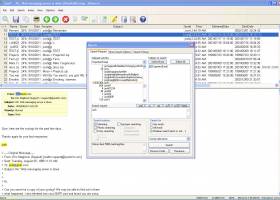
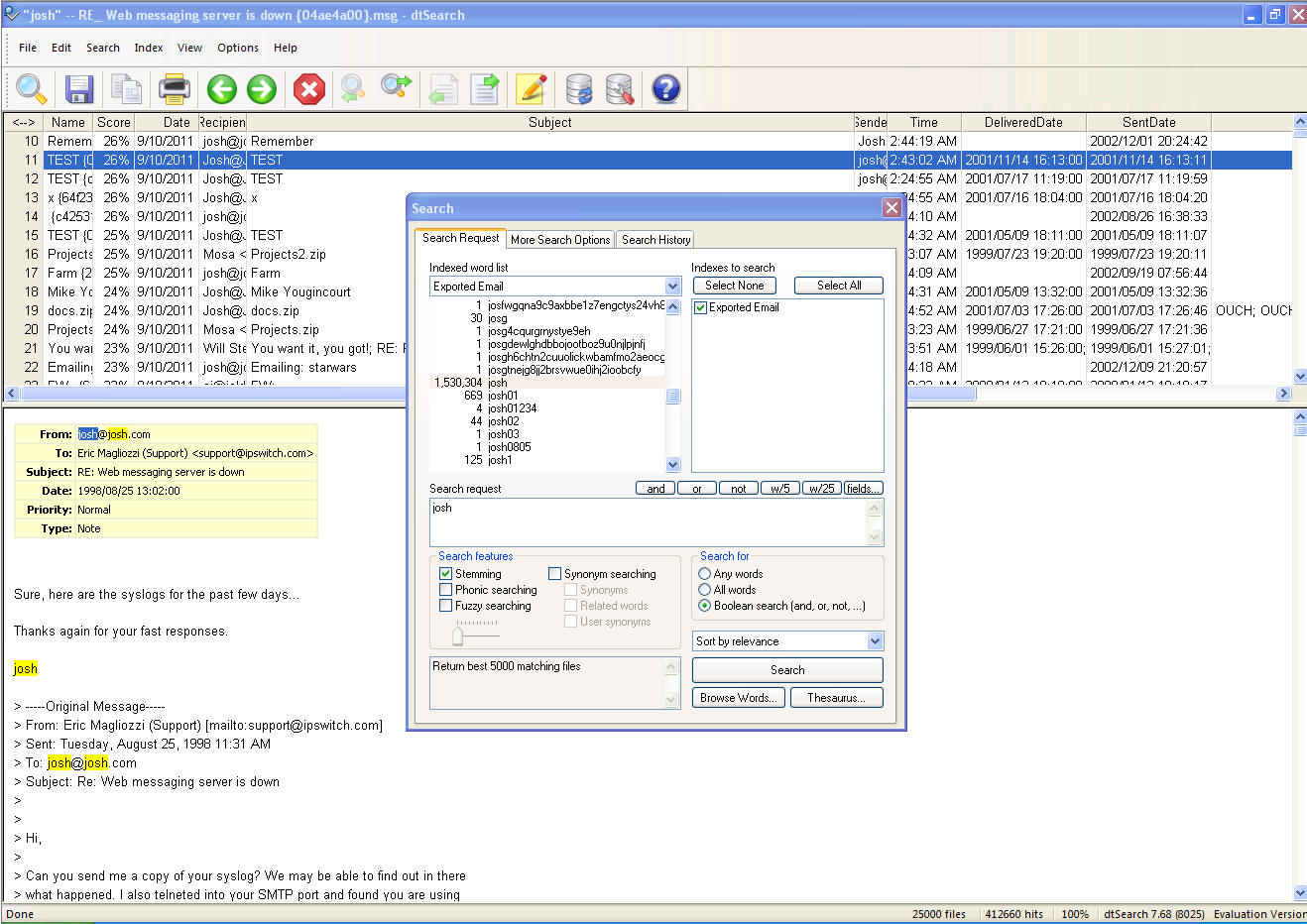
After a search, dtSearch Desktop with Spider will display the results of the search. The top half of the dtSearch window will list all of the files retrieved in the search, and the lower half will show the first document in the list, with hits highlighted in yellow.
dtSearch products instantly search gigabytes of text across a desktop, network or Internet/Intranet.
To get started with dtSearch Desktop with Spider, the first step is to build an index of your documents. Whenever you edit your original documents, you will need to update your index to reflect the changes.
After a search, dtSearch Desktop with Spider will display the results of the search. The top half of the dtSearch window will list all of the files retrieved in the search, and the lower half will show the first document in the list, with hits highlighted in yellow.
dtSearch products instantly search gigabytes of text across a desktop, network or Internet/Intranet.
dtSearch 2025.02 (Build 8845) download tags
dtSearch 2025.02 (Build 8845) Windows 7 release notes
New Release
JSON file format support:
Added support for indexing and searching JSON files (type id it_JsonRecord=371). As with XML, field searching, including nested field searching, is supported. Because JSON files cannot be automatically detected, the file type table must contain a rule identifying JSON files using a filename pattern (i.e., *.json).
JSON tables support:
If the file type table specifies the file type "JSON Table" (it_JsonTable=372), then the JSON file must consist of an array of objects, each of which will be indexed as a row of the file. Information outside the array object will be ignored.
CSV and JSON table configuration files:
Table configuration files provide a way to make indexed table data more useful by providing a way to specify the name and date for each row using data in the table. To enable table configuration files, set the flag dtsFlagUseJsonConfigFiles in Options.OtherFlags. When this flag is enabled and a CSV or JSON table is being indexed, dtSearch will look for a file named {filename}.config.json (where {filename} is the name of the CSV or JSON table) containing the rules to apply to that file. The .config.json file can contain these settings:
"RowName": A template using %% around field names specifying how to build an informative filename for each row. Example: "Row for %%lastname%% %%firstname%%". The row name will always include the ordinal and offset for the row data so the generated filename does not have to be unique.
"RowDateField": The name of the field to use as the date for the row, which will appear and be sortable in search results like file modification dates. If no RowDateField is specified, the modification date of the containing file will be used.
"DateFormat": The layout of the RowDateField (example: "YYYY-MM-DD").
"SkipBlankFields": If true, fields with blank values will be omitted rather than being included with an empty value. (This can improve the reada
[ dtSearch release history ]
JSON file format support:
Added support for indexing and searching JSON files (type id it_JsonRecord=371). As with XML, field searching, including nested field searching, is supported. Because JSON files cannot be automatically detected, the file type table must contain a rule identifying JSON files using a filename pattern (i.e., *.json).
JSON tables support:
If the file type table specifies the file type "JSON Table" (it_JsonTable=372), then the JSON file must consist of an array of objects, each of which will be indexed as a row of the file. Information outside the array object will be ignored.
CSV and JSON table configuration files:
Table configuration files provide a way to make indexed table data more useful by providing a way to specify the name and date for each row using data in the table. To enable table configuration files, set the flag dtsFlagUseJsonConfigFiles in Options.OtherFlags. When this flag is enabled and a CSV or JSON table is being indexed, dtSearch will look for a file named {filename}.config.json (where {filename} is the name of the CSV or JSON table) containing the rules to apply to that file. The .config.json file can contain these settings:
"RowName": A template using %% around field names specifying how to build an informative filename for each row. Example: "Row for %%lastname%% %%firstname%%". The row name will always include the ordinal and offset for the row data so the generated filename does not have to be unique.
"RowDateField": The name of the field to use as the date for the row, which will appear and be sortable in search results like file modification dates. If no RowDateField is specified, the modification date of the containing file will be used.
"DateFormat": The layout of the RowDateField (example: "YYYY-MM-DD").
"SkipBlankFields": If true, fields with blank values will be omitted rather than being included with an empty value. (This can improve the reada
[ dtSearch release history ]
Bookmark dtSearch
dtSearch for Windows 7 - Copyright information
All dtSearch reviews, submitted ratings and written comments become the sole property of Windows 7 download. You acknowledge that you, not windows7download, are responsible for the contents of your submission. However, windows7download reserves the right to remove or refuse to post any submission for any reason.
Windows 7 Download periodically updates pricing and software information of dtSearch full version from the publisher, but some information may be out-of-date. You should confirm all information.
Using warez version, crack, warez passwords, patches, serial numbers, registration codes, key generator, pirate key, keymaker or keygen for dtSearch license key is illegal and prevent future development of dtSearch. Download links are directly from our mirrors or publisher's website, dtSearch torrent or shared files from free file sharing and free upload services, including Rapidshare, MegaUpload, YouSendIt, SendSpace, DepositFiles, DivShare, HellShare, HotFile, FileServe or MediaFire, are not used.
Windows 7 Download periodically updates pricing and software information of dtSearch full version from the publisher, but some information may be out-of-date. You should confirm all information.
Using warez version, crack, warez passwords, patches, serial numbers, registration codes, key generator, pirate key, keymaker or keygen for dtSearch license key is illegal and prevent future development of dtSearch. Download links are directly from our mirrors or publisher's website, dtSearch torrent or shared files from free file sharing and free upload services, including Rapidshare, MegaUpload, YouSendIt, SendSpace, DepositFiles, DivShare, HellShare, HotFile, FileServe or MediaFire, are not used.
Post dtSearch review


Windows 7 dtSearch related downloads
MPFF is a fast file searching utility that can run a file search in up to three different paths including a ...
Are you tired of slow file searches on your Windows 7? Look no further - Indexer++ is here to save the day! Developed by ...
... a drive and chooses which file extensions to search for. The results can be further filtered by ...
Puggle is a desktop search engine written exclusively in Java. It provides full text search over files, folders, music, photos, web pages and ...
... for keeping track of their location. Simple, portable search tool with user-friendly interface Since it is portable, ...
My Account
Help
Windows 7 Software Coupons
-
FREE VPN PROXY by SEED4.ME WINDOWS
Free VPN by Seed4Me -
WinX DVD Copy Pro
42% Off -
WinX MediaTrans
63% Off -
MacX MediaTrans
63% Off -
MacX DVD Ripper Pro
50% Off
My Saved Stuff
You have not saved any software.
Click "Save" next to each software.
Click "Save" next to each software.
Would you like to receive announcements of new versions of your software by email or by RSS reader? Register for FREE!
Windows 7 Downloads Picks
- Portable XYplorer 28.30.0600 x64
- xplorer² 5.1.0.1
- FRSFileList 1.7.0
- File Defragger 2.1
- Disk Savvy Pro x64 17.7.18
- SpeedCommander 22.20 Build 11900
- Data Igloo standard 2.0
- BestSync Portable 2010 x64 5.4.34
- Portable cdrtfe 1.5.9.1
- Sync Breeze Server x64 17.8.26
- file@home 4.1.4
- Portable WhereIsIt 2012 Build 522
- BestSync Portable x64 2024 (19.0.1.5)
- SuperCopier x64 2.2.6.6
- EMDB 5.41
- WinDirStat 2.5.0
- Extended File Details 1.0
- Drives Monitor 18.1
- Filmotech 3.11.2
- xplorer² x64 5.1.0.1
Popular Tags
search
utility
nsf to pst
remove
erase
undelete
directory
find
file
disk
data
folders
music
data recovery
duplicate files
file manager
duplicate
tool
cleaner
file recovery
folder
mp3
lotus notes to outlook
hard
software
drive
files
data recovery software
recovery
delete
Popular Windows 7 Software
- Network Monitor II 31.7
- Avro Keyboard 5.6.0.0
- Media Creation Tool x64 22H2
- Ghostscript (x64 bit) 10.03.1
- Windows 7
- iTop Data Recovery 6.1.0.936
- Windows 7 Service Pack 1 7601.17514.1011
- iTop Easy Desktop 4.2.0.312
- Advanced SystemCare 19.3.0.200
- Smart Game Booster 5.3.1.692
- iTop PDF 3.6.0.4
- GoodSync2Go 12.9.29.9
- The Dude 7.22.2 Stable
- IObit Uninstaller 15.4.0.1
- Atlantis Word Processor 5.0.4
© 2026 Windows7Download.com - All logos, trademarks, art and other creative works are and remain copyright and property of their respective owners. Microsoft Windows is a registered trademarks of Microsoft Corporation. Microsoft Corporation in no way endorses or is affiliated with windows7download.com.