


Notepad++ for Windows 7 - "Streamline coding with Notepad++" - Windows 7 Download


Notepad++ 8.9.6.2
"Revolutionize your text editing with the ultimate Windows 7 software - Notepad++."
Looking for a simple and effective text editor? Notepad++ is the perfect solution for all your note-taking and coding needs. This free software, developed by Don HO, offers a user-friendly interface and a variety of features that will make your work easier, including tabbed editing, syntax highlighting, and customizable shortcuts. Say goodbye to traditional, clunky text editors and make the switch to Notepad++ today. Experience the power of no-frills editing!
Notepad++ 8.9.6.2 full details

| File Size: | 6.50 MB |
|---|---|
| License: | Open Source |
| Price: | FREE |
| Released: | 2026-06-01 |
| Downloads: | Total: 51600 | This Month: 429 |
| Publisher: | Don HO |
| Publisher URL: | https://notepad-plus-plus.org/ |

Download Notepad++ 8.9.6.2
Save Notepad++ to My Stuff
Tweet
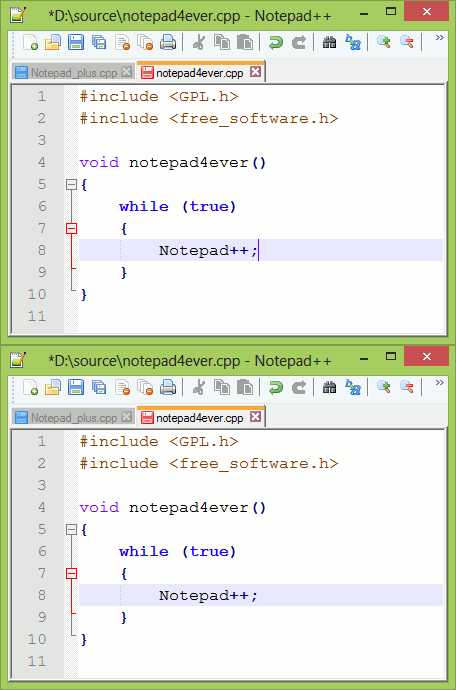
Notepad++ 8.9.6.2 full screenshots



Notepad++ - Windows 7 Download awards


Notepad++ 8.9.6.2 full description
Notepad++ is a powerful text editor that is widely used by programmers and other professionals who work with code. With its powerful features and user-friendly interface, Notepad++ makes it easy to edit and manipulate text, making it a must-have tool for anyone who works with code on a regular basis.
One of the key features of Notepad++ is its support for multiple programming languages. Notepad++ offers syntax highlighting for over 50 programming languages, making it easy to read and edit code in a variety of formats. This makes it a great tool for web developers, software engineers, and other professionals who work with code on a regular basis.
Another great feature of Notepad++ is its support for macros and plugins. Users can create custom macros to automate repetitive tasks, and can install plugins to extend the functionality of the software. This makes it easy to customize Notepad++ to meet your specific needs and work more efficiently.
Notepad++ also offers powerful search and replace capabilities, which make it easy to find and replace text within large files. This can save users a great deal of time and make it easier to edit files quickly and efficiently.
In addition to its powerful features, Notepad++ is also extremely lightweight and fast. It loads quickly and doesn't use a lot of system resources, making it a great tool for users who need to edit text quickly and efficiently.
Overall, Notepad++ is a fantastic text editor that offers a wide range of powerful features to help users work with code more efficiently. With its support for multiple programming languages, macros, and plugins, as well as its powerful search and replace capabilities, Notepad++ is a must-have tool for anyone who works with code on a regular basis.
Features:
Syntax Highlighting and Syntax Folding
User Defined Syntax Highlighting and Folding: screenshot 1, screenshot 2, screenshot 3 and screenshot 4
PCRE (Perl Compatible Regular Expression) Search/Replace
GUI entirely customizable: minimalist, tab with close button, multi-line tab, vertical tab and vertical document list
Document Map
Auto-completion: Word completion, Function completion and Function parameters hint
Multi-Document (Tab interface)
Multi-View
WYSIWYG (Printing)
Zoom in and zoom out
Multi-Language environment supported
Bookmark
Macro recording and playback
Launch with different arguments
One of the key features of Notepad++ is its support for multiple programming languages. Notepad++ offers syntax highlighting for over 50 programming languages, making it easy to read and edit code in a variety of formats. This makes it a great tool for web developers, software engineers, and other professionals who work with code on a regular basis.
Another great feature of Notepad++ is its support for macros and plugins. Users can create custom macros to automate repetitive tasks, and can install plugins to extend the functionality of the software. This makes it easy to customize Notepad++ to meet your specific needs and work more efficiently.
Notepad++ also offers powerful search and replace capabilities, which make it easy to find and replace text within large files. This can save users a great deal of time and make it easier to edit files quickly and efficiently.
In addition to its powerful features, Notepad++ is also extremely lightweight and fast. It loads quickly and doesn't use a lot of system resources, making it a great tool for users who need to edit text quickly and efficiently.
Overall, Notepad++ is a fantastic text editor that offers a wide range of powerful features to help users work with code more efficiently. With its support for multiple programming languages, macros, and plugins, as well as its powerful search and replace capabilities, Notepad++ is a must-have tool for anyone who works with code on a regular basis.
Features:
Syntax Highlighting and Syntax Folding
User Defined Syntax Highlighting and Folding: screenshot 1, screenshot 2, screenshot 3 and screenshot 4
PCRE (Perl Compatible Regular Expression) Search/Replace
GUI entirely customizable: minimalist, tab with close button, multi-line tab, vertical tab and vertical document list
Document Map
Auto-completion: Word completion, Function completion and Function parameters hint
Multi-Document (Tab interface)
Multi-View
WYSIWYG (Printing)
Zoom in and zoom out
Multi-Language environment supported
Bookmark
Macro recording and playback
Launch with different arguments
Notepad++ 8.9.6.2 download tags
Notepad++ 8.9.6.2 Windows 7 release notes
New Release
Vulnerability-fixes:
Fix a bypass scenario in the previously fixed vulnerability (CVE-2026-48800) that was not fully addressed. (Implement commit)
[ Notepad++ release history ]
Vulnerability-fixes:
Fix a bypass scenario in the previously fixed vulnerability (CVE-2026-48800) that was not fully addressed. (Implement commit)
[ Notepad++ release history ]
Bookmark Notepad++
Notepad++ for Windows 7 - Copyright information
All Notepad++ reviews, submitted ratings and written comments become the sole property of Windows 7 download. You acknowledge that you, not windows7download, are responsible for the contents of your submission. However, windows7download reserves the right to remove or refuse to post any submission for any reason.
Windows 7 Download periodically updates pricing and software information of Notepad++ full version from the publisher, but some information may be out-of-date. You should confirm all information.
Using warez version, crack, warez passwords, patches, serial numbers, registration codes, key generator, pirate key, keymaker or keygen for Notepad++ license key is illegal and prevent future development of Notepad++. Download links are directly from our mirrors or publisher's website, Notepad++ torrent or shared files from free file sharing and free upload services, including Rapidshare, MegaUpload, YouSendIt, SendSpace, DepositFiles, DivShare, HellShare, HotFile, FileServe or MediaFire, are not used.
Windows 7 Download periodically updates pricing and software information of Notepad++ full version from the publisher, but some information may be out-of-date. You should confirm all information.
Using warez version, crack, warez passwords, patches, serial numbers, registration codes, key generator, pirate key, keymaker or keygen for Notepad++ license key is illegal and prevent future development of Notepad++. Download links are directly from our mirrors or publisher's website, Notepad++ torrent or shared files from free file sharing and free upload services, including Rapidshare, MegaUpload, YouSendIt, SendSpace, DepositFiles, DivShare, HellShare, HotFile, FileServe or MediaFire, are not used.
Notepad++ users' reviews
Notepad++ 6.5.1
review by Anil Sahu (Nov 17, 2013)

i like it because it is running to very fast.
Notepad++ 5.9.6.2
review by debashis Pattanayak (Dec 4, 2011)
it is an excellent sw.I use windows7.please guide me how can edit html source code using notepad
Post Notepad++ review


Windows 7 Notepad++ related downloads
... by "NohponeX", one of our most popular offerings. Notepad X is the perfect text editor for anyone ...
... renowned software company known for its high-quality applications, Notepad! is a testament to their commitment to delivering ...
Are you tired of the basic Notepad app that comes with Windows 7? Look no further than Another Notepad, developed by the skilled team at PC Shareware, ...
TED Notepad is a freeware notepad replacement. Offers 435 text-processing functions, innovative features and ...
... for Windows 9x/NT/XP/Vista/7 with similar features to Microsoft Notepad but with many extra (and rather useful) features. ...
My Account
Help
Windows 7 Software Coupons
-
MacX DVD Ripper Pro
50% Off -
MacX Media Management Bundle
70% Off -
WinX MediaTrans
63% Off -
MacX Video Converter Pro
56% Off -
MacX DVD Video Converter
58% Off
My Saved Stuff
You have not saved any software.
Click "Save" next to each software.
Click "Save" next to each software.
Would you like to receive announcements of new versions of your software by email or by RSS reader? Register for FREE!
Windows 7 Downloads Picks
Popular Tags
text editor
excel to pdf
doc to pdf
pdf converter
notepad
pptx to pdf
word
html
powerpoint to pdf
word to pdf
txt to pdf
rtf to pdf
word to pdf converter
docm to pdf
ppt to pdf
editor
pdf to doc
word to jpg
pdf to word
office converter
pdf to text
ppt to jpg
docx to pdf
unicode
convert word to pdf
convert pdf to word
xlsx to pdf
text
xlsm to pdf
xls to pdf
Popular Windows 7 Software
- Network Monitor II 31.7
- Avro Keyboard 5.6.0.0
- Media Creation Tool x64 22H2
- Ghostscript (x64 bit) 10.03.1
- Windows 7
- iTop Data Recovery 6.4.0.959
- Windows 7 Service Pack 1 7601.17514.1011
- iTop Easy Desktop 4.5.0.349
- Advanced SystemCare 19.6.0.238
- Smart Game Booster 6.0.1.1231
- iTop PDF 3.6.0.4
- GoodSync2Go 12.11.9.9
- The Dude 7.24.5 Stable
- IObit Uninstaller 16.0.0.34
- Windows 7 DreamScene Activator 1.1
© 2026 Windows7Download.com - All logos, trademarks, art and other creative works are and remain copyright and property of their respective owners. Microsoft Windows is a registered trademarks of Microsoft Corporation. Microsoft Corporation in no way endorses or is affiliated with windows7download.com.