


TreeLine for Windows 7 - "Organize your life with TreeLine" - Windows 7 Download


TreeLine 3.1.6
Organize your information and ideas with TreeLine.
Welcome to the cutting-edge world of Windows 7 software downloads! Today we're proud to introduce you to TreeLine - the innovative software solution developed by Doug Bell. With TreeLine, organizing and managing data has never been easier. Whether you're a student, teacher, or simply someone looking for a user-friendly way to stay on top of things, TreeLine is the perfect tool for you. With a sleek interface and a robust set of features, you'll be amazed at just how easy it is to get started with this amazing software. So why wait? Download TreeLine for Windows 7 and start exploring today!
TreeLine 3.1.6 full details

| File Size: | 16.30 MB |
|---|---|
| License: | Open Source |
| Price: | FREE |
| Released: | 2023-06-03 |
| Downloads: | Total: 526 | This Month: 95 |
| Publisher: | Doug Bell |
| Publisher URL: | https://bellz.org/ |

Download TreeLine 3.1.6
Save TreeLine to My Stuff
Tweet
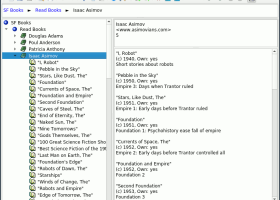
TreeLine 3.1.6 full screenshots
TreeLine - Windows 7 Download awards

TreeLine 3.1.6 full description
TreeLine has an interface to plugin extension modules. This allows extensions to be written by various coders that provide functionality needed by a few users without adding bloat to the main application. The plugins can add new menu items, access the TreeLine data and read and write TreeLine Files.
The plugins are installed by copying their Python file (*.py) to the plugins directory ("/lib/treeline/plugins/" on Linux or "TreeLinelibplugins" on Windows). The same plugin file works for both Linux and Windows.
Features:
General
Stores almost any type of information, including plain text, rich text, HTML, numbers, dates, times, booleans, URLs, etc.
The tree structure helps keep things organized.
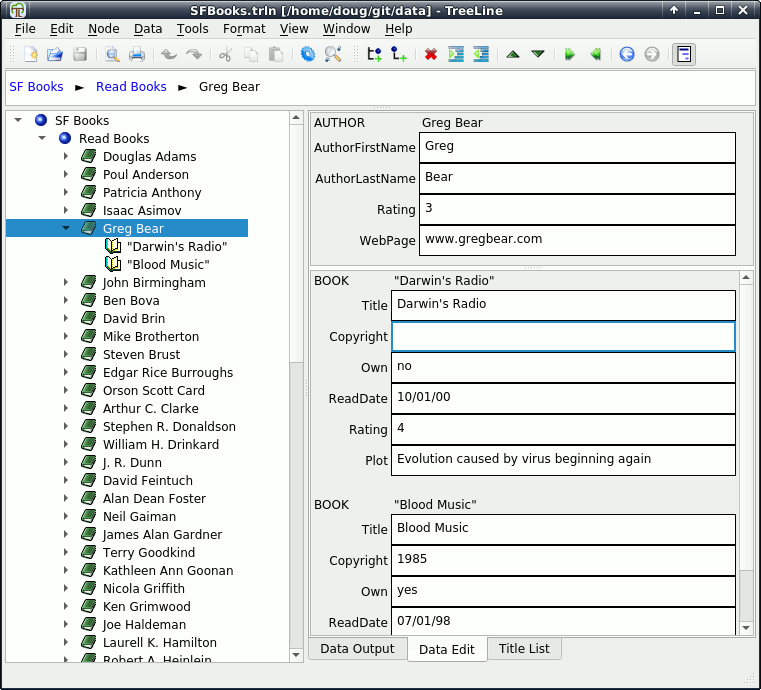
Each node can have several fields that form a mini-database.
Several node types, with different sets of fields, can be included in one file.
The node format, including fields, output lines, formatting and tree-view icon, can be defined for each node type.
Views
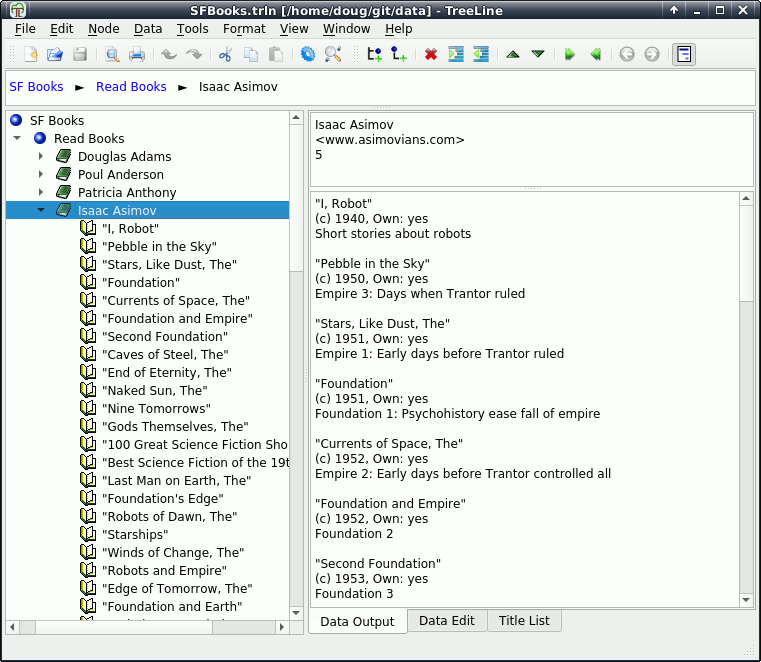
The left-hand view shows an indented, expandable list of titles
The right-hand view can show one of three views - for showing output, editing node data and editing node titles.
The right-hand view is normally split to show data from the parent node and its children.
If multiple nodes are selected, the right-hand view shows all of their data.
The output view can be set to show indented output from all descendant nodes.
An upper breadcrumb view shows titles of the selected node's ancestors; the titles can be clicked to select them in the tree.
Navigation
Find commands can search node data for text matches or for more specific rules.
Filtering commands show only matching nodes in a flat left-hand view.
Previous and next selection commands toggle selections to quickly move between parts of the tree.
Formatting
The dialog for data type configuration has several tabs to easily set all type, field and output parameters.
Each tree node can be set to a type format independently.
Formatting information can be copied from another TreeLine file.
File Handling
Undo and redo commands are available for all modifying operations.
TreeLine files use a JSON format, with options for automatically compressing or encrypting the files.
Document templates for new files are preformatted to cover basic needs.
The formatted output can be printed with parent/child lines, headers and footers.
File Import and Export
The data can be exported to single or multiple HTML files with optional navigation panes.
A live tree HTML export creates an interactive view with expandable nodes and a descendant output pane.
Plain text, tab-indented text and delimited table files can be imported and exported.
Files from older versions of TreeLine (2.x and 1.x) can be imported and exported.
Mozilla and XBEL format bookmark files can be imported and exported.
Generic XML files can be imported and exported, allowing TreeLine to function as a crude XML editor.
ODF text documents can be imported and exported as outlines.
Linking
Internal link fields select a linked node when clicked.
External link fields can be used to open URLs in web browsers.
Both internal and external links can be embedded into text fields.
Nodes that are duplicated by cloning show up as separate clickable paths in the upper breadcrumb view.
Data Manipulation
Nodes can be sorted by title or by predefined key fields.
Math fields can be defined that automatically calculate their contents based on numerical values in other nodes.
Numbering fields can be defined and automatically updated.
A node's icon and output format can be changed conditionally based on its data.
Cloned nodes (the same nodes with multiple parents/locations) can be created using special paste commands or by automatically matching identical nodes.
Text data can be spell checked (requires an external program - see the System Requirements section).
Data can be automatically re-arranged using categories from data fields.
The plugins are installed by copying their Python file (*.py) to the plugins directory ("
Features:
General
Stores almost any type of information, including plain text, rich text, HTML, numbers, dates, times, booleans, URLs, etc.
The tree structure helps keep things organized.
Each node can have several fields that form a mini-database.
Several node types, with different sets of fields, can be included in one file.
The node format, including fields, output lines, formatting and tree-view icon, can be defined for each node type.
Views
The left-hand view shows an indented, expandable list of titles
The right-hand view can show one of three views - for showing output, editing node data and editing node titles.
The right-hand view is normally split to show data from the parent node and its children.
If multiple nodes are selected, the right-hand view shows all of their data.
The output view can be set to show indented output from all descendant nodes.
An upper breadcrumb view shows titles of the selected node's ancestors; the titles can be clicked to select them in the tree.
Navigation
Find commands can search node data for text matches or for more specific rules.
Filtering commands show only matching nodes in a flat left-hand view.
Previous and next selection commands toggle selections to quickly move between parts of the tree.
Formatting
The dialog for data type configuration has several tabs to easily set all type, field and output parameters.
Each tree node can be set to a type format independently.
Formatting information can be copied from another TreeLine file.
File Handling
Undo and redo commands are available for all modifying operations.
TreeLine files use a JSON format, with options for automatically compressing or encrypting the files.
Document templates for new files are preformatted to cover basic needs.
The formatted output can be printed with parent/child lines, headers and footers.
File Import and Export
The data can be exported to single or multiple HTML files with optional navigation panes.
A live tree HTML export creates an interactive view with expandable nodes and a descendant output pane.
Plain text, tab-indented text and delimited table files can be imported and exported.
Files from older versions of TreeLine (2.x and 1.x) can be imported and exported.
Mozilla and XBEL format bookmark files can be imported and exported.
Generic XML files can be imported and exported, allowing TreeLine to function as a crude XML editor.
ODF text documents can be imported and exported as outlines.
Linking
Internal link fields select a linked node when clicked.
External link fields can be used to open URLs in web browsers.
Both internal and external links can be embedded into text fields.
Nodes that are duplicated by cloning show up as separate clickable paths in the upper breadcrumb view.
Data Manipulation
Nodes can be sorted by title or by predefined key fields.
Math fields can be defined that automatically calculate their contents based on numerical values in other nodes.
Numbering fields can be defined and automatically updated.
A node's icon and output format can be changed conditionally based on its data.
Cloned nodes (the same nodes with multiple parents/locations) can be created using special paste commands or by automatically matching identical nodes.
Text data can be spell checked (requires an external program - see the System Requirements section).
Data can be automatically re-arranged using categories from data fields.
TreeLine 3.1.6 download tags
Bookmark TreeLine
TreeLine for Windows 7 - Copyright information
All TreeLine reviews, submitted ratings and written comments become the sole property of Windows 7 download. You acknowledge that you, not windows7download, are responsible for the contents of your submission. However, windows7download reserves the right to remove or refuse to post any submission for any reason.
Windows 7 Download periodically updates pricing and software information of TreeLine full version from the publisher, but some information may be out-of-date. You should confirm all information.
Using warez version, crack, warez passwords, patches, serial numbers, registration codes, key generator, pirate key, keymaker or keygen for TreeLine license key is illegal and prevent future development of TreeLine. Download links are directly from our mirrors or publisher's website, TreeLine torrent or shared files from free file sharing and free upload services, including Rapidshare, MegaUpload, YouSendIt, SendSpace, DepositFiles, DivShare, HellShare, HotFile, FileServe or MediaFire, are not used.
Windows 7 Download periodically updates pricing and software information of TreeLine full version from the publisher, but some information may be out-of-date. You should confirm all information.
Using warez version, crack, warez passwords, patches, serial numbers, registration codes, key generator, pirate key, keymaker or keygen for TreeLine license key is illegal and prevent future development of TreeLine. Download links are directly from our mirrors or publisher's website, TreeLine torrent or shared files from free file sharing and free upload services, including Rapidshare, MegaUpload, YouSendIt, SendSpace, DepositFiles, DivShare, HellShare, HotFile, FileServe or MediaFire, are not used.
Post TreeLine review


Windows 7 TreeLine related downloads
... "Generate Birthday Card" software, an innovative creation by Generate Barcode. This user-friendly application allows you to design ...
Professionally design www.generatebarcode.com offer Generate Greeting Card tool to create and print birthday, wedding, friendship day greeting cards ...
... to the home of "Create Cards", a remarkable Windows 7 software developed by the innovative team at "Create ...
PDF Creator is absolutely free of cost. It has no ... people have been using it. GIRDAC Free PDF Creator creates PDF files from more than 300 Windows ...
Effective and Remarkable Generate Card Label software easily download from company website ... design immediately cards for different visitors in offices, create identification cards for company employees, generate barcode stickers ...
My Account
Help
Windows 7 Software Coupons
-
WinX DVD Copy Pro
42% Off -
FREE VPN PROXY by SEED4.ME WINDOWS
Free VPN by Seed4Me -
MacX DVD Ripper Pro
50% Off -
Media Player Morpher
85% Off -
WinX DVD Ripper
50% Off
My Saved Stuff
You have not saved any software.
Click "Save" next to each software.
Click "Save" next to each software.
Would you like to receive announcements of new versions of your software by email or by RSS reader? Register for FREE!
Windows 7 Downloads Picks
- Microsoft Office 2007
- LibreOffice 26.2.3.2 Latest
- LibreOffice x64 24.2.4
- Quite Imposing Plus 6.0d
- PDF-XChange Lite 10.2.1.385
- EMF Printer Driver 17.76 Revision 3239
- Microsoft Office 2010 x32 14.0 BETA
- Microsoft Office 2016 x64 2405 B17628.20164
- Microsoft Office 2003
- WebEx MeetMeNow 2.0 44.6.0.29928
- XL Toolbox 7.0.0 Alpha 18
- Microsoft Office 2007 Service Pack SP3
- Microsoft Office Compatibility Pack for Word, Excel, and PowerPoint 2007 File Formats 4
- FinePrint (x64 bit) 11.44
- Advanced Reliable Software 1.9
- Microsoft Office 2013 15.0.4420.1017 RTM
- PDF to Word Converter 19.4.2.4
- Notepad++ Portable 8.9.4
- CZ Excel Converter 4.0 B130902
- GIRDAC PDF Converter Ultimate 23.2.2.4
Popular Tags
outlook
pdf
conversion
add in
excel
word to pdf
printer
text
editor
adobe
software
powerpoint
doc
files
microsoft
spreadsheet
tool
data
converter
pdf creator
document
xls
create
office
pdf converter
create pdf
free
word
acrobat
convert
Popular Windows 7 Software
- Microsoft Office 2007
- LoadPlanner Desktop 2.6.4
- LibreOffice 26.2.3.2 Latest
- LibreOffice x64 24.2.4
- Card Maker Software For Windows OS 8.2.0.2
- dbForge Data Compare for Oracle 2025.3
- Alternate Timer 4.850
- EasyBilling Invoicing Software 9.9.4
- dbForge Transaction Log for SQL Server 2025.3
- Quick Receipt Software 2.9.4
- ChequeSystem Cheque Printing Software 8.7.0
- dbForge Monitor for SQL Server 2025.3
- dbForge Schema Compare for SQL Server 2025.3.149
- dbForge Compare Bundle for SQL Server 2025.3
- dbForge Data Compare for SQL Server 2025.3
© 2026 Windows7Download.com - All logos, trademarks, art and other creative works are and remain copyright and property of their respective owners. Microsoft Windows is a registered trademarks of Microsoft Corporation. Microsoft Corporation in no way endorses or is affiliated with windows7download.com.