


Convert XLS for Windows 7 - "Effortlessly Convert XLS Spreadsheets" - Windows 7 Download


Convert XLS 18.40
"Effortlessly convert XLS files to any format with this top-rated Windows software."
Introducing Convert XLS from Softinterface, Inc. This powerful software allows you to easily convert Excel spreadsheets to different file formats including CSV, XML, and TXT with just a few clicks. It features a user-friendly interface and supports batch processing for efficient conversion. With Convert XLS, you can also filter and sort data, adjust column widths, and more. Say goodbye to the hassle of manual data conversion and download Convert XLS today.
Convert XLS 18.40 full details

| File Size: | 6.00 MB |
|---|---|
| License: | Trialware |
| Price: | $549.95 |
| Released: |
2026-05-01
 |
| Downloads: | Total: 1508 | This Month: 219 |
| Publisher: | SoftInterface Inc |
| Publisher URL: | https://www.softinterface.com/Convert-XLS/Convert-XLS.htm |

Download Convert XLS 18.40
Save Convert XLS to My Stuff
Tweet

Convert XLS 18.40 full screenshots


Convert XLS - Windows 7 Download awards


Convert XLS 18.40 full description
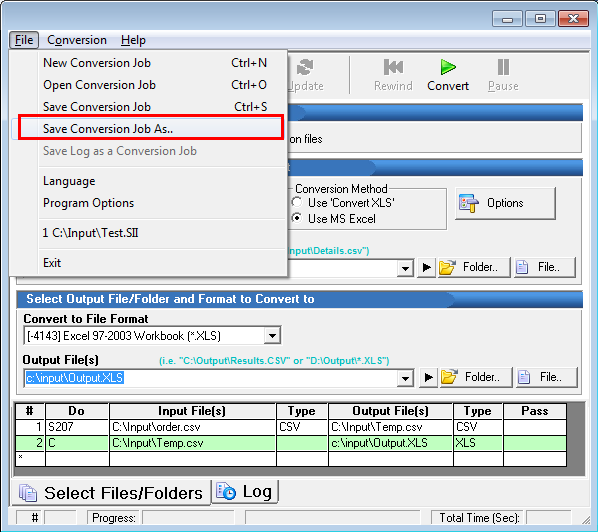
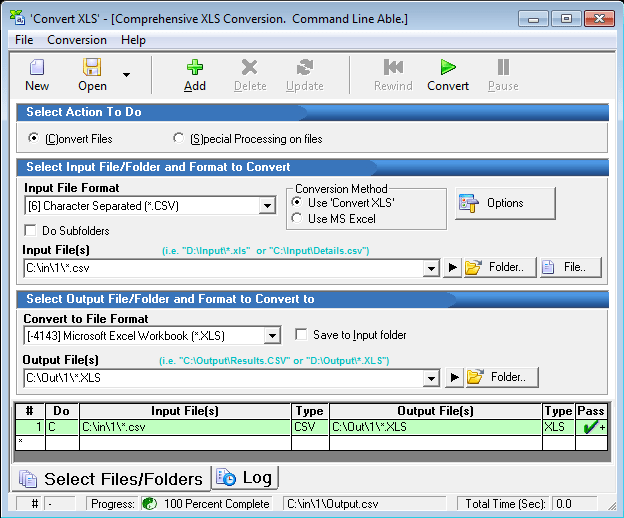
Fast, accurate & powerful, 'Convert XLS' is the comprehensive Excel/CSV/TXT conversion tool. Convert to/from Excel, CSV, TXT etc. Batch able. Automate all your Excel processes easily. Repeat complex conversion tasks by restoring prior 'Conversion Jobs'. A 'Conversion Job' consists of all 'Conversion Tasks' that you specify to be done within the 'Convert XLS' user interface. It's the best Excel conversion tool you've never tried, until today. Convert Excel files to and from XLS/XLSX/Text/CSV/HTML/XML without requiring MS Excel to be installed. If you do have MS Excel, 'Convert XLS' will support all file types in addition to TXT, XML, CSV etc. (see table below for a listing). Advanced Excel Manipulation Special processes including moving, deleting, adding and copying sheets.
Append/Concatenate Excel files into a single sheet. Special processing of files including appending/concatenation, removing extra lines, launching 3rd party programs, search and replace strings and much more. Numerous CSV (comma delimited file) manipulation features including padding, swapping out the delimiter and more. Convert Fixed Width Text Files to/from Excel or CSV files. Supports recursive subfolders. Convert Excel to/from to many file types including CSV, XML, HTM, TXT, SLK, WKS, DBF, Lotus and others. See below for listing. Copy Sheet Data/Formula from the same or different workbook. Specify ranges! Can be used to merge data from many sheets/workbooks.
Copy Worksheet(s) whole (including formatting) to the same or different workbook, and specify location within the workbook. Merge Excel File Data. Combine Excel worksheet data by specifying the sheet(s) (and/or Range within each sheet) from a whole folder of workbooks to a single sheet. Batch printing of Excel (or any file MS Excel can open). Run Excel Macros from command line or user interface. Convert Word Tables To Excel. Change cell numeric formatting of sheets/cells you specify.
Append/Concatenate Excel files into a single sheet. Special processing of files including appending/concatenation, removing extra lines, launching 3rd party programs, search and replace strings and much more. Numerous CSV (comma delimited file) manipulation features including padding, swapping out the delimiter and more. Convert Fixed Width Text Files to/from Excel or CSV files. Supports recursive subfolders. Convert Excel to/from to many file types including CSV, XML, HTM, TXT, SLK, WKS, DBF, Lotus and others. See below for listing. Copy Sheet Data/Formula from the same or different workbook. Specify ranges! Can be used to merge data from many sheets/workbooks.
Copy Worksheet(s) whole (including formatting) to the same or different workbook, and specify location within the workbook. Merge Excel File Data. Combine Excel worksheet data by specifying the sheet(s) (and/or Range within each sheet) from a whole folder of workbooks to a single sheet. Batch printing of Excel (or any file MS Excel can open). Run Excel Macros from command line or user interface. Convert Word Tables To Excel. Change cell numeric formatting of sheets/cells you specify.
Convert XLS 18.40 download tags
Convert XLS 18.40 Windows 7 release notes
New Release
Bug Fix/Enhancement: Special Process 101 (Copy Sheet Data) and Special Process 112 (Clear Cell Contents) now handle ranges with wild cards much better. Multiple ranges can now be specified each with or without a wild card.
Range parameters accept wildcard suffixes that resolve to the appropriate last row at the time the process runs. This avoids having to compute or hardcode the size of your data.
The single-asterisk form B2:B* finds the last non-empty cell in column B by scanning upward from the bottom of the column. Use this when you want exactly the data in column B, regardless of what other columns contain.
The double-asterisk form B2:B** instead uses the sheet's overall used area to determine the end row, then restricts the range to column B. Use this when you are copying column B alongside other columns and need the row counts to align — for example, when column D has data through row 100 but column B only has data through row 50, B2:B** will still return through row 100.
The bare-asterisk form B2:* expands to the worksheet's last used cell, which may include columns to the right of the start. The result could be something like B2:D50 if D is the rightmost used column and 50 is the last used row.
Comma-separated lists are supported and each entry is expanded independently. B2:B*,G2:G* is two ranges, evaluated separately, with no interaction between them.
If the column on the right side of the wildcard differs from the start column (for example, B2:D*), the bottom row is taken from the wildcard column (D), and the resulting range spans from B through D.
If a column referenced by B* or B** is empty below the start row, the result collapses to the start cell alone (for example, B2:B* with an empty column B becomes just B2).
[ Convert XLS release history ]
Bug Fix/Enhancement: Special Process 101 (Copy Sheet Data) and Special Process 112 (Clear Cell Contents) now handle ranges with wild cards much better. Multiple ranges can now be specified each with or without a wild card.
Range parameters accept wildcard suffixes that resolve to the appropriate last row at the time the process runs. This avoids having to compute or hardcode the size of your data.
The single-asterisk form B2:B* finds the last non-empty cell in column B by scanning upward from the bottom of the column. Use this when you want exactly the data in column B, regardless of what other columns contain.
The double-asterisk form B2:B** instead uses the sheet's overall used area to determine the end row, then restricts the range to column B. Use this when you are copying column B alongside other columns and need the row counts to align — for example, when column D has data through row 100 but column B only has data through row 50, B2:B** will still return through row 100.
The bare-asterisk form B2:* expands to the worksheet's last used cell, which may include columns to the right of the start. The result could be something like B2:D50 if D is the rightmost used column and 50 is the last used row.
Comma-separated lists are supported and each entry is expanded independently. B2:B*,G2:G* is two ranges, evaluated separately, with no interaction between them.
If the column on the right side of the wildcard differs from the start column (for example, B2:D*), the bottom row is taken from the wildcard column (D), and the resulting range spans from B through D.
If a column referenced by B* or B** is empty below the start row, the result collapses to the start cell alone (for example, B2:B* with an empty column B becomes just B2).
[ Convert XLS release history ]
Bookmark Convert XLS
Convert XLS for Windows 7 - Copyright information
All Convert XLS reviews, submitted ratings and written comments become the sole property of Windows 7 download. You acknowledge that you, not windows7download, are responsible for the contents of your submission. However, windows7download reserves the right to remove or refuse to post any submission for any reason.
Windows 7 Download periodically updates pricing and software information of Convert XLS full version from the publisher, but some information may be out-of-date. You should confirm all information.
Using warez version, crack, warez passwords, patches, serial numbers, registration codes, key generator, pirate key, keymaker or keygen for Convert XLS license key is illegal and prevent future development of Convert XLS. Download links are directly from our mirrors or publisher's website, Convert XLS torrent or shared files from free file sharing and free upload services, including Rapidshare, MegaUpload, YouSendIt, SendSpace, DepositFiles, DivShare, HellShare, HotFile, FileServe or MediaFire, are not used.
Windows 7 Download periodically updates pricing and software information of Convert XLS full version from the publisher, but some information may be out-of-date. You should confirm all information.
Using warez version, crack, warez passwords, patches, serial numbers, registration codes, key generator, pirate key, keymaker or keygen for Convert XLS license key is illegal and prevent future development of Convert XLS. Download links are directly from our mirrors or publisher's website, Convert XLS torrent or shared files from free file sharing and free upload services, including Rapidshare, MegaUpload, YouSendIt, SendSpace, DepositFiles, DivShare, HellShare, HotFile, FileServe or MediaFire, are not used.
Post Convert XLS review


Windows 7 Convert XLS related downloads
Introducing Ailt XLS to WMF Converter, a cutting-edge software developed by Ailtware, Inc. that allows you to convert your Microsoft Excel files (XLS) into Windows Metafile ...
Looking for a reliable and efficient XLS to EMF conversion software? Look no further than Ailt XLS to EMF Converter developed by Ailtware, Inc. This ...
... offers a solution to users who want to convert one or more Excel XLS files into HTML. ...
... offers a solution to users who want to convert one or more Excel XLS files into OpenOffice ...
Looking for a software tool to help you convert your Excel files from XLS to XLSX format? ...
My Account
Help
Windows 7 Software Coupons
-
FREE VPN PROXY by SEED4.ME WINDOWS
Free VPN by Seed4Me -
MacX Media Management Bundle
70% Off -
Media Player Morpher
85% Off -
WinX MediaTrans
63% Off -
MacX MediaTrans
63% Off
My Saved Stuff
You have not saved any software.
Click "Save" next to each software.
Click "Save" next to each software.
Would you like to receive announcements of new versions of your software by email or by RSS reader? Register for FREE!
Windows 7 Downloads Picks
- Microsoft Office 2007
- LibreOffice 26.2.3.2 Latest
- LibreOffice x64 24.2.4
- Quite Imposing Plus 6.0d
- PDF-XChange Lite 10.2.1.385
- EMF Printer Driver 17.76 Revision 3239
- Microsoft Office 2010 x32 14.0 BETA
- Microsoft Office 2016 x64 2405 B17628.20164
- Microsoft Office 2003
- WebEx MeetMeNow 2.0 44.6.0.29928
- XL Toolbox 7.0.0 Alpha 18
- Microsoft Office 2007 Service Pack SP3
- Microsoft Office Compatibility Pack for Word, Excel, and PowerPoint 2007 File Formats 4
- FinePrint (x64 bit) 11.44
- Advanced Reliable Software 1.9
- Microsoft Office 2013 15.0.4420.1017 RTM
- PDF to Word Converter 19.4.2.4
- Notepad++ Portable 8.9.4
- CZ Excel Converter 4.0 B130902
- GIRDAC PDF Converter Ultimate 23.2.2.4
Popular Tags
data
powerpoint
microsoft
editor
doc
add in
free
tool
text
create
files
pdf
word to pdf
convert
adobe
excel
document
office
pdf converter
outlook
converter
software
xls
spreadsheet
pdf creator
word
printer
conversion
acrobat
create pdf
Popular Windows 7 Software
- Microsoft Office 2007
- LoadPlanner Desktop 2.6.4
- LibreOffice 26.2.3.2 Latest
- LibreOffice x64 24.2.4
- Card Maker Software For Windows OS 8.2.0.2
- dbForge Data Compare for Oracle 2025.3
- Alternate Timer 4.850
- EasyBilling Invoicing Software 9.9.4
- dbForge Transaction Log for SQL Server 2025.3
- Quick Receipt Software 2.9.4
- ChequeSystem Cheque Printing Software 8.7.0
- dbForge Monitor for SQL Server 2025.3
- dbForge Schema Compare for SQL Server 2025.3.149
- dbForge Compare Bundle for SQL Server 2025.3
- dbForge Data Compare for SQL Server 2025.3
© 2026 Windows7Download.com - All logos, trademarks, art and other creative works are and remain copyright and property of their respective owners. Microsoft Windows is a registered trademarks of Microsoft Corporation. Microsoft Corporation in no way endorses or is affiliated with windows7download.com.