


TeXnicCenter for Windows 7 - "Power up your typesetting with TeXnicCenter" - Windows 7 Download


TeXnicCenter 2.0 Beta 2
"TexnicCenter: The Ultimate LaTeX Editor for Windows 7"
Introducing TeXnicCenter, the ultimate tool for creating professional-quality documents in Windows 7. Developed by the expert minds at ToolsCenter.org, this software is the go-to solution for academics, students, and researchers alike. With its sleek interface and advanced functionality, TeXnicCenter makes document creation a breeze. So why wait? Download TeXnicCenter today and take your writing to the next level!
TeXnicCenter 2.0 Beta 2 full details

| File Size: | 10.00 MB |
|---|---|
| License: | Open Source |
| Price: | FREE |
| Released: | 2013-06-29 |
| Downloads: | Total: 2183 | This Month: 115 |
| Publisher: | ToolsCenter.org |
| Publisher URL: | http://www.texniccenter.org/ |

Download TeXnicCenter 2.0 Beta 2
Save TeXnicCenter to My Stuff
Tweet
TeXnicCenter - Windows 7 Download awards

TeXnicCenter 2.0 Beta 2 full description
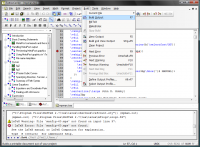
TeXnicCenter is what we call an integrated documentation environment (IDE) for LaTeX. That means that TeXnicCenter integrates all the functionality you need to create, write, build, fix, view and print your LaTeX documents. TeXnicCenter’s innovative user interface, its powerful features, its large community (more than 1,000,000 users all over the world) and the fact that it is Free Open Source Software (GPL) makes it the first choice for LaTeX authors working on the Windows platform. Read on to learn, what TeXnicCenter can do for you!
Creating new Documents
You often have to create new LaTeX documents? You will love TeXnicCenter. Its powerful template mechanism allows you to define document templates once and create new documents based on these templates by simply choosing the 'New' option from the 'File' menu. The COM-Plug-In mechanism allows every one to implement document wizards. Some quite useful wizards are already available on the internet.
Features
This page provides an overview of TeXnicCenter's features.
User Interface
* LaTeX code snippets
Simple insertion of LaTeX constructs via toolbars and menus
* Tabbed MDI window
Open as many files as needed. Each open file is represented by a tab.
* Customizable
All toolbars, menus and short cuts are customizable.
* Customizable window layout
All panes can be docket to any window edge or undocked if required.
* Integratable tools
Integrate any third party tools into TeXnicCenter's tools menu
* Multi language
Out of the box support for English and German - other Translations can be provided by users.
Text Editor
# Syntax highlighting
Highlighting of LaTeX constructs with customizable colors
# Auto completion
Simply hit [Ctrl]+[Space] to complete the command you've just started to type
# Paranthesis matching
Highlighting of missing and matching parenthesis
# Dynamic word wrapping
Wrap long lines at editor's edge or defined text column while typing
# Spell checker
Integrated spell checker including check while you type
# Forward and inverse search
Support for forward and inverse search in conjunction with any viewer supporting these features
... and a lot more
* Display of line numbers
* Unlimited undo/redo
* Bookmarks
* "Go to last change"
* Incremental search
* Find, find and replace
* Find in files
* Support for Windows, Linux and MacOS line breaks
* Customizable cursor styles
Creating new Documents
You often have to create new LaTeX documents? You will love TeXnicCenter. Its powerful template mechanism allows you to define document templates once and create new documents based on these templates by simply choosing the 'New' option from the 'File' menu. The COM-Plug-In mechanism allows every one to implement document wizards. Some quite useful wizards are already available on the internet.
Features
This page provides an overview of TeXnicCenter's features.
User Interface
* LaTeX code snippets
Simple insertion of LaTeX constructs via toolbars and menus
* Tabbed MDI window
Open as many files as needed. Each open file is represented by a tab.
* Customizable
All toolbars, menus and short cuts are customizable.
* Customizable window layout
All panes can be docket to any window edge or undocked if required.
* Integratable tools
Integrate any third party tools into TeXnicCenter's tools menu
* Multi language
Out of the box support for English and German - other Translations can be provided by users.
Text Editor
# Syntax highlighting
Highlighting of LaTeX constructs with customizable colors
# Auto completion
Simply hit [Ctrl]+[Space] to complete the command you've just started to type
# Paranthesis matching
Highlighting of missing and matching parenthesis
# Dynamic word wrapping
Wrap long lines at editor's edge or defined text column while typing
# Spell checker
Integrated spell checker including check while you type
# Forward and inverse search
Support for forward and inverse search in conjunction with any viewer supporting these features
... and a lot more
* Display of line numbers
* Unlimited undo/redo
* Bookmarks
* "Go to last change"
* Incremental search
* Find, find and replace
* Find in files
* Support for Windows, Linux and MacOS line breaks
* Customizable cursor styles
TeXnicCenter 2.0 Beta 2 download tags
TeXnicCenter 2.0 Beta 2 Windows 7 release notes
New Release
* Spell checking: The spelling is now done based on the project language (see project settings). If no project is loaded, the default language from the options dialog is used.
* Spell checking: Changing the spelling language does NOT require a restart anymore.
* Editor: Added color schemes. It is now possible to choose between different factory settings and a customized scheme.
* Editor: Show instant advice only, if the keyword has not been typed yet.
* Editor: Incremental search is now insensitive to the case.
* Editor: Options to modify vertical edge mode.
* Structure Parser: recognizes include* now
* Integration: “Recently used projects” and “Recently used files” subgroups are now available from the jump lists in the Windows taskbar.
* Integration: The title of the TXC window shows the title of the current project without “.tcp”.
[ TeXnicCenter release history ]
* Spell checking: The spelling is now done based on the project language (see project settings). If no project is loaded, the default language from the options dialog is used.
* Spell checking: Changing the spelling language does NOT require a restart anymore.
* Editor: Added color schemes. It is now possible to choose between different factory settings and a customized scheme.
* Editor: Show instant advice only, if the keyword has not been typed yet.
* Editor: Incremental search is now insensitive to the case.
* Editor: Options to modify vertical edge mode.
* Structure Parser: recognizes include* now
* Integration: “Recently used projects” and “Recently used files” subgroups are now available from the jump lists in the Windows taskbar.
* Integration: The title of the TXC window shows the title of the current project without “.tcp”.
[ TeXnicCenter release history ]
Bookmark TeXnicCenter
TeXnicCenter for Windows 7 - Copyright information
All TeXnicCenter reviews, submitted ratings and written comments become the sole property of Windows 7 download. You acknowledge that you, not windows7download, are responsible for the contents of your submission. However, windows7download reserves the right to remove or refuse to post any submission for any reason.
Windows 7 Download periodically updates pricing and software information of TeXnicCenter full version from the publisher, but some information may be out-of-date. You should confirm all information.
Using warez version, crack, warez passwords, patches, serial numbers, registration codes, key generator, pirate key, keymaker or keygen for TeXnicCenter license key is illegal and prevent future development of TeXnicCenter. Download links are directly from our mirrors or publisher's website, TeXnicCenter torrent or shared files from free file sharing and free upload services, including Rapidshare, MegaUpload, YouSendIt, SendSpace, DepositFiles, DivShare, HellShare, HotFile, FileServe or MediaFire, are not used.
Windows 7 Download periodically updates pricing and software information of TeXnicCenter full version from the publisher, but some information may be out-of-date. You should confirm all information.
Using warez version, crack, warez passwords, patches, serial numbers, registration codes, key generator, pirate key, keymaker or keygen for TeXnicCenter license key is illegal and prevent future development of TeXnicCenter. Download links are directly from our mirrors or publisher's website, TeXnicCenter torrent or shared files from free file sharing and free upload services, including Rapidshare, MegaUpload, YouSendIt, SendSpace, DepositFiles, DivShare, HellShare, HotFile, FileServe or MediaFire, are not used.
Post TeXnicCenter review


Windows 7 TeXnicCenter related downloads
Welcome to the world of proTeXt, the ultimate Windows 7 software for all your typesetting needs! ...
My Account
Help
Windows 7 Software Coupons
-
WinX DVD Copy Pro
42% Off -
Media Player Morpher
85% Off -
MacX DVD Video Converter
58% Off -
MacX Media Management Bundle
70% Off -
MacX DVD Ripper Pro
50% Off
My Saved Stuff
You have not saved any software.
Click "Save" next to each software.
Click "Save" next to each software.
Would you like to receive announcements of new versions of your software by email or by RSS reader? Register for FREE!
Windows 7 Downloads Picks
- Microsoft Office 2007
- LibreOffice 26.2.3.2 Latest
- LibreOffice x64 24.2.4
- Quite Imposing Plus 6.0d
- PDF-XChange Lite 10.2.1.385
- EMF Printer Driver 17.76 Revision 3239
- Microsoft Office 2010 x32 14.0 BETA
- Microsoft Office 2016 x64 2405 B17628.20164
- Microsoft Office 2003
- WebEx MeetMeNow 2.0 44.6.0.29928
- XL Toolbox 7.0.0 Alpha 18
- Microsoft Office 2007 Service Pack SP3
- Microsoft Office Compatibility Pack for Word, Excel, and PowerPoint 2007 File Formats 4
- FinePrint (x64 bit) 11.44
- Advanced Reliable Software 1.9
- Microsoft Office 2013 15.0.4420.1017 RTM
- PDF to Word Converter 19.4.2.4
- Notepad++ Portable 8.9.4
- CZ Excel Converter 4.0 B130902
- GIRDAC PDF Converter Ultimate 23.2.2.4
Popular Tags
tool
document
data
acrobat
free
office
editor
conversion
converter
create
doc
powerpoint
xls
create pdf
microsoft
files
excel
word
pdf creator
word to pdf
printer
software
add in
pdf
convert
spreadsheet
pdf converter
outlook
text
adobe
Popular Windows 7 Software
- Microsoft Office 2007
- LoadPlanner Desktop 2.6.4
- LibreOffice 26.2.3.2 Latest
- LibreOffice x64 24.2.4
- Card Maker Software For Windows OS 8.2.0.2
- dbForge Data Compare for Oracle 2025.3
- Alternate Timer 4.850
- EasyBilling Invoicing Software 9.9.4
- dbForge Transaction Log for SQL Server 2025.3
- Quick Receipt Software 2.9.4
- ChequeSystem Cheque Printing Software 8.7.0
- dbForge Monitor for SQL Server 2025.3
- dbForge Schema Compare for SQL Server 2025.3.149
- dbForge Compare Bundle for SQL Server 2025.3
- dbForge Data Compare for SQL Server 2025.3
© 2026 Windows7Download.com - All logos, trademarks, art and other creative works are and remain copyright and property of their respective owners. Microsoft Windows is a registered trademarks of Microsoft Corporation. Microsoft Corporation in no way endorses or is affiliated with windows7download.com.