


TeamViewer Host for Windows 7 - "Secure Remote Access Made Easy" - Windows 7 Download


TeamViewer Host 15.82.6
"Remotely access your computer with ease using TeamViewer Host."
TeamViewer Host is the ultimate remote access tool for Windows 7. Developed by the renowned software company, TeamViewer GmbH, it allows you to quickly and securely access and control any computer or server from anywhere in the world. With its easy-to-use interface and powerful features, you can share files, transfer data, and troubleshoot issues with ease. Whether you're a professional IT technician or just need to provide remote support for a family member, TeamViewer Host is the perfect solution for all your Windows 7 remote access needs. Download it today and start working smarter.
TeamViewer Host 15.82.6 full details

| File Size: | 37.60 MB |
|---|---|
| License: | Freeware |
| Price: | $26.32 |
| Released: | 2026-09-30 |
| Downloads: | Total: 1175 | This Month: 294 |
| Publisher: | TeamViewer GmbH |
| Publisher URL: | https://www.teamviewer.com/ |

Download TeamViewer Host 15.82.6
Save TeamViewer Host to My Stuff
Tweet
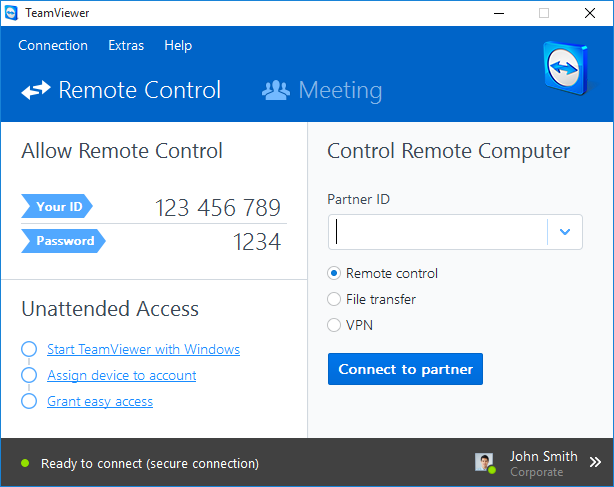
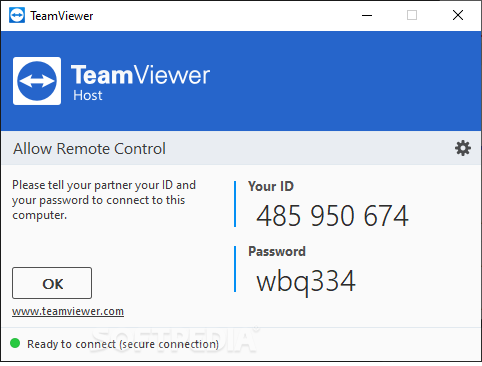
TeamViewer Host 15.82.6 full screenshots



TeamViewer Host - Windows 7 Download awards


TeamViewer Host 15.82.6 full description
TeamViewer Host is running as a system service and is used for 24/7 access to remote computers, including login/logout and remote reboot - optimized for server maintenance or home-office access.
BTW: Unlike most competitors TeamViewer includes an unlimited number of free hosts with all licenses - you just pay for the supporter license and your remote servers are included for free!
Similar to QuickSupport, commercial users can also visually adapt the TeamViewer Host to their requirements and, for example, insert their logo and their own text.
BTW: Unlike most competitors TeamViewer includes an unlimited number of free hosts with all licenses - you just pay for the supporter license and your remote servers are included for free!
Similar to QuickSupport, commercial users can also visually adapt the TeamViewer Host to their requirements and, for example, insert their logo and their own text.
TeamViewer Host 15.82.6 download tags
TeamViewer Host 15.82.6 Windows 7 release notes
New Release
New features:
Added support for Admin settings, device management, Single-Sign-On (SSO) and Microsoft LAPS integration to the Hybrid Conditional Access.
Tensor-licensed customers can now forward their local microphone and camera to the remote device, enabling them to join meetings or use applications that require a camera and microphone directly from a remote session.
Auditability for account security has been improved. Password changes will now be logged as separate events.
The user creation date and last active information have been added to the User Details panel, giving administrators quick insight when reviewing user profiles.
Permission handling for user groups has been improved. Actions such as creating, viewing, updating, and deleting user groups are now controlled by assigned permissions, ensuring clear and consistent access management.
Customers can now create Conditional Access rules using Company Profiles, enabling secure access scenarios involving trusted third-party organizations, such as external support providers using TeamViewer. A new External Company option is available in both the Source and Target fields during rule creation, allowing administrators to specify a Company Profile name and apply the rule to users associated with that external organization.
Improvements:
TeamViewer now natively supports Windows on ARM devices for both TeamViewer Remote and TeamViewer (Classic). Its functionality matches the existing Intel-based versions, ensuring a consistent experience across device architectures.
The width of the in-session Tia side panel has been increased to provide a more comfortable experience when interacting with chat.
Session connections using Windows authentication are now available from both the command bar and the context menu on the Service Queue page.
The unattended access text in the Classic Host has been updated to align with TeamViewer Remote. The revised wording more clearly indicates that the device is managed by the company, redu
[ TeamViewer Host release history ]
New features:
Added support for Admin settings, device management, Single-Sign-On (SSO) and Microsoft LAPS integration to the Hybrid Conditional Access.
Tensor-licensed customers can now forward their local microphone and camera to the remote device, enabling them to join meetings or use applications that require a camera and microphone directly from a remote session.
Auditability for account security has been improved. Password changes will now be logged as separate events.
The user creation date and last active information have been added to the User Details panel, giving administrators quick insight when reviewing user profiles.
Permission handling for user groups has been improved. Actions such as creating, viewing, updating, and deleting user groups are now controlled by assigned permissions, ensuring clear and consistent access management.
Customers can now create Conditional Access rules using Company Profiles, enabling secure access scenarios involving trusted third-party organizations, such as external support providers using TeamViewer. A new External Company option is available in both the Source and Target fields during rule creation, allowing administrators to specify a Company Profile name and apply the rule to users associated with that external organization.
Improvements:
TeamViewer now natively supports Windows on ARM devices for both TeamViewer Remote and TeamViewer (Classic). Its functionality matches the existing Intel-based versions, ensuring a consistent experience across device architectures.
The width of the in-session Tia side panel has been increased to provide a more comfortable experience when interacting with chat.
Session connections using Windows authentication are now available from both the command bar and the context menu on the Service Queue page.
The unattended access text in the Classic Host has been updated to align with TeamViewer Remote. The revised wording more clearly indicates that the device is managed by the company, redu
[ TeamViewer Host release history ]
Bookmark TeamViewer Host
TeamViewer Host for Windows 7 - Copyright information
All TeamViewer Host reviews, submitted ratings and written comments become the sole property of Windows 7 download. You acknowledge that you, not windows7download, are responsible for the contents of your submission. However, windows7download reserves the right to remove or refuse to post any submission for any reason.
Windows 7 Download periodically updates pricing and software information of TeamViewer Host full version from the publisher, but some information may be out-of-date. You should confirm all information.
Using warez version, crack, warez passwords, patches, serial numbers, registration codes, key generator, pirate key, keymaker or keygen for TeamViewer Host license key is illegal and prevent future development of TeamViewer Host. Download links are directly from our mirrors or publisher's website, TeamViewer Host torrent or shared files from free file sharing and free upload services, including Rapidshare, MegaUpload, YouSendIt, SendSpace, DepositFiles, DivShare, HellShare, HotFile, FileServe or MediaFire, are not used.
Windows 7 Download periodically updates pricing and software information of TeamViewer Host full version from the publisher, but some information may be out-of-date. You should confirm all information.
Using warez version, crack, warez passwords, patches, serial numbers, registration codes, key generator, pirate key, keymaker or keygen for TeamViewer Host license key is illegal and prevent future development of TeamViewer Host. Download links are directly from our mirrors or publisher's website, TeamViewer Host torrent or shared files from free file sharing and free upload services, including Rapidshare, MegaUpload, YouSendIt, SendSpace, DepositFiles, DivShare, HellShare, HotFile, FileServe or MediaFire, are not used.
Post TeamViewer Host review


Windows 7 TeamViewer Host related downloads
Remote Desktop Assistant is a wrapper for Microsoft Remote Desktop Connection and OpenSSH. It creates RDP configuration files ...
Discover seamless remote access with Remote Utilities - Viewer Portable Edition, a powerful software ... users who need flexibility and efficiency. Developed by Remote Utilities LLC, this portable viewer allows you to ...
... over what your kid may click on next, Remote Authority can help with its simple approach. ...

Are you searching for a reliable, professional-grade remote access solution to manage your devices efficiently? Look ...
Remote Utilities Host is a powerful and user-friendly software developed by Remote Utilities Pty (Cy) Ltd. This software provides remote ...
My Account
Help
Windows 7 Software Coupons
-
WinX MediaTrans
63% Off -
Media Player Morpher
85% Off -
MacX Video Converter Pro
56% Off -
WinX HD Video Converter
56% Off -
MacX Media Management Bundle
70% Off
My Saved Stuff
You have not saved any software.
Click "Save" next to each software.
Click "Save" next to each software.
Would you like to receive announcements of new versions of your software by email or by RSS reader? Register for FREE!
Windows 7 Downloads Picks
- TeamViewer Host 15.82.6
- VNC for Mac and Linux 7.16.0 (r14)
- TeamViewer QuickSupport 15.82.6
- UltraVNC 1.6.4.0
- LogMeIn Pro 4.1.16174
- DameWare Mini Remote Control 64bit 12.3.0.12
- AirPort Utility 5.6.1.2
- DameWare Mini Remote Control 12.3.0.12
- ScreenConnect 21.5.2870.7759
- Xmanager Enterprise 7.0 B0151
- SmartCode ViewerX VNC Viewer ActiveX 7.15.1
- NetRemote 2.0.21.144
- Icloud 7.21.0.23
- Freefloat Access One 2.0.31
- Goverlan Remote Administration Suite 8.01.10
- XenViewer 1.1.135
- DualDesk Lite 20.5.1.0
- Smart Bluetooth Marketing 1.4.0.151
- Ideal Administration 20.0
- ThinWin 0.2.8
Popular Tags
remote
remote shutdown
chat
windows
reboot
spy
keylogger
remote control
software
server
remote access
remote pc
shutdown
vnc
remote support
file transfer
remote desktop
network tools
remote admin
restart
remote spy
remote assistance
rdp
helpdesk
internet
logoff
pc remote control
control
network
pc monitoring
Popular Windows 7 Software
- Network Traffic Generator and Monitor 12.6
- Firefox 64bit x64 127.0.2
- iTop VPN 8.0.0.7373
- Google Chrome 126.0.6478.127
- RouterOS 7.24.4 Stable
- Universal Maps Downloader 10.260
- SSuite NetSurfer Browser x64 2.30.16.10
- iTop Private Browser 3.1.0.255
- Allavsoft 3.29.6.9765
- NetSpot for Windows 6.0.0.780
- SSuite NetSurfer Browser 2.30.16.10
- Google Chrome 17 17.0.963.78
- SoftPerfect Network Scanner 26.9
- Google Chrome Portable 126.0.6478.127
- Dukto Portable R6
© 2026 Windows7Download.com - All logos, trademarks, art and other creative works are and remain copyright and property of their respective owners. Microsoft Windows is a registered trademarks of Microsoft Corporation. Microsoft Corporation in no way endorses or is affiliated with windows7download.com.