


Syncovery for Windows 7 - "Efficient Data Backup & Sync" - Windows 7 Download


Syncovery 12.9.7 Build 100
"Effortlessly sync and back up files with Syncovery - the ultimate Windows 7 software."
Looking for reliable and versatile software to manage your files? Look no further than Syncovery from Super Flexible Software Ltd. This powerful program offers efficient syncing and backing up of files across a variety of devices and platforms, making it an essential tool for those who work across multiple machines. With Syncovery's intuitive interface and customizable settings, users can easily tailor the program to suit their specific needs. Say goodbye to lost files and hours of re-work - download Syncovery today and experience the peace of mind that comes with seamless file management.
Syncovery 12.9.7 Build 100 full details

| File Size: | 81.90 MB |
|---|---|
| License: | Trialware |
| Price: | $39.90 |
| Released: | 2026-11-02 |
| Downloads: | Total: 1102 | This Month: 15 |
| Publisher: | Super Flexible Software |
| Publisher URL: | https://www.syncovery.com/ |

Download Syncovery 12.9.7 Build 100
Save Syncovery to My Stuff
Tweet

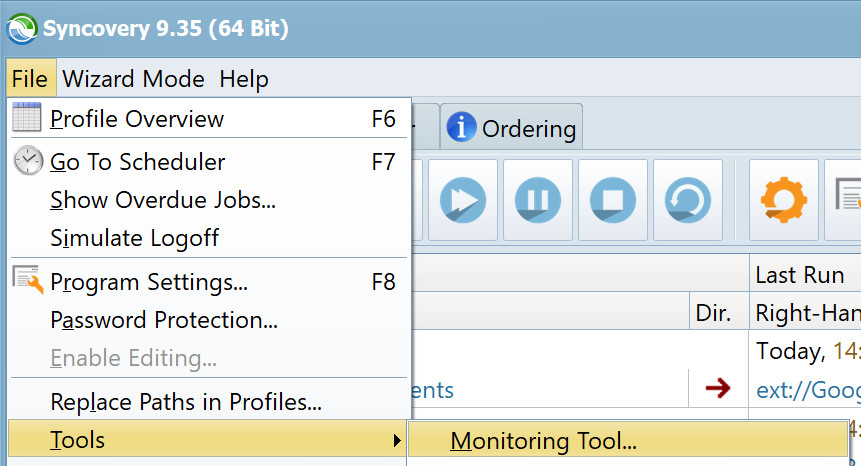
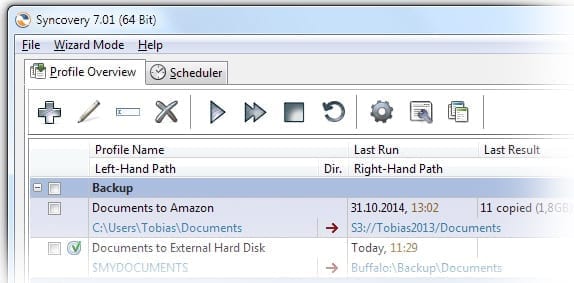
Syncovery 12.9.7 Build 100 full screenshots




Syncovery - Windows 7 Download awards

Syncovery 12.9.7 Build 100 full description
Syncovery is the ultimate solution for all your data backup and synchronization needs on Windows 7. Developed by Super Flexible Software, this software offers a seamless experience with its user-friendly interface and advanced features. It's a great choice for both personal and business use, allowing you to synchronize files across multiple devices and platforms.
With Syncovery, you can schedule tasks for automatic backups, set up FTP and cloud storage connections, and even copy locked files. The software is highly customizable, giving you the freedom to tailor your backup and sync settings to your preferences. It also has a built-in restore function, making it easy to retrieve lost data.
Whether you're a tech-savvy professional or a novice PC user, Syncovery provides you with the best backup solution to ensure that you never lose your important files again. Try it out now and experience the power of the world's best backup and sync software for Windows 7!
With Syncovery, you can schedule tasks for automatic backups, set up FTP and cloud storage connections, and even copy locked files. The software is highly customizable, giving you the freedom to tailor your backup and sync settings to your preferences. It also has a built-in restore function, making it easy to retrieve lost data.
Whether you're a tech-savvy professional or a novice PC user, Syncovery provides you with the best backup solution to ensure that you never lose your important files again. Try it out now and experience the power of the world's best backup and sync software for Windows 7!
Syncovery 12.9.7 Build 100 download tags
Syncovery 12.9.7 Build 100 Windows 7 release notes
New Release
What changed in Syncovery 12.10:
No default password. There is no preset login such as “admin” / “pass” any more. When you open the web GUI of a new installation, you create the login yourself.
Passwords need at least 8 characters, and very common passwords are not accepted. They are stored only as salted, slow hashes, never in readable form.
Failed logins are limited. After 10 failed attempts within 15 minutes, for the same user name or from the same address, further attempts are refused until the 15 minutes have passed.
Logins from the Internet need a second factor: a code from an authenticator app, or a code sent by e-mail. Without one, such logins are refused.
Login recovery works only through a folder that an administrator of the machine creates (see below). The former fixed recovery password no longer exists.
Creating the first login:
When no login exists yet, the web GUI shows the page “Create the Login for the Web GUI”. Choose a user name and a password with at least 8 characters.
For security, the first login can be created:
from the computer or NAS that Syncovery runs on, at any time;
from your local network, within 60 minutes after Syncovery was started;
never from the Internet.
If the 60 minutes have passed, restart Syncovery (on a NAS: stop and start the Syncovery package in the App Center or Package Center) and reload the page.
On Windows and macOS, you can also set the web GUI login in the Program Settings of the Syncovery desktop program.
Logins from the Internet need a second factor:
Syncovery checks the address of every login. Addresses of your local network (such as 192.168.x.x, 10.x.x.x or VPN ranges like 100.64.x.x) and the computer itself are local. Every other address is treated as the public Internet, and a login from there always needs a second factor, also for user accounts and for the read-only login.
For local logins, the second factor is optional. An administrator can require it for all logins in the Program Settings (Second
[ Syncovery release history ]
What changed in Syncovery 12.10:
No default password. There is no preset login such as “admin” / “pass” any more. When you open the web GUI of a new installation, you create the login yourself.
Passwords need at least 8 characters, and very common passwords are not accepted. They are stored only as salted, slow hashes, never in readable form.
Failed logins are limited. After 10 failed attempts within 15 minutes, for the same user name or from the same address, further attempts are refused until the 15 minutes have passed.
Logins from the Internet need a second factor: a code from an authenticator app, or a code sent by e-mail. Without one, such logins are refused.
Login recovery works only through a folder that an administrator of the machine creates (see below). The former fixed recovery password no longer exists.
Creating the first login:
When no login exists yet, the web GUI shows the page “Create the Login for the Web GUI”. Choose a user name and a password with at least 8 characters.
For security, the first login can be created:
from the computer or NAS that Syncovery runs on, at any time;
from your local network, within 60 minutes after Syncovery was started;
never from the Internet.
If the 60 minutes have passed, restart Syncovery (on a NAS: stop and start the Syncovery package in the App Center or Package Center) and reload the page.
On Windows and macOS, you can also set the web GUI login in the Program Settings of the Syncovery desktop program.
Logins from the Internet need a second factor:
Syncovery checks the address of every login. Addresses of your local network (such as 192.168.x.x, 10.x.x.x or VPN ranges like 100.64.x.x) and the computer itself are local. Every other address is treated as the public Internet, and a login from there always needs a second factor, also for user accounts and for the read-only login.
For local logins, the second factor is optional. An administrator can require it for all logins in the Program Settings (Second
[ Syncovery release history ]
Bookmark Syncovery
Syncovery for Windows 7 - Copyright information
All Syncovery reviews, submitted ratings and written comments become the sole property of Windows 7 download. You acknowledge that you, not windows7download, are responsible for the contents of your submission. However, windows7download reserves the right to remove or refuse to post any submission for any reason.
Windows 7 Download periodically updates pricing and software information of Syncovery full version from the publisher, but some information may be out-of-date. You should confirm all information.
Using warez version, crack, warez passwords, patches, serial numbers, registration codes, key generator, pirate key, keymaker or keygen for Syncovery license key is illegal and prevent future development of Syncovery. Download links are directly from our mirrors or publisher's website, Syncovery torrent or shared files from free file sharing and free upload services, including Rapidshare, MegaUpload, YouSendIt, SendSpace, DepositFiles, DivShare, HellShare, HotFile, FileServe or MediaFire, are not used.
Windows 7 Download periodically updates pricing and software information of Syncovery full version from the publisher, but some information may be out-of-date. You should confirm all information.
Using warez version, crack, warez passwords, patches, serial numbers, registration codes, key generator, pirate key, keymaker or keygen for Syncovery license key is illegal and prevent future development of Syncovery. Download links are directly from our mirrors or publisher's website, Syncovery torrent or shared files from free file sharing and free upload services, including Rapidshare, MegaUpload, YouSendIt, SendSpace, DepositFiles, DivShare, HellShare, HotFile, FileServe or MediaFire, are not used.
Post Syncovery review


Windows 7 Syncovery related downloads
Backup for Workgroups is a disk-based, client/server automatic backup and disaster recovery software program for Windows servers ...
BackUp Maker will easily backup your important folders thanks to an intuitive interface ... the range of functions enable you to create backup tasks for saving files and folders with a ...
Backup To Email provides a fast and secure method to backup important files and save them the email account. ...
Backup Exec BKF Recovery software is amazing backup recovery solution for Windows users. It supports corrupt ...
SyncBreeze Pro is an advanced product version, which adds the ability to synchronize specific file types using flexible file matching rules, ...
My Account
Help
Windows 7 Software Coupons
-
Media Player Morpher
85% Off -
MacX Media Management Bundle
70% Off -
WinX DVD Copy Pro
42% Off -
MacX DVD Video Converter
58% Off -
MacX DVD Ripper Pro
50% Off
My Saved Stuff
You have not saved any software.
Click "Save" next to each software.
Click "Save" next to each software.
Would you like to receive announcements of new versions of your software by email or by RSS reader? Register for FREE!
Windows 7 Downloads Picks
- KLS Backup Professional 2025 (15.0.0.3)
- iTop Data Recovery 6.4.0.959
- GoodSync2Go 12.11.12.2
- Backup for Workgroups 4.3
- FBackup 9.9 Build 1062
- Backup4all Lite 9.9 Build 1044
- Portable Recover Files 3.3.1.0
- Backup To EMail 2.2 Build 252
- BackUp Maker Standard Edition 8.405
- SuperDiary 5.0 Build 03
- Backup4all Portable 9.9 Build 999
- Portable Back4Sure 3.8.0
- FreeFileSync 14.13
- Backup4all Portable 9.9 Build 999
- Backup4all Standard 8.5 B264
- TeamDrive 5.3.0 Build 3927
- Paragon Backup & Recovery Free Edition 2013
- SaveGameBackup 3.4
- Secure Protocol Extension for AnyFileBackup 5.3.2
- Bvckup Release 82.25.0
Popular Tags
images
video
file
picture
windows
folder
restore
backup
rescue
memory
disk
digital
salvage
damaged
recovery
usb
corrupted
undelete
partition
drive
recover
pictures
retrieve
erased
audio
deleted
media
card
formatted
utility
Popular Windows 7 Software
- Auslogics Registry Cleaner 11.2.0.6
- Driver Easy 7.2.3 Build 6590
- Don't Sleep 10.44
- WinTools.one Professional 26.10.1
- ALTRun 2026.10.26
- Datavare EML to Gmail Importer 1.0
- AutoHotkey 2.0.31
- System Mechanic Professional 23.1
- Ashampoo UnInstaller Pro 27 27.0.1
- Oracle-to-Access 3.1
- Free iPhone Backup Extractor 3.8.0.2725
- ExtraDisks x64 26.10.1
- File Juggler 3.1.9
- NSClient++ 0.26.0
- CompanionLink for Outlook 11 Build 11024
© 2026 Windows7Download.com - All logos, trademarks, art and other creative works are and remain copyright and property of their respective owners. Microsoft Windows is a registered trademarks of Microsoft Corporation. Microsoft Corporation in no way endorses or is affiliated with windows7download.com.