


Sumatra PDF Portable for Windows 7 - "Portable PDF Reader: Sumatra" - Windows 7 Download


Sumatra PDF Portable 3.6
"Experience lightning-fast PDF viewing with Sumatra - the perfect reader for Windows 7."
Looking for a lightweight yet powerful PDF reader? Look no further than Sumatra PDF Portable. Developed by Krzysztof Kowalczyk, this software offers a range of features, including the ability to open multiple documents at once, bookmark pages, and search through text. Its minimalistic design makes it easy to navigate and perfect for those who prefer a streamlined reading experience. Best of all, it's completely free to download and use. Whether you're a student, professional, or casual user, Sumatra PDF Portable is an excellent choice for anyone looking for a reliable PDF reader.
Sumatra PDF Portable 3.6 full details

| File Size: | 7.30 MB |
|---|---|
| License: | Open Source |
| Price: | FREE |
| Released: | 2026-03-17 |
| Downloads: | Total: 1387 | This Month: 7 |
| Publisher: | Krzysztof Kowalczyk |
| Publisher URL: | https://www.sumatrapdfreader.org/ |

Download Sumatra PDF Portable 3.6
Save Sumatra PDF Portable to My Stuff
Tweet

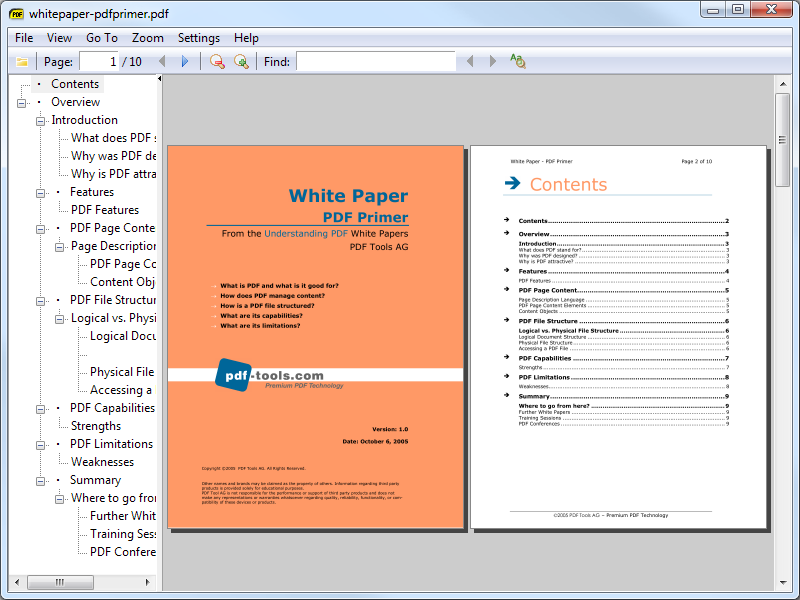
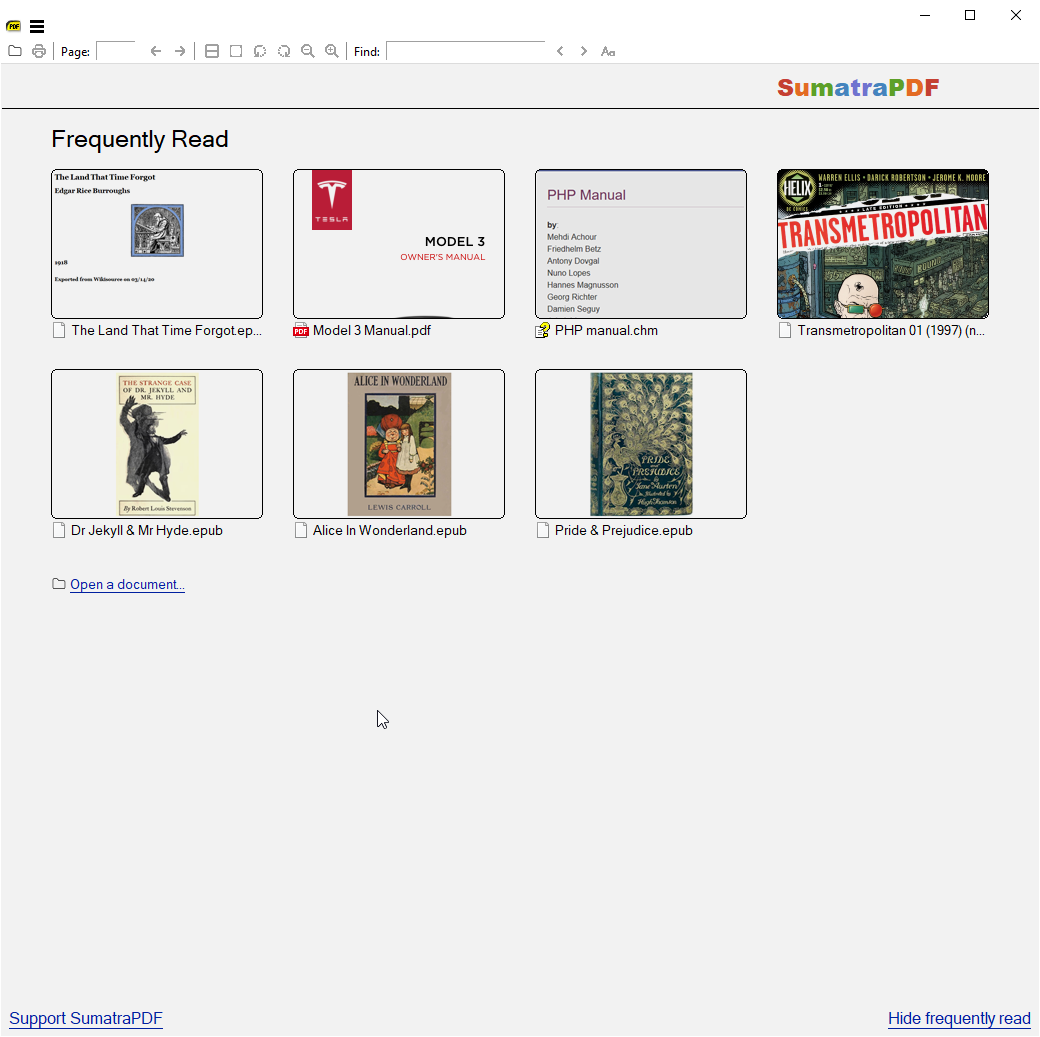
Sumatra PDF Portable 3.6 full screenshots




Sumatra PDF Portable - Windows 7 Download awards


Sumatra PDF Portable 3.6 full description
The portable PDF viewer
Sumatra PDF Portable is the lightweight Sumatra PDF packaged as a portable app, so you can view PDF files on the go. You can place it on your USB flash drive, iPod, portable hard drive or a CD and use it on any computer, without leaving any personal information behind.
Features:
Sumatra PDF Portable Screenshot Sumatra PDF is a slim, free, open-source PDF viewer for Windows. Sumatra has a minimalistic design. Simplicity has a higher priority than a lot of features. It's small and starts up very fast.
One of the worst problems with Adobe's Acrobat reader is that it often takes about a week to load PDFs. OK, maybe not quite that long, but it is very slow.
SumatraPDF is one of several apps knocking around that are designed to simplify your PDF viewing - and it doesn't do a bad job either. Opening files in the program is virtually as quick as opening and closing your eyes and it doesn't take a genius to find your way around the interface.
Options are a little thin on the ground but SumatraPDF provides a very comfortable environment for reading PDFs and you can print documents without much hassle. Give me this over Acrobat any day for looking at eBooks.
Sumatra PDF Portable is the lightweight Sumatra PDF packaged as a portable app, so you can view PDF files on the go. You can place it on your USB flash drive, iPod, portable hard drive or a CD and use it on any computer, without leaving any personal information behind.
Features:
Sumatra PDF Portable Screenshot Sumatra PDF is a slim, free, open-source PDF viewer for Windows. Sumatra has a minimalistic design. Simplicity has a higher priority than a lot of features. It's small and starts up very fast.
One of the worst problems with Adobe's Acrobat reader is that it often takes about a week to load PDFs. OK, maybe not quite that long, but it is very slow.
SumatraPDF is one of several apps knocking around that are designed to simplify your PDF viewing - and it doesn't do a bad job either. Opening files in the program is virtually as quick as opening and closing your eyes and it doesn't take a genius to find your way around the interface.
Options are a little thin on the ground but SumatraPDF provides a very comfortable environment for reading PDFs and you can print documents without much hassle. Give me this over Acrobat any day for looking at eBooks.
Sumatra PDF Portable 3.6 download tags
Sumatra PDF Portable 3.6 Windows 7 release notes
New Release
Add DisableAntiAlias advanced setting and CmdToggleAntiAlias command
Add CmdShowAnnotations, CmdHideAnnotations, CmdToggleShowAnnotations commands for temporarily hiding / showing annotations
Add CmdToggleInverseSearch to temporarily disable mouse click invoking tex inverse search
Add bgcolor, opacity, textsize, borderWidth arguments to CmdCreateAnnot* commands
Add Annotations.FreeTextBackgroundColor and Annotations.FreeTextOpacity advanced settings
Sort thumbnails on home page by most recently used date. Set advanced setting HomePageSortByFrequentlyRead = true to revert to pre-3.6 behavior of sorting by frequency of use.
Support brotli compression in PDF files
In Command Palette, if you start search with : we show everything (like in 3.5)
In Command Palette, when viewing opened files history (#), you can press Delete to remove the entry from history
Improved zooming:
zooming with pinch touch screen gesture or with ctrl + scroll wheel now zooms around the mouse position and does continuous zoom levels. Used to zoom around top-left corner and progress fixed zoom levels shown in menu
Include manual (F1 to launch browser with documentation)
Add LazyLoading advanced setting, defaults to true. When restoring a session lazy loading delays loading a file until its tab is selected. Makes SumatraPDF startup faster.
New commands in command palette (Ctrl + K):
CmdCloseAllTabs : “Close All Tabs”
CmdCloseTabsToTheLeft : “Close Tabs To The Left”
CmdDeleteFile: “Delete File”
CmdToggleFrequentlyRead : “Toggle Frequently Read”
CmdToggleLinks : “Toggle Show Links”
CmdInvokeInverseSearch
CmdMoveTabRight (Ctrl + Shift + PageUp), CmdMoveTabLeft (Ctrl + Shift + PageDown) to move tabs left / right, like in Chrome
Add ability to provide arguments to some commands when creating bindings in Shortcuts:
CmdCreateAnnot* commands take a color argument, openedit to automatically open edit annotations window when creating an annotation, copytoclipboard to copy selection to clip
[ Sumatra PDF Portable release history ]
Add DisableAntiAlias advanced setting and CmdToggleAntiAlias command
Add CmdShowAnnotations, CmdHideAnnotations, CmdToggleShowAnnotations commands for temporarily hiding / showing annotations
Add CmdToggleInverseSearch to temporarily disable mouse click invoking tex inverse search
Add bgcolor, opacity, textsize, borderWidth arguments to CmdCreateAnnot* commands
Add Annotations.FreeTextBackgroundColor and Annotations.FreeTextOpacity advanced settings
Sort thumbnails on home page by most recently used date. Set advanced setting HomePageSortByFrequentlyRead = true to revert to pre-3.6 behavior of sorting by frequency of use.
Support brotli compression in PDF files
In Command Palette, if you start search with : we show everything (like in 3.5)
In Command Palette, when viewing opened files history (#), you can press Delete to remove the entry from history
Improved zooming:
zooming with pinch touch screen gesture or with ctrl + scroll wheel now zooms around the mouse position and does continuous zoom levels. Used to zoom around top-left corner and progress fixed zoom levels shown in menu
Include manual (F1 to launch browser with documentation)
Add LazyLoading advanced setting, defaults to true. When restoring a session lazy loading delays loading a file until its tab is selected. Makes SumatraPDF startup faster.
New commands in command palette (Ctrl + K):
CmdCloseAllTabs : “Close All Tabs”
CmdCloseTabsToTheLeft : “Close Tabs To The Left”
CmdDeleteFile: “Delete File”
CmdToggleFrequentlyRead : “Toggle Frequently Read”
CmdToggleLinks : “Toggle Show Links”
CmdInvokeInverseSearch
CmdMoveTabRight (Ctrl + Shift + PageUp), CmdMoveTabLeft (Ctrl + Shift + PageDown) to move tabs left / right, like in Chrome
Add ability to provide arguments to some commands when creating bindings in Shortcuts:
CmdCreateAnnot* commands take a color argument, openedit to automatically open edit annotations window when creating an annotation, copytoclipboard to copy selection to clip
[ Sumatra PDF Portable release history ]
Bookmark Sumatra PDF Portable
Sumatra PDF Portable for Windows 7 - Copyright information
All Sumatra PDF Portable reviews, submitted ratings and written comments become the sole property of Windows 7 download. You acknowledge that you, not windows7download, are responsible for the contents of your submission. However, windows7download reserves the right to remove or refuse to post any submission for any reason.
Windows 7 Download periodically updates pricing and software information of Sumatra PDF Portable full version from the publisher, but some information may be out-of-date. You should confirm all information.
Using warez version, crack, warez passwords, patches, serial numbers, registration codes, key generator, pirate key, keymaker or keygen for Sumatra PDF Portable license key is illegal and prevent future development of Sumatra PDF Portable. Download links are directly from our mirrors or publisher's website, Sumatra PDF Portable torrent or shared files from free file sharing and free upload services, including Rapidshare, MegaUpload, YouSendIt, SendSpace, DepositFiles, DivShare, HellShare, HotFile, FileServe or MediaFire, are not used.
Windows 7 Download periodically updates pricing and software information of Sumatra PDF Portable full version from the publisher, but some information may be out-of-date. You should confirm all information.
Using warez version, crack, warez passwords, patches, serial numbers, registration codes, key generator, pirate key, keymaker or keygen for Sumatra PDF Portable license key is illegal and prevent future development of Sumatra PDF Portable. Download links are directly from our mirrors or publisher's website, Sumatra PDF Portable torrent or shared files from free file sharing and free upload services, including Rapidshare, MegaUpload, YouSendIt, SendSpace, DepositFiles, DivShare, HellShare, HotFile, FileServe or MediaFire, are not used.
Post Sumatra PDF Portable review


Windows 7 Sumatra PDF Portable related downloads
... to your one-stop destination for the VeryPDF Java PDF Viewer, a top-tier software developed by the renowned ...
Aloaha portable PDF Reader and Viewer, supports split, merge, print, re-order of PDF pages. Save as pdf, img or html. Extract ...
Foxit Reader is a free PDF document viewer, with incredible small size, breezing-fast launch speed and ...
Looking for a reliable and efficient PDF viewer that seamlessly integrates with your Windows 7 system? ...
GIRDAC PDF to Image Converter is a software application for converting PDF documents to to over 100 image file formats. ...
PDF To Excel Converter is a windows application to convert PDF document to Excel XLS / XLSX formats fast ...
My Account
Help
Windows 7 Software Coupons
-
MacX Video Converter Pro
56% Off -
MacX DVD Video Converter
58% Off -
WinX HD Video Converter
56% Off -
MacX DVD Ripper Pro
50% Off -
WinX DVD Ripper
50% Off
My Saved Stuff
You have not saved any software.
Click "Save" next to each software.
Click "Save" next to each software.
Would you like to receive announcements of new versions of your software by email or by RSS reader? Register for FREE!
Windows 7 Downloads Picks
- LibreOffice 26.8.2.2 Latest
- QueueExplorer Standard 5.1.2
- Soda PDF Professional 14.0.418.3254
- Notepad++ Portable 8.9.6.2
- AMP Calendar 2.42
- WikidPad Portable 2.3 Beta 15
- Chemistry Add-in for Word 3.3.4
- LogSaw 1.0.3
- PDF-XChange Standard 10.2.1.385
- Adobe Acrobat XI Pro 11.0.10
- Convert XLS 18.501
- LibreOffice x64 24.2.4
- AMP Calendar 2.42
- SOFA Statistics 1.4.5
- Microsoft Office 2010 x32 14.0 BETA
- WikidPad 2.3 Beta 15
- Desktop Calendar 3.2
- PDFZilla 3.9.5
- Portable AMP Calendar 2.42
- Microsoft Office 2007
Popular Tags
excel
conversion
editor
microsoft
word
free
powerpoint
xls
pdf converter
pdf creator
text
files
spreadsheet
create
printer
data
doc
adobe
word to pdf
acrobat
office
add in
document
converter
tool
convert
create pdf
pdf
software
outlook
Popular Windows 7 Software
- PKeyMaster 2610 (Build 20527.20
- Decanter Sizing Calculator 1.0.0.1
- Netpas Estimator 5.2 Build 5299
- Amigo Point Of Sale 9.9.3
- Visitor Management System Application 6.9.8
- LANDPARK MANAGER 5.2.4
- ASCOMP PDF-compress 2.001
- Address Organizer Deluxe 4.21
- LibreOffice 26.8.2.2 Latest
- FastFox Typing Expander 2.35
- Software ID Cards 9.2.0.1
- Office.Files.Images 2.88
- Coolutils Converter 3.1.1.160
- Adminsoft Accounts 4.332
- ShixxNOTE 7.net Build 408
© 2026 Windows7Download.com - All logos, trademarks, art and other creative works are and remain copyright and property of their respective owners. Microsoft Windows is a registered trademarks of Microsoft Corporation. Microsoft Corporation in no way endorses or is affiliated with windows7download.com.