


Subtitle Edit for Windows 7 - Create, edit and synchronize video subtitles - Windows 7 Download


Subtitle Edit 4.0.15
Edit, synchronize, translate and convert subtitles in more than 200 formats.
Subtitle Edit is a free, open-source editor for creating, translating and synchronizing video subtitles. It supports more than 200 formats and provides visual timing controls, an audio waveform or spectrogram, spell checking, error detection and subtitle comparison. OCR tools can convert image-based captions into editable text, while export options cover text and image subtitle formats.
Subtitle Edit 4.0.15 full details

| File Size: | 10.40 MB |
|---|---|
| License: | Open Source |
| Price: | FREE |
| Released: | 2026-05-05 |
| Downloads: | Total: 15520 | This Month: 464 |
| Publisher: | Nikolaj Lynge Olsson |
| Publisher URL: | https://www.nikse.dk/ |

Download Subtitle Edit 4.0.15
Save Subtitle Edit to My Stuff
Tweet
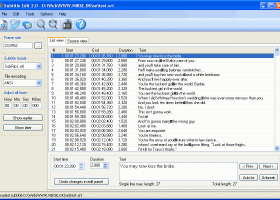
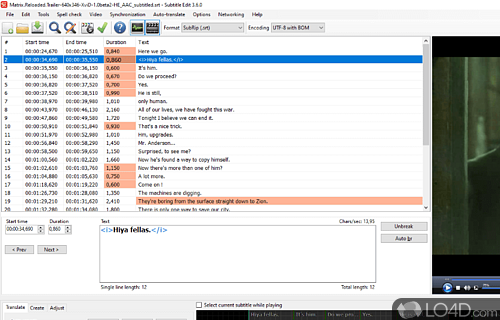
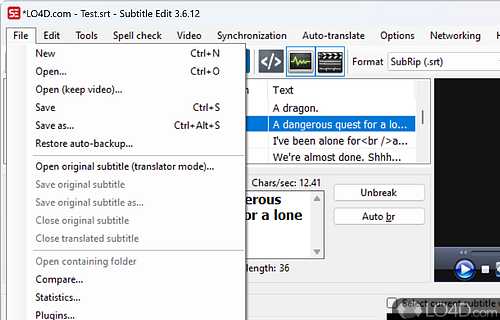
Subtitle Edit 4.0.15 full screenshots


Subtitle Edit - Windows 7 Download awards



Subtitle Edit 4.0.15 full description
Subtitle Edit is an open-source subtitle editor for creating, correcting, translating and synchronizing captions for video. It is suited to anyone preparing subtitle files, from viewers fixing timing on a downloaded track to translators and editors working with multiple formats. The program can adjust subtitle text and timing alongside a video preview, helping users check that dialogue appears at the right moment and remains on screen long enough to read.
For timing work, Subtitle Edit offers visual synchronization controls for changing subtitle start and end positions or adjusting playback speed. Users can shift text earlier or later, synchronize at selected points, or use another subtitle as a timing reference. An audio visualizer can show a waveform or spectrogram, making it easier to align subtitle boundaries with speech and other sounds. The video player can use DirectShow, VLC media player or MPlayer. A display-time adjustment tool and options to merge or split subtitle files support broader timing changes.
The editor handles more than 200 subtitle formats, including SubRip, MicroDVD, Sub Station Alpha, Advanced Sub Station Alpha, SAMI and YouTube SBV. It can open embedded subtitles in Matroska and MP4/MV4 files, and can import or extract subtitles from several other video and disc formats. Optical character recognition helps convert image-based subtitles from sources such as VobSub, Blu-ray SUP, DVB transport streams and XSub into editable text. Export options include text-based files, image subtitles, Blu-ray SUP, VobSub, EBU STL and formats used by authoring tools.
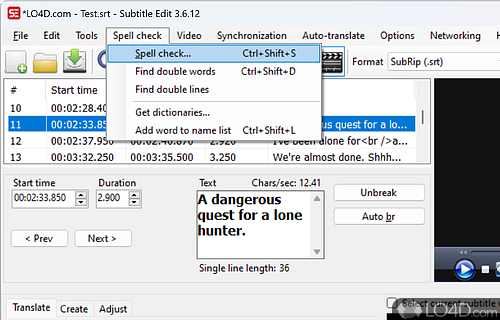
For text cleanup, the program includes spell checking through OpenOffice dictionaries or NHunspell, search and replace, renumbering, casing changes using a names dictionary, and tools for merging short lines or splitting long ones. A wizard can detect common subtitle errors, and a filter can remove text intended for hearing-impaired viewers. Translation features include automatic translation through Google Translate and a built-in Swedish-to-Danish option. Users can also compare subtitle files, apply typewriter or karaoke effects, and undo or redo editing steps.
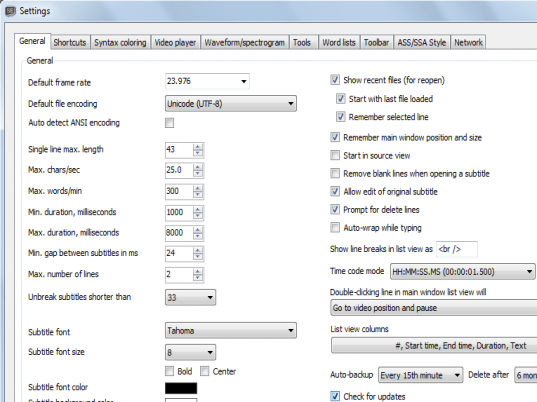
Subtitle Edit is free and open source, with a multilingual interface and support for Unicode and ANSI text in different encodings. It runs on Windows 7, 8, 10 and 11 and requires .NET Framework 4.0. Its range of conversion, timing and OCR tools makes it useful for repairing existing captions, preparing translations, and moving subtitle work between video formats and editing workflows.
For timing work, Subtitle Edit offers visual synchronization controls for changing subtitle start and end positions or adjusting playback speed. Users can shift text earlier or later, synchronize at selected points, or use another subtitle as a timing reference. An audio visualizer can show a waveform or spectrogram, making it easier to align subtitle boundaries with speech and other sounds. The video player can use DirectShow, VLC media player or MPlayer. A display-time adjustment tool and options to merge or split subtitle files support broader timing changes.
The editor handles more than 200 subtitle formats, including SubRip, MicroDVD, Sub Station Alpha, Advanced Sub Station Alpha, SAMI and YouTube SBV. It can open embedded subtitles in Matroska and MP4/MV4 files, and can import or extract subtitles from several other video and disc formats. Optical character recognition helps convert image-based subtitles from sources such as VobSub, Blu-ray SUP, DVB transport streams and XSub into editable text. Export options include text-based files, image subtitles, Blu-ray SUP, VobSub, EBU STL and formats used by authoring tools.
For text cleanup, the program includes spell checking through OpenOffice dictionaries or NHunspell, search and replace, renumbering, casing changes using a names dictionary, and tools for merging short lines or splitting long ones. A wizard can detect common subtitle errors, and a filter can remove text intended for hearing-impaired viewers. Translation features include automatic translation through Google Translate and a built-in Swedish-to-Danish option. Users can also compare subtitle files, apply typewriter or karaoke effects, and undo or redo editing steps.
Subtitle Edit is free and open source, with a multilingual interface and support for Unicode and ANSI text in different encodings. It runs on Windows 7, 8, 10 and 11 and requires .NET Framework 4.0. Its range of conversion, timing and OCR tools makes it useful for repairing existing captions, preparing translations, and moving subtitle work between video formats and editing workflows.
Subtitle Edit 4.0.15 download tags
Subtitle Edit 4.0.15 Windows 7 release notes
New Release
NEW:
Add Central Kurdish (Sorani) support to Gemini translation
Add Estonian language auto-detect - thx Donat
Add speed parameter to ElevenLabs TTS - thx cvrle77
Add "copy original text" keyboard shortcuts
IMPROVED:
Update Portuguese translation - thx Blackspirits
Update Italian translation - thx bovirus
Update Persian translation - thx rmtjokar
Update Korean translation - thx domddol
Update Chinese translation - thx nkh0472
Update Bulgarian translation - thx KalinM
Focus OK button in multiple-replace - thx David
Update translate AI model names
Update error messages for gzip and 7z files - thx Robert
Only merge lines that are really close (ismt dfxp) - thx OtaStrom
Update whisper cpp commad line help - thx nicolaev66
Update Vosk Breton - thx Pêr
FIXED:
Set higher timeout for downloads (e.g. Purfview's faster whisper)
Allow wave generation of track 0 - thx MikieMikie
Fix for timestamps in dvbsub in mkv - thx GH
Fix for ffmpeg 8.0.1 - thx gerben
Try to fix Papago translate
Prompt for download of Whisper engine when running selected lines - thx ItsMibag
Fix for stereo flag in TTS - thx cvrle77
Fix typo in Ollama prompt - thx calvinthefreak
Avoid making empty sc file when using move shortcut - thx OmrSi
Remove double space in shortcut name
[ Subtitle Edit release history ]
NEW:
Add Central Kurdish (Sorani) support to Gemini translation
Add Estonian language auto-detect - thx Donat
Add speed parameter to ElevenLabs TTS - thx cvrle77
Add "copy original text" keyboard shortcuts
IMPROVED:
Update Portuguese translation - thx Blackspirits
Update Italian translation - thx bovirus
Update Persian translation - thx rmtjokar
Update Korean translation - thx domddol
Update Chinese translation - thx nkh0472
Update Bulgarian translation - thx KalinM
Focus OK button in multiple-replace - thx David
Update translate AI model names
Update error messages for gzip and 7z files - thx Robert
Only merge lines that are really close (ismt dfxp) - thx OtaStrom
Update whisper cpp commad line help - thx nicolaev66
Update Vosk Breton - thx Pêr
FIXED:
Set higher timeout for downloads (e.g. Purfview's faster whisper)
Allow wave generation of track 0 - thx MikieMikie
Fix for timestamps in dvbsub in mkv - thx GH
Fix for ffmpeg 8.0.1 - thx gerben
Try to fix Papago translate
Prompt for download of Whisper engine when running selected lines - thx ItsMibag
Fix for stereo flag in TTS - thx cvrle77
Fix typo in Ollama prompt - thx calvinthefreak
Avoid making empty sc file when using move shortcut - thx OmrSi
Remove double space in shortcut name
[ Subtitle Edit release history ]
Subtitle Edit 4.0.15 Windows 7 requirements
.NET Framework Version 4.0
Bookmark Subtitle Edit
Subtitle Edit for Windows 7 - Copyright information
All Subtitle Edit reviews, submitted ratings and written comments become the sole property of Windows 7 download. You acknowledge that you, not windows7download, are responsible for the contents of your submission. However, windows7download reserves the right to remove or refuse to post any submission for any reason.
Windows 7 Download periodically updates pricing and software information of Subtitle Edit full version from the publisher, but some information may be out-of-date. You should confirm all information.
Using warez version, crack, warez passwords, patches, serial numbers, registration codes, key generator, pirate key, keymaker or keygen for Subtitle Edit license key is illegal and prevent future development of Subtitle Edit. Download links are directly from our mirrors or publisher's website, Subtitle Edit torrent or shared files from free file sharing and free upload services, including Rapidshare, MegaUpload, YouSendIt, SendSpace, DepositFiles, DivShare, HellShare, HotFile, FileServe or MediaFire, are not used.
Windows 7 Download periodically updates pricing and software information of Subtitle Edit full version from the publisher, but some information may be out-of-date. You should confirm all information.
Using warez version, crack, warez passwords, patches, serial numbers, registration codes, key generator, pirate key, keymaker or keygen for Subtitle Edit license key is illegal and prevent future development of Subtitle Edit. Download links are directly from our mirrors or publisher's website, Subtitle Edit torrent or shared files from free file sharing and free upload services, including Rapidshare, MegaUpload, YouSendIt, SendSpace, DepositFiles, DivShare, HellShare, HotFile, FileServe or MediaFire, are not used.
Post Subtitle Edit review


Windows 7 Subtitle Edit related downloads
Subtitle Edit portable is a free editor for video subtitles - a subtitle editor.With SE you can easily ...
If you're looking for a powerful and efficient subtitle translation tool for Windows 7, look no further ...
... we present you with an exceptional tool called SubtitleTools, developed by the talented VahidN. SubtitleTools is a ...
Titlebee is a powerful video editing software designed to create professional-quality titles and captions ... use for both beginners and professionals. Whether you're editing videos for personal or business purposes, Titlebee is ...
Ultra Vision Served as a HD video converter and allows you to convert AVCHD .M2TS, .MTS, ...
My Account
Help
Windows 7 Software Coupons
-
WinX HD Video Converter
56% Off -
MacX MediaTrans
63% Off -
FREE VPN PROXY by SEED4.ME WINDOWS
Free VPN by Seed4Me -
MacX Video Converter Pro
56% Off -
WinX DVD Ripper
50% Off
My Saved Stuff
You have not saved any software.
Click "Save" next to each software.
Click "Save" next to each software.
Would you like to receive announcements of new versions of your software by email or by RSS reader? Register for FREE!
Windows 7 Downloads Picks
- MpcStar 7.0
- BluffTitler 17.0.0.4
- Adobe Premiere Elements 2024.2
- MP4Box 1.0.1
- iTop Screen Recorder 7.0.0.3776
- Windows Media Player 11 11.2405.8.0
- Blue Iris 6.0.1.27
- Windows 7 Codec Pack 4.3.1
- Windows Essentials Codec Pack 4.3.2.207
- TMPGEnc Video Mastering Works 8.0.12.13
- Video To Video Converter 2.9 B2.9.6.11
- Subtitle Edit 4.0.15
- Free Video Converter 1.0.1.4
- Freemake Video Converter 6.0.1.1
- VLC Media Player x64 3.0.20
- Windows Media Player 12
- Total Video Player 1.31
- Free Online TV Player 4.9.5.0
- VLC Media Player Portable 3.0.23
- GiliSoft Video Editor 19.0.0
Popular Tags
convert
iphone
3gp converter
converter
mpeg
asf
dvd to psp
avi
wmv
dvd to ipod
avi converter
mp3
flv
movie
divx
ipod
dvd
download
3gp
psp
vcd
xvid
dvd ripper
mp4 converter
video converter
mov
mpg
mp4
rmvb
video
Popular Windows 7 Software
- MpcStar 7.0
- Free Any Video Converter Pro 3.8.8
- Nero StartSmart 7.11.10.0c
- KORG PA Manager 5.1.2010
- DVDFab 13.0.6.9
- 7thShare Any Video Converter 3.2.6
- WonderFox DVD Ripper Pro 24.3
- BluffTitler 17.0.0.4
- Audacity Portable 3.5.0
- Adobe Premiere Elements 2024.2
- 7thShare Any Blu-ray Ripper 3.2.6
- HD Video Converter Factory Pro 28.9
- Tipard Blu-ray Player 6.3.68
- Free HD Video Converter Factory 28.9
- MP4Box 1.0.1
© 2026 Windows7Download.com - All logos, trademarks, art and other creative works are and remain copyright and property of their respective owners. Microsoft Windows is a registered trademarks of Microsoft Corporation. Microsoft Corporation in no way endorses or is affiliated with windows7download.com.