


Simstat for Windows 7 - "Enhance Research with Simstat" - Windows 7 Download


Simstat 2.6
"Transform data into insights with Simstat - a powerful analytics software for Windows 7."
Looking for a reliable statistics software for your Windows 7 system? Look no further than Simstat from Kovach Computing Services. Simstat boasts impressive statistical tools perfect for analyzing data sets, generating graphs and charts, and running hypothesis tests. With intuitive interfaces and a range of customizable configurations, Simstat is a powerful tool for both novice and expert users. Stay ahead of the curve and enhance your data analysis with Simstat for Windows 7.
Simstat 2.6 full details

| File Size: | 7.90 MB |
|---|---|
| License: | Demo |
| Price: | $695.00 |
| Released: | 2015-10-15 |
| Downloads: | Total: 671 | This Month: 96 |
| Publisher: | Kovach Computing Services |
| Publisher URL: | http://www.kovcomp.co.uk |

Download Simstat 2.6
Save Simstat to My Stuff
Tweet
Simstat - Windows 7 Download awards


Simstat 2.6 full description
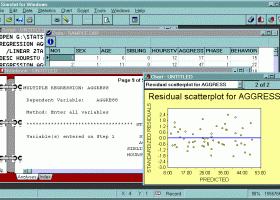
SIMSTAT for Windows is an innovative product that goes beyond mere statistical analysis. It offers output management features not found in any other program as well as its own scripting language to automate statistical analysis and to write small applications, interactive tutorials with multimedia capabilities, as well as computer assisted interviewing systems.
It also has an innovative Results Notebook for compiling your statistical results alongside notes and annotations. It can import data from various database and spreadsheet formats as well as ASCII and SPSS files.
Data Management
The data window is a spreadsheet like data editor where values can be entered, browsed, or edited. It has the following features:
- Reads standard DBF files up to 1024 variables (or fields). Can import and export comma or tab separated text files, Paradox, Lotus 1-2-3, Symphony, Excel, Quattro Pro, - SPSS/PC+ and SPSS for Windows files.
- Supports variable and value labels and up to 3 missing values
- Records can be filtered using valid xBase expressions
- Records can be sorted on one or several variables or on results of xBase expressions
- Supports data transformation (including conditional transformation), recoding, ranking. Provides more than 50 transformation functions including trigonometric, statistical, random number functions.
Output Management
The notebook window displays the statistical output for all analyses performed during a session. The notebook metaphor provides an efficient way to browse and manage results.
The text output of each analysis is displayed on a separate page. You can turn pages either with the mouse by clicking on the page flip icons at the bottom of the notebook or by keyboard keys. While each page can be annotated or edited, it is also possible to add empty pages in order to put down ideas or remarks, sketch an analysis plan, or write down interpretation of results.
Tabs can be added to create sections in the notebook allowing you to store different kinds of analysis in different sections of the notebook. An index of all analysis is automatically generated. This index can be used to quickly locate and go to a specific page, move pages within the notebook, or delete some pages.
Graphics
The charts window displays all high-resolution charts created during a session. It allows you full control of axis, labels, legends, colours, line drawing, etc. The resulting graphics can be exported to disk in Windows Metafile format or copied to the clipboard as a picture, Windows Metafile, or tab separated values.
Scripting
The script window is used to enter and edit commands. Those commands can be either read from a script file on disk, typed in by the user or automatically generated by the program. When used with the RECORD feature, the script can also be used as a log window to keep track of the analysis performed during a session. Those commands may then be executed again, providing an efficient way to automate statistical analysis. Additional commands also allows one to create demonstration programs, computer assisted teaching lessons, and even computer assisted data entry:
- Statistical analysis, data filtering and transformation commands
- Record script feature to automatically generate commands corresponding to operations performed with menus and dialog boxes.
- Flow control features such as IF-THEN-ELSE statements, GOTO or GOSUB commands, RUN command to run external programs, etc.
- Can read, write, and perform mathematical operations on user defined variables or any database field
- Create menus, text boxes, input boxes, dialog boxes, multiple items questions, etc. (responses from a user can be stored in memory variables or in a data file)
Multimedia features: play sound (.WAV), music (.MDI), and movie (.AVI) files, display graphics (.BMP) and text.
Add-ins
SIMSTAT for Windows has a wide range of add-ins that allows you to extend the capabilities of the program.
Capability
The program can handle u
It also has an innovative Results Notebook for compiling your statistical results alongside notes and annotations. It can import data from various database and spreadsheet formats as well as ASCII and SPSS files.
Data Management
The data window is a spreadsheet like data editor where values can be entered, browsed, or edited. It has the following features:
- Reads standard DBF files up to 1024 variables (or fields). Can import and export comma or tab separated text files, Paradox, Lotus 1-2-3, Symphony, Excel, Quattro Pro, - SPSS/PC+ and SPSS for Windows files.
- Supports variable and value labels and up to 3 missing values
- Records can be filtered using valid xBase expressions
- Records can be sorted on one or several variables or on results of xBase expressions
- Supports data transformation (including conditional transformation), recoding, ranking. Provides more than 50 transformation functions including trigonometric, statistical, random number functions.
Output Management
The notebook window displays the statistical output for all analyses performed during a session. The notebook metaphor provides an efficient way to browse and manage results.
The text output of each analysis is displayed on a separate page. You can turn pages either with the mouse by clicking on the page flip icons at the bottom of the notebook or by keyboard keys. While each page can be annotated or edited, it is also possible to add empty pages in order to put down ideas or remarks, sketch an analysis plan, or write down interpretation of results.
Tabs can be added to create sections in the notebook allowing you to store different kinds of analysis in different sections of the notebook. An index of all analysis is automatically generated. This index can be used to quickly locate and go to a specific page, move pages within the notebook, or delete some pages.
Graphics
The charts window displays all high-resolution charts created during a session. It allows you full control of axis, labels, legends, colours, line drawing, etc. The resulting graphics can be exported to disk in Windows Metafile format or copied to the clipboard as a picture, Windows Metafile, or tab separated values.
Scripting
The script window is used to enter and edit commands. Those commands can be either read from a script file on disk, typed in by the user or automatically generated by the program. When used with the RECORD feature, the script can also be used as a log window to keep track of the analysis performed during a session. Those commands may then be executed again, providing an efficient way to automate statistical analysis. Additional commands also allows one to create demonstration programs, computer assisted teaching lessons, and even computer assisted data entry:
- Statistical analysis, data filtering and transformation commands
- Record script feature to automatically generate commands corresponding to operations performed with menus and dialog boxes.
- Flow control features such as IF-THEN-ELSE statements, GOTO or GOSUB commands, RUN command to run external programs, etc.
- Can read, write, and perform mathematical operations on user defined variables or any database field
- Create menus, text boxes, input boxes, dialog boxes, multiple items questions, etc. (responses from a user can be stored in memory variables or in a data file)
Multimedia features: play sound (.WAV), music (.MDI), and movie (.AVI) files, display graphics (.BMP) and text.
Add-ins
SIMSTAT for Windows has a wide range of add-ins that allows you to extend the capabilities of the program.
Capability
The program can handle u
Simstat 2.6 download tags
Bookmark Simstat
Simstat for Windows 7 - Copyright information
All Simstat reviews, submitted ratings and written comments become the sole property of Windows 7 download. You acknowledge that you, not windows7download, are responsible for the contents of your submission. However, windows7download reserves the right to remove or refuse to post any submission for any reason.
Windows 7 Download periodically updates pricing and software information of Simstat full version from the publisher, but some information may be out-of-date. You should confirm all information.
Using warez version, crack, warez passwords, patches, serial numbers, registration codes, key generator, pirate key, keymaker or keygen for Simstat license key is illegal and prevent future development of Simstat. Download links are directly from our mirrors or publisher's website, Simstat torrent or shared files from free file sharing and free upload services, including Rapidshare, MegaUpload, YouSendIt, SendSpace, DepositFiles, DivShare, HellShare, HotFile, FileServe or MediaFire, are not used.
Windows 7 Download periodically updates pricing and software information of Simstat full version from the publisher, but some information may be out-of-date. You should confirm all information.
Using warez version, crack, warez passwords, patches, serial numbers, registration codes, key generator, pirate key, keymaker or keygen for Simstat license key is illegal and prevent future development of Simstat. Download links are directly from our mirrors or publisher's website, Simstat torrent or shared files from free file sharing and free upload services, including Rapidshare, MegaUpload, YouSendIt, SendSpace, DepositFiles, DivShare, HellShare, HotFile, FileServe or MediaFire, are not used.
Post Simstat review


Windows 7 Simstat related downloads
My Account
Help
Windows 7 Software Coupons
-
MacX Video Converter Pro
56% Off -
Media Player Morpher
85% Off -
WinX MediaTrans
63% Off -
MacX MediaTrans
63% Off -
WinX DVD Ripper
50% Off
My Saved Stuff
You have not saved any software.
Click "Save" next to each software.
Click "Save" next to each software.
Would you like to receive announcements of new versions of your software by email or by RSS reader? Register for FREE!
Windows 7 Downloads Picks
- LochMaster 4.0
- BricsCad Classic 24.2.06-1
- Sweet Home 3D 7.4
- Mobile Atlas Creator 2.2.1
- MVSP 3.22
- MaxIm DL 6.05
- Graph Streaming 0.7.0.12
- GPS Utility 5.51
- Geneious PRO x64 6.0.4
- Melanie Viewer 7.0.7
- Jmol 14.31.53
- Sprint-Layout 6.0
- DICOMscope 3.5.1
- Geneious PRO for Vista 4.7.6
- LabCollector 4.96
- EAGLE Light 9.6.2
- Geneious PRO 6.0.4
- CurveExpert Professional 2.7.3
- Circuit Diagram 3.1.0 B3
- Graph construction program 3.2.0
Popular Tags
solidedge
converter
viewer
autocad
cad
dwg
import
cam
home
software
hpgl
animation
architect
convert
design
file
assembly
dxf
plug in
solidworks
view
export
stl file
open
dwg viewer
intellicad
landscape
obj file
bmp
stl
Popular Windows 7 Software
- CorelDRAW X7 (x32 bit) 17.4.0.887
- CorelDRAW X7 (x64 bit) 17.4.0.887
- CorelDRAW X5 15.2.0.686
- CorelDRAW X4
- iTop Screenshot 1.2.3.544
- CorelDRAW 2017 19.1.0.419
- CorelDRAW X6 16.4.0.1280
- Blender - 32 bit 2.80
- Adobe InDesign CS5 CS5.5 7.5.3
- CorelDRAW X8 18.0.0.450
- Graphic Workshop Professional 15.0a rev11
- Model Air Design 2.4
- Blender Portable 4.1.1
- Model Air Design 2.4
- Paint.NET 5.0.13
© 2026 Windows7Download.com - All logos, trademarks, art and other creative works are and remain copyright and property of their respective owners. Microsoft Windows is a registered trademarks of Microsoft Corporation. Microsoft Corporation in no way endorses or is affiliated with windows7download.com.