


Shell for Windows 7 - "Enhance Your PC with "Shell"" - Windows 7 Download


Shell 1.8
"Transform your Windows 7 experience with Shell – the ultimate customization software."
Looking for a way to enhance your Windows 7 experience? Look no further than Nilesoft's "Shell" software. With its sleek and customizable interface, "Shell" offers a wide range of features to help you get the most out of your operating system. From improved file management to enhanced security, "Shell" has it all. Don't settle for a basic Windows experience - download "Shell" today and take your computing to the next level.
Shell 1.8 full details

| File Size: | 3.20 MB |
|---|---|
| License: | Freeware |
| Price: | FREE |
| Released: | 2023-01-15 |
| Downloads: | Total: 215 | This Month: 102 |
| Publisher: | Nilesoft |
| Publisher URL: | https://nilesoft.org |

Download Shell 1.8
Save Shell to My Stuff
Tweet
Shell - Windows 7 Download awards

Shell 1.8 full description
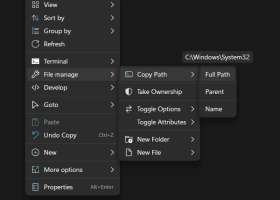
Shell is a powerful context menu manager for Windows File Explorer. Shell is a context menu extender that lets you handpick the items to integrate into Windows File Explorer's context menu, create custom commands to access all your favorite web pages, files, and folders, and launch any application directly from the context menu. It also provides you a convenient solution to modify or remove any context menu item added by the system or third party software. Shell is a portable utility, so you dont need to install anything on your PC. Features - Fully customize the appearance. - Adding new custom menu items such as sub-menu, menu item and separator. - Modify Windows File Explorer menu items. - Support all file system objects files, folders, desktop and taskbar. - Support expressions syntax, with built-in functions and predefined variables. - Support colors, glyphs, SVG, embedded icons, and image files such as .ico, .png or .bmp. - Support search and filter. - Support for complex nested items. - Support multiple columns. - Lightweight, portable and relatively easy to use. - Quickly and easily configure files in plain text. - Minimal resource usage. - No limitations.
Shell 1.8 download tags
Shell 1.8 Windows 7 release notes
New Release
- Internal fixes and improvements
- Improved default section syntax
- New 'static.enabled' option to enable or disable handle static section
- New 'dynamic.enabled' option to enable or disable handle dynamic section
- New 'theme.background' option to separate background color from background color of menu items
- New 'prefix' option to customize mnemonic-prefix.
- New 'layout.popup' option to show submenu alignment to parent
- New 'image.align' option to enable display of image and checked together
- New options have been added to margin and padding (left, top, right, bottom)
- New options have been added to theme.item.text, theme.item.back, and theme.symbol (normal, normal.disabled, select, select.disabled)
- New 'in' option for static items to help select items in submenus
- New 'invoke' option for dyamic items to change command operations to multiple or single
- New 'image.scale' option to enable scaling of images to fit the size of static items
- New 'exclude' option to prevent processes or windows
- New functions color.invert, color.accent_light1, color.accent_light2 color.accent_light3 color.accent_dark1 color.accent_dark2 color.accent_dark3
- New function path.wsl to help convert the path to wsl path
- New functions for color processing With its new syntax, color.opacity, color.light, color.dark, color.rgba
- New functions 'window.send, window.post' to send commands to the current window or specify window
- New function 'sys.is_primary_monitor'
- New function 'icon.box'
- Support for system menus that are included by a third party
- Support moving dynamic and static items to other complex submenus
- Support for customizing static items in complex submenus
- Support effects gradient and Transparency(transparent, blur, acrylic).
- These functions 'this.desktop, this.taskbar,this.explorer,this.nav' have been moved to window scope
- The following options have been moved to theme scope: (item, font, border shadow, separator, symbol, image)
- The 'default' section has been renamed to 'set'.
- The extension of configuration file has been changed to .nss (Nilesoft Shell Script)
- str.replace bug fixed
[ Shell release history ]
- Internal fixes and improvements
- Improved default section syntax
- New 'static.enabled' option to enable or disable handle static section
- New 'dynamic.enabled' option to enable or disable handle dynamic section
- New 'theme.background' option to separate background color from background color of menu items
- New 'prefix' option to customize mnemonic-prefix.
- New 'layout.popup' option to show submenu alignment to parent
- New 'image.align' option to enable display of image and checked together
- New options have been added to margin and padding (left, top, right, bottom)
- New options have been added to theme.item.text, theme.item.back, and theme.symbol (normal, normal.disabled, select, select.disabled)
- New 'in' option for static items to help select items in submenus
- New 'invoke' option for dyamic items to change command operations to multiple or single
- New 'image.scale' option to enable scaling of images to fit the size of static items
- New 'exclude' option to prevent processes or windows
- New functions color.invert, color.accent_light1, color.accent_light2 color.accent_light3 color.accent_dark1 color.accent_dark2 color.accent_dark3
- New function path.wsl to help convert the path to wsl path
- New functions for color processing With its new syntax, color.opacity, color.light, color.dark, color.rgba
- New functions 'window.send, window.post' to send commands to the current window or specify window
- New function 'sys.is_primary_monitor'
- New function 'icon.box'
- Support for system menus that are included by a third party
- Support moving dynamic and static items to other complex submenus
- Support for customizing static items in complex submenus
- Support effects gradient and Transparency(transparent, blur, acrylic).
- These functions 'this.desktop, this.taskbar,this.explorer,this.nav' have been moved to window scope
- The following options have been moved to theme scope: (item, font, border shadow, separator, symbol, image)
- The 'default' section has been renamed to 'set'.
- The extension of configuration file has been changed to .nss (Nilesoft Shell Script)
- str.replace bug fixed
[ Shell release history ]
Shell 1.8 Windows 7 requirements
Windows 7/8/10/11
Bookmark Shell
Shell for Windows 7 - Copyright information
All Shell reviews, submitted ratings and written comments become the sole property of Windows 7 download. You acknowledge that you, not windows7download, are responsible for the contents of your submission. However, windows7download reserves the right to remove or refuse to post any submission for any reason.
Windows 7 Download periodically updates pricing and software information of Shell full version from the publisher, but some information may be out-of-date. You should confirm all information.
Using warez version, crack, warez passwords, patches, serial numbers, registration codes, key generator, pirate key, keymaker or keygen for Shell license key is illegal and prevent future development of Shell. Download links are directly from our mirrors or publisher's website, Shell torrent or shared files from free file sharing and free upload services, including Rapidshare, MegaUpload, YouSendIt, SendSpace, DepositFiles, DivShare, HellShare, HotFile, FileServe or MediaFire, are not used.
Windows 7 Download periodically updates pricing and software information of Shell full version from the publisher, but some information may be out-of-date. You should confirm all information.
Using warez version, crack, warez passwords, patches, serial numbers, registration codes, key generator, pirate key, keymaker or keygen for Shell license key is illegal and prevent future development of Shell. Download links are directly from our mirrors or publisher's website, Shell torrent or shared files from free file sharing and free upload services, including Rapidshare, MegaUpload, YouSendIt, SendSpace, DepositFiles, DivShare, HellShare, HotFile, FileServe or MediaFire, are not used.
Post Shell review


Windows 7 Shell related downloads
GUI shell for the UPX executable packer UPX Shell is an ASPack-like GUI shell for UPX (Ultimate ...
Introducing CDBF Shell, the ultimate tool for Windows 7 users who ... work with your DBF files efficiently. With CDBF Shell, you can view and edit data, create backups, ...
... containing a set of tools such as command shell (command interpreter), console emulator, text editor and various ...
... the ultimate tool for managing your Windows 7 shell extensions – ShellExView! Developed by NirSoft Freeware, this ...
XnShell is a powerful Shell extension for Windows ™ Explorer, allowing you to preview and ...
My Account
Help
Windows 7 Software Coupons
-
MacX MediaTrans
63% Off -
WinX DVD Ripper
50% Off -
WinX HD Video Converter
56% Off -
WinX DVD Copy Pro
42% Off -
MacX DVD Ripper Pro
50% Off
My Saved Stuff
You have not saved any software.
Click "Save" next to each software.
Click "Save" next to each software.
Would you like to receive announcements of new versions of your software by email or by RSS reader? Register for FREE!
Windows 7 Downloads Picks
Popular Tags
program
window
run
folder
explorer
free
manager
tray
switch
mouse
system
extension
desktop
shift
windows
file
cmd
shell
display
utility
batch
command line
change
settings
folders
vista
launcher
customize
virtual desktop
shortcut
Popular Windows 7 Software
- Network Monitor II 31.7
- Avro Keyboard 5.6.0.0
- Media Creation Tool x64 22H2
- Ghostscript (x64 bit) 10.03.1
- Windows 7
- iTop Data Recovery 6.1.0.936
- Windows 7 Service Pack 1 7601.17514.1011
- iTop Easy Desktop 4.2.0.312
- Advanced SystemCare 19.3.0.200
- Smart Game Booster 5.3.1.692
- iTop PDF 3.6.0.4
- GoodSync2Go 12.9.29.9
- The Dude 7.22.2 Stable
- IObit Uninstaller 15.4.0.1
- Atlantis Word Processor 5.0.4
© 2026 Windows7Download.com - All logos, trademarks, art and other creative works are and remain copyright and property of their respective owners. Microsoft Windows is a registered trademarks of Microsoft Corporation. Microsoft Corporation in no way endorses or is affiliated with windows7download.com.