


Folder Menu (x32 bit) for Windows 7 - Effortlessly access folders, organized and easy, with Folder Menu! - Windows 7 Download


Folder Menu (x32 bit) 3.1.2.2
"Streamline your workflow with Folder Menu – the ultimate x32 bit software for Windows 7 users."
Introducing Folder Menu (x32 bit) – a powerful software developed by Rexx that enhances your Windows 7 experience. This innovative tool simplifies your workflow with quick access to your frequently used folders directly from the system tray. The x32 bit version is perfect for optimizing your 32-bit operating system. Folder Menu minimizes clutter and saves time, making it an indispensable addition to any Windows 7 user. Download now and level up your productivity!
Folder Menu (x32 bit) 3.1.2.2 full details

| File Size: | 420 kB |
|---|---|
| License: | Open Source |
| Price: | FREE |
| Released: | 2010-04-23 |
| Downloads: | Total: 544 | This Month: 109 |
| Publisher: | Rexx |
| Publisher URL: | http://foldermenu.sourceforge.net/ |

Download Folder Menu (x32 bit) 3.1.2.2
Save Folder Menu (x32 bit) to My Stuff
Tweet
Folder Menu (x32 bit) - Windows 7 Download awards

Folder Menu (x32 bit) 3.1.2.2 full description
Folder Menu is a folder switching tool.
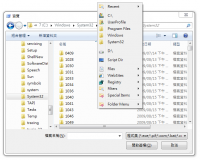
The Folder Menu application was designed to be a folder switching tool. You can quickly jump to your favorite folders in explorer, open/save dialog or command prompt.
You can quickly jump to your favorite folders in explorer, open/save dialog or command prompt...and more.
You can also launch your favorite folders, files or urls.
Features:
* Quickly Switching Folders
Click the middle mouse button (show menu 1 hotkey), a popup menu for favorite folders will show up, click on an item and it will switch to that folder.
The following applications are supported:
o Explorer
o Open/Save Dialog
o MS Office 2003 Open/Save Dialog
o Command Prompt
o Total Commander
o Unreal Commander
o Free Commander
o Emacs
o rxvt
o ...and more
# Quickly Launch Folders
You can also show the menu anywhere with Win+W (show menu 2 hotkey), and launch files or folders quickly.
Besides folders, you can also use files, URLs or registry keys as a favorite item.
# Show Menu Hotkeys
Show Menu 1: Only show menu in supported applications, and open folder in the active window.
Show Menu 2: Always show menu, and always open folder in a new explorer.
Show Menu 1.5: Between 1 and 2, always show menu, and open folder in active window if it is supported, otherwise, it will open folder in a new explorer.
# Ctrl-Click Menu
If you holding Ctrl (or Shift) while click on an item, or right click on an item, a menu of subfolders of that item will show up.
Holding both Ctrl and Shift to show files in the menu.
# Browse Mode
Turn the CapsLock on to enter browse mode.
In browse mode, the behavior of Click and Ctrl-Click will be exchanged. That is, click on an item will open its subfolder menu, and Ctrl-Click will open the item.
# Recent Items
You can add a "Recent items" submenu to the favorite menu, it will record recently opened items.
The System Recent item is the recent files in Windows system.
# Open Selected Text
Select a file path, URL or registry key, and press Win+J, the selected path will be opened automatically.
# Explorer List
List all opened explorers, and click on an item to activate that one.
If you holding Ctrl (or Shift, or mouse right button) while click, the path of that item will be opened in active window or new window.
# Submenu
Support multi-level submenus.
# Custom Icons
You can customize menu icons and sizes for specific file types.
Special items can also use custom icons, Computer for my computer, Drive for HDDs, Folder for folders, Unknown for unknown file type, Menu for submenus, Recent for recent item, Explorer for explorer list item.
You can also customize icon for each items.
# Toggle Explorer Settings
You can quickly toggle between show or hide hidden files, and show or hide file extension.
# Multiple Language Support
Folder Menu support language files.
Put the language file and the exe in the same folder, and then you can select the language in the "others" tab in options.
# Total Commander Menu
Folder Menu can read the Dir Menu of Total Commander, you can also use TC Menu as main menu.
The Folder Menu application was designed to be a folder switching tool. You can quickly jump to your favorite folders in explorer, open/save dialog or command prompt.
You can quickly jump to your favorite folders in explorer, open/save dialog or command prompt...and more.
You can also launch your favorite folders, files or urls.
Features:
* Quickly Switching Folders
Click the middle mouse button (show menu 1 hotkey), a popup menu for favorite folders will show up, click on an item and it will switch to that folder.
The following applications are supported:
o Explorer
o Open/Save Dialog
o MS Office 2003 Open/Save Dialog
o Command Prompt
o Total Commander
o Unreal Commander
o Free Commander
o Emacs
o rxvt
o ...and more
# Quickly Launch Folders
You can also show the menu anywhere with Win+W (show menu 2 hotkey), and launch files or folders quickly.
Besides folders, you can also use files, URLs or registry keys as a favorite item.
# Show Menu Hotkeys
Show Menu 1: Only show menu in supported applications, and open folder in the active window.
Show Menu 2: Always show menu, and always open folder in a new explorer.
Show Menu 1.5: Between 1 and 2, always show menu, and open folder in active window if it is supported, otherwise, it will open folder in a new explorer.
# Ctrl-Click Menu
If you holding Ctrl (or Shift) while click on an item, or right click on an item, a menu of subfolders of that item will show up.
Holding both Ctrl and Shift to show files in the menu.
# Browse Mode
Turn the CapsLock on to enter browse mode.
In browse mode, the behavior of Click and Ctrl-Click will be exchanged. That is, click on an item will open its subfolder menu, and Ctrl-Click will open the item.
# Recent Items
You can add a "Recent items" submenu to the favorite menu, it will record recently opened items.
The System Recent item is the recent files in Windows system.
# Open Selected Text
Select a file path, URL or registry key, and press Win+J, the selected path will be opened automatically.
# Explorer List
List all opened explorers, and click on an item to activate that one.
If you holding Ctrl (or Shift, or mouse right button) while click, the path of that item will be opened in active window or new window.
# Submenu
Support multi-level submenus.
# Custom Icons
You can customize menu icons and sizes for specific file types.
Special items can also use custom icons, Computer for my computer, Drive for HDDs, Folder for folders, Unknown for unknown file type, Menu for submenus, Recent for recent item, Explorer for explorer list item.
You can also customize icon for each items.
# Toggle Explorer Settings
You can quickly toggle between show or hide hidden files, and show or hide file extension.
# Multiple Language Support
Folder Menu support language files.
Put the language file and the exe in the same folder, and then you can select the language in the "others" tab in options.
# Total Commander Menu
Folder Menu can read the Dir Menu of Total Commander, you can also use TC Menu as main menu.
Folder Menu (x32 bit) 3.1.2.2 download tags
Folder Menu (x32 bit) 3.1.2.2 Windows 7 release notes
New Release
* Fixed getting icon for link of exe file
* Fixed name of quot;MS Office Dialogquot; (Office 2007 in Windows XP still needs it, not only 2003)
[ Folder Menu (x32 bit) release history ]
* Fixed getting icon for link of exe file
* Fixed name of quot;MS Office Dialogquot; (Office 2007 in Windows XP still needs it, not only 2003)
[ Folder Menu (x32 bit) release history ]
Bookmark Folder Menu (x32 bit)
Folder Menu (x32 bit) for Windows 7 - Copyright information
All Folder Menu (x32 bit) reviews, submitted ratings and written comments become the sole property of Windows 7 download. You acknowledge that you, not windows7download, are responsible for the contents of your submission. However, windows7download reserves the right to remove or refuse to post any submission for any reason.
Windows 7 Download periodically updates pricing and software information of Folder Menu (x32 bit) full version from the publisher, but some information may be out-of-date. You should confirm all information.
Using warez version, crack, warez passwords, patches, serial numbers, registration codes, key generator, pirate key, keymaker or keygen for Folder Menu (x32 bit) license key is illegal and prevent future development of Folder Menu (x32 bit). Download links are directly from our mirrors or publisher's website, Folder Menu (x32 bit) torrent or shared files from free file sharing and free upload services, including Rapidshare, MegaUpload, YouSendIt, SendSpace, DepositFiles, DivShare, HellShare, HotFile, FileServe or MediaFire, are not used.
Windows 7 Download periodically updates pricing and software information of Folder Menu (x32 bit) full version from the publisher, but some information may be out-of-date. You should confirm all information.
Using warez version, crack, warez passwords, patches, serial numbers, registration codes, key generator, pirate key, keymaker or keygen for Folder Menu (x32 bit) license key is illegal and prevent future development of Folder Menu (x32 bit). Download links are directly from our mirrors or publisher's website, Folder Menu (x32 bit) torrent or shared files from free file sharing and free upload services, including Rapidshare, MegaUpload, YouSendIt, SendSpace, DepositFiles, DivShare, HellShare, HotFile, FileServe or MediaFire, are not used.
Post Folder Menu (x32 bit) review


Windows 7 Folder Menu (x32 bit) related downloads
Windows 7 Little Tweaker is a small and simple to ... easily activate a few useful extras for Microsoft Windows 7 32bit platforms. Windows 7 Little Tweaker is a ...
Portable Windows Elapsed Running Time is a small utility designed to enable you to view the ...
Introducing Windows 7. Your PC, simplified. Windows 7 is more than Vista done right, but you ...
... XP Mode and Windows Virtual PC, available on Windows 7 Professional and Windows 7 Ultimate, allow you to ...
Windows 7 is the next release of the Windows client ... feedback to meet our engineering goals of making Windows 7 the best-performing and most stable Windows operating system ...
My Account
Help
Windows 7 Software Coupons
-
FREE VPN PROXY by SEED4.ME WINDOWS
Free VPN by Seed4Me -
MacX Media Management Bundle
70% Off -
Media Player Morpher
85% Off -
WinX MediaTrans
63% Off -
MacX MediaTrans
63% Off
My Saved Stuff
You have not saved any software.
Click "Save" next to each software.
Click "Save" next to each software.
Would you like to receive announcements of new versions of your software by email or by RSS reader? Register for FREE!
Windows 7 Downloads Picks
- Network Monitor II 31.7
- Windows 7
- iTop Easy Desktop 4.2.0.312
- Windows 7 DreamScene Activator 1.1
- Windows XP Mode (Windows Virtual PC) 1.3.7600.16423
- Windows 7 Little Tweaker 1.2
- Windows Elapsed Running Time 1.6.0
- Windows 7 Enterprise
- User Account Manager 6.03
- Secunia Personal Software Inspector 3.0.0.11005
- PDF-XChange Standard 9.5.368
- System Monitor II 31.3
- Realtek High Definition Audio driver 2.82
- Windows 7 x64
- Microsoft Security Essentials Definition Updates x64 1.67.7.0
- System Explorer 7.1.0.5359
- GPU Monitor 12.9
- Total PC Care 3.0.648.7830
- Lupo PenSuite (x64 bit) 2016
- Microsoft Virtual PC 2007 SP1 6.0.192
Popular Tags
text
software
free
password
files
keyboard
download
tool
security
utilities
monitor
video
desktop
edit
manager
print
optimize
database
convert
data
file
system
windows
search
shareware
utility
web
editor
time
image
Popular Windows 7 Software
- Network Monitor II 31.7
- Avro Keyboard 5.6.0.0
- Media Creation Tool x64 22H2
- Ghostscript (x64 bit) 10.03.1
- Windows 7
- iTop Data Recovery 6.1.0.936
- Windows 7 Service Pack 1 7601.17514.1011
- iTop Easy Desktop 4.2.0.312
- Advanced SystemCare 19.3.0.200
- Smart Game Booster 5.3.1.692
- iTop PDF 3.6.0.4
- GoodSync2Go 12.9.29.9
- The Dude 7.22.2 Stable
- IObit Uninstaller 15.4.0.1
- Atlantis Word Processor 5.0.4
© 2026 Windows7Download.com - All logos, trademarks, art and other creative works are and remain copyright and property of their respective owners. Microsoft Windows is a registered trademarks of Microsoft Corporation. Microsoft Corporation in no way endorses or is affiliated with windows7download.com.