

Crimson Editor Portable for Windows 7 - "Efficient code editing: Crimson Editor Portable" - Windows 7 Download


Crimson Editor Portable 3.72 R286M
"Crimson Editor Portable: A powerful text editor on-the-go."
Welcome to the ultimate source for downloading the leading software toolset around - Crimson Editor Portable. Developed by Ingyu Kang, this software not only allows you to write and edit source files, but you can also highlight syntax, search and replace text, and even adjust the interface to fit your personal needs. This software is everything you need to take your coding game to the next level. Download Crimson Editor Portable today and see what all the fuss is about!
Crimson Editor Portable 3.72 R286M full details

| File Size: | 1.70 MB |
|---|---|
| License: | Open Source |
| Price: | FREE |
| Released: | 2011-10-05 |
| Downloads: | Total: 845 | This Month: 1 |
| Publisher: | Ingyu Kang |
| Publisher URL: | http://www.crimsoneditor.com/ |

Download Crimson Editor Portable 3.72 R286M
Save Crimson Editor Portable to My Stuff
Tweet
Crimson Editor Portable - Windows 7 Download awards

Crimson Editor Portable 3.72 R286M full description
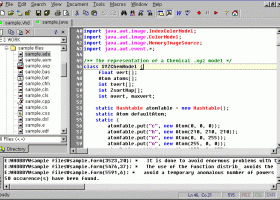
Crimson Editor is a professional source code editor for Windows.
This program is not only fast in loading time, but also small in size (so small that it can be copied in one floppy disk).
While it can serve as a good replacement for Notepad, it also offers many powerful features for programming languages such as HTML, C/C++, Perl and Java.
Edit multiple documents
- switch between documents using file selection tab.
- Ctrl+Tab brings the last accessed document to topmost.
- support window splitter to see different parts of a document.
Syntax highlighting
- configurable via custom syntax files.
- preconfigured for more than 100 computer languages.
Multi-level undo / redo
- all editing actions are recorded from the opening of a file.
- any document always can be undone to it's initial contents.
- unlimited undo and redo buffers.
Project management
- manage group of related files into one project.
- remote files also can be included in a project.
Directory tree view window
- click to open documents.
- filter to display only selected file class.
Find & Replace
- replace specified text one by one, or as a whole.
- support regular expression.
Column mode editing
- copy and paste rectangular selections.
- switch between column mode and line mode. (Alt+C)
Natural word wrapping
- word wrapping does not affect syntax highlighting.
- configurable wrapping indentation. (easer to understand the syntax)
Spell checker
- around 100000 words were added in the dictionary.
- users can register new words in their own dictionary. (InstallDir/user.dic)
User tools and macros
- execute external programs with proper arguments.
- compile, execute and test your code.
- ease your fingers with key stroke recording. (record & replay)
Edit remote files directly using built-in FTP client
- open, edit, and save documents in remote FTP servers.
- save account information (encoded) for automatic logon.
Print & Print preview
- configurable page header and footer.
- print with line numbers.
- print with syntax highlighting. (used in color printer)
- true type font selection for printer.
Other useful features
support Unicode & UTF-8 encoding, drag & drop text editing,
single instance / multiple instances, ability to detect changed files,
bookmark & go to, highlight active line, highlight matching pairs,
multi-byte support with integrated IME (for eastern languages),
auto indent, wheel mouse support, copy & paste, line numbers,
configurable line spacing, option to save files in Unix format,
Crimson Editor Portable 3.72 R286M download tags
Crimson Editor Portable 3.72 R286M Windows 7 release notes
New Release
· unicode encoding, splitter window
· bug fixed: DEL key deletes directory item when project item is selected.
· bug fixed: ftp file transfer error when the file size is multiple of 512 bytes.
· bug fixed: search & replace the beginning of line crashes Crimson Editor.
· bug fixed: find with 'Match whole word' considers a '_' as not part of a word.
· bug fixed: comment color when typing the word 'remove' in ASP document.
· bug fixed: screen resolution problem using dual monitor.
· bug fixed: backup file creation failed in UNC path.
[ Crimson Editor Portable release history ]
Bookmark Crimson Editor Portable
Crimson Editor Portable for Windows 7 - Copyright information
All Crimson Editor Portable reviews, submitted ratings and written comments become the sole property of Windows 7 download. You acknowledge that you, not windows7download, are responsible for the contents of your submission. However, windows7download reserves the right to remove or refuse to post any submission for any reason.
Windows 7 Download periodically updates pricing and software information of Crimson Editor Portable full version from the publisher, but some information may be out-of-date. You should confirm all information.
Using warez version, crack, warez passwords, patches, serial numbers, registration codes, key generator, pirate key, keymaker or keygen for Crimson Editor Portable license key is illegal and prevent future development of Crimson Editor Portable. Download links are directly from our mirrors or publisher's website, Crimson Editor Portable torrent or shared files from free file sharing and free upload services, including Rapidshare, MegaUpload, YouSendIt, SendSpace, DepositFiles, DivShare, HellShare, HotFile, FileServe or MediaFire, are not used.
Post Crimson Editor Portable review


Windows 7 Crimson Editor Portable related downloads
NFOpad Portable is a lightweight text editor and NFO file viewer for people who read ... edit plain-text files, including release notes and ASCII-art documents. It follows the familiar, simple approach of Microsoft ...
Introducing SSuite Spell Checker - a remarkable software crafted by SSuite Office ... it effortlessly detects and corrects errors in your documents in real-time. Say goodbye to embarrassing typos and ...
Portable CsvEditor is the portable version of CsvEditor developed to be able to ... from a USB flash drive or any other portable device. This software will offer you a ...
Introducing VOVSOFT - Website Spell Checker, an essential tool for webmasters, content creators, and ... ensuring your content is polished and professional.
VOVSOFT’s Website Spell Checker supports multiple languages, making it a versatile choice ...
Portable AMP Calendar is a handy utility designed to display a calendar based on the ...
SSuite Spell Checker is an innovative software solution developed by SSuite ... tool is designed to help users improve their productivity by eliminating spelling errors in their documents. With ...
My Account
Help
Windows 7 Software Coupons
-
MacX Media Management Bundle
70% Off -
WinX DVD Ripper
50% Off -
WinX MediaTrans
63% Off -
MacX Video Converter Pro
56% Off -
MacX DVD Video Converter
58% Off
My Saved Stuff
You have not saved any software.
Click "Save" next to each software.
Would you like to receive announcements of new versions of your software by email or by RSS reader? Register for FREE!
Windows 7 Downloads Picks
- LibreOffice 26.8.2.2 Latest
- QueueExplorer Standard 5.1.2
- Soda PDF Professional 14.0.418.3254
- Microsoft Office 2007
- Microsoft Office 2010 x32 14.0 BETA
- Typeit! 4.994
- EMF Printer Driver 17.77 Revision 3242
- Notepad++ Portable 8.9.6.2
- Chemistry Add-in for Word 3.3.4
- Text Filter 2.1.0 B3629
- Adobe Acrobat XI Pro 11.0.10
- PDF OwnerGuard Personal 12.9.1
- LibreOffice x64 24.2.4
- Convert XLS 18.501
- ASAP Utilities 9.3
- Microsoft Office 2003
- Microsoft OneNote 2010 2408 Build 17928.201
- Portable Text Filter 2.1.0 B3629
- PDFZilla 3.9.5
- NFOpad Portable 1.68
Popular Tags
word
outlook
conversion
document
pdf
files
printer
pdf creator
doc
data
create
adobe
pdf converter
convert
powerpoint
add in
spreadsheet
excel
microsoft
text
xls
tool
free
create pdf
office
software
editor
converter
acrobat
word to pdf
Popular Windows 7 Software
- PKeyMaster 2610 (Build 20527.20
- Amigo Point Of Sale 9.9.3
- Info-Base 13.3 - 12.11.2024
- Coolutils Converter 3.1.1.160
- Netpas Estimator 5.2 Build 5299
- Visitor Management System Application 6.9.8
- Decanter Sizing Calculator 1.0.0.1
- ASCOMP PDF-compress 2.001
- Software ID Cards 9.2.0.1
- LANDPARK MANAGER 5.2.4
- LibreOffice 26.8.2.2 Latest
- Total PDF Printer 4.1.0.76
- Address Organizer Deluxe 4.21
- Adminsoft Accounts 4.332
- Office.Files.Images 2.88
© 2026 Windows7Download.com - All logos, trademarks, art and other creative works are and remain copyright and property of their respective owners. Microsoft Windows is a registered trademarks of Microsoft Corporation. Microsoft Corporation in no way endorses or is affiliated with windows7download.com.