


Comfort Keys Pro for Windows 7 - "Effortlessly optimize typing with Comfort Keys Pro" - Windows 7 Download


Comfort Keys Pro 9.6.0.0
"Streamline your workflow with Comfort Keys Pro - a powerful shortcut tool for Windows 7."
Comfort Keys Pro is an incredibly useful software developed by the Comfort Software Group and it's loaded with features that can simplify your life. With this program, you can organize your shortcuts, perform automated tasks and create mouse gestures, making your daily routine more efficient and reducing the likelihood of repetitive strain injuries. This software is perfect for professionals, gamers, and anyone who spends a significant amount of time on their computer. The interface is user-friendly, and the installation process is seamless. Get Comfort Keys Pro today and take command of your PC.
Comfort Keys Pro 9.6.0.0 full details

| File Size: | 7.60 MB |
|---|---|
| License: | Trialware |
| Price: | $39.95 |
| Released: |
2026-05-05
 |
| Downloads: | Total: 881 | This Month: 85 |
| Publisher: | Comfort Software Group |
| Publisher URL: | https://www.comfortsoftware.com/ |

Download Comfort Keys Pro 9.6.0.0
Save Comfort Keys Pro to My Stuff
Serial Key for Comfort Keys Pro 9.6.0.0
Tweet
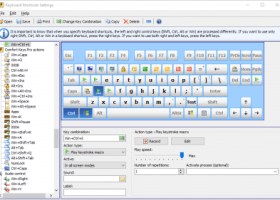
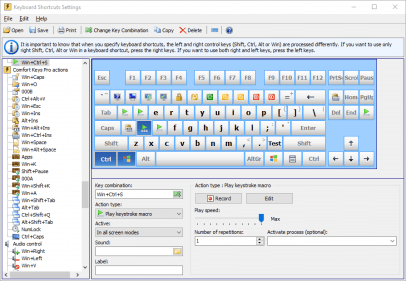
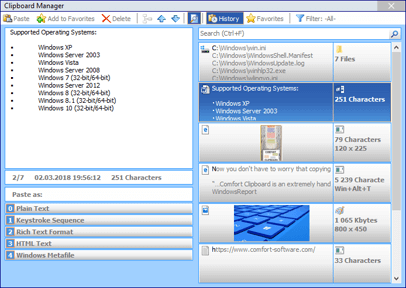
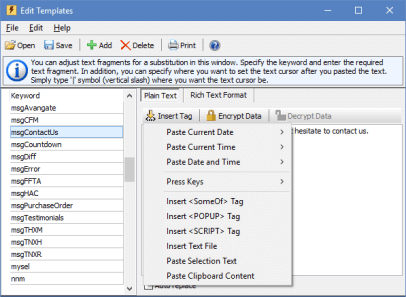
Comfort Keys Pro 9.6.0.0 full screenshots
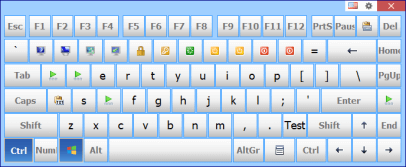

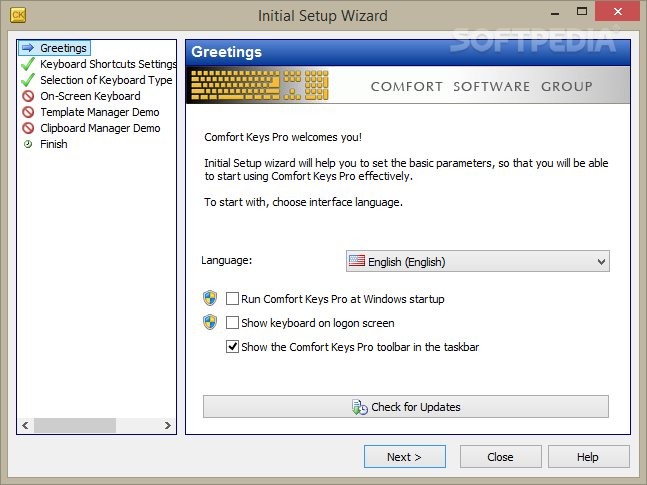

Comfort Keys Pro - Windows 7 Download awards

Comfort Keys Pro 9.6.0.0 full description
Discover how to perform any routine action in one click! Stop typing the same text over and over again! Now you don't need to go through numerous menus to find the necessary program or web page.
With this new generation hotkey manager you can leave your mouse alone and configure hotkeys for all of your actions - just like real pro's do.
With Comfort Keys Pro you will stop typing the same text over and over again.
Your work will be made simpler and more efficient by the several tools integrated into Comfort Keys:
· A clipboard manager
· Text and graphic templates manager
· An enhanced application switching window
· A current language flag which is always located next to the text cursor and helps determine the currently used language
· A history window for the previously launched applications with an ability to quick-launch them again.
With this new generation hotkey manager you can leave your mouse alone and configure hotkeys for all of your actions - just like real pro's do.
With Comfort Keys Pro you will stop typing the same text over and over again.
Your work will be made simpler and more efficient by the several tools integrated into Comfort Keys:
· A clipboard manager
· Text and graphic templates manager
· An enhanced application switching window
· A current language flag which is always located next to the text cursor and helps determine the currently used language
· A history window for the previously launched applications with an ability to quick-launch them again.
Comfort Keys Pro 9.6.0.0 download tags
Comfort Keys Pro 9.6.0.0 Windows 7 release notes
New Release
Improved: Hotkeys and templates files can now be stored on a network folder (for example, OneDrive) and synchronized across devices.
New: Added ToggleKeyboard.exe and ToggleClipboard.exe files to the main program folder, which can be pinned to the taskbar for quick access to the Clipboard Manager and on-screen keyboard.
Improved: The on-screen keyboard now appears in Google Chrome and Microsoft Edge for certain ComboBox input fields (for example, the Google search box).
Improved: If DataCommonSettings.ini exists, settings are now saved to this file.
Improved: If DataLogonSettings.ini exists, logon keyboard settings are now loaded from this file.
New: A Refresh command (F5 hotkey) has been added to the Clipboard Manager. This helps when clipboard file changes cannot be tracked in a network folder - press F5 to reload data manually.
New: Added the LogonTransparent setting to control logon keyboard transparency.
New: MoveBottomKB.exe now supports bottom offset in either pixels or percent (for example, MoveBottomKB.exe 250 or MoveBottomKB.exe 10%).
Improved: The last state of control keys is now restored after using the "Replace key or shortcut" action.
Improved: The "Disable system touch keyboard and handwriting panel" setting has been refined.
Changed: Removed double-click handling for the system tray icon.
Improved: Updated duplicate detection logic in the Clipboard Manager.
Improved: When saving multiple fragments from the Clipboard Manager, the program now asks for a separator (same behavior as when merging fragments).
Improved: Input language order now follows the order defined in Windows settings (also fixes switching with system language shortcuts).
Fixed: In the Clipboard Manager, when saving a clip to a file, the file extension now updates correctly after changing the file type.
Fixed: Emoji icons in templates may become corrupted when loading old template files.
Fixed: Corrected automatic assignment of the F11 key when it is available thro
[ Comfort Keys Pro release history ]
Improved: Hotkeys and templates files can now be stored on a network folder (for example, OneDrive) and synchronized across devices.
New: Added ToggleKeyboard.exe and ToggleClipboard.exe files to the main program folder, which can be pinned to the taskbar for quick access to the Clipboard Manager and on-screen keyboard.
Improved: The on-screen keyboard now appears in Google Chrome and Microsoft Edge for certain ComboBox input fields (for example, the Google search box).
Improved: If DataCommonSettings.ini exists, settings are now saved to this file.
Improved: If DataLogonSettings.ini exists, logon keyboard settings are now loaded from this file.
New: A Refresh command (F5 hotkey) has been added to the Clipboard Manager. This helps when clipboard file changes cannot be tracked in a network folder - press F5 to reload data manually.
New: Added the LogonTransparent setting to control logon keyboard transparency.
New: MoveBottomKB.exe now supports bottom offset in either pixels or percent (for example, MoveBottomKB.exe 250 or MoveBottomKB.exe 10%).
Improved: The last state of control keys is now restored after using the "Replace key or shortcut" action.
Improved: The "Disable system touch keyboard and handwriting panel" setting has been refined.
Changed: Removed double-click handling for the system tray icon.
Improved: Updated duplicate detection logic in the Clipboard Manager.
Improved: When saving multiple fragments from the Clipboard Manager, the program now asks for a separator (same behavior as when merging fragments).
Improved: Input language order now follows the order defined in Windows settings (also fixes switching with system language shortcuts).
Fixed: In the Clipboard Manager, when saving a clip to a file, the file extension now updates correctly after changing the file type.
Fixed: Emoji icons in templates may become corrupted when loading old template files.
Fixed: Corrected automatic assignment of the F11 key when it is available thro
[ Comfort Keys Pro release history ]
Bookmark Comfort Keys Pro
Comfort Keys Pro for Windows 7 - Copyright information
All Comfort Keys Pro reviews, submitted ratings and written comments become the sole property of Windows 7 download. You acknowledge that you, not windows7download, are responsible for the contents of your submission. However, windows7download reserves the right to remove or refuse to post any submission for any reason.
Windows 7 Download periodically updates pricing and software information of Comfort Keys Pro full version from the publisher, but some information may be out-of-date. You should confirm all information.
Using warez version, crack, warez passwords, patches, serial numbers, registration codes, key generator, pirate key, keymaker or keygen for Comfort Keys Pro license key is illegal and prevent future development of Comfort Keys Pro. Download links are directly from our mirrors or publisher's website, Comfort Keys Pro torrent or shared files from free file sharing and free upload services, including Rapidshare, MegaUpload, YouSendIt, SendSpace, DepositFiles, DivShare, HellShare, HotFile, FileServe or MediaFire, are not used.
Windows 7 Download periodically updates pricing and software information of Comfort Keys Pro full version from the publisher, but some information may be out-of-date. You should confirm all information.
Using warez version, crack, warez passwords, patches, serial numbers, registration codes, key generator, pirate key, keymaker or keygen for Comfort Keys Pro license key is illegal and prevent future development of Comfort Keys Pro. Download links are directly from our mirrors or publisher's website, Comfort Keys Pro torrent or shared files from free file sharing and free upload services, including Rapidshare, MegaUpload, YouSendIt, SendSpace, DepositFiles, DivShare, HellShare, HotFile, FileServe or MediaFire, are not used.
Post Comfort Keys Pro review


Windows 7 Comfort Keys Pro related downloads
Comfort On-Screen Keyboard Pro is an application displaying a unique virtual keyboard on the screen and allowing you use the ...
Some of the latest keyboard and notebook models no longer have indicators for ... the Caps Lock, Num Lock and Scroll Lock keys, and some people prefer not to have to ...
... software simplifies the process of switching between multiple keyboard layouts, making it an essential tool for multilingual ...
... This software is the solution to all your keyboard related complications, simplifying the process of repetitive keystrokes ...
... management solution! Allow us to introduce "Comfort Clipboard Pro" - a top-notch software meticulously developed by the ...
My Account
Help
Windows 7 Software Coupons
-
WinX DVD Copy Pro
42% Off -
WinX DVD Ripper
50% Off -
MacX Media Management Bundle
70% Off -
MacX DVD Ripper Pro
50% Off -
WinX MediaTrans
63% Off
My Saved Stuff
You have not saved any software.
Click "Save" next to each software.
Click "Save" next to each software.
Would you like to receive announcements of new versions of your software by email or by RSS reader? Register for FREE!
Windows 7 Downloads Picks
- Windows 7 Service Pack 1 7601.17514.1011
- Advanced SystemCare 19.3.0.200
- Smart Game Booster 5.3.1.692
- The Dude 7.22.2 Stable
- Windows Access Panel 1.0
- Windows 7 Manager 5.2.0
- Windows 7 Manager (x64bit) 5.2.0
- Windows 7 Manager (x32bit) 5.2.0
- Argus Monitor 7.3.4 Build 3142
- Windows Logon Notifier 1.0
- Portable Wise Registry Cleaner 11.3.2 Build 734
- Autoruns for Windows 14.11
- Argente Utilities 3.0.6.9
- Windows 7 Logon Changer 1.1
- Advanced SystemCare Professional 14.2.0
- AVG-PC Tuneup 24.4 Build 17418
- CCleaner 7.7.1313.0 Ad-suppor
- Advanced Serial Data Logger Enterprise 5.1.4 build 310
- Portable Glary Utilities 6.41.0.45
- Advanced Driver Updater 4.6.1086.8539
Popular Tags
performance
cpu
repair
spyware
backup
uninstall
boost
utility
cleaner
registry
faster
memory
system
optimize
tweak
security
remove
optimizer
speed
ram
tune
disk
vista
windows
driver
disk cleaner
clean
startup
defrag
registry cleaner
Popular Windows 7 Software
- Network Monitor II 31.7
- Avro Keyboard 5.6.0.0
- Media Creation Tool x64 22H2
- Ghostscript (x64 bit) 10.03.1
- Windows 7
- iTop Data Recovery 6.1.0.936
- Windows 7 Service Pack 1 7601.17514.1011
- iTop Easy Desktop 4.2.0.312
- Advanced SystemCare 19.3.0.200
- Smart Game Booster 5.3.1.692
- iTop PDF 3.6.0.4
- GoodSync2Go 12.9.29.9
- The Dude 7.22.2 Stable
- IObit Uninstaller 15.4.0.1
- Atlantis Word Processor 5.0.4
© 2026 Windows7Download.com - All logos, trademarks, art and other creative works are and remain copyright and property of their respective owners. Microsoft Windows is a registered trademarks of Microsoft Corporation. Microsoft Corporation in no way endorses or is affiliated with windows7download.com.