


Classic Menu for PowerPoint 2007 for Windows 7 - Revamp PowerPoint 2007's menu with Classic Menu. - Windows 7 Download


Classic Menu for PowerPoint 2007 5.25
Enhance PowerPoint 2007 with Classic Menu.
Welcome to the ultimate destination for Windows 7 software downloads! Elevate your PowerPoint game with the Classic Menu add-on: the perfect tool to maximize productivity and enhance your user experience. Developed by the industry veterans at Addintools, this power-packed software unlocks the full potential of PowerPoint 2007, fostering an immersive and seamless workflow. With its intuitive interface, customizable menus, and seamless integration, Classic Menu empowers you to work smarter, not harder. So, what are you waiting for? Download Classic Menu today and see the difference it can make!
Classic Menu for PowerPoint 2007 5.25 full details

| File Size: | 2.52 MB |
|---|---|
| License: | Free To Try |
| Price: | $15.99 |
| Released: | 2010-08-05 |
| Downloads: | Total: 1286 | This Month: 69 |
| Publisher: | Addintools |
| Publisher URL: | https://www.addintools.com |

Download Classic Menu for PowerPoint 2007 5.25
Save Classic Menu for PowerPoint 2007 to My Stuff
Tweet
Classic Menu for PowerPoint 2007 - Windows 7 Download awards

Classic Menu for PowerPoint 2007 5.25 full description
As an expert in Windows 7 software, I would like to introduce to you one of the best applications for PowerPoint 2007 users, the Classic Menu for PowerPoint 2007 developed by Addintools.
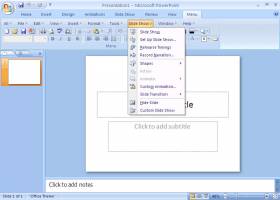
This software is perfect for those who prefer the classic style of PowerPoint 2003. With Classic Menu for PowerPoint, you can revert back to the traditional menu and toolbars and easily navigate through the program. You no longer have to spend time looking for features as they are now just a click away.
The software is compatible with Microsoft PowerPoint 2007 and is easy to install. The user-friendly interface makes it simple to use even for those who aren't tech-savvy. Classic Menu for PowerPoint 2007 is a time-saver and provides a seamless transition from the previous PowerPoint version to the latest one.
The features of Classic Menu for PowerPoint 2007 include the Classic Menu, Classic Toolbar, and Ribbon. The Classic Menu consists of the File, Edit, Insert, View, Format, and Help tabs that are easily accessible in one click. The Classic Toolbar includes frequently used tools like Save, Undo, Redo, and Print Preview.
The Classic Ribbon contains all the features of Microsoft PowerPoint 2007 in a classic menu style. The Ribbon also includes quick access toolbars for frequently used functions like Cut, Copy, and Paste. Classic Menu for PowerPoint 2007 is a must-have application for those who are used to the traditional PowerPoint interface.
In conclusion, Classic Menu for PowerPoint 2007 developed by Addintools is a practical and dependable application for every PowerPoint 2007 user. It offers a convenient and traditional interface that will make the transition to PowerPoint 2007 effortless. It is a great investment for those who value their time and efficiency.
This software is perfect for those who prefer the classic style of PowerPoint 2003. With Classic Menu for PowerPoint, you can revert back to the traditional menu and toolbars and easily navigate through the program. You no longer have to spend time looking for features as they are now just a click away.
The software is compatible with Microsoft PowerPoint 2007 and is easy to install. The user-friendly interface makes it simple to use even for those who aren't tech-savvy. Classic Menu for PowerPoint 2007 is a time-saver and provides a seamless transition from the previous PowerPoint version to the latest one.
The features of Classic Menu for PowerPoint 2007 include the Classic Menu, Classic Toolbar, and Ribbon. The Classic Menu consists of the File, Edit, Insert, View, Format, and Help tabs that are easily accessible in one click. The Classic Toolbar includes frequently used tools like Save, Undo, Redo, and Print Preview.
The Classic Ribbon contains all the features of Microsoft PowerPoint 2007 in a classic menu style. The Ribbon also includes quick access toolbars for frequently used functions like Cut, Copy, and Paste. Classic Menu for PowerPoint 2007 is a must-have application for those who are used to the traditional PowerPoint interface.
In conclusion, Classic Menu for PowerPoint 2007 developed by Addintools is a practical and dependable application for every PowerPoint 2007 user. It offers a convenient and traditional interface that will make the transition to PowerPoint 2007 effortless. It is a great investment for those who value their time and efficiency.
Classic Menu for PowerPoint 2007 5.25 download tags
Classic Menu for PowerPoint 2007 5.25 Windows 7 release notes
Major Update
User can browse the whole menus with keyboard shortcuts (insert Q into the original shortcuts of Office 2003. For example: press Alt + T to open the "Tools" menu in PowerPoint 2003, you just need to press Alt, Q, T to open the "Tools" menu in PowerPoint 2007).
[ Classic Menu for PowerPoint 2007 release history ]
User can browse the whole menus with keyboard shortcuts (insert Q into the original shortcuts of Office 2003. For example: press Alt + T to open the "Tools" menu in PowerPoint 2003, you just need to press Alt, Q, T to open the "Tools" menu in PowerPoint 2007).
[ Classic Menu for PowerPoint 2007 release history ]
Classic Menu for PowerPoint 2007 5.25 Windows 7 requirements
Microsoft PowerPoint 2007 or Office 2007 installed
Bookmark Classic Menu for PowerPoint 2007
Classic Menu for PowerPoint 2007 for Windows 7 - Copyright information
All Classic Menu for PowerPoint 2007 reviews, submitted ratings and written comments become the sole property of Windows 7 download. You acknowledge that you, not windows7download, are responsible for the contents of your submission. However, windows7download reserves the right to remove or refuse to post any submission for any reason.
Windows 7 Download periodically updates pricing and software information of Classic Menu for PowerPoint 2007 full version from the publisher, but some information may be out-of-date. You should confirm all information.
Using warez version, crack, warez passwords, patches, serial numbers, registration codes, key generator, pirate key, keymaker or keygen for Classic Menu for PowerPoint 2007 license key is illegal and prevent future development of Classic Menu for PowerPoint 2007. Download links are directly from our mirrors or publisher's website, Classic Menu for PowerPoint 2007 torrent or shared files from free file sharing and free upload services, including Rapidshare, MegaUpload, YouSendIt, SendSpace, DepositFiles, DivShare, HellShare, HotFile, FileServe or MediaFire, are not used.
Windows 7 Download periodically updates pricing and software information of Classic Menu for PowerPoint 2007 full version from the publisher, but some information may be out-of-date. You should confirm all information.
Using warez version, crack, warez passwords, patches, serial numbers, registration codes, key generator, pirate key, keymaker or keygen for Classic Menu for PowerPoint 2007 license key is illegal and prevent future development of Classic Menu for PowerPoint 2007. Download links are directly from our mirrors or publisher's website, Classic Menu for PowerPoint 2007 torrent or shared files from free file sharing and free upload services, including Rapidshare, MegaUpload, YouSendIt, SendSpace, DepositFiles, DivShare, HellShare, HotFile, FileServe or MediaFire, are not used.
Post Classic Menu for PowerPoint 2007 review


Windows 7 Classic Menu for PowerPoint 2007 related downloads
... respond more quickly to their needs, Office Professional 2007 helps professionals work faster, stay organized, and manage ...
Microsoft Office 2010 x64 gives you powerful new tools ... by addressing bugs that affect lots of users. For specific bugs fixes, download the "Microsoft Office 2010 ...
... one of the best products ever released by Microsoft and it can even be considered as a ...
Microsoft Office 2010 is a desktop productivity suite for people who create documents, analyze information, prepare presentations ...
Office 2003 Service Pack 3 (SP3) for Multilingual User Interface Pack Office 2003 Service Pack 3 for Multilingual User Interface Pack ...
... Pack 3 provides the latest updates to the 2007 Microsoft Office Suite. This update also applies to ...
My Account
Help
Windows 7 Software Coupons
-
MacX Video Converter Pro
56% Off -
MacX MediaTrans
63% Off -
WinX DVD Ripper
50% Off -
WinX DVD Copy Pro
42% Off -
WinX MediaTrans
63% Off
My Saved Stuff
You have not saved any software.
Click "Save" next to each software.
Click "Save" next to each software.
Would you like to receive announcements of new versions of your software by email or by RSS reader? Register for FREE!
Windows 7 Downloads Picks
- Microsoft Office 2007
- LibreOffice 26.8.1.1 Latest
- LibreOffice x64 24.2.4
- Quite Imposing Plus 6.1b
- PDF-XChange Lite 10.2.1.385
- EMF Printer Driver 17.77 Revision 3242
- Microsoft Office 2010 x32 14.0 BETA
- Microsoft Office 2016 x64 2405 B17628.20164
- Microsoft Office 2003
- WebEx MeetMeNow 2.0 44.6.0.29928
- XL Toolbox 7.0.0 Alpha 18
- Microsoft Office Compatibility Pack for Word, Excel, and PowerPoint 2007 File Formats 4
- Microsoft Office 2007 Service Pack SP3
- FinePrint (x64 bit) 11.44
- Advanced Reliable Software 1.9
- PDF to Word Converter 19.4.2.4
- Microsoft Office 2013 15.0.4420.1017 RTM
- Notepad++ Portable 8.9.6.2
- CZ Excel Converter 4.0 B130902
- GIRDAC PDF Converter Ultimate 23.2.2.4
Popular Tags
editor
acrobat
adobe
printer
word
files
add in
data
convert
office
powerpoint
software
pdf converter
outlook
create
xls
doc
word to pdf
microsoft
free
pdf
converter
document
create pdf
conversion
spreadsheet
pdf creator
excel
tool
text
Popular Windows 7 Software
- Microsoft Office 2007
- LoadPlanner Desktop 2.6.4
- LibreOffice 26.8.1.1 Latest
- LibreOffice x64 24.2.4
- Card Maker Software For Windows OS 8.2.0.2
- dbForge Data Compare for Oracle 2026.1
- Alternate Timer 4.850
- EasyBilling Invoicing Software 10.0.0
- dbForge Transaction Log for SQL Server 2026.1
- Quick Receipt Software 3.0.1
- ChequeSystem Cheque Printing Software 8.8.0
- dbForge Monitor for SQL Server 2026.1
- dbForge Schema Compare for SQL Server 2026.1.39
- dbForge Compare Bundle for SQL Server 2026.2
- dbForge Data Compare for SQL Server 2026.1
© 2026 Windows7Download.com - All logos, trademarks, art and other creative works are and remain copyright and property of their respective owners. Microsoft Windows is a registered trademarks of Microsoft Corporation. Microsoft Corporation in no way endorses or is affiliated with windows7download.com.