


AMP WinOFF for Windows 7 - Schedule shutdowns by time or activity - Windows 7 Download


AMP WinOFF 5.0.1
Schedules shutdowns and other power actions using time or activity conditions.
AMP WinOFF schedules Windows power and session actions by time, elapsed duration, or inactivity. It can monitor keyboard and mouse input, CPU load, and network activity, and combine conditions to delay an action until the computer is idle or transfers have stopped. Choices include shutdown, restart, logoff, lock, sleep, and hibernate. It also offers command-line support and security controls.
AMP WinOFF 5.0.1 full details

| File Size: | 614 kB |
|---|---|
| License: | Freeware |
| Price: | FREE |
| Released: | 2010-10-18 |
| Downloads: | Total: 3601 | This Month: 1 |
| Publisher: | AMPSoft |
| Publisher URL: | https://www.ampsoft.net/ |

Download AMP WinOFF 5.0.1
Save AMP WinOFF to My Stuff
Tweet
AMP WinOFF - Windows 7 Download awards



AMP WinOFF 5.0.1 full description
AMP WinOFF is a Windows utility for setting up automatic power and session actions. It is useful for people who want a computer to shut down after a download, finish work at a set time, or respond to periods of inactivity without needing to monitor it. Rather than relying on a single timer, it lets a scheduled plan use one or more conditions, making it possible to fit the action to how the computer is being used.
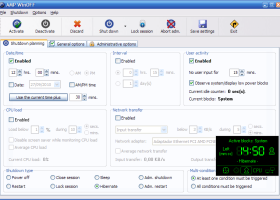
Plans can be triggered at a particular date and time, after a chosen interval, or when there has been no keyboard or mouse input for a specified period. The utility can also monitor CPU load and network activity. Conditions may be combined or used as alternatives: for example, a plan can shut down at a scheduled hour or after the computer has been idle, or wait until both processor and network activity fall below chosen levels. These options help avoid interrupting active work or transfers while still allowing unattended shutdowns.
The available actions include powering off, restarting, closing or locking the session, administrative shutdown or restart, sleep, and hibernation. Immediate shutdown and session locking are also accessible from the taskbar icon menu. A display of the active plan can make it easier to check what action is pending and which conditions govern it. Security settings include protection against closing the utility and password protection for access to its configuration.
Additional controls support automated routines: AMP WinOFF can run a program, capture the desktop, or hang up a modem before carrying out the selected action. Command-line support allows plans or actions to be incorporated into batch processing. Together, these features suit home and office computers that perform scheduled jobs, unattended downloads, or other tasks where a computer should remain available until a specified time or activity threshold.
AMP WinOFF is freeware and supports Windows versions including Windows 7 and Windows 7 x64, as well as earlier Windows releases. Its interface is available in English and Spanish. The utility is focused on scheduling shutdown-related actions rather than general task automation, so its conditions and pre-shutdown options are intended for managing the computer’s power state and session.
AMP WinOFF 5.0.1 download tags
AMP WinOFF 5.0.1 Windows 7 release notes
New Release
· Fixed: The list of network adapters in Windows Vista/7 included also disabled adapters.
· Fixed: The program failed sometimes to detect the list of network adapters, especially in Vista/7.
· Fixed: In certain situations the program failed to save the settings for all users in Vista/7.
· Fixed: When using the same settings for all users in Vista/7 the program displayed an User Account Control confirmation before activating the shut down planning, even if the settings wasn't changed.
· Fixed: The program didn't saved the shut down time AM/PM value properly.
[ AMP WinOFF release history ]
Bookmark AMP WinOFF
AMP WinOFF for Windows 7 - Copyright information
All AMP WinOFF reviews, submitted ratings and written comments become the sole property of Windows 7 download. You acknowledge that you, not windows7download, are responsible for the contents of your submission. However, windows7download reserves the right to remove or refuse to post any submission for any reason.
Windows 7 Download periodically updates pricing and software information of AMP WinOFF full version from the publisher, but some information may be out-of-date. You should confirm all information.
Using warez version, crack, warez passwords, patches, serial numbers, registration codes, key generator, pirate key, keymaker or keygen for AMP WinOFF license key is illegal and prevent future development of AMP WinOFF. Download links are directly from our mirrors or publisher's website, AMP WinOFF torrent or shared files from free file sharing and free upload services, including Rapidshare, MegaUpload, YouSendIt, SendSpace, DepositFiles, DivShare, HellShare, HotFile, FileServe or MediaFire, are not used.
Post AMP WinOFF review


Windows 7 AMP WinOFF related downloads
My Account
Help
Windows 7 Software Coupons
-
WinX DVD Ripper
50% Off -
WinX DVD Copy Pro
42% Off -
Media Player Morpher
85% Off -
MacX MediaTrans
63% Off -
WinX MediaTrans
63% Off
My Saved Stuff
You have not saved any software.
Click "Save" next to each software.
Click "Save" next to each software.
Would you like to receive announcements of new versions of your software by email or by RSS reader? Register for FREE!
Windows 7 Downloads Picks
- Daphne Portable 2.04
- Launchy 2.6 Beta 2
- Winstep Nexus Dock 26.1
- RocketDock 1.3.5
- Portable EF StartUp Manager 24.04
- PStart 2.11.0.5
- USBAgent 3.9 B2
- Portable PStart 2.11.0.5
- SlickRun 4.6.1.0
- Airytec Switch Off Portable 3.5.1.950
- AutoRunnerU 2.1.1
- AutoRunnerX 2.1.1
- Airytec Switch Off Portable x64 3.5.1.950
- CrispoMyOwnTech AutoRun Setup 1.0
- TurboLaunch 5.1.4
- FileBox eXtender (x64 bit) 2.01.00
- 7GMode 1.0
- LaunchBar Commander 1.160.02
- PopSel 2.58
- EasySetup 2.0.7b
Popular Tags
task manager
taskbar
trojan
antivirus
manager
run
startup
program
program launcher
utility
launcher
application launcher
process
start
shortcuts
windows
fast
search
security
menu
performance
desktop
task
tray
launch
virus
hotkey
spyware
application
shortcut
Popular Windows 7 Software
- Auslogics Registry Cleaner 11.2.0.6
- Driver Easy 7.2.3 Build 6590
- WinTools.one Professional 26.10.1
- AutoHotkey 2.0.31
- Don't Sleep 10.44
- Datavare EML to Gmail Importer 1.0
- ALTRun 2026.10.26
- System Mechanic Professional 23.1
- UFS Explorer Professional Recovery 10.23.0
- Registry Cleaner by Emulous.com 1.01
- Ashampoo UnInstaller Pro 27 27.0.1
- Backup Emails in PDF from Outlook 6.0
- RegmagiK Registry Editor 4.10.7
- Active@ Hard Disk Monitor 23.0.0
- Oracle-to-Access 3.1
© 2026 Windows7Download.com - All logos, trademarks, art and other creative works are and remain copyright and property of their respective owners. Microsoft Windows is a registered trademarks of Microsoft Corporation. Microsoft Corporation in no way endorses or is affiliated with windows7download.com.