


Winstep Nexus Dock for Windows 7 - Sleek dock improves navigation. - Windows 7 Download


Winstep Nexus Dock 26.1
Elevate your desktop with Nexus Dock - customizable shortcut hub.
Looking for a sleek and functional way to organize your desktop icons? Look no further than Winstep Nexus Dock! Developed by Winstep Software Technologies, this software allows you to add shortcuts, launch programs, and access frequently used files all from one customizable bar. With various customization options and a user-friendly interface, Winstep Nexus Dock is a must-have for Windows 7 users looking to streamline their desktop experience.
Winstep Nexus Dock 26.1 full details

| File Size: | 40.00 MB |
|---|---|
| License: | Free To Try |
| Price: | $29.95 |
| Released: |
2026-01-28
 |
| Downloads: | Total: 53520 | This Month: 365 |
| Publisher: | Winstep Software Technologies |
| Publisher URL: | http://www.winstep.net/ |

Download Winstep Nexus Dock 26.1
Save Winstep Nexus Dock to My Stuff
Tweet
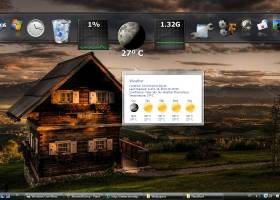
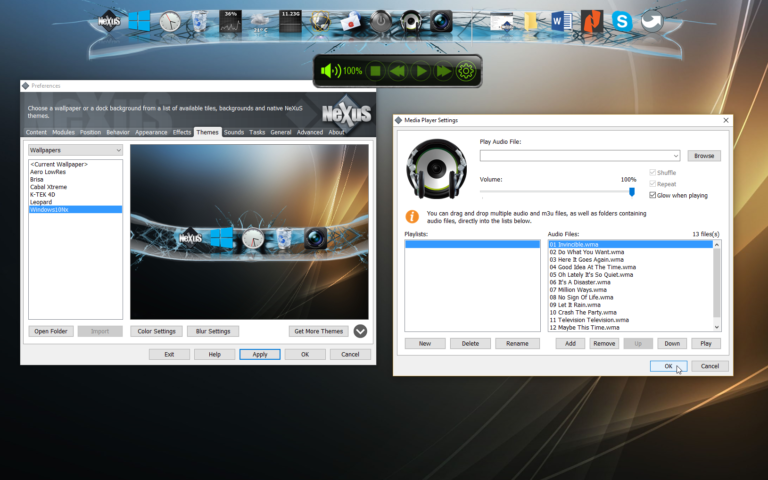
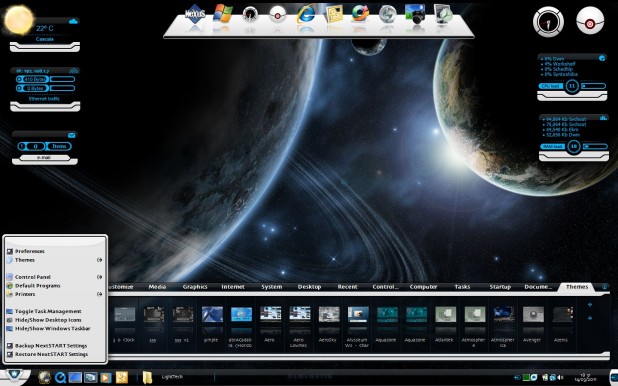
Winstep Nexus Dock 26.1 full screenshots


Winstep Nexus Dock - Windows 7 Download awards


Winstep Nexus Dock 26.1 full description
The Winstep Nexus Dock is a free Windows dock application that provides fast access to your most frequently used applications, with flexible options allowing it to dock or float anywhere on the screen. Every feature you’d expect from a dock, including widgets, mouse-over effects, skins, drag-and-drop, and even live icon reflections and support for Vista Aero Glass effects. Features List: - Live icon reflections. - System tray support. - Dock magnification, swing, bounce, afterglow and many other incredible mouse over effects. Water ripple, fluid surface, fluid reflections and many more dock animation effects. - Automatic Vista glass blur for semi-transparent dock backgrounds. - Dock auto-hide and auto-collapse to take up as little screen space as possible. - Built-in clock, weather, recycler, fortune cookie reader, email checker, net, cpu and ram meter docklets/widgets. - Over 80 useful internal commands. - Ability to prevent maximized windows from overlapping the dock. - Supports drag & drop of virtual file system objects (My Computer, Control Panel, etc...). - Completely customizable - thousands of backgrounds freely available. - Fully compatible with skins for all other docks. - Full drag & drop support with extremely easy to use and intuitive interface. - Multi language support. - Includes Update Manager to look for, download, and automatically install new versions. ... and many, many, other incredible features!
Winstep Nexus Dock 26.1 download tags
Winstep Nexus Dock 26.1 Windows 7 release notes
New Release
Added partial Danish translation.
Updated Spanish language file.
Updated Czech language file, updated language name to Èeština.
Updated Portuguese (Brazil) language file.
Updated Portuguese language file.
Added new 'Reset Reserved Screen Areas" Internal Command. This will reset any areas reserved for the NextSTART taskbar and WorkShelf shelves, docks, etc - useful when Windows gets confused about areas of the screen that should not be covered by maximized windows. It will also reset any multi-monitor and per-monitor tasklists.
The 'Renew Now' button will now also appear on the About tab of Preferences if the user's upgrade subscription has expired and he is running a version that no longer works with his current license key.
Added all the Windows 10/11 Start button right click menu options to the contexct menu of a 'Start Menu' internal command.
Added new 'Use Legacy Mode' setting, disabled by default, to the CPU Module settings dialog.
If running on Windows 8 or above and 'Use Legacy Mode' is NOT enabled, the total CPU usage percentage displayed on the CPU Meter is now the same as that displayed on the Task Manager of Windows 8 onwards.
System Interrupts is now also included in the list of processes and their CPU usage.
Added "Check Service Communication" option to the Troubleshooting Options dialog. Verifies that the Winstep service required to perform actions that require admin privileges (such as installing a theme font) is operating properly.
All Windows Settings internal commands now have individual icons instead of all sharing the same icon.
Added new 'Settings' tab type, displaying all the Windows 10 and 11 Settings categories.
Under Windows 10 and 11 the default shelf now has a Settings tab instead of a Quick Launch tab.
Changed the wording of the uninstall survey.
Added support for per-monitor tasklists: docks, shelves, drawers and even grid-stacks showing a list of running applications can now show windows open on all monitors or only win
[ Winstep Nexus Dock release history ]
Added partial Danish translation.
Updated Spanish language file.
Updated Czech language file, updated language name to Èeština.
Updated Portuguese (Brazil) language file.
Updated Portuguese language file.
Added new 'Reset Reserved Screen Areas" Internal Command. This will reset any areas reserved for the NextSTART taskbar and WorkShelf shelves, docks, etc - useful when Windows gets confused about areas of the screen that should not be covered by maximized windows. It will also reset any multi-monitor and per-monitor tasklists.
The 'Renew Now' button will now also appear on the About tab of Preferences if the user's upgrade subscription has expired and he is running a version that no longer works with his current license key.
Added all the Windows 10/11 Start button right click menu options to the contexct menu of a 'Start Menu' internal command.
Added new 'Use Legacy Mode' setting, disabled by default, to the CPU Module settings dialog.
If running on Windows 8 or above and 'Use Legacy Mode' is NOT enabled, the total CPU usage percentage displayed on the CPU Meter is now the same as that displayed on the Task Manager of Windows 8 onwards.
System Interrupts is now also included in the list of processes and their CPU usage.
Added "Check Service Communication" option to the Troubleshooting Options dialog. Verifies that the Winstep service required to perform actions that require admin privileges (such as installing a theme font) is operating properly.
All Windows Settings internal commands now have individual icons instead of all sharing the same icon.
Added new 'Settings' tab type, displaying all the Windows 10 and 11 Settings categories.
Under Windows 10 and 11 the default shelf now has a Settings tab instead of a Quick Launch tab.
Changed the wording of the uninstall survey.
Added support for per-monitor tasklists: docks, shelves, drawers and even grid-stacks showing a list of running applications can now show windows open on all monitors or only win
[ Winstep Nexus Dock release history ]
Bookmark Winstep Nexus Dock
Winstep Nexus Dock for Windows 7 - Copyright information
All Winstep Nexus Dock reviews, submitted ratings and written comments become the sole property of Windows 7 download. You acknowledge that you, not windows7download, are responsible for the contents of your submission. However, windows7download reserves the right to remove or refuse to post any submission for any reason.
Windows 7 Download periodically updates pricing and software information of Winstep Nexus Dock full version from the publisher, but some information may be out-of-date. You should confirm all information.
Using warez version, crack, warez passwords, patches, serial numbers, registration codes, key generator, pirate key, keymaker or keygen for Winstep Nexus Dock license key is illegal and prevent future development of Winstep Nexus Dock. Download links are directly from our mirrors or publisher's website, Winstep Nexus Dock torrent or shared files from free file sharing and free upload services, including Rapidshare, MegaUpload, YouSendIt, SendSpace, DepositFiles, DivShare, HellShare, HotFile, FileServe or MediaFire, are not used.
Windows 7 Download periodically updates pricing and software information of Winstep Nexus Dock full version from the publisher, but some information may be out-of-date. You should confirm all information.
Using warez version, crack, warez passwords, patches, serial numbers, registration codes, key generator, pirate key, keymaker or keygen for Winstep Nexus Dock license key is illegal and prevent future development of Winstep Nexus Dock. Download links are directly from our mirrors or publisher's website, Winstep Nexus Dock torrent or shared files from free file sharing and free upload services, including Rapidshare, MegaUpload, YouSendIt, SendSpace, DepositFiles, DivShare, HellShare, HotFile, FileServe or MediaFire, are not used.
Post Winstep Nexus Dock review


Windows 7 Winstep Nexus Dock related downloads
SSuite Mac Dock is a very simple Windows utility designed to create a Mac OS X-like ...
Are you missing the in Windows 7 Classic Start Menu? If so, you are ... you can easily change the unusable menu of Windows 7 to the well known classic start menu ...
Windows 7 Tweaks is a handy and reliable application designed to enable you to add shortcuts to your desktop context menu. Easily accessible from ...
This free File.net Windows Process Viewer displays all running Windows processes on your computer. It shows the Windows ...
... the ultimate solution for managing and understanding your Windows 7 processes – Windows Process Viewer! Developed by ...
My Account
Help
Windows 7 Software Coupons
-
MacX DVD Ripper Pro
50% Off -
MacX Media Management Bundle
70% Off -
WinX DVD Ripper
50% Off -
MacX MediaTrans
63% Off -
WinX DVD Copy Pro
42% Off
My Saved Stuff
You have not saved any software.
Click "Save" next to each software.
Click "Save" next to each software.
Would you like to receive announcements of new versions of your software by email or by RSS reader? Register for FREE!
Windows 7 Downloads Picks
- Winstep Nexus Dock 26.1
- Portable PStart 2.11.0.5
- 7GMode 1.0
- Portable EF StartUp Manager 24.04
- QuickWayToFolders x64 1.4.1
- RocketDock 1.3.5
- PStart 2.11.0.5
- LaunchBar Commander 1.160.02
- Mz StartUp Manager 3.1.0
- Daphne Portable 2.04
- QuickWayToFolders 1.4.2
- Airytec Switch Off Portable 3.5.1.950
- VisualCron 12.1.3 Build 39435
- Shutti Shutdown Timer 1.2
- TurboLaunch 5.1.4
- Task Till Dawn 2.21
- MadAppLauncher Portable 1.10.0.0
- FileBox eXtender (x64 bit) 2.01.00
- Tao ExDOS Pro 2009 9.0.209
- Airytec Switch Off Portable x64 3.5.1.950
Popular Tags
application launcher
spyware
program
windows
performance
task manager
start
security
launcher
application
process
menu
virus
desktop
startup
shortcuts
utility
search
run
launch
taskbar
hotkey
program launcher
task
fast
trojan
shortcut
tray
antivirus
manager
Popular Windows 7 Software
- Network Monitor II 31.7
- Avro Keyboard 5.6.0.0
- Media Creation Tool x64 22H2
- Ghostscript (x64 bit) 10.03.1
- Windows 7
- iTop Data Recovery 6.1.0.936
- Windows 7 Service Pack 1 7601.17514.1011
- iTop Easy Desktop 4.2.0.312
- Advanced SystemCare 19.3.0.200
- Smart Game Booster 5.3.1.692
- iTop PDF 3.6.0.4
- GoodSync2Go 12.9.29.9
- The Dude 7.22.2 Stable
- IObit Uninstaller 15.4.0.1
- Atlantis Word Processor 5.0.4
© 2026 Windows7Download.com - All logos, trademarks, art and other creative works are and remain copyright and property of their respective owners. Microsoft Windows is a registered trademarks of Microsoft Corporation. Microsoft Corporation in no way endorses or is affiliated with windows7download.com.