


Wink for Windows 7 - Powerful screen recording software. - Windows 7 Download


Wink 3.01
Discover a powerful Windows 7 screen capture and tutorial creator with Wink. Edit, add audio, and save in multiple formats.
Wink software by Satish Kumar is the ultimate tool for creating tutorials and presentations. With a user-friendly interface, it allows easy recording of screen activity, webcam footage, and audio commentary. The software also provides you with a variety of editing features, such as adding callouts, zooms, and text captions to enhance the final product. Wink makes it easy to share your tutorials on multiple platforms, ensuring that your message is received loud and clear!
Wink 3.01 full details

| File Size: | 5.50 MB |
|---|---|
| License: | Freeware |
| Price: | FREE |
| Released: | 2020-11-01 |
| Downloads: | Total: 379 | This Month: 162 |
| Publisher: | Satish Kumar |
| Publisher URL: | https://www.debugmode.com/ |

Download Wink 3.01
Save Wink to My Stuff
Tweet
Wink - Windows 7 Download awards


Wink 3.01 full description
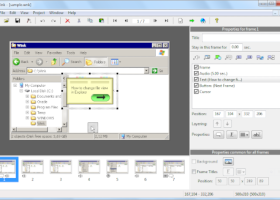
Wink is a Tutorial and Presentation creation software, primarily aimed at creating tutorials on how to use software (like a tutor for MS-Word/Excel etc). Using Wink you can capture screenshots, add explanations boxes, buttons, titles etc and generate a highly effective tutorial for your users.
Features:
Freeware: Distributed as freeware for business or personal use. However if you want to redistribute Wink, you need to get permission from the author.
Cross-Platform: Available for all flavours of Windows and various versions of Linux (x86 only).
Audio: Record voice as you create the tutorial for explaining better.
Input formats: Capture screenshots from your PC, or use images in BMP/JPG/PNG/TIFF/GIF formats.
Output formats: MPEG-4 video, PDF, PostScript, HTML or any of the above image formats. Use MPEG-4/html for the web and PDF for printable manuals.
Multilingual support: Works in English, French, German, Italian, Danish, Spanish, Serbian, Japanese, Brazilian Portuguese and Simplified/Traditional Chinese.
Smart Capture Tools: Capture screenshots automatically as you use your PC, based on mouse and keyboard input (great time saver and generates professional captures).
Performance/Quality: Creates highly compressed video presentations, ideal for using on the web.
Tools:
Navigation buttons to move to next/previous/random frames in the presentation, you can use custom bitmaps for these buttons (full transparency/alpha channel support).
Callouts and shapes for displaying text explanations. The built-in Callout Editor is used to create custom shaped callouts as you want.
Intuitive drag-n-drop editing of the frame, callout, cursor, navigation buttons and the title elements.
Advanced features like templates, cursor editing, background images and control bars for the video etc.
Completely PC and Web ready with exports to PDF, HTML, MPEG-4 formats.
Innovative compression techniques applied to reduce file size of output video file.
Features:
Freeware: Distributed as freeware for business or personal use. However if you want to redistribute Wink, you need to get permission from the author.
Cross-Platform: Available for all flavours of Windows and various versions of Linux (x86 only).
Audio: Record voice as you create the tutorial for explaining better.
Input formats: Capture screenshots from your PC, or use images in BMP/JPG/PNG/TIFF/GIF formats.
Output formats: MPEG-4 video, PDF, PostScript, HTML or any of the above image formats. Use MPEG-4/html for the web and PDF for printable manuals.
Multilingual support: Works in English, French, German, Italian, Danish, Spanish, Serbian, Japanese, Brazilian Portuguese and Simplified/Traditional Chinese.
Smart Capture Tools: Capture screenshots automatically as you use your PC, based on mouse and keyboard input (great time saver and generates professional captures).
Performance/Quality: Creates highly compressed video presentations, ideal for using on the web.
Tools:
Navigation buttons to move to next/previous/random frames in the presentation, you can use custom bitmaps for these buttons (full transparency/alpha channel support).
Callouts and shapes for displaying text explanations. The built-in Callout Editor is used to create custom shaped callouts as you want.
Intuitive drag-n-drop editing of the frame, callout, cursor, navigation buttons and the title elements.
Advanced features like templates, cursor editing, background images and control bars for the video etc.
Completely PC and Web ready with exports to PDF, HTML, MPEG-4 formats.
Innovative compression techniques applied to reduce file size of output video file.
Wink 3.01 download tags
Wink 3.01 Windows 7 release notes
New Release
Improved MP4 video quality by calculating a more appropriate video bitrate
Fixes issues:
Cursor rendering and dialog
Documentation findings
Sound Editor Crashes trying to edit track
Feature Request: Quantitative cursor smoothness adjustment
Audio Editor tracking accuracy
[ Wink release history ]
Improved MP4 video quality by calculating a more appropriate video bitrate
Fixes issues:
Cursor rendering and dialog
Documentation findings
Sound Editor Crashes trying to edit track
Feature Request: Quantitative cursor smoothness adjustment
Audio Editor tracking accuracy
[ Wink release history ]
Bookmark Wink
Wink for Windows 7 - Copyright information
All Wink reviews, submitted ratings and written comments become the sole property of Windows 7 download. You acknowledge that you, not windows7download, are responsible for the contents of your submission. However, windows7download reserves the right to remove or refuse to post any submission for any reason.
Windows 7 Download periodically updates pricing and software information of Wink full version from the publisher, but some information may be out-of-date. You should confirm all information.
Using warez version, crack, warez passwords, patches, serial numbers, registration codes, key generator, pirate key, keymaker or keygen for Wink license key is illegal and prevent future development of Wink. Download links are directly from our mirrors or publisher's website, Wink torrent or shared files from free file sharing and free upload services, including Rapidshare, MegaUpload, YouSendIt, SendSpace, DepositFiles, DivShare, HellShare, HotFile, FileServe or MediaFire, are not used.
Windows 7 Download periodically updates pricing and software information of Wink full version from the publisher, but some information may be out-of-date. You should confirm all information.
Using warez version, crack, warez passwords, patches, serial numbers, registration codes, key generator, pirate key, keymaker or keygen for Wink license key is illegal and prevent future development of Wink. Download links are directly from our mirrors or publisher's website, Wink torrent or shared files from free file sharing and free upload services, including Rapidshare, MegaUpload, YouSendIt, SendSpace, DepositFiles, DivShare, HellShare, HotFile, FileServe or MediaFire, are not used.
Post Wink review


Windows 7 Wink related downloads

FastStone Capture is a powerful, flexible and intuitive screen-capture utility. It allows you to capture anything on the screen including windows, objects, full ...
... your Windows 7 experience? Look no further! Introducing Capture Color man Lite, an innovative software developed by ...
... for all graphic designers, artists, and web developers: Free Color Picker. Developed by the talented Jacek Pazera, ...
MadCap Capture is a state-of-the art software program that lets you easily capture anything that displays on your computer screen and ...
Introducing Free Image Watermark Master, the ultimate solution for effortlessly ... their photos from unauthorized use. Formerly known as Free Photo Stamp Remover, this intuitive tool allows you ...
My Account
Help
Windows 7 Software Coupons
-
WinX DVD Ripper
50% Off -
WinX DVD Copy Pro
42% Off -
WinX HD Video Converter
56% Off -
MacX MediaTrans
63% Off -
MacX Media Management Bundle
70% Off
My Saved Stuff
You have not saved any software.
Click "Save" next to each software.
Click "Save" next to each software.
Would you like to receive announcements of new versions of your software by email or by RSS reader? Register for FREE!
Windows 7 Downloads Picks
- Blender Portable 4.1.1
- Embird 2023 B10.86
- TatukGIS Viewer 5.97.0.3649
- Photo Editing & Saving Wizard 2021
- Diagram Designer 1.29.5
- Portable FastStone Image Viewer 8.2
- RLPlot 1.5
- NVIDIA PhysX 9.23.1019
- packVol Standard 3.8.8
- Portable PicPick 7.4.1
- Adobe Camera Raw 14.4
- Abacre Photo Editor 2.1.1
- ImageMagick for Windows 7.1.1-47
- GT Text 2.0.2
- Adobe SpeedGrade CC
- Portable Inkscape 1.4.4
- Photo Stamp Removal 15.1
- Spontz Visuals Editor 2.1
- Albumin 3D 1.7.1
- Asymptote 2.88
Popular Tags
images
jpeg
jpg
color
photos
vanderlee
digital
effects
exif
pictures
bmp
scanner
adobe
image
video
macromedia
tool
zoom
photo
picture
screen
design
graphic
plugin
photoshop
designer
corel
resize
filter
graphics
Popular Windows 7 Software
- CorelDRAW X7 (x32 bit) 17.4.0.887
- CorelDRAW X7 (x64 bit) 17.4.0.887
- CorelDRAW X5 15.2.0.686
- CorelDRAW X4
- iTop Screenshot 1.2.3.544
- CorelDRAW 2017 19.1.0.419
- CorelDRAW X6 16.4.0.1280
- Blender - 32 bit 2.80
- Adobe InDesign CS5 CS5.5 7.5.3
- CorelDRAW X8 18.0.0.450
- Graphic Workshop Professional 15.0a rev11
- Model Air Design 2.4
- Blender Portable 4.1.1
- Model Air Design 2.4
- Paint.NET 5.0.13
© 2026 Windows7Download.com - All logos, trademarks, art and other creative works are and remain copyright and property of their respective owners. Microsoft Windows is a registered trademarks of Microsoft Corporation. Microsoft Corporation in no way endorses or is affiliated with windows7download.com.