


TagScanner for Windows 7 - Music tag editing and library organization - Windows 7 Download


TagScanner 6.1.21
Edit music tags in batches, rename tracks, find album art and export library data.
TagScanner organizes music libraries by editing tags in batches, renaming files from their metadata, and creating tags from file or folder names. It supports formats such as MP3, FLAC, OGG, WMA, AAC and WAV, plus ID3, APE, Vorbis, WMA and MP4/iTunes tags. Users can retrieve album details and covers from online databases, create playlists, and export collection data to HTML, XML, CSV or other formats.
TagScanner 6.1.21 full details

| File Size: | 4.30 MB |
|---|---|
| License: | Freeware |
| Price: | FREE |
| Released: |
2026-05-19
 |
| Downloads: | Total: 2612 | This Month: 189 |
| Publisher: | Sergey Serkov |
| Publisher URL: | https://www.xdlab.ru/en/ |

Download TagScanner 6.1.21
Save TagScanner to My Stuff
Tweet
TagScanner 6.1.21 full screenshots

TagScanner - Windows 7 Download awards



TagScanner 6.1.21 full description
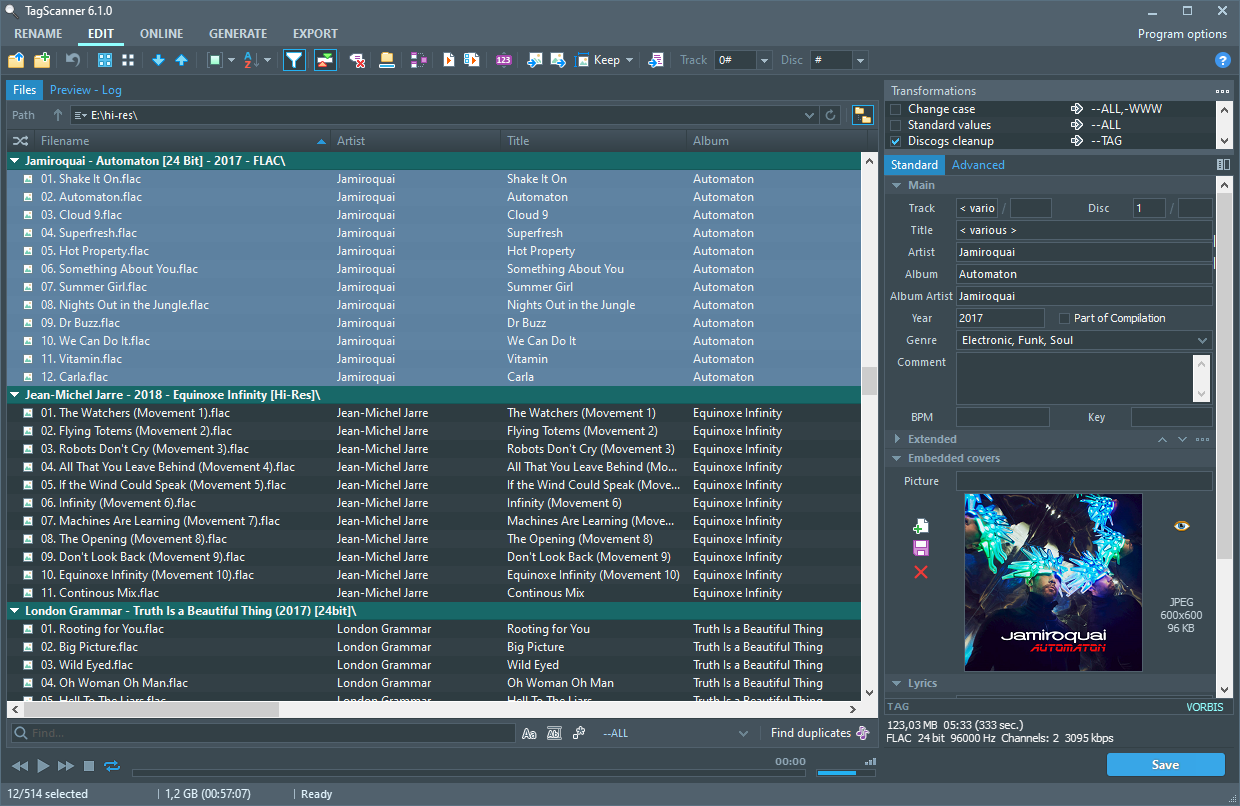
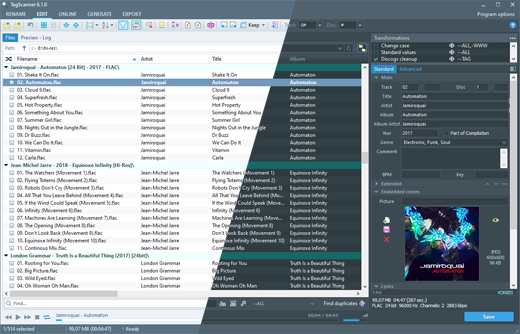
TagScanner is a music collection organizer for people who want to maintain consistent file names and metadata across audio libraries. It edits tags in batches, reads information from audio files and filenames, and helps connect track details with cover art and lyrics. A built-in audio player lets users check files during organization without leaving the program.
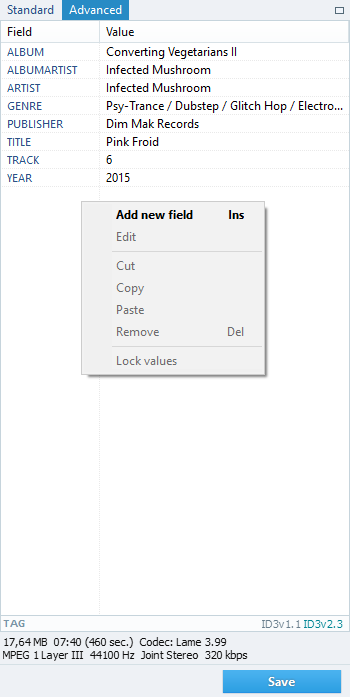
The tag editor works with common audio formats including MP3, OGG, FLAC, WMA, MPEG-4, Opus, AAC, WAV and AIFF, along with several other formats. It handles ID3, APE, Vorbis Comments, WMA and MP4/iTunes metadata. Users can add or revise information across multiple tracks, rearrange and format tag fields, convert between supported tag versions, and apply text replacements or case changes to tags and filenames. Embedded lyrics and cover art are supported, and artwork can be resized for portable devices.
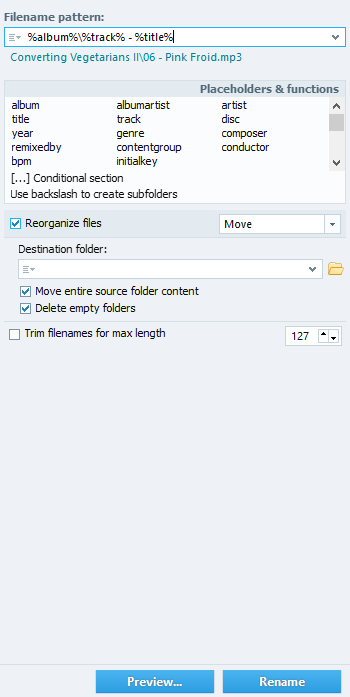
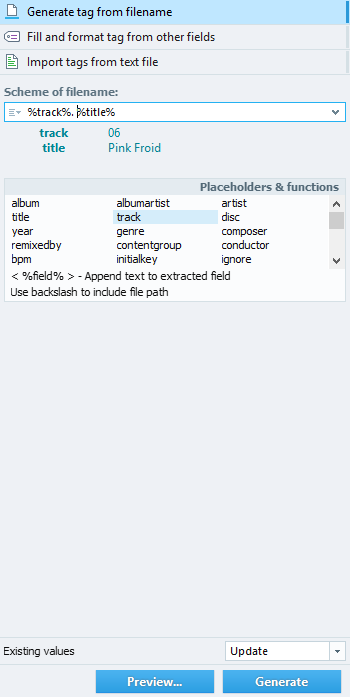
TagScanner can rename audio files using their tags and file information, or build tags from folder and file names. For missing album details, it can retrieve information and covers from online databases such as freedb, Amazon, Discogs and MusicBrainz. These tools help match track metadata and file names consistently, whether correcting an existing library or preparing newly added music. Unicode support and a multilingual interface accommodate collections containing text in different languages.
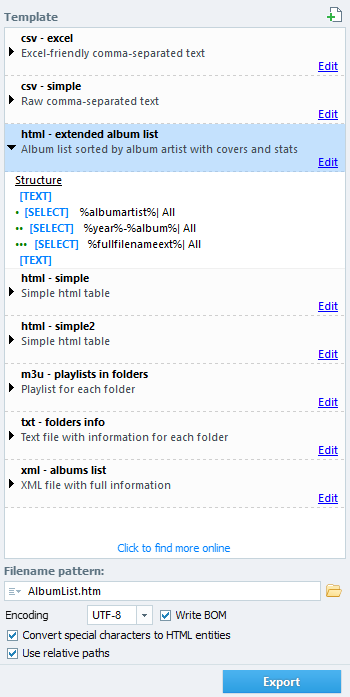
For library management beyond editing, the program creates playlists and exports collection information to HTML, XML, CSV, Excel or a user-defined format. The built-in player is useful for checking tracks while reviewing their details. Together, batch editing, renaming and export functions support both routine cleanup and preparation of music files for portable players or catalogues.
TagScanner is freeware and supports Windows systems, including Windows 7 and Windows 7 x64. Its broad format and metadata support makes it suitable for mixed-format collections, while batch operations help reduce repetitive work when many files need the same corrections. Online database lookup requires an internet connection; local tag editing, text transformations and file renaming can be performed on the collection itself.
The tag editor works with common audio formats including MP3, OGG, FLAC, WMA, MPEG-4, Opus, AAC, WAV and AIFF, along with several other formats. It handles ID3, APE, Vorbis Comments, WMA and MP4/iTunes metadata. Users can add or revise information across multiple tracks, rearrange and format tag fields, convert between supported tag versions, and apply text replacements or case changes to tags and filenames. Embedded lyrics and cover art are supported, and artwork can be resized for portable devices.
TagScanner can rename audio files using their tags and file information, or build tags from folder and file names. For missing album details, it can retrieve information and covers from online databases such as freedb, Amazon, Discogs and MusicBrainz. These tools help match track metadata and file names consistently, whether correcting an existing library or preparing newly added music. Unicode support and a multilingual interface accommodate collections containing text in different languages.
For library management beyond editing, the program creates playlists and exports collection information to HTML, XML, CSV, Excel or a user-defined format. The built-in player is useful for checking tracks while reviewing their details. Together, batch editing, renaming and export functions support both routine cleanup and preparation of music files for portable players or catalogues.
TagScanner is freeware and supports Windows systems, including Windows 7 and Windows 7 x64. Its broad format and metadata support makes it suitable for mixed-format collections, while batch operations help reduce repetitive work when many files need the same corrections. Online database lookup requires an internet connection; local tag editing, text transformations and file renaming can be performed on the collection itself.
TagScanner 6.1.21 download tags
TagScanner 6.1.21 Windows 7 release notes
New Release
Improved: Additional protection against file damage on error while tagging
Improved: Copy path function are now copy all unique paths from selection
Improved: Rename folder by TAG feature now works more predictable and save result into log
Updated support for Apple mp4 tags
Fixed: False click on filelist after cover selection
Fixed: Renaming of files with only case changing in some cases
Fixed: Incorrect work of autocompletion for multi-word values
Updated playback engine
Translation: Italian, Portuguese (Brazil)
[ TagScanner release history ]
Improved: Additional protection against file damage on error while tagging
Improved: Copy path function are now copy all unique paths from selection
Improved: Rename folder by TAG feature now works more predictable and save result into log
Updated support for Apple mp4 tags
Fixed: False click on filelist after cover selection
Fixed: Renaming of files with only case changing in some cases
Fixed: Incorrect work of autocompletion for multi-word values
Updated playback engine
Translation: Italian, Portuguese (Brazil)
[ TagScanner release history ]
Bookmark TagScanner
TagScanner for Windows 7 - Copyright information
All TagScanner reviews, submitted ratings and written comments become the sole property of Windows 7 download. You acknowledge that you, not windows7download, are responsible for the contents of your submission. However, windows7download reserves the right to remove or refuse to post any submission for any reason.
Windows 7 Download periodically updates pricing and software information of TagScanner full version from the publisher, but some information may be out-of-date. You should confirm all information.
Using warez version, crack, warez passwords, patches, serial numbers, registration codes, key generator, pirate key, keymaker or keygen for TagScanner license key is illegal and prevent future development of TagScanner. Download links are directly from our mirrors or publisher's website, TagScanner torrent or shared files from free file sharing and free upload services, including Rapidshare, MegaUpload, YouSendIt, SendSpace, DepositFiles, DivShare, HellShare, HotFile, FileServe or MediaFire, are not used.
Windows 7 Download periodically updates pricing and software information of TagScanner full version from the publisher, but some information may be out-of-date. You should confirm all information.
Using warez version, crack, warez passwords, patches, serial numbers, registration codes, key generator, pirate key, keymaker or keygen for TagScanner license key is illegal and prevent future development of TagScanner. Download links are directly from our mirrors or publisher's website, TagScanner torrent or shared files from free file sharing and free upload services, including Rapidshare, MegaUpload, YouSendIt, SendSpace, DepositFiles, DivShare, HellShare, HotFile, FileServe or MediaFire, are not used.
Post TagScanner review


Windows 7 TagScanner related downloads
TagScanner is a powerful tool for organizing and managing your music collection. It can edit ...
My Account
Help
Windows 7 Software Coupons
-
WinX DVD Ripper
50% Off -
WinX DVD Copy Pro
42% Off -
MacX Video Converter Pro
56% Off -
MacX DVD Ripper Pro
50% Off -
MacX MediaTrans
63% Off
My Saved Stuff
You have not saved any software.
Click "Save" next to each software.
Click "Save" next to each software.
Would you like to receive announcements of new versions of your software by email or by RSS reader? Register for FREE!
Windows 7 Downloads Picks
- Picture Window Pro 8.567
- Multimedia Builder 4.9.8
- Monkey's Audio 13.27
- DJ Audio Editor 9.1
- Kangas Sound Editor 4.2.0
- Praat 6.4.67
- K-Lite Codec Pack 64-bit 18.4.0
- x64 Components Addon 18.4.9
- Sytrus 2.6.74
- cineSync 4.2.9
- Power Audio Editor 7.4.3.252
- Audio Dedupe 6.3.0.2
- LMMS (Linux MultiMedia Studio) x64 1.2.2
- HP MediaSmart Music Software 4.2.4604
- Open Sound World 1.2.7
- Open Song Composer 0.98
- Crowd Chamber 2.02
- Music Tag Tool 2.11
- Crowd Chamber x64 4.1.0
- K-Lite Video Conversion Pack 1.9.0
Popular Tags
organize music files
file
mp3
pc music organizer
automatic music organizer
organizer
tag
music
music file organizer
the best music organizer
audio
music organizer
get music organizer
windows music organizer
software
mp3 organizer
video
music organizer software
music organizer download
download music organizer
song
automatized music organizer
organize
wma
automated music organizer
computer music organizer
organize music
mp3 music organizer
duplicate
files
Popular Windows 7 Software
- MpcStar 7.0
- Free Any Video Converter Pro 3.8.8
- Nero StartSmart 7.11.10.0c
- KORG PA Manager 5.1.2010
- DVDFab 13.0.6.8
- 7thShare Any Video Converter 3.2.6
- WonderFox DVD Ripper Pro 24.3
- BluffTitler 17.0.0.4
- Audacity Portable 3.5.0
- Adobe Premiere Elements 2024.2
- 7thShare Any Blu-ray Ripper 3.2.6
- HD Video Converter Factory Pro 28.9
- Tipard Blu-ray Player 6.3.68
- Free HD Video Converter Factory 28.9
- MP4Box 1.0.1
© 2026 Windows7Download.com - All logos, trademarks, art and other creative works are and remain copyright and property of their respective owners. Microsoft Windows is a registered trademarks of Microsoft Corporation. Microsoft Corporation in no way endorses or is affiliated with windows7download.com.