


SQLBackupAndFTP for Windows 7 - SQL Backup And FTP – Reliable Backup Solution. - Windows 7 Download


SQLBackupAndFTP 10.0.9
Effortlessly backup your SQL databases with this efficient software.
"Experience seamless data protection with SQLBackupAndFTP - the ultimate backup solution for Windows 7! Developed by Pranas.NET, this software ensures easy and efficient backup of your SQL Server databases, FTP/SFTP transfers, and local backups. With its intuitive interface and powerful features, you can now schedule backups, compress and encrypt data, and restore your files with just a few clicks. Save time and resources with SQLBackupAndFTP for your Windows 7 systems today!"
SQLBackupAndFTP 10.0.9 full details

| File Size: | 4.46 MB |
|---|---|
| License: | Freeware |
| Price: | FREE |
| Released: | 2014-06-26 |
| Downloads: | Total: 838 | This Month: 74 |
| Publisher: | Pranas.NET |
| Publisher URL: | http://pranas.net/ |

Download SQLBackupAndFTP 10.0.9
Save SQLBackupAndFTP to My Stuff
Tweet
SQLBackupAndFTP - Windows 7 Download awards

SQLBackupAndFTP 10.0.9 full description
SQLBackupAndFTP, developed by Pranas.NET, is the ultimate solution for anyone looking for an easy and reliable way to backup their SQL databases. With a user-friendly interface and powerful features, this software provides everything you need to ensure your data is safe and protected. Whether you're a seasoned IT professional or a small business owner, SQLBackupAndFTP has all the tools you need to automate and tailor your SQL database backups to suit your exact needs. With multiple backup destinations, scheduling options, and customizable email notifications, you can rest easy knowing your data is safe and secure – no matter what. So why wait? Download SQLBackupAndFTP today and start protecting your SQL databases the easy way.
SQLBackupAndFTP 10.0.9 download tags
SQLBackupAndFTP 10.0.9 Windows 7 release notes
New Release
Main Window:
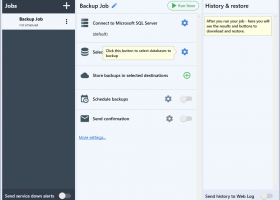
The main window is now divided into three sections: job list on the left, job execution history with restore on the right and job settings in the center.
Job List:
All backup jobs are now displayed in a single list as opposed to separate .jobx files for each job in previous versions. This allows you to manage all jobs in one screen instead of opening them one by one. The red exclamation mark to the left of job’s name indicates that the last backup has failed, while the green check mark indicates that everything went fine.
Job History and Restore:
When you select a job from the left panel you can see all its backups in the right panel. Moreover, there you can look at a detailed execution log, download or even restore the database from the selected backup wherever the backup is located. Previously you had to use a separate utility to restore backups, now you can restore your backups right from the application. This works with Full, Differential, and Transaction Log backups. They will be automatically downloaded from the destination folder, then unpacked, and restored on the database.
Job Settings:
In the middle panel you can see all backup job settings placed in step-by-step order. It makes the setup process easier especially for the new ones. Also, yellow tool tips guide you if you’re not sure what to do next.
There are five main steps to follow: from connecting to SQL Server down to setting up email notifications. All other settings are optional and hidden under the “More settings…” link. So, there is no good old Advanced Settings dialog, all advanced settings are presented as job setup steps.
You can either set up each step by clicking the blue gear icon or turn some functionality off and on using a switch. But, of course, not all of the steps are optional. For example, you can’t skip connection to SQL Server or database selection step.
For those who prefer using “Backup all non-system databases” option, there is a surprise here. Now y
[ SQLBackupAndFTP release history ]
Main Window:
The main window is now divided into three sections: job list on the left, job execution history with restore on the right and job settings in the center.
Job List:
All backup jobs are now displayed in a single list as opposed to separate .jobx files for each job in previous versions. This allows you to manage all jobs in one screen instead of opening them one by one. The red exclamation mark to the left of job’s name indicates that the last backup has failed, while the green check mark indicates that everything went fine.
Job History and Restore:
When you select a job from the left panel you can see all its backups in the right panel. Moreover, there you can look at a detailed execution log, download or even restore the database from the selected backup wherever the backup is located. Previously you had to use a separate utility to restore backups, now you can restore your backups right from the application. This works with Full, Differential, and Transaction Log backups. They will be automatically downloaded from the destination folder, then unpacked, and restored on the database.
Job Settings:
In the middle panel you can see all backup job settings placed in step-by-step order. It makes the setup process easier especially for the new ones. Also, yellow tool tips guide you if you’re not sure what to do next.
There are five main steps to follow: from connecting to SQL Server down to setting up email notifications. All other settings are optional and hidden under the “More settings…” link. So, there is no good old Advanced Settings dialog, all advanced settings are presented as job setup steps.
You can either set up each step by clicking the blue gear icon or turn some functionality off and on using a switch. But, of course, not all of the steps are optional. For example, you can’t skip connection to SQL Server or database selection step.
For those who prefer using “Backup all non-system databases” option, there is a surprise here. Now y
[ SQLBackupAndFTP release history ]
SQLBackupAndFTP 10.0.9 Windows 7 requirements
.NET Framework 3.5
Bookmark SQLBackupAndFTP
SQLBackupAndFTP for Windows 7 - Copyright information
All SQLBackupAndFTP reviews, submitted ratings and written comments become the sole property of Windows 7 download. You acknowledge that you, not windows7download, are responsible for the contents of your submission. However, windows7download reserves the right to remove or refuse to post any submission for any reason.
Windows 7 Download periodically updates pricing and software information of SQLBackupAndFTP full version from the publisher, but some information may be out-of-date. You should confirm all information.
Using warez version, crack, warez passwords, patches, serial numbers, registration codes, key generator, pirate key, keymaker or keygen for SQLBackupAndFTP license key is illegal and prevent future development of SQLBackupAndFTP. Download links are directly from our mirrors or publisher's website, SQLBackupAndFTP torrent or shared files from free file sharing and free upload services, including Rapidshare, MegaUpload, YouSendIt, SendSpace, DepositFiles, DivShare, HellShare, HotFile, FileServe or MediaFire, are not used.
Windows 7 Download periodically updates pricing and software information of SQLBackupAndFTP full version from the publisher, but some information may be out-of-date. You should confirm all information.
Using warez version, crack, warez passwords, patches, serial numbers, registration codes, key generator, pirate key, keymaker or keygen for SQLBackupAndFTP license key is illegal and prevent future development of SQLBackupAndFTP. Download links are directly from our mirrors or publisher's website, SQLBackupAndFTP torrent or shared files from free file sharing and free upload services, including Rapidshare, MegaUpload, YouSendIt, SendSpace, DepositFiles, DivShare, HellShare, HotFile, FileServe or MediaFire, are not used.
Post SQLBackupAndFTP review


Windows 7 SQLBackupAndFTP related downloads
... database backups created using BACKUP DATABASE command or SQLBackupAndFTP. It's a lifesaver when you need to quickly ...
My Account
Help
Windows 7 Software Coupons
-
FREE VPN PROXY by SEED4.ME WINDOWS
Free VPN by Seed4Me -
MacX DVD Video Converter
58% Off -
WinX MediaTrans
63% Off -
MacX Video Converter Pro
56% Off -
MacX Media Management Bundle
70% Off
My Saved Stuff
You have not saved any software.
Click "Save" next to each software.
Click "Save" next to each software.
Would you like to receive announcements of new versions of your software by email or by RSS reader? Register for FREE!
Windows 7 Downloads Picks
- iTop Data Recovery 6.1.0.936
- GoodSync2Go 12.9.29.9
- R-Studio for Windows x64 9.4 B191310
- StrongRecovery Portable 5.2.2.2
- DMDE 4.0.6.806
- BackUp Maker Standard Edition 8.405
- StrongRecovery 5.2.2.2
- KLS Backup Standard 2025 (14.0.0.2)
- Driver Genius Professional Edition 25.0.0.136
- R-Studio 9.5 build 191742
- Backup for Workgroups 4.3
- Backup To EMail 2.2 Build 252
- Mozy Remote Backup 2.36.5.646
- Virtos S.O.S Backup Enterprise 5.5.05
- Windows 7 USB/DVD Download Tool 1.0.24.0
- FreeFileSync 14.9
- Sync Breeze Ultimate 18.0.24
- Image 4.01
- A Bootable USB 0.9.6.508 beta
- Portable Recover Files 3.3.1.0
Popular Tags
erased
file
usb
media
formatted
audio
retrieve
folder
picture
deleted
windows
backup
disk
digital
undelete
partition
pictures
utility
recovery
drive
recover
video
corrupted
card
memory
damaged
salvage
images
rescue
restore
Popular Windows 7 Software
- Network Monitor II 31.7
- Avro Keyboard 5.6.0.0
- Media Creation Tool x64 22H2
- Ghostscript (x64 bit) 10.03.1
- Windows 7
- iTop Data Recovery 6.1.0.936
- Windows 7 Service Pack 1 7601.17514.1011
- iTop Easy Desktop 4.2.0.312
- Advanced SystemCare 19.3.0.200
- Smart Game Booster 5.3.1.692
- iTop PDF 3.6.0.4
- GoodSync2Go 12.9.29.9
- The Dude 7.22.2 Stable
- IObit Uninstaller 15.4.0.1
- Atlantis Word Processor 5.0.4
© 2026 Windows7Download.com - All logos, trademarks, art and other creative works are and remain copyright and property of their respective owners. Microsoft Windows is a registered trademarks of Microsoft Corporation. Microsoft Corporation in no way endorses or is affiliated with windows7download.com.