

PSPad editor for Windows 7 - Code editor with HTML tools and FTP - Windows 7 Download


PSPad editor 5.0.7.775
A configurable code editor with syntax highlighting, HTML tools and built-in FTP.
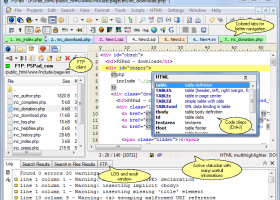
PSPad is a freeware code and text editor for programmers and web authors. It provides syntax highlighting profiles for languages such as C++, SQL, PHP, ASP and Python, with configurable syntax settings, auto-completion and Code Explorer. Additional tools include a hex editor, text comparison, character-set conversion, templates, macros and spellcheck. HTML utilities can format or compress code, and a built-in FTP client supports editing files on a server. Project support and compiler integration make it useful for development work as well as quick edits.
PSPad editor 5.0.7.775 full details

| File Size: | 10.57 MB |
|---|---|
| License: | Freeware |
| Price: | FREE |
| Released: | 2023-03-18 |
| Downloads: | Total: 6972 | This Month: 7 |
| Publisher: | Jan Fiala |
| Publisher URL: | http://www.pspad.com/en/author.php |

Download PSPad editor 5.0.7.775
Save PSPad editor to My Stuff
Tweet
PSPad editor - Windows 7 Download awards



PSPad editor 5.0.7.775 full description
PSPad is a freeware text and code editor for programmers and web authors who need language-aware editing tools without relying on a full development environment. It supports multiple syntax-highlighting profiles and arrives configured for languages including Visual Basic, C++, SQL, PHP, ASP and Python. Users can adjust syntax settings to suit their projects, making the editor useful for working across different languages and file types in one application.
Syntax highlighting helps distinguish code elements while editing, and auto-completion can assist with entering code. Code Explorer provides a way to navigate a file's structure, while project support groups related files for ongoing work. Templates and macros can speed up repeated tasks, and custom shortcuts allow frequently used commands to fit an individual workflow. A spellcheck option is also available for text that accompanies code or appears in web content.
The editor includes tools for examining and transforming files beyond ordinary text editing. Its hex editor displays data in hexadecimal form, and text-difference tools help compare versions of a document. CP conversion supports changing character encodings. For HTML work, tools can compress or format code, and integration with TopStyle Lite and TidyHTML adds web-authoring utilities. A built-in FTP client lets users edit files stored on a server, while file browsing helps locate content within a working directory. PSPad can also serve as an interface for working with an external compiler, so it can be used as a lightweight IDE.
These features suit developers editing source code, maintaining websites, comparing text revisions or making direct changes to remote files. A web author might format HTML, adjust a stylesheet and transfer the updated file through FTP; a programmer can organize project files, use language-specific highlighting and prepare code for compilation. The range of tools makes PSPad relevant to both occasional edits and regular development tasks, especially when a single editor for code, text and web files is preferred.
PSPad is freeware and is available in multiple languages. It supports Windows systems including Windows 7 in both 32-bit and 64-bit editions, as well as several earlier and later Windows releases. The stated system requirements call for no special hardware or software. Its combination of configurable language profiles, editing aids and included utilities provides a practical workspace for users who want more than a basic text editor without requiring a large integrated development suite.
PSPad editor 5.0.7.775 download tags
PSPad editor 5.0.7.775 Windows 7 release notes
New Release
Speed up start optimalization
Windows 10 include HighDPI support
Tons of new features and improvement
Updated help file
...
[ PSPad editor release history ]
Speed up start optimalization
Windows 10 include HighDPI support
Tons of new features and improvement
Updated help file
...
[ PSPad editor release history ]
PSPad editor 5.0.7.775 Windows 7 requirements
no special requirements
Bookmark PSPad editor
PSPad editor for Windows 7 - Copyright information
All PSPad editor reviews, submitted ratings and written comments become the sole property of Windows 7 download. You acknowledge that you, not windows7download, are responsible for the contents of your submission. However, windows7download reserves the right to remove or refuse to post any submission for any reason.
Windows 7 Download periodically updates pricing and software information of PSPad editor full version from the publisher, but some information may be out-of-date. You should confirm all information.
Using warez version, crack, warez passwords, patches, serial numbers, registration codes, key generator, pirate key, keymaker or keygen for PSPad editor license key is illegal and prevent future development of PSPad editor. Download links are directly from our mirrors or publisher's website, PSPad editor torrent or shared files from free file sharing and free upload services, including Rapidshare, MegaUpload, YouSendIt, SendSpace, DepositFiles, DivShare, HellShare, HotFile, FileServe or MediaFire, are not used.
Post PSPad editor review


Windows 7 PSPad editor related downloads
... easy to design patterns. Specialized RegEx tools like html/xml tag selector, line selector, or number selector help ...
A simple text editor for plain text editing. It has got many ... (not tabbed) · Can save to TXT, RTF, HTML, PHP, JSCRIPT, VBSCRIPT, BAT and DOC. · Ability ...
This is the text editor for D lang 1 with Customized Syntax highlighting, ... Programming Language" News Group started looking at many editors to see which one was the most useful ...
Welcome to the ultimate software download destination for Windows 7 users! Our website offers an extensive range of software from reliable developers in the industry. One such software that ...
... the world of cutting-edge software development! Devart T4 Editor is a remarkable addition to any Windows 7 ...
My Account
Help
Windows 7 Software Coupons
-
FREE VPN PROXY by SEED4.ME WINDOWS
Free VPN by Seed4Me -
MacX Video Converter Pro
56% Off -
WinX HD Video Converter
56% Off -
Media Player Morpher
85% Off -
WinX DVD Copy Pro
42% Off
My Saved Stuff
You have not saved any software.
Click "Save" next to each software.
Click "Save" next to each software.
Would you like to receive announcements of new versions of your software by email or by RSS reader? Register for FREE!
Windows 7 Downloads Picks
Popular Tags
editor
text editor
highlighting
editors
ftp
search
html
notepad
code
java
programmer
text
syntax
tool
css
hex editor
syntax highlighting
ide
html editor
perl
asp
javascript
xml
edit
compare
unicode
development
programming
php
hex
Popular Windows 7 Software
- Barcode for ASP.NET 5.0
- QuickBuild 16.0.31
- Simply Fortran 4.1 Build 4955
- Virtual COM Port Driver 9.0
- Microsoft Visual Studio Enterprise 2026 18.11.2
- IronWebScraper - The C# Library 2026.11.1
- InnoExtractor 2027 v12.2.0.187
- OpenSSL 4.1.0
- TeXstudio Portable 4.8.1
- GdPicture.NET SDK 14.4.11.1
- AthTek Code to FlowChart 2.0
- SignalLab VCL 8.0.0.169
- PilotEdit Pro x64 21.7.0
- Google App Engine SDK 1.3.8
- Adobe AIR SDK for Linux 51.2.2.5
© 2026 Windows7Download.com - All logos, trademarks, art and other creative works are and remain copyright and property of their respective owners. Microsoft Windows is a registered trademarks of Microsoft Corporation. Microsoft Corporation in no way endorses or is affiliated with windows7download.com.