


Prevent for Windows 7 - Prevent - Protect Your Files - Windows 7 Download


Prevent 1.0
Prevent software stops accidental file actions.
Looking for a way to secure your files and folders from accidental deletion or modification? Look no further than Prevent, the innovative software developed by The Windows Club. With Prevent, you can easily lock your files and folders to prevent unwanted changes, ensuring your valuable data is always safe and secure. Whether you're a business owner looking to protect confidential information or a casual user looking to safeguard important files, Prevent is the perfect solution. Download Prevent today and enjoy total peace of mind.
Prevent 1.0 full details

| File Size: | 358 kB |
|---|---|
| License: | Freeware |
| Price: | FREE |
| Released: | 2013-06-01 |
| Downloads: | Total: 769 | This Month: 67 |
| Publisher: | The Windows Club |
| Publisher URL: | https://www.thewindowsclub.com/ |

Download Prevent 1.0
Save Prevent to My Stuff
Tweet
Prevent - Windows 7 Download awards


Prevent 1.0 full description
Prevent v 1.0 is a freeware app which runs on all Windows. If you don’t want anyone deleting or renaming or messing around with your data, maybe your younger sibling, then Prevent may be able to help you.
The downloaded zip file consists of:
1. Prevent.exe
2. Pre_1
3. Pre_2
4. Read Me file.
5. Uninstall
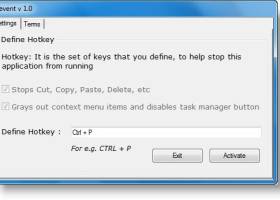
Run the Prevent installer setup. The installer only places the Prevent folder in the system Program Files folder. A desktop shortcut will also be created. To run the program, click on Prevent. Set your Hot key to stop Prevent. You may set it as Ctrl+Pif you wish. Hotkeys Win+F8 kills Pre_1 and Win+F9 kills Pre_2, too. But the single hotkey set by you will kill all Prevent processes at the same time.
Prevent :
1. Stops Cut
2. Stops Paste
3. Stops Copy
4. Stops Delete
5. Stops Copy To
6. Stops Move to
7. Stops Send To
8. Prevents renaming
9. Disables Task Manager’s End Process button. Also it doesn’t allow you to right click on process name and click on end process. It also grays out the context menu items, disable Ctrl+C and Ctrl+V and/or stops the process.
To uninstall or remove Prevent, use the Uninstaller situated in the Prevent folder, or uninstall it via the Control Panel or simply delete its Program folder.
The downloaded zip file consists of:
1. Prevent.exe
2. Pre_1
3. Pre_2
4. Read Me file.
5. Uninstall
Run the Prevent installer setup. The installer only places the Prevent folder in the system Program Files folder. A desktop shortcut will also be created. To run the program, click on Prevent. Set your Hot key to stop Prevent. You may set it as Ctrl+Pif you wish. Hotkeys Win+F8 kills Pre_1 and Win+F9 kills Pre_2, too. But the single hotkey set by you will kill all Prevent processes at the same time.
Prevent :
1. Stops Cut
2. Stops Paste
3. Stops Copy
4. Stops Delete
5. Stops Copy To
6. Stops Move to
7. Stops Send To
8. Prevents renaming
9. Disables Task Manager’s End Process button. Also it doesn’t allow you to right click on process name and click on end process. It also grays out the context menu items, disable Ctrl+C and Ctrl+V and/or stops the process.
To uninstall or remove Prevent, use the Uninstaller situated in the Prevent folder, or uninstall it via the Control Panel or simply delete its Program folder.
Prevent 1.0 download tags
Bookmark Prevent
Prevent for Windows 7 - Copyright information
All Prevent reviews, submitted ratings and written comments become the sole property of Windows 7 download. You acknowledge that you, not windows7download, are responsible for the contents of your submission. However, windows7download reserves the right to remove or refuse to post any submission for any reason.
Windows 7 Download periodically updates pricing and software information of Prevent full version from the publisher, but some information may be out-of-date. You should confirm all information.
Using warez version, crack, warez passwords, patches, serial numbers, registration codes, key generator, pirate key, keymaker or keygen for Prevent license key is illegal and prevent future development of Prevent. Download links are directly from our mirrors or publisher's website, Prevent torrent or shared files from free file sharing and free upload services, including Rapidshare, MegaUpload, YouSendIt, SendSpace, DepositFiles, DivShare, HellShare, HotFile, FileServe or MediaFire, are not used.
Windows 7 Download periodically updates pricing and software information of Prevent full version from the publisher, but some information may be out-of-date. You should confirm all information.
Using warez version, crack, warez passwords, patches, serial numbers, registration codes, key generator, pirate key, keymaker or keygen for Prevent license key is illegal and prevent future development of Prevent. Download links are directly from our mirrors or publisher's website, Prevent torrent or shared files from free file sharing and free upload services, including Rapidshare, MegaUpload, YouSendIt, SendSpace, DepositFiles, DivShare, HellShare, HotFile, FileServe or MediaFire, are not used.
Post Prevent review


Windows 7 Prevent related downloads
KeyFreeze is a FREE Windows application that blocks your keyboard and mouse without “locking” the screen. ...
Looking for an efficient way to restrict access to certain programs and applications on your PC? ...
... The program simply creates a special folder that prevents Windows to copy autorun files through virus programs ...

Introducing HackCheck by Abelssoft, the ultimate security tool designed to safeguard your online identity and personal ...
Malwarebytes Anti-Exploit is a powerful software that provides users with the necessary security against zero-day vulnerabilities. ...
My Account
Help
Windows 7 Software Coupons
-
MacX MediaTrans
63% Off -
FREE VPN PROXY by SEED4.ME WINDOWS
Free VPN by Seed4Me -
WinX MediaTrans
63% Off -
MacX Video Converter Pro
56% Off -
MacX DVD Video Converter
58% Off
My Saved Stuff
You have not saved any software.
Click "Save" next to each software.
Click "Save" next to each software.
Would you like to receive announcements of new versions of your software by email or by RSS reader? Register for FREE!
Windows 7 Downloads Picks
- Deep Freeze 8.71.20.5734
- EventSentry Light 6.0.1.48
- Sandboxie 1.17.5 Plus
- Alternate Password DB 3.710
- OpenVPN x64 2.6.11
- Privacy Eraser Free 6.28
- Portable Wise Disk Cleaner 11.3.4 Build 854
- Panda Managed Office Protection 5.04
- CCleaner Portable 6.36.11508
- Portable Wise Disk Cleaner Pro 11.1.3
- Panda Cloud Office Protection 5.04
- AVG-PC Tuneup 2012 2012.27
- Refog Personal Monitor 9.2.0
- Nessus 10.7.4
- Secure Eraser Standard Edition 7.102
- Ultimate Tool 2010 Professional Edition for Win 7 1.1
- Microsoft Security Essentials Definition Updates x32 July 15, 2024
- FortiClient 7.4.2.1737
- System Cleanup 1.7.501
- Firewall Builder for Windows 5.1.0 B3599
Popular Tags
internet security
remove
keylogger
shredder
lost password
privacy
crack
history
recovery
password recovery
protect
internet
password
freeware
recover
crack password
erase
monitor
file
cookies
clean
hide
firewall
security
secure
lock
software
cache
delete
wipe
Popular Windows 7 Software
- VPNBook
- IObit Malware Fighter 13.2.0.1635
- Microsoft Safety Scanner 1.449.489.0 (May 7,
- Malwarebytes Chameleon 3.1.33.0
- Free Folder Lock 2.3.8.8
- DualSafe Password Manager 1.4.0.14
- Deep Freeze 8.71.20.5734
- 7thShare Folder Lock Pro 2.3.8.8
- EventSentry Light 6.0.1.48
- Top Data Protector 3.1.0.18
- Sandboxie 1.17.5 Plus
- imyPass iPassBye 1.0.16
- Advanced SystemCare Ultimate 18.2.0.91
- imyPass iPassGo 1.0.52
- Alternate Password DB 3.710
© 2026 Windows7Download.com - All logos, trademarks, art and other creative works are and remain copyright and property of their respective owners. Microsoft Windows is a registered trademarks of Microsoft Corporation. Microsoft Corporation in no way endorses or is affiliated with windows7download.com.