


Monitor Test Utility for Windows 7 - Portable monitor motion and pattern testing - Windows 7 Download


Monitor Test Utility 3.0.0
Checks monitor behavior with visual motion and pattern tests.
Monitor Test Utility is a portable Windows tool for visually checking a monitor's display behavior. It provides motion and pattern tests, with multiple patterns cycled using on-screen arrows or the Spacebar. Select a screen from the device list and view details such as resolution, refresh rate, color count, pixel aspect ratio, virtual screen size, and diagonal measurement. It is freeware and runs without installation.
Monitor Test Utility 3.0.0 full details

| File Size: | 348 kB |
|---|---|
| License: | Freeware |
| Price: | FREE |
| Released: |
2026-10-04
 |
| Downloads: | Total: 5 | This Month: 5 |
| Publisher: | Javad Taheri |
| Publisher URL: | https://github.com/Javad-Taheri/KeyboardTestUtility |

Download Monitor Test Utility 3.0.0
Save Monitor Test Utility to My Stuff
Tweet
Monitor Test Utility 3.0.0 full screenshots


Monitor Test Utility - Windows 7 Download awards

Monitor Test Utility 3.0.0 full description
Monitor Test Utility is a portable Windows application for checking a monitor's display behavior. It is useful after setting up a new screen or when investigating visible irregularities, and it can also help users explore basic display characteristics. Rather than changing display settings or repairing faults, the utility presents visual tests that the user can inspect directly on the screen.
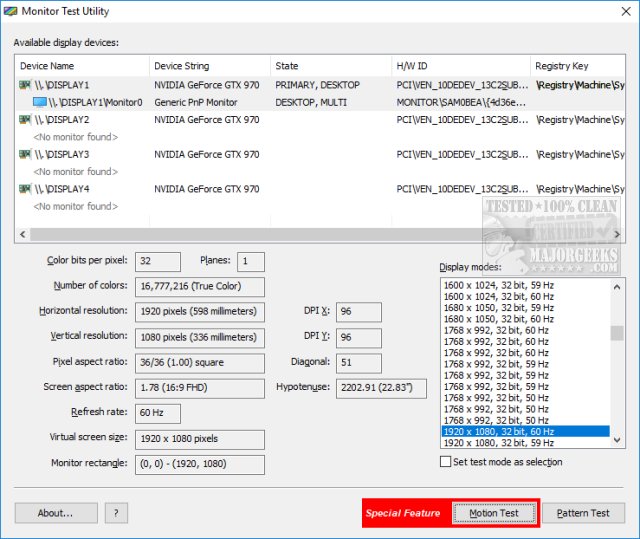
The program offers a motion test and a pattern test. The motion test lets users observe moving on-screen content, which can help reveal display behavior that is less apparent on a static image. The pattern test provides several patterns for checking different visual aspects of the monitor. Users can move between those patterns with the on-screen arrows or the Spacebar, making it possible to review the sequence without navigating through separate menus.
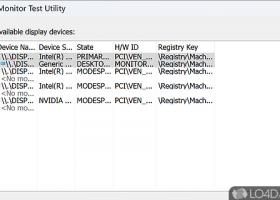
A device list lets users select the monitor to examine before starting a test. The main window also displays information about the selected screen, including color count, horizontal and vertical resolution, pixel aspect ratio, refresh rate, virtual screen size, and diagonal measurement. These details give users useful context while viewing the patterns, such as the resolution and refresh rate reported for the display. The controls and information are kept together on the main screen, so the basic testing workflow does not require extensive configuration.
The utility can be used for a quick visual check when a screen appears to show objects abnormally, or to observe a display's capabilities after connecting or purchasing a monitor. Its patterns and motion test are intended for visual inspection; they do not replace hardware diagnostics or establish the cause of a problem. Results depend on what is visible to the person conducting the test, so the utility is best treated as a straightforward aid for noticing display anomalies rather than a repair tool.
Monitor Test Utility is freeware and does not require installation. The executable can be launched directly, including from removable storage such as a USB flash drive or external hard drive. It is designed not to create additional files or folders or modify Windows Registry entries. The program supports Windows 7, Vista, 8, 10, and 11, with 32-bit and 64-bit support stated for Windows 7 through Windows 10 and for Vista and Windows 8; Windows 11 is also supported. Its compact file size makes it practical to keep alongside other portable troubleshooting tools.
The program offers a motion test and a pattern test. The motion test lets users observe moving on-screen content, which can help reveal display behavior that is less apparent on a static image. The pattern test provides several patterns for checking different visual aspects of the monitor. Users can move between those patterns with the on-screen arrows or the Spacebar, making it possible to review the sequence without navigating through separate menus.
A device list lets users select the monitor to examine before starting a test. The main window also displays information about the selected screen, including color count, horizontal and vertical resolution, pixel aspect ratio, refresh rate, virtual screen size, and diagonal measurement. These details give users useful context while viewing the patterns, such as the resolution and refresh rate reported for the display. The controls and information are kept together on the main screen, so the basic testing workflow does not require extensive configuration.
The utility can be used for a quick visual check when a screen appears to show objects abnormally, or to observe a display's capabilities after connecting or purchasing a monitor. Its patterns and motion test are intended for visual inspection; they do not replace hardware diagnostics or establish the cause of a problem. Results depend on what is visible to the person conducting the test, so the utility is best treated as a straightforward aid for noticing display anomalies rather than a repair tool.
Monitor Test Utility is freeware and does not require installation. The executable can be launched directly, including from removable storage such as a USB flash drive or external hard drive. It is designed not to create additional files or folders or modify Windows Registry entries. The program supports Windows 7, Vista, 8, 10, and 11, with 32-bit and 64-bit support stated for Windows 7 through Windows 10 and for Vista and Windows 8; Windows 11 is also supported. Its compact file size makes it practical to keep alongside other portable troubleshooting tools.
Monitor Test Utility 3.0.0 download tags
Bookmark Monitor Test Utility
Monitor Test Utility for Windows 7 - Copyright information
All Monitor Test Utility reviews, submitted ratings and written comments become the sole property of Windows 7 download. You acknowledge that you, not windows7download, are responsible for the contents of your submission. However, windows7download reserves the right to remove or refuse to post any submission for any reason.
Windows 7 Download periodically updates pricing and software information of Monitor Test Utility full version from the publisher, but some information may be out-of-date. You should confirm all information.
Using warez version, crack, warez passwords, patches, serial numbers, registration codes, key generator, pirate key, keymaker or keygen for Monitor Test Utility license key is illegal and prevent future development of Monitor Test Utility. Download links are directly from our mirrors or publisher's website, Monitor Test Utility torrent or shared files from free file sharing and free upload services, including Rapidshare, MegaUpload, YouSendIt, SendSpace, DepositFiles, DivShare, HellShare, HotFile, FileServe or MediaFire, are not used.
Windows 7 Download periodically updates pricing and software information of Monitor Test Utility full version from the publisher, but some information may be out-of-date. You should confirm all information.
Using warez version, crack, warez passwords, patches, serial numbers, registration codes, key generator, pirate key, keymaker or keygen for Monitor Test Utility license key is illegal and prevent future development of Monitor Test Utility. Download links are directly from our mirrors or publisher's website, Monitor Test Utility torrent or shared files from free file sharing and free upload services, including Rapidshare, MegaUpload, YouSendIt, SendSpace, DepositFiles, DivShare, HellShare, HotFile, FileServe or MediaFire, are not used.
Post Monitor Test Utility review


Windows 7 Monitor Test Utility related downloads
The HddSpeedTest utility will offer two methods to test your drives speed. A high drive speed is ...
Introducing Speed Test Pro Standard - the ultimate tool for measuring ... and upload speeds. But that's not all. Speed Test Pro Standard also allows you to track your ...
Monitors your system ram, cpu usage, page file load ... and the system power in real time. Also displays your current I.P. address. The power usage meter ...
... software destination offering a remarkable tool called Performance Monitor, developed by the brilliant mind of Lorenzi Davide. ...
... easy to use tool designed to help you monitor the processor temperature of Intel Core, Core 2 ...
My Account
Help
Windows 7 Software Coupons
-
WinX DVD Ripper
50% Off -
MacX Media Management Bundle
70% Off -
MacX Video Converter Pro
56% Off -
WinX MediaTrans
63% Off -
MacX DVD Video Converter
58% Off
My Saved Stuff
You have not saved any software.
Click "Save" next to each software.
Click "Save" next to each software.
Would you like to receive announcements of new versions of your software by email or by RSS reader? Register for FREE!
Windows 7 Downloads Picks
- Windows Theme Installer 1.1
- System Stability Tester 1.5.1
- PCMark 2.3.2912
- Hdd Speed Test Tool 1.0.14
- PC Wizard 2008 2009 1.89
- CINEBENCH 2024.0.0
- PC Wizard 2015 2.14
- Opti Drive Control 1.80
- FurMark 1.38.1.0
- OCCT 14.0.12
- Disk Bench 2.7.0.1
- AS SSD Benchmark 2.0.7316.34247
- CrystalCPUID (32 bit) 4.15.5.452e
- Memtest86 11.0 B1000
- HD_Speed x64 1.7.8.107
- Memtest86+ for Windows 7.00
- HWiNFO32 7.72 B5355
- CPUTempWatch x64 1.0.14
- PCMark 8 2.3.293
- HD_Speed 1.7.8.107
Popular Tags
benchmark
digital
analyze
test
performance benchmark
time
bandwidth
tester
windows 7
performance testing
media
software review
user-friendly
monitor test utility
software
benchmark system
hardware
hardware detection
images
windows
system benchmark
memory
tool
cpu
monitor
analysis
benchmarking
server
performance
memory monitor
Popular Windows 7 Software
- Network Monitor II 31.7
- Avro Keyboard 5.6.0.0
- Media Creation Tool x64 22H2
- Ghostscript (x64 bit) 10.03.1
- Windows 7
- iTop Data Recovery 6.1.0.936
- Windows 7 Service Pack 1 7601.17514.1011
- iTop Easy Desktop 4.2.0.312
- Advanced SystemCare 19.3.0.200
- Smart Game Booster 5.3.1.692
- iTop PDF 3.6.0.4
- GoodSync2Go 12.9.29.9
- The Dude 7.24.5 Stable
- IObit Uninstaller 15.4.0.1
- Atlantis Word Processor 5.0.4
© 2026 Windows7Download.com - All logos, trademarks, art and other creative works are and remain copyright and property of their respective owners. Microsoft Windows is a registered trademarks of Microsoft Corporation. Microsoft Corporation in no way endorses or is affiliated with windows7download.com.