


MKVCleaver for Windows 7 - MKVCleaver: Ultimate Video Extractor! - Windows 7 Download


MKVCleaver 0.8.0.2
"Unlock All Audio & Video Streams: Download MKVCleaver Now!"
Looking for a powerful tool to extract video and audio from MKV files? Look no further than MKVCleaver, the innovative software from Ilia Bakhmoutski. With its intuitive interface and lightning-fast processing, MKVCleaver makes it easy to extract content from MKV files and convert them to a variety of different formats. Whether you're looking to stream video or audio on your computer or mobile device, or you just want to free up space on your hard drive, MKVCleaver is the perfect tool for the job. Try it today and experience the power of MKVCleaver for yourself!
MKVCleaver 0.8.0.2 full details

| File Size: | 7.80 MB |
|---|---|
| License: | Open Source |
| Price: | FREE |
| Released: |
2025-11-22
 |
| Downloads: | Total: 657 | This Month: 80 |
| Publisher: | Ilia Bakhmoutski |
| Publisher URL: | https://blogs.sapib.ca/apps/ |

Download MKVCleaver 0.8.0.2
Save MKVCleaver to My Stuff
Tweet
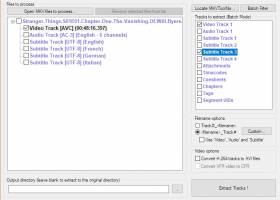
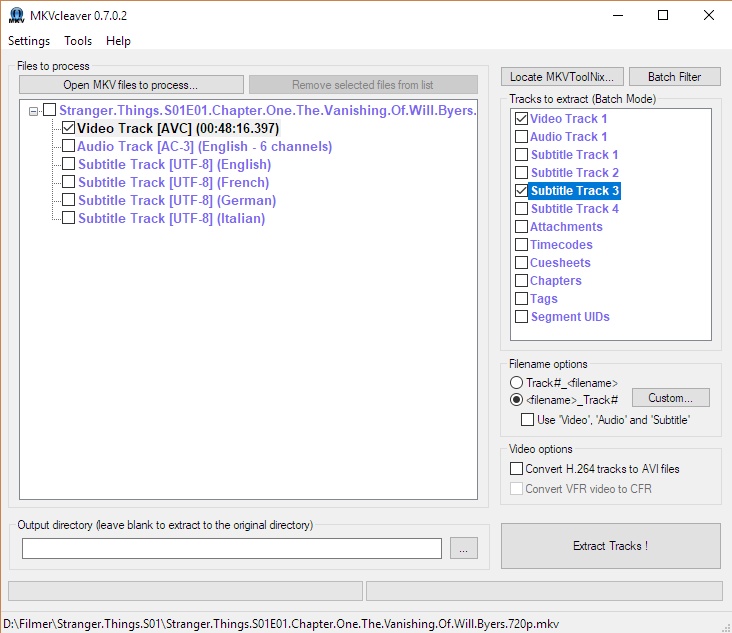
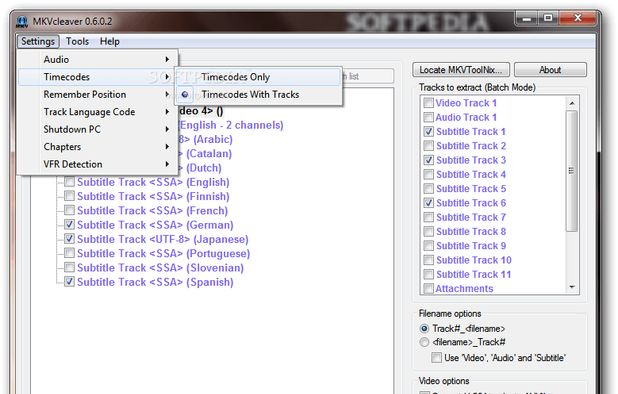
MKVCleaver 0.8.0.2 full screenshots




MKVCleaver - Windows 7 Download awards

MKVCleaver 0.8.0.2 full description
MKVCleaver is a powerful software developed by Ilia Bakhmoutski for Windows 7. It’s a must-have for anyone who deals with MKV files on a regular basis. This software has been designed with a user-friendly interface making it easy to use even for the not-so-tech-savvy user.
With MKVCleaver, you can extract portions of an MKV file without losing quality. This is especially useful if you only need a part of the video or audio file. Additionally, the software offers a plethora of features including, but not limited to, batch processing, customizable naming of output files, and the ability to create chapter files.
If you're dealing with large files, this software will be a lifesaver. It helps you keep track of your files, making sure you don’t lose track of them while you’re working on a project. Furthermore, MKVCleaver works on multiple platforms providing flexibility for users across different devices.
In conclusion, MKVCleaver is an absolute essential for anyone who works with MKV files. It provides an efficient and quick way to extract portions of the file without losing quality. Its user interface is easy to navigate, and the software is adaptable for different devices. It’s definitely worth checking out for all Windows 7 users.
With MKVCleaver, you can extract portions of an MKV file without losing quality. This is especially useful if you only need a part of the video or audio file. Additionally, the software offers a plethora of features including, but not limited to, batch processing, customizable naming of output files, and the ability to create chapter files.
If you're dealing with large files, this software will be a lifesaver. It helps you keep track of your files, making sure you don’t lose track of them while you’re working on a project. Furthermore, MKVCleaver works on multiple platforms providing flexibility for users across different devices.
In conclusion, MKVCleaver is an absolute essential for anyone who works with MKV files. It provides an efficient and quick way to extract portions of the file without losing quality. Its user interface is easy to navigate, and the software is adaptable for different devices. It’s definitely worth checking out for all Windows 7 users.
MKVCleaver 0.8.0.2 download tags
MKVCleaver 0.8.0.2 Windows 7 release notes
New Release
Changes:
New icon
Batch item multi-select
GUI improvements
MediaInfo.dll no longer included with portable version
Removed LogRotate executable
Replaced some AutoIT code with SQLite queries to increase speed and reduce code complexity
Added parameters menu option to main GUI
Added track filter dry-run option
Customizable log viewer colours
Exportable log lines either as RTF or TXT
Auto update placeholders when changing parameters and vise versa
Added track type to Get Codec(s) GUI
Added chapter count to each file in the left pane
Removed source code from portable version
Track filters can be turned off without deleting them
Rewrote Help file
Placeholders can be targeted per track type
HotKey to Expand/Collapse all files in the left pane
UTF16-LE encoding in custom.ini
File cleanup on close
First run path selection
MkvToolNix icon replaces text “Locate MKVToolNix” when package is found
Added tool-tips to some GUI fields
Added A_EAC3 codec
Many more minor GUI improvements
Fixes:
Drag & Drop with long paths (Bug 1559)
Freezes when pressing Esc while file info dialog is open (Bug 1520)
GUI flicker on start/stop
Drag & Drop on custom forms for parameters and placeholders
Message Spelling
Better MessageBox messages
Session restore code bugs
Pressing Esc now works for all GUIs
Singleton now works
Child/Parent GUIs relation code improvements
Update code now detects which files to replace
Parameters and placeholder substitutions
Code consistency for all GUIs
Handling of AND/OR logic for track filters
SQLite query improvements
Better GUI responsiveness
Log viewer windows auto sizing
Custom filename separator handling
Many more minor bug fixes
Breaking Changes:
Syntax change for Layout Editor
Syntax change for custom filename separators
Renamed database to mkvcleaver.db
MediaInfo package needs to be installed manually or MediaInfo.dll present
Removed [aDelay] placeholder
[Delay] placeholder format changed (space is placed between delay integer and “ms”)
Database table s
[ MKVCleaver release history ]
Changes:
New icon
Batch item multi-select
GUI improvements
MediaInfo.dll no longer included with portable version
Removed LogRotate executable
Replaced some AutoIT code with SQLite queries to increase speed and reduce code complexity
Added parameters menu option to main GUI
Added track filter dry-run option
Customizable log viewer colours
Exportable log lines either as RTF or TXT
Auto update placeholders when changing parameters and vise versa
Added track type to Get Codec(s) GUI
Added chapter count to each file in the left pane
Removed source code from portable version
Track filters can be turned off without deleting them
Rewrote Help file
Placeholders can be targeted per track type
HotKey to Expand/Collapse all files in the left pane
UTF16-LE encoding in custom.ini
File cleanup on close
First run path selection
MkvToolNix icon replaces text “Locate MKVToolNix” when package is found
Added tool-tips to some GUI fields
Added A_EAC3 codec
Many more minor GUI improvements
Fixes:
Drag & Drop with long paths (Bug 1559)
Freezes when pressing Esc while file info dialog is open (Bug 1520)
GUI flicker on start/stop
Drag & Drop on custom forms for parameters and placeholders
Message Spelling
Better MessageBox messages
Session restore code bugs
Pressing Esc now works for all GUIs
Singleton now works
Child/Parent GUIs relation code improvements
Update code now detects which files to replace
Parameters and placeholder substitutions
Code consistency for all GUIs
Handling of AND/OR logic for track filters
SQLite query improvements
Better GUI responsiveness
Log viewer windows auto sizing
Custom filename separator handling
Many more minor bug fixes
Breaking Changes:
Syntax change for Layout Editor
Syntax change for custom filename separators
Renamed database to mkvcleaver.db
MediaInfo package needs to be installed manually or MediaInfo.dll present
Removed [aDelay] placeholder
[Delay] placeholder format changed (space is placed between delay integer and “ms”)
Database table s
[ MKVCleaver release history ]
Bookmark MKVCleaver
MKVCleaver for Windows 7 - Copyright information
All MKVCleaver reviews, submitted ratings and written comments become the sole property of Windows 7 download. You acknowledge that you, not windows7download, are responsible for the contents of your submission. However, windows7download reserves the right to remove or refuse to post any submission for any reason.
Windows 7 Download periodically updates pricing and software information of MKVCleaver full version from the publisher, but some information may be out-of-date. You should confirm all information.
Using warez version, crack, warez passwords, patches, serial numbers, registration codes, key generator, pirate key, keymaker or keygen for MKVCleaver license key is illegal and prevent future development of MKVCleaver. Download links are directly from our mirrors or publisher's website, MKVCleaver torrent or shared files from free file sharing and free upload services, including Rapidshare, MegaUpload, YouSendIt, SendSpace, DepositFiles, DivShare, HellShare, HotFile, FileServe or MediaFire, are not used.
Windows 7 Download periodically updates pricing and software information of MKVCleaver full version from the publisher, but some information may be out-of-date. You should confirm all information.
Using warez version, crack, warez passwords, patches, serial numbers, registration codes, key generator, pirate key, keymaker or keygen for MKVCleaver license key is illegal and prevent future development of MKVCleaver. Download links are directly from our mirrors or publisher's website, MKVCleaver torrent or shared files from free file sharing and free upload services, including Rapidshare, MegaUpload, YouSendIt, SendSpace, DepositFiles, DivShare, HellShare, HotFile, FileServe or MediaFire, are not used.
Post MKVCleaver review


Windows 7 MKVCleaver related downloads
... chapters from MKV files? Look no further than MKVCleaver x64. Developed by Ilia Bakhmoutski, this powerful software ...
MKVcleaver is a GUI (Graphical User Interface) for mkvtoolnix, ... GUI interface, but a lot of functionality. MKVcleaver has the following features: Drag & Drop ...
Discover the power of Portable MKVCleaver, an innovative tool developed by Ilia Bakhmoutski, designed ... folder on your computer. With its user-friendly interface, MKVCleaver simplifies the extraction process, enabling you to select ...
My Account
Help
Windows 7 Software Coupons
-
FREE VPN PROXY by SEED4.ME WINDOWS
Free VPN by Seed4Me -
MacX Media Management Bundle
70% Off -
Media Player Morpher
85% Off -
WinX MediaTrans
63% Off -
MacX MediaTrans
63% Off
My Saved Stuff
You have not saved any software.
Click "Save" next to each software.
Click "Save" next to each software.
Would you like to receive announcements of new versions of your software by email or by RSS reader? Register for FREE!
Windows 7 Downloads Picks
- MpcStar 7.0
- BluffTitler 17.0.0.3
- Adobe Premiere Elements 2024.2
- MP4Box 1.0.1
- iTop Screen Recorder 6.5.0.3613
- Windows Media Player 11 11.2405.8.0
- Blue Iris 6.0.1.27
- Windows 7 Codec Pack 4.3.1
- Windows Essentials Codec Pack 4.3.2.207
- TMPGEnc Video Mastering Works 8.0.11.12
- Video To Video Converter 2.9 B2.9.6.11
- Subtitle Edit 4.0.15
- Free Video Converter 1.0.1.4
- Freemake Video Converter 6.0.0.2
- VLC Media Player x64 3.0.20
- Windows Media Player 12
- Free Online TV Player 4.9.5.0
- Total Video Player 1.31
- VLC Media Player Portable 3.0.23
- GiliSoft Video Editor 19.0.0
Popular Tags
flv
video
rmvb
convert
dvd to ipod
mpeg
3gp
dvd to psp
iphone
wmv
avi
movie
mov
converter
3gp converter
vcd
download
divx
mpg
ipod
mp4 converter
asf
xvid
dvd ripper
avi converter
video converter
psp
mp3
mp4
dvd
Popular Windows 7 Software
- MpcStar 7.0
- Free Any Video Converter Pro 3.8.8
- Nero StartSmart 7.11.10.0c
- KORG PA Manager 5.1.2010
- DVDFab 13.0.5.9
- 7thShare Any Video Converter 3.2.6
- BluffTitler 17.0.0.3
- WonderFox DVD Ripper Pro 24.0
- Audacity Portable 3.5.0
- Adobe Premiere Elements 2024.2
- 7thShare Any Blu-ray Ripper 3.2.6
- HD Video Converter Factory Pro 28.1
- Tipard Blu-ray Player 6.3.68
- Free HD Video Converter Factory 28.1
- MP4Box 1.0.1
© 2026 Windows7Download.com - All logos, trademarks, art and other creative works are and remain copyright and property of their respective owners. Microsoft Windows is a registered trademarks of Microsoft Corporation. Microsoft Corporation in no way endorses or is affiliated with windows7download.com.