

Folderico for Windows 7 - Customize folder icons in Windows - Windows 7 Download


Folderico 4.0.0.12 RC12
Change folder icons, preview choices, use themes, and restore original icons.
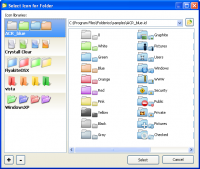
Folderico changes folder icons in Windows Explorer, helping users distinguish directories at a glance. Icons can be selected through an Explorer context menu or a separate dialog, with previews available in both workflows. The utility supports SFT themes, ICL files, and iColorFolder themes, and can restore a folder's original icon in one click. The Explorer context-menu feature works only on 32-bit Windows.
Folderico 4.0.0.12 RC12 full details

| File Size: | 4.10 MB |
|---|---|
| License: | Freeware |
| Price: | FREE |
| Released: | 2012-09-24 |
| Downloads: | Total: 9332 | This Month: 8 |
| Publisher: | Shedko Software |
| Publisher URL: | http://eng.softq.org |

Download Folderico 4.0.0.12 RC12
Save Folderico to My Stuff
Tweet
Folderico - Windows 7 Download awards



Folderico 4.0.0.12 RC12 full description
Folderico is a lightweight utility for changing folder icons in Windows Explorer. It is intended for people who want to distinguish folders visually, organize collections, or give frequently used directories a recognizable appearance. Rather than changing folder contents or their locations, it assigns a different icon to a selected folder, making visual identification easier when browsing in Explorer.
Folder icons can be changed from an Explorer context-menu item or through a dialog in Folderico. Both methods provide a preview of the available image before it is applied, so users can check the appearance and choose an icon without relying on filenames alone. The context-menu approach keeps the operation close to the folder being customized; the separate dialog offers another way to browse and select an image. Folderico can also return a folder to its original icon in one click, which is useful when a temporary visual scheme is no longer needed or an icon choice should be undone.
For broader customization, the program works with its SFT theme format and associates those files with Folderico for processing. It also supports ICL files and themes made for iColorFolder, allowing users to work with those existing icon collections rather than being limited to individual images. Explorer integration places Folderico's command in the context menu, keeping common icon changes within the normal file-browsing workflow. The context-menu feature is limited to 32-bit Windows, so that particular method is not available on 64-bit systems.
Folderico can help separate project folders, work documents, personal files, archives, or other frequently browsed directories through visual cues. A consistent set of icons can make a larger folder collection easier to scan, while a distinctive icon can draw attention to an important location. Restoring the original icon makes it practical to experiment with themes and selections without leaving a folder permanently customized.
Folderico is freeware for Windows Vista and Windows 7, including their 64-bit editions. Its reported installer size is about 4.2 MB. The Explorer context-menu limitation applies to 32-bit Windows; users on 64-bit Windows can use the program's dialog-based method instead.
Folderico 4.0.0.12 RC12 download tags
Folderico 4.0.0.12 RC12 Windows 7 release notes
New Release
· Fixed: on many PC Folderico do not display icon-collection.
[ Folderico release history ]
· Fixed: on many PC Folderico do not display icon-collection.
[ Folderico release history ]
Bookmark Folderico
Folderico for Windows 7 - Copyright information
All Folderico reviews, submitted ratings and written comments become the sole property of Windows 7 download. You acknowledge that you, not windows7download, are responsible for the contents of your submission. However, windows7download reserves the right to remove or refuse to post any submission for any reason.
Windows 7 Download periodically updates pricing and software information of Folderico full version from the publisher, but some information may be out-of-date. You should confirm all information.
Using warez version, crack, warez passwords, patches, serial numbers, registration codes, key generator, pirate key, keymaker or keygen for Folderico license key is illegal and prevent future development of Folderico. Download links are directly from our mirrors or publisher's website, Folderico torrent or shared files from free file sharing and free upload services, including Rapidshare, MegaUpload, YouSendIt, SendSpace, DepositFiles, DivShare, HellShare, HotFile, FileServe or MediaFire, are not used.
Post Folderico review


Windows 7 Folderico related downloads
Looking to design and enhance your Windows 7 experience? Look no further than Icon Craft, an ...
Looking for a way to spruce up your Windows 7 desktop? Look no further than Windows Toolbar Icons, ...
Welcome to the home of "Windows 7 Menu Icons", a premium software developed by the renowned Menu ...
As a Windows 7 software expert, I highly recommend the Icon Library developed by IconLibrary. The software is designed ...
Looking to add some pizzazz to your Windows 7 interface? Look no further than the Windows 7 ...
My Account
Help
Windows 7 Software Coupons
-
WinX DVD Ripper
50% Off -
MacX MediaTrans
63% Off -
WinX MediaTrans
63% Off -
MacX DVD Ripper Pro
50% Off -
MacX DVD Video Converter
58% Off
My Saved Stuff
You have not saved any software.
Click "Save" next to each software.
Click "Save" next to each software.
Would you like to receive announcements of new versions of your software by email or by RSS reader? Register for FREE!
Windows 7 Downloads Picks
- Black Web Buttons 1.0
- Blue Web Buttons 1.0
- IconPackager 10.03
- White Web Buttons 1.0
- Orange Web Buttons 1.0
- Folderico 4.0.0.12 RC12
- XMac Networking
- IconCool Studio Pro 9.0 B220225
- Yellow Web Buttons 1.0
- IconCool Studio 9.0 B220225
- Color Web Buttons 1.0
- Social Web Buttons 2.0
- MINIUM²
- Transparentizer 1.31
- LUMINIGHT Business
- Plastic XP Medical
- STROKE Video Production
- LUMINA Database
- REAL VISTA Data
- Red Web Buttons 2.1
Popular Tags
vista
icons
windows
network
vector
stock
set
interface
flash
desktop
vista icons
photoshop
toolbar
images
icon
development
free
design
stock icons
bmp
windows icons
ico
image
collection
icon set
stockicons
application
illustrator
toolbars
icone
Popular Windows 7 Software
- Windows 7 Themes Pack 1
- Monitor Computer Usage Software 7.0
- desktopPet 1.6.0
- DesktopOK 12.82
- Pleasant Modeller 1.0.0
- CamPaper 6 Build 123
- Cydia Cloud Free Installer 2.0.0 2.0
- 3D Rubik's Screensaver 2.0
- Harmony 1.0.4228
- Windows 7 Logon Background Changer 1.5.2
- Windows 10 Transformation Pack 7.0
- Eye Care Software 20.07.25
- Atomic Time Synchronizer 20.0.0.2200
- OK.It's.Raining.Men 2.55
- DesktopDigitalClock 6.41
© 2026 Windows7Download.com - All logos, trademarks, art and other creative works are and remain copyright and property of their respective owners. Microsoft Windows is a registered trademarks of Microsoft Corporation. Microsoft Corporation in no way endorses or is affiliated with windows7download.com.