


Bulk Crap Uninstaller Portable for Windows 7 - Experience efficient and simple uninstallation with this portable app. - Windows 7 Download


Bulk Crap Uninstaller Portable 6.2.0
"Effortlessly uninstall unwanted programs with Bulk Crap Uninstaller Portable"
If you're tired of bloated programs leaving traces all over your system, you need Bulk Crap Uninstaller Portable. Developed by Klocman software, this free utility helps you purge unwanted software quickly and easily. With its intuitive interface and powerful scanning capabilities, you can reclaim precious disk space and keep your PC running smoothly. What's more, this portable version lets you take BCUninstaller with you wherever you go, so you can clean up other people's PCs too! Give it a try and see what a difference it can make.
Bulk Crap Uninstaller Portable 6.2.0 full details

| File Size: | 141.00 MB |
|---|---|
| License: | Open Source |
| Price: | FREE |
| Released: | 2026-06-10 |
| Downloads: | Total: 308 | This Month: 6 |
| Publisher: | Marcin Szeniak |
| Publisher URL: | https://www.bcuninstaller.com/ |

Download Bulk Crap Uninstaller Portable 6.2.0
Save Bulk Crap Uninstaller Portable to My Stuff
Tweet

Bulk Crap Uninstaller Portable 6.2.0 full screenshots



Bulk Crap Uninstaller Portable - Windows 7 Download awards

Bulk Crap Uninstaller Portable 6.2.0 full description
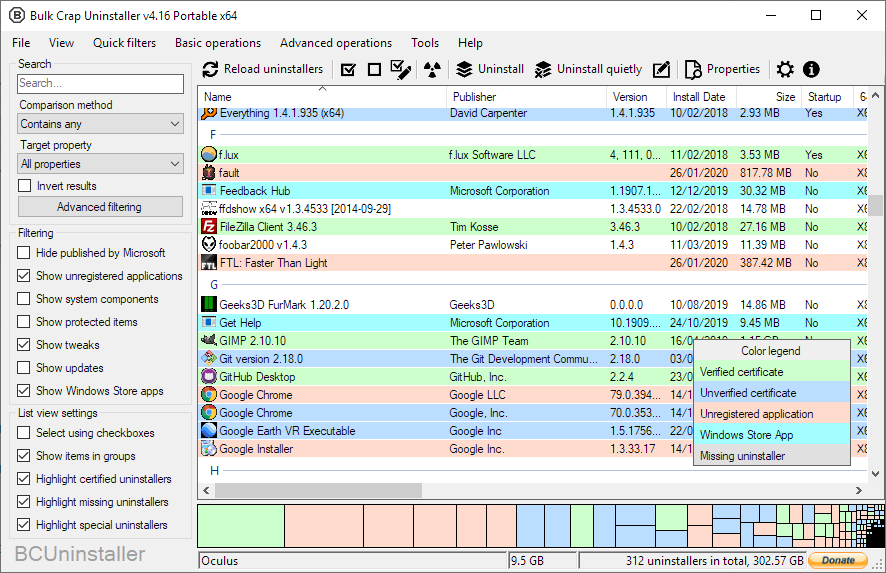
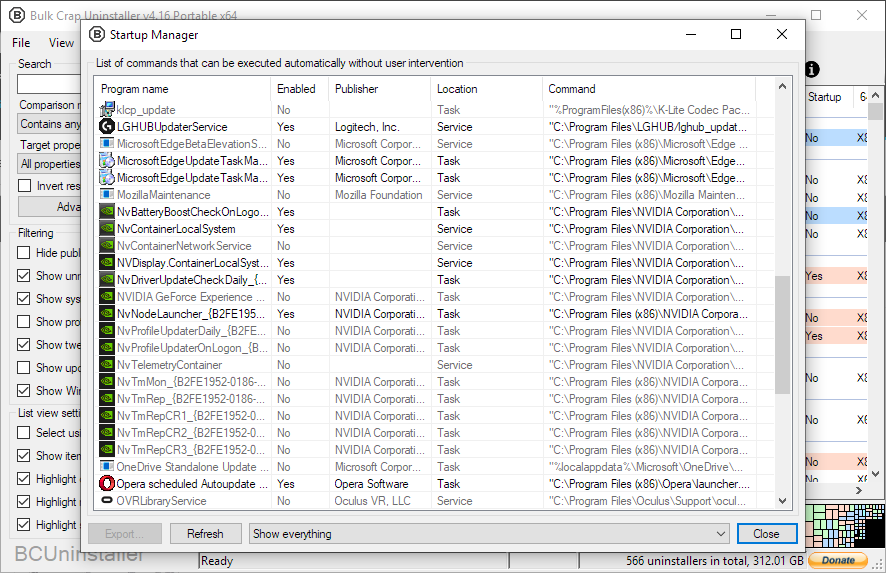
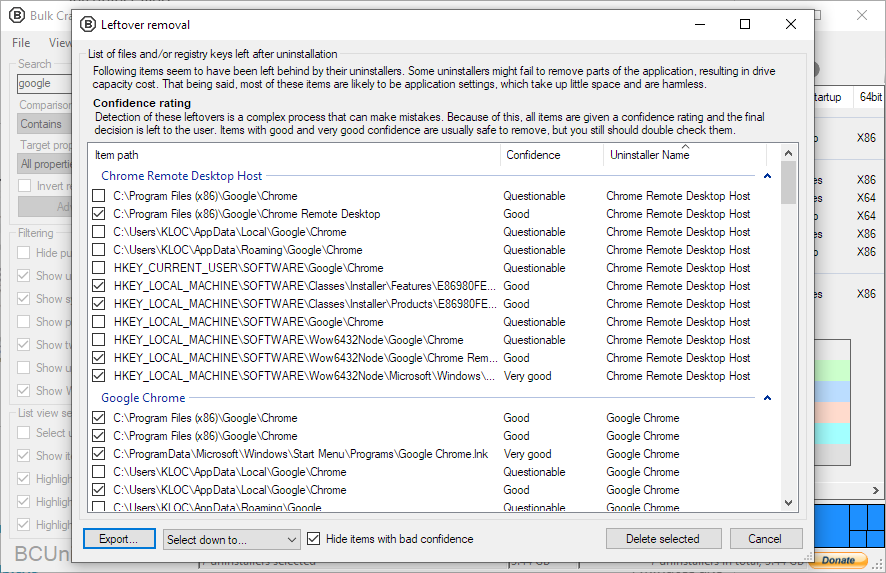
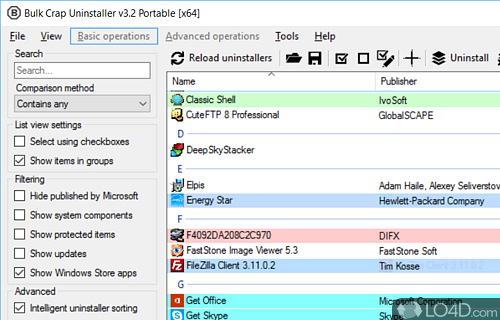
BCUninstaller (or "Bulk Crap Uninstaller") is a free program uninstaller. It is focused on removing large amounts of applications in a small amount of time. It can clean up leftovers too! Bulk Crap Uninstaller is a very useful and reliable software solution whose main aim resides in helping you remove programs from your computer as fast as possible, going through all the steps in a fraction of the time it would take to do manually. Bulk Crap Uninstaller is an effective and intuitive tool that can assist you in removing large amounts of software from your PC, speeding up the operation and enabling you to get it done in no time.
BCUninstaller can detect, manage and uninstall applications from the following sources:
Normal registered applications (same as Programs and Features and many other uninstallers)
Hidden/protected registered applications
Applications with damaged or missing uninstallers
Portable applications (looks in common locations and on portible drives, configurable)
Chocolatey packages
Oculus games/apps
Steam games/apps
Windows Features
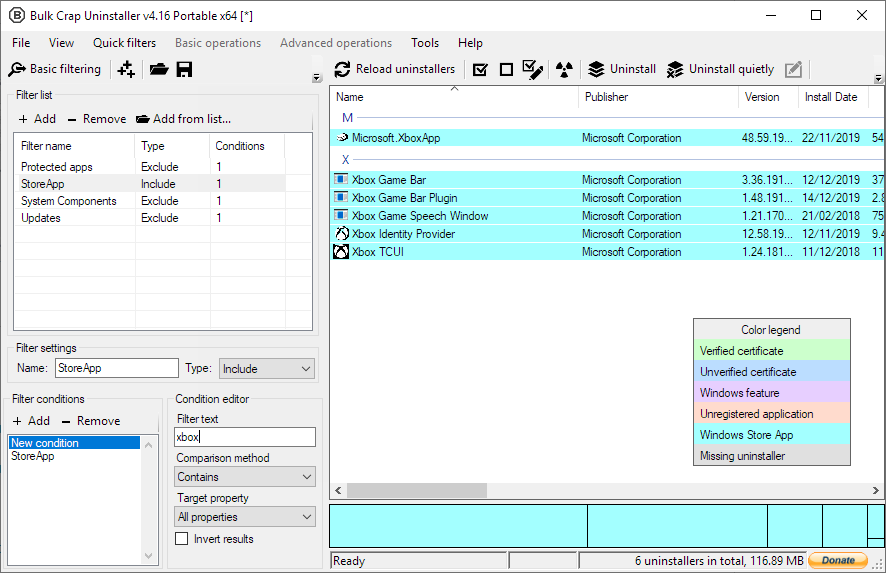
Windows Store apps (Universal Windows Platform apps)
Windows Updates Applications from all of these sources are threated the same - you can filter, export and automatically uninstall them in the same way.
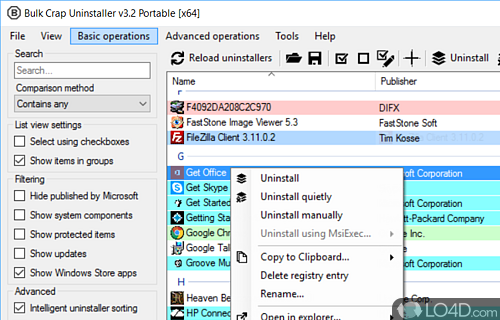
The main feature of BCUninstaller is its ability to fully or nearly fully automate the process of uninstalling multiple applications. BCU always attempts to use the application’s original uninstaller to avoid issues found in uninstall managers that blindly remove files to achieve uninstall automation (e.g. failing to unregister context menu entries or services).
Uninstall any number of applications in a single batch
Minimal to no user input is required during uninstallation
Uninstall multiple items at once to speed up the process (with collision prevention)
Console interface can automatically uninstall applications based on conditions with no user input
Quietly uninstall many uninstallers that don’t support silent uninstallation
Uninstall applications even if they don’t have any uninstallers
Uninstall applications by window, shortcut or directory
Can handle crashing and hanging uninstallers
BCUninstaller can detect, manage and uninstall applications from the following sources:
Normal registered applications (same as Programs and Features and many other uninstallers)
Hidden/protected registered applications
Applications with damaged or missing uninstallers
Portable applications (looks in common locations and on portible drives, configurable)
Chocolatey packages
Oculus games/apps
Steam games/apps
Windows Features
Windows Store apps (Universal Windows Platform apps)
Windows Updates Applications from all of these sources are threated the same - you can filter, export and automatically uninstall them in the same way.
The main feature of BCUninstaller is its ability to fully or nearly fully automate the process of uninstalling multiple applications. BCU always attempts to use the application’s original uninstaller to avoid issues found in uninstall managers that blindly remove files to achieve uninstall automation (e.g. failing to unregister context menu entries or services).
Uninstall any number of applications in a single batch
Minimal to no user input is required during uninstallation
Uninstall multiple items at once to speed up the process (with collision prevention)
Console interface can automatically uninstall applications based on conditions with no user input
Quietly uninstall many uninstallers that don’t support silent uninstallation
Uninstall applications even if they don’t have any uninstallers
Uninstall applications by window, shortcut or directory
Can handle crashing and hanging uninstallers
Bulk Crap Uninstaller Portable 6.2.0 download tags
Bulk Crap Uninstaller Portable 6.2.0 Windows 7 release notes
New Release
Features:
Add invalid-uninstaller view preset by @breshinotestachegira in #903
Add certificate and integrity columns to app list by @breshinotestachegira in #894
Improve Scoop custom path detection by @breshinotestachegira in #892
Fixes:
Improve uninstall list load error handling by @breshinotestachegira in #895
Fix tweak visibility filtering by @breshinotestachegira in #898
Fix orphaned-only view preset by @breshinotestachegira in #899
Stabilize icon handle ownership by @breshinotestachegira in #902
Fix: Use Directory.GetLastWriteTime for install date fallback by @AniketDeshmane in #908
Do not offer to send "no way to uninstall" error messages by @Klocman in #922
Ignore ERROR_BAD_CONFIGURATION when listing MSI components by @Klocman in #924
Eat InvalidOperationException coming from ListViewGroupAccessibleObject by @Klocman in #925
Harden BCU console export and size detection - Fix BCU-console export failures by @breshinotestachegira in #897
Harden registry factory parsing by @breshinotestachegira in #893
Guard startup uninstall list loading by @breshinotestachegira in #927
Clean generated files on uninstall by @One-Simon in #928
Translations:
Updated Hungarian translation by @titanicbobo in #875
Updated Vietnamese translations by @wanwanvxt in #918
Fix : Swedish translation causes UI overflow in some windows by @Leise-Shadow in #865
Other:
Fix publish script after v6.1 by @tsiakoulias in #868
Updated the localization pack
Repository:
Moved the repository under a new BCUninstaller organization (old links still work)
Added two maintainers: @hazeliscoding and @One-Simon
Added PR merge rules (require up-to-date approval and CI to pass)
Updated CI script to also build the launcher (only for testing, not included in artifacts)
[ Bulk Crap Uninstaller Portable release history ]
Features:
Add invalid-uninstaller view preset by @breshinotestachegira in #903
Add certificate and integrity columns to app list by @breshinotestachegira in #894
Improve Scoop custom path detection by @breshinotestachegira in #892
Fixes:
Improve uninstall list load error handling by @breshinotestachegira in #895
Fix tweak visibility filtering by @breshinotestachegira in #898
Fix orphaned-only view preset by @breshinotestachegira in #899
Stabilize icon handle ownership by @breshinotestachegira in #902
Fix: Use Directory.GetLastWriteTime for install date fallback by @AniketDeshmane in #908
Do not offer to send "no way to uninstall" error messages by @Klocman in #922
Ignore ERROR_BAD_CONFIGURATION when listing MSI components by @Klocman in #924
Eat InvalidOperationException coming from ListViewGroupAccessibleObject by @Klocman in #925
Harden BCU console export and size detection - Fix BCU-console export failures by @breshinotestachegira in #897
Harden registry factory parsing by @breshinotestachegira in #893
Guard startup uninstall list loading by @breshinotestachegira in #927
Clean generated files on uninstall by @One-Simon in #928
Translations:
Updated Hungarian translation by @titanicbobo in #875
Updated Vietnamese translations by @wanwanvxt in #918
Fix : Swedish translation causes UI overflow in some windows by @Leise-Shadow in #865
Other:
Fix publish script after v6.1 by @tsiakoulias in #868
Updated the localization pack
Repository:
Moved the repository under a new BCUninstaller organization (old links still work)
Added two maintainers: @hazeliscoding and @One-Simon
Added PR merge rules (require up-to-date approval and CI to pass)
Updated CI script to also build the launcher (only for testing, not included in artifacts)
[ Bulk Crap Uninstaller Portable release history ]
Bookmark Bulk Crap Uninstaller Portable
Bulk Crap Uninstaller Portable for Windows 7 - Copyright information
All Bulk Crap Uninstaller Portable reviews, submitted ratings and written comments become the sole property of Windows 7 download. You acknowledge that you, not windows7download, are responsible for the contents of your submission. However, windows7download reserves the right to remove or refuse to post any submission for any reason.
Windows 7 Download periodically updates pricing and software information of Bulk Crap Uninstaller Portable full version from the publisher, but some information may be out-of-date. You should confirm all information.
Using warez version, crack, warez passwords, patches, serial numbers, registration codes, key generator, pirate key, keymaker or keygen for Bulk Crap Uninstaller Portable license key is illegal and prevent future development of Bulk Crap Uninstaller Portable. Download links are directly from our mirrors or publisher's website, Bulk Crap Uninstaller Portable torrent or shared files from free file sharing and free upload services, including Rapidshare, MegaUpload, YouSendIt, SendSpace, DepositFiles, DivShare, HellShare, HotFile, FileServe or MediaFire, are not used.
Windows 7 Download periodically updates pricing and software information of Bulk Crap Uninstaller Portable full version from the publisher, but some information may be out-of-date. You should confirm all information.
Using warez version, crack, warez passwords, patches, serial numbers, registration codes, key generator, pirate key, keymaker or keygen for Bulk Crap Uninstaller Portable license key is illegal and prevent future development of Bulk Crap Uninstaller Portable. Download links are directly from our mirrors or publisher's website, Bulk Crap Uninstaller Portable torrent or shared files from free file sharing and free upload services, including Rapidshare, MegaUpload, YouSendIt, SendSpace, DepositFiles, DivShare, HellShare, HotFile, FileServe or MediaFire, are not used.
Post Bulk Crap Uninstaller Portable review


Windows 7 Bulk Crap Uninstaller Portable related downloads
Portable Wise Disk Cleaner is a Windows utility for ... application leftovers without manually searching through folders. Its portable format is suited to users who prefer to ...
Portable Wise Disk Cleaner is a Windows utility for ... file types that are no longer needed. Its portable edition is suited to use without a conventional ...
Portable BleachBit is the portable version of BleachBit developed to be able to ... from a USB flash drive or any other portable device. This tool deletes unnecessary files to free ...
Cookie Monster is a small utility designed to manage cookies created by the most usual Windows ...
Cookie Monster is a small utility designed to manage cookies created by the most usual Windows ...
... records of recently accessed documents. · Removing or uninstalling will not uncover locked folders. · Windows explorer ...
My Account
Help
Windows 7 Software Coupons
-
WinX MediaTrans
63% Off -
MacX Media Management Bundle
70% Off -
FREE VPN PROXY by SEED4.ME WINDOWS
Free VPN by Seed4Me -
MacX Video Converter Pro
56% Off -
WinX HD Video Converter
56% Off
My Saved Stuff
You have not saved any software.
Click "Save" next to each software.
Click "Save" next to each software.
Would you like to receive announcements of new versions of your software by email or by RSS reader? Register for FREE!
Windows 7 Downloads Picks
- OpenVPN Server Monitor 2.0.0.0
- Sandboxie 1.19.0 Plus
- USB Shutter 1.0
- Secure Eraser Standard Edition 7.102
- Portable Wise Disk Cleaner 11.4.0 Build 860
- Deep Freeze 8.71.20.5734
- Portable Wise Disk Cleaner Pro 11.1.3
- EventSentry Light 6.0.1.48
- WashAndGo 29.04 Build 72868
- Microsoft Security Essentials Definition Updates x32 July 15, 2024
- ActivTrak 3.47
- DiskMax 7.26
- Autorun Eater 2.6
- Protect My Disk 6.3.0
- Secure Wipe portable 1.0
- Secure Eraser Standard Edition 7.102
- ZoneAlarm Internet Security Suite 2013 13.0.208.000
- OpenVPN x64 2.6.11
- Portable BleachBit 6.0.6
- ZoneAlarm DataLock 2012 92.075.000
Popular Tags
freeware
erase
keylogger
secure
clean
lock
hide
history
password
password recovery
cookies
internet security
privacy
file
shredder
crack password
monitor
delete
cache
security
recover
wipe
remove
firewall
lost password
crack
internet
software
protect
recovery
Popular Windows 7 Software
- Cryptainer LE 20.2.1.0
- Cryptainer USB 20.2.1.0
- AVG Anti-Virus 10 (x32 bit) 2011.1434
- ZoneAlarm Pro Antivirus + Firewall 2016 15.8.189.19019
- avast! 5 Pro Antivirus 6.0.1000
- Privacy Eraser Portable 6.31
- imyPass Windows Password Reset Platinum 1.0.16
- vt-cli 1.3.1
- DualSafe Password Manager 1.4.0.14
- OpenVPN Server Monitor 2.0.0.0
- GiliSoft Privacy Protector 11.5.34
- GiliSoft USB Lock 10.6.55
- USB Encryption 12.5.25
- KeePassX 2.0.3
- Top Data Protector 3.1.0.18
© 2026 Windows7Download.com - All logos, trademarks, art and other creative works are and remain copyright and property of their respective owners. Microsoft Windows is a registered trademarks of Microsoft Corporation. Microsoft Corporation in no way endorses or is affiliated with windows7download.com.