


FileMenu Tools for Windows 7 - Supercharge your menu! - Windows 7 Download


FileMenu Tools 8.6.0.0
"Optimize your file management with FileMenu Tools - the ultimate Windows 7 software download."
FileMenu Tools is an innovative software solution developed by LopeSoft. It boasts a user-friendly interface and advanced features that allow users to customize the context menu in Windows Explorer. With FileMenu Tools, you can create your own commands, add submenus, and even set up hotkeys for frequently used tasks. This powerful tool is an excellent addition to any Windows 7 system, providing users with greater flexibility and control over their file management tasks. Experience the ultimate convenience in file management with FileMenu Tools.
FileMenu Tools 8.6.0.0 full details

| File Size: | 12.50 MB |
|---|---|
| License: | Demo |
| Price: | $9.99 |
| Released: |
2025-10-25
 |
| Downloads: | Total: 3723 | This Month: 128 |
| Publisher: | LopeSoft |
| Publisher URL: | https://www.lopesoft.com/ |

Download FileMenu Tools 8.6.0.0
Save FileMenu Tools to My Stuff
Tweet
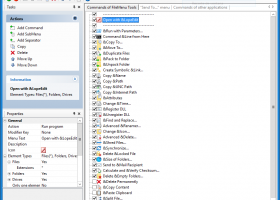
FileMenu Tools 8.6.0.0 full screenshots


FileMenu Tools - Windows 7 Download awards


FileMenu Tools 8.6.0.0 full description
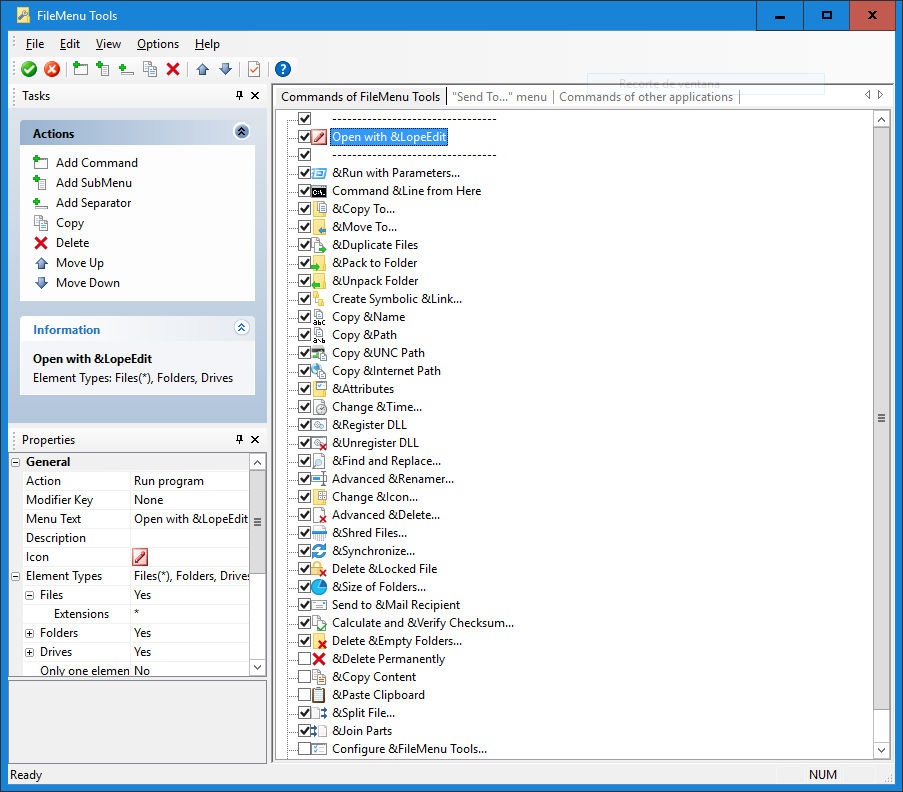
FileMenu Tools allows you to customise the context menu of Windows Explorer.
And it lets you:
* Add some built-in utilities that perform operations on files and folders.
* Add customised commands which run external applications, copy/move to a specific folder or delete specific file types.
* Configure the "Send to..." submenu.
* Enable/disable commands which are added by other applications to the context menu.
The build-in utilities are the following:
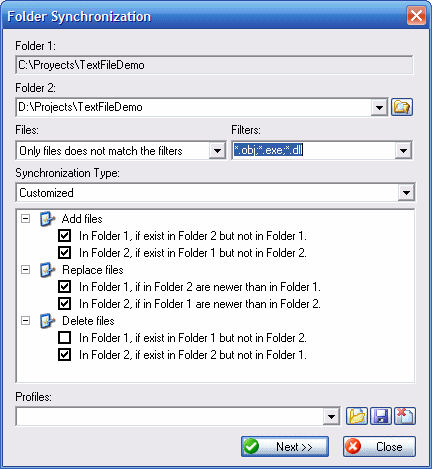
· Synchronize Folders - Synchronizes two folders. It is possible configure the synchronization type (unidirectional, bidirectional, etc.) and the file types which must be synchronized.
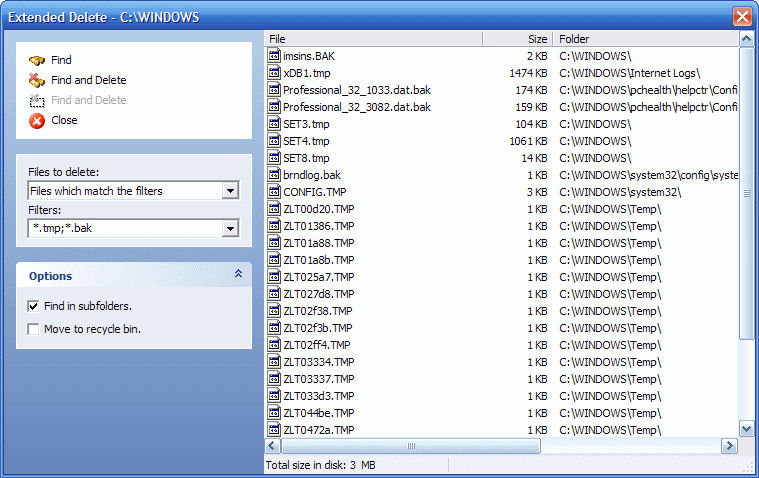
· Extended Delete - Deletes recursively specific file types from a folder. The file types are specified with wildcards, for example: *.txt, *.t??, etc.
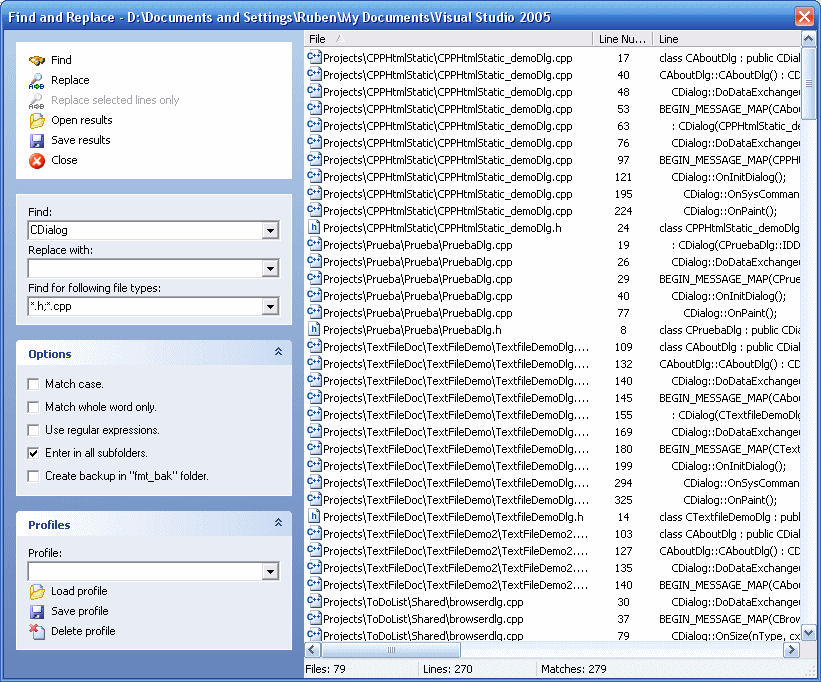
· Find And Replace - Finds and replaces a text in all selected files. It is possible to use regular expressions.
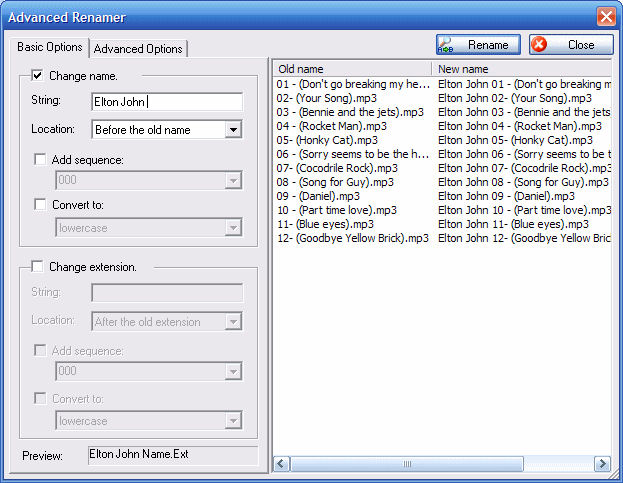
· Advanced Renamer - Renames all the selected elements by using some patterns.
· Delete Locked File - Deletes files which are locked by any application and cannot be deleted normally.
· Delete and no move to Recycle Bin - Deletes definitely files and folders.
· Change Icon - Change the icon assigned to the selected folder
· Run with Arguments - Run a program with parameters typed through a dialog box.
· Command Line From Here - Open a command line window and go to selected folder.
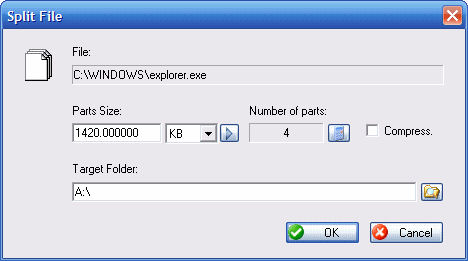
· Split File - Splits the selected file in various parts.
· Join File - Joins the parts of a file which were previously splitted.
· Copy to... - Copies the selected elements to other folder.
· Move to... - Moves the selected elements to other folder.
· Copy Name - Copies to the clipboard the name of the all selected elements.
· Copy Path - Copies to the clipboard the path of the all selected elements.
· Copy Content - Copies to the clipboard the content of the selected element. If a folder is selected, all element names that the folder contains will be copied
· Attributes - Displays a submenu which lets change the attributes of the selected elements. If a folder is selected, it is possible change the attributes recursively.
· Change Time - Changes the creation time, the last access time and/or the last write time of the selected elements. If a folder is selected, it is possible change the time recursively.
· Register DLL - Register a DLL in Windows.
· Unregister DLL - Unregister a DLL.
· Create New Folder - Creates a new folder into the selected folder
Pros:
* Command line execution
* Advanced rename for folders and files
* Totally customizable
And it lets you:
* Add some built-in utilities that perform operations on files and folders.
* Add customised commands which run external applications, copy/move to a specific folder or delete specific file types.
* Configure the "Send to..." submenu.
* Enable/disable commands which are added by other applications to the context menu.
The build-in utilities are the following:
· Synchronize Folders - Synchronizes two folders. It is possible configure the synchronization type (unidirectional, bidirectional, etc.) and the file types which must be synchronized.
· Extended Delete - Deletes recursively specific file types from a folder. The file types are specified with wildcards, for example: *.txt, *.t??, etc.
· Find And Replace - Finds and replaces a text in all selected files. It is possible to use regular expressions.
· Advanced Renamer - Renames all the selected elements by using some patterns.
· Delete Locked File - Deletes files which are locked by any application and cannot be deleted normally.
· Delete and no move to Recycle Bin - Deletes definitely files and folders.
· Change Icon - Change the icon assigned to the selected folder
· Run with Arguments - Run a program with parameters typed through a dialog box.
· Command Line From Here - Open a command line window and go to selected folder.
· Split File - Splits the selected file in various parts.
· Join File - Joins the parts of a file which were previously splitted.
· Copy to... - Copies the selected elements to other folder.
· Move to... - Moves the selected elements to other folder.
· Copy Name - Copies to the clipboard the name of the all selected elements.
· Copy Path - Copies to the clipboard the path of the all selected elements.
· Copy Content - Copies to the clipboard the content of the selected element. If a folder is selected, all element names that the folder contains will be copied
· Attributes - Displays a submenu which lets change the attributes of the selected elements. If a folder is selected, it is possible change the attributes recursively.
· Change Time - Changes the creation time, the last access time and/or the last write time of the selected elements. If a folder is selected, it is possible change the time recursively.
· Register DLL - Register a DLL in Windows.
· Unregister DLL - Unregister a DLL.
· Create New Folder - Creates a new folder into the selected folder
Pros:
* Command line execution
* Advanced rename for folders and files
* Totally customizable
FileMenu Tools 8.6.0.0 download tags
FileMenu Tools 8.6.0.0 Windows 7 release notes
New Release
(Improvement) Improved scaling of icons and controls based on screen DPI settings and resolution.
(New) Added new property: "Use shortcut target". This can be enabled for all commands (built-in commands and custcom commands). When enabled, if a shortcut file is selected (with .lnk extension), then the shortcut target will be used instead when running the command.
(Fixed) Unpack Folder: did not work correctly when multiple folders were selected.
[ FileMenu Tools release history ]
(Improvement) Improved scaling of icons and controls based on screen DPI settings and resolution.
(New) Added new property: "Use shortcut target". This can be enabled for all commands (built-in commands and custcom commands). When enabled, if a shortcut file is selected (with .lnk extension), then the shortcut target will be used instead when running the command.
(Fixed) Unpack Folder: did not work correctly when multiple folders were selected.
[ FileMenu Tools release history ]
Bookmark FileMenu Tools
FileMenu Tools for Windows 7 - Copyright information
All FileMenu Tools reviews, submitted ratings and written comments become the sole property of Windows 7 download. You acknowledge that you, not windows7download, are responsible for the contents of your submission. However, windows7download reserves the right to remove or refuse to post any submission for any reason.
Windows 7 Download periodically updates pricing and software information of FileMenu Tools full version from the publisher, but some information may be out-of-date. You should confirm all information.
Using warez version, crack, warez passwords, patches, serial numbers, registration codes, key generator, pirate key, keymaker or keygen for FileMenu Tools license key is illegal and prevent future development of FileMenu Tools. Download links are directly from our mirrors or publisher's website, FileMenu Tools torrent or shared files from free file sharing and free upload services, including Rapidshare, MegaUpload, YouSendIt, SendSpace, DepositFiles, DivShare, HellShare, HotFile, FileServe or MediaFire, are not used.
Windows 7 Download periodically updates pricing and software information of FileMenu Tools full version from the publisher, but some information may be out-of-date. You should confirm all information.
Using warez version, crack, warez passwords, patches, serial numbers, registration codes, key generator, pirate key, keymaker or keygen for FileMenu Tools license key is illegal and prevent future development of FileMenu Tools. Download links are directly from our mirrors or publisher's website, FileMenu Tools torrent or shared files from free file sharing and free upload services, including Rapidshare, MegaUpload, YouSendIt, SendSpace, DepositFiles, DivShare, HellShare, HotFile, FileServe or MediaFire, are not used.
Post FileMenu Tools review


Windows 7 FileMenu Tools related downloads
... Free by ArcticLine Software is a must-have for Windows 7 users, offering an efficient way to customize and ...
Are you looking for a better Command Prompt for your Windows operating system? a more powerful ...
GTweak is a command-line script that can be used for tweaking operating systems of Windows family. ...
... is a suite of the most popular innovative tools letting users operate windows on the desktop in ...
... open multiple console Windows in tabs. Lots of customization options. You can even customize settings for each ...
My Account
Help
Windows 7 Software Coupons
-
FREE VPN PROXY by SEED4.ME WINDOWS
Free VPN by Seed4Me -
Media Player Morpher
85% Off -
MacX DVD Video Converter
58% Off -
WinX DVD Copy Pro
42% Off -
MacX MediaTrans
63% Off
My Saved Stuff
You have not saved any software.
Click "Save" next to each software.
Click "Save" next to each software.
Would you like to receive announcements of new versions of your software by email or by RSS reader? Register for FREE!
Windows 7 Downloads Picks
Popular Tags
utility
virtual desktop
shortcut
program
launcher
customize
mouse
explorer
window
shift
command line
shell
cmd
run
folder
change
desktop
extension
windows
vista
tray
display
folders
settings
manager
file
batch
system
switch
free
Popular Windows 7 Software
- Avro Keyboard 5.6.0.0
- Ghostscript (x64 bit) 10.03.1
- iTop Data Recovery 5.5.0.844
- Windows 7
- Windows 7 Service Pack 1 7601.17514.1011
- iTop Easy Desktop 4.0.0.231
- Advanced SystemCare 19.1.0.176
- Smart Game Booster 5.3.1.692
- iTop PDF 3.6.0.4
- GoodSync2Go 12.9.19.9
- The Dude 7.20.6 Stable
- Atlantis Word Processor 5.0.0.15
- IObit Uninstaller 15.2.0.2
- Miraplacid Text Driver Terminal Edition 8.0
- Miraplacid Text Driver 8.0
© 2025 Windows7Download.com - All logos, trademarks, art and other creative works are and remain copyright and property of their respective owners. Microsoft Windows is a registered trademarks of Microsoft Corporation. Microsoft Corporation in no way endorses or is affiliated with windows7download.com.