


WebSiteSniffer 64-bit for Windows 7 - "Powerful Website Sniffer for Win 7 - 64-bit" - Windows 7 Download


WebSiteSniffer 64-bit 1.51
"Sniff out website data seamlessly with 64-bit WebSiteSniffer - your desired online companion."
Welcome to the WebSiteSniffer - a powerful 64-bit software tool designed to capture all HTTP/HTTPS traffic between your computer and websites. This unique software allows you to view and analyze all network requests made by your browser, providing valuable insight into website performance and security. Developed by the leading software developer, NirSoft, the WebSiteSniffer is easy to use, fast, and reliable - perfect for the busy professional or enthusiast alike. Download your copy today and experience the power of WebSiteSniffer for yourself.
WebSiteSniffer 64-bit 1.51 full details

| File Size: | 236 kB |
|---|---|
| License: | Freeware |
| Price: | FREE |
| Released: | 2017-08-22 |
| Downloads: | Total: 462 | This Month: 78 |
| Publisher: | NirSoft |
| Publisher URL: | https://www.nirsoft.net/ |

Download WebSiteSniffer 64-bit 1.51
Save WebSiteSniffer 64-bit to My Stuff
Tweet
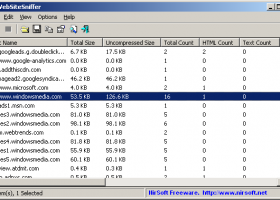
WebSiteSniffer 64-bit 1.51 full screenshots
WebSiteSniffer 64-bit - Windows 7 Download awards

WebSiteSniffer 64-bit 1.51 full description
WebSiteSniffer will provide users with a packet sniffer tool that will help you capture all Web site files downloaded by your Web browser while browsing the Internet, and stores them on your hard drive under the base folder that you choose.
WebSiteSniffer allows you to choose which type of Web site files will be captured: HTML Files, Text Files, XML Files, CSS Files, Video/Audio Files, Images, Scripts, and Flash (.swf) files.
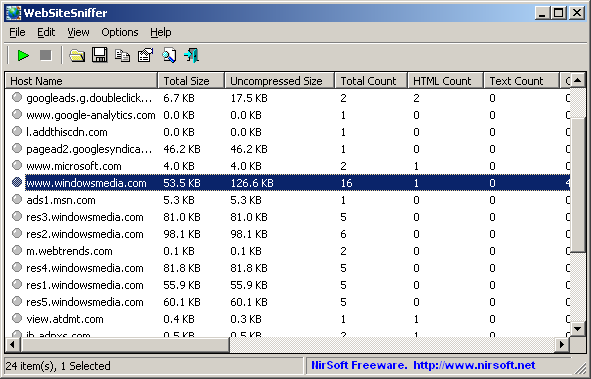
While capturing the Web site files, the main window of WebSiteSniffer displays general statistics about the downloaded files for every Web site / host name, including the total size of all files (compressed and uncompressed) and total number of files for every file type (HTML, Text, Images, and so on).
Start Using WebSiteSniffer
Except of a capture driver needed for capturing network packets, WebSiteSniffer doesn't require any installation process or additional dll files. In order to start using it, simply run the executable file - WebSiteSniffer.exe
After running WebSiteSniffer in the first time, the 'Capture Options' window appears on the screen, and you're requested to choose the base folder to download and extract all Web site files, the file types that you wish to capture (html, image, video, audio, scripts, and so on...), the capture method, and the desired network adapter. In the next time that you use WebSiteSniffer, it'll automatically start capturing the web site files according to the last selected settings.
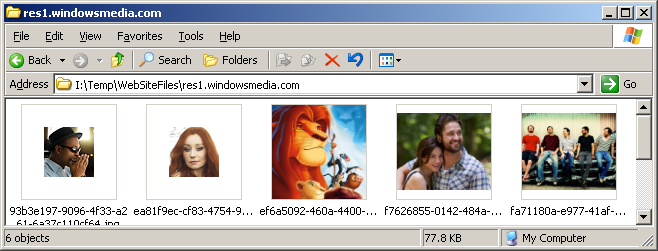
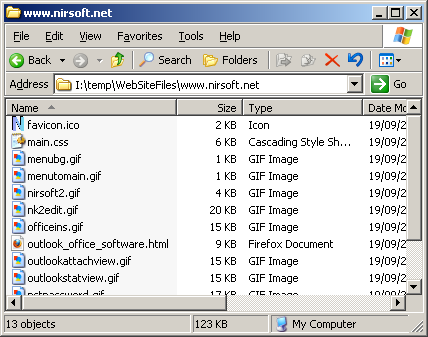
After clicking the 'Ok' button, WebSiteSniffer starts capturing the network packets on your network adapter. You can simply open your Web browser, browse into any Web site you like, and you'll see the files of the Web site you visit accumulated under the base folder that you chose. The main window of WebSiteSniffer also displays the statistics about captured files for every Web site. You can also select the desired Web site item and press F8 (Open Web Site Folder) to open the folder of the selected Web site in Windows Explorer, and easily view all files captured from this Web site.
WebSiteSniffer allows you to choose which type of Web site files will be captured: HTML Files, Text Files, XML Files, CSS Files, Video/Audio Files, Images, Scripts, and Flash (.swf) files.
While capturing the Web site files, the main window of WebSiteSniffer displays general statistics about the downloaded files for every Web site / host name, including the total size of all files (compressed and uncompressed) and total number of files for every file type (HTML, Text, Images, and so on).
Start Using WebSiteSniffer
Except of a capture driver needed for capturing network packets, WebSiteSniffer doesn't require any installation process or additional dll files. In order to start using it, simply run the executable file - WebSiteSniffer.exe
After running WebSiteSniffer in the first time, the 'Capture Options' window appears on the screen, and you're requested to choose the base folder to download and extract all Web site files, the file types that you wish to capture (html, image, video, audio, scripts, and so on...), the capture method, and the desired network adapter. In the next time that you use WebSiteSniffer, it'll automatically start capturing the web site files according to the last selected settings.
After clicking the 'Ok' button, WebSiteSniffer starts capturing the network packets on your network adapter. You can simply open your Web browser, browse into any Web site you like, and you'll see the files of the Web site you visit accumulated under the base folder that you chose. The main window of WebSiteSniffer also displays the statistics about captured files for every Web site. You can also select the desired Web site item and press F8 (Open Web Site Folder) to open the folder of the selected Web site in Windows Explorer, and easily view all files captured from this Web site.
WebSiteSniffer 64-bit 1.51 download tags
WebSiteSniffer 64-bit 1.51 Windows 7 release notes
New Release
Added /cfg command-line option, which instructs WebSiteSniffer to use a config file in another location instead if the default config file, for example:
WebSiteSniffer.exe /cfg "%AppData%WebSiteSniffer.cfg"
[ WebSiteSniffer 64-bit release history ]
Added /cfg command-line option, which instructs WebSiteSniffer to use a config file in another location instead if the default config file, for example:
WebSiteSniffer.exe /cfg "%AppData%WebSiteSniffer.cfg"
[ WebSiteSniffer 64-bit release history ]
WebSiteSniffer 64-bit 1.51 Windows 7 requirements
· WinPcap driver
Bookmark WebSiteSniffer 64-bit
WebSiteSniffer 64-bit for Windows 7 - Copyright information
All WebSiteSniffer 64-bit reviews, submitted ratings and written comments become the sole property of Windows 7 download. You acknowledge that you, not windows7download, are responsible for the contents of your submission. However, windows7download reserves the right to remove or refuse to post any submission for any reason.
Windows 7 Download periodically updates pricing and software information of WebSiteSniffer 64-bit full version from the publisher, but some information may be out-of-date. You should confirm all information.
Using warez version, crack, warez passwords, patches, serial numbers, registration codes, key generator, pirate key, keymaker or keygen for WebSiteSniffer 64-bit license key is illegal and prevent future development of WebSiteSniffer 64-bit. Download links are directly from our mirrors or publisher's website, WebSiteSniffer 64-bit torrent or shared files from free file sharing and free upload services, including Rapidshare, MegaUpload, YouSendIt, SendSpace, DepositFiles, DivShare, HellShare, HotFile, FileServe or MediaFire, are not used.
Windows 7 Download periodically updates pricing and software information of WebSiteSniffer 64-bit full version from the publisher, but some information may be out-of-date. You should confirm all information.
Using warez version, crack, warez passwords, patches, serial numbers, registration codes, key generator, pirate key, keymaker or keygen for WebSiteSniffer 64-bit license key is illegal and prevent future development of WebSiteSniffer 64-bit. Download links are directly from our mirrors or publisher's website, WebSiteSniffer 64-bit torrent or shared files from free file sharing and free upload services, including Rapidshare, MegaUpload, YouSendIt, SendSpace, DepositFiles, DivShare, HellShare, HotFile, FileServe or MediaFire, are not used.
Post WebSiteSniffer 64-bit review


Windows 7 WebSiteSniffer 64-bit related downloads
WebSiteSniffer will provide users with a packet sniffer tool ... will help you capture all Web site files downloaded by your Web browser while browsing the Internet, ...
LogStat analyzes the HTTP protocol and displays extensive web statistics. FEATURES: ... Analysis of visits by date and time, websites, downloads, images, directories, file types, hosts and countries. · ...
Group Policy Status Monitor provides a way of getting the "heartbeat" of ... your favorite log collection system. Group Policy Status Monitor runs in the system tray of your XP ...
... performance of a server? With this free download speed test it is very easy to measure ...
Cyfin Proxy 64-bit is a stand-alone Internet monitoring proxy server. It combines real-time monitoring with the ...
My Account
Help
Windows 7 Software Coupons
-
WinX MediaTrans
63% Off -
MacX Media Management Bundle
70% Off -
MacX Video Converter Pro
56% Off -
MacX DVD Ripper Pro
50% Off -
Media Player Morpher
85% Off
My Saved Stuff
You have not saved any software.
Click "Save" next to each software.
Click "Save" next to each software.
Would you like to receive announcements of new versions of your software by email or by RSS reader? Register for FREE!
Windows 7 Downloads Picks
- iTop VPN 7.4.0.6857
- RouterOS 7.22.1 Stable
- SABnzbd 4.3.2
- Security Center Lite 4.2
- Network Activity Indicator 1.9
- NetWorx Portable 26.1
- Security Center Pro 4.2
- PuTTY 0.81
- SmartCode VNC Manager Standard Edition 2025.03.1
- TV-Browser 4.2.7
- WebLoad Professional 8.6.0.026
- Hironico Db Tool 2.2.0
- Change MAC Address 25.01
- IPSentry Network Monitoring Suite 7.70.309
- Windows Live Writer 2009 14.0.8089.726
- Microsoft Assessment and Planning Toolkit 5.5.3638.0
- Adobe Flash Player 10 for 64-bit Windows Preview 2
- MyConnection Server 11.4c Build 26040817
- Portable iReasoning MIB Browser Enterprise 14.0 B4717
- Network Drive Manager 2.8.0
Popular Tags
server
free
software inventory
ping
lan
dns
message
download
google
search
pages
ebay
software
tool
freeware
inventory
network
email
computer
internet
rss
identity management
address
web
security
proxy
manager
website
html
auction
Popular Windows 7 Software
- Network Traffic Generator and Monitor 12.6
- Firefox 64bit x64 127.0.2
- iTop VPN 7.4.0.6857
- Google Chrome 126.0.6478.127
- RouterOS 7.22.1 Stable
- Universal Maps Downloader 10.253
- SSuite NetSurfer Browser x64 2.30.16.10
- iTop Private Browser 3.1.0.255
- Allavsoft 3.29.1.9611
- NetSpot for Windows 5.1.0.703
- SSuite NetSurfer Browser 2.30.16.10
- Google Chrome 17 17.0.963.78
- SoftPerfect Network Scanner 26.3
- Google Chrome Portable 126.0.6478.127
- Dukto Portable R6
© 2026 Windows7Download.com - All logos, trademarks, art and other creative works are and remain copyright and property of their respective owners. Microsoft Windows is a registered trademarks of Microsoft Corporation. Microsoft Corporation in no way endorses or is affiliated with windows7download.com.