


Total Image Converter for Windows 7 - Versatile tool for seamless image format conversion. ... - Windows 7 Download


Total Image Converter 8.5.0 Build 360
Effortlessly convert and resize images with Total Image Converter.
Total Image Converter by CoolUtils Development is a powerful and versatile tool designed for seamless image format conversion. Supporting a wide range of formats, including JPEG, PNG, TIFF, and more, it allows users to effortlessly convert images in bulk, saving time and effort. The intuitive interface makes it accessible for both beginners and advanced users, while advanced features like batch processing and customizable settings enhance productivity. With Total Image Converter, transforming yo ...
Total Image Converter 8.5.0 Build 360 full details

| File Size: | 80.80 MB |
|---|---|
| License: | Demo |
| Price: | $24.90 |
| Released: | 2026-10-29 |
| Downloads: | Total: 56 | This Month: 10 |
| Publisher: | CoolUtils Development |
| Publisher URL: | https://www.CoolUtils.com/TotalCSVConverter |

Download Total Image Converter 8.5.0 Build 360
Save Total Image Converter to My Stuff
Tweet
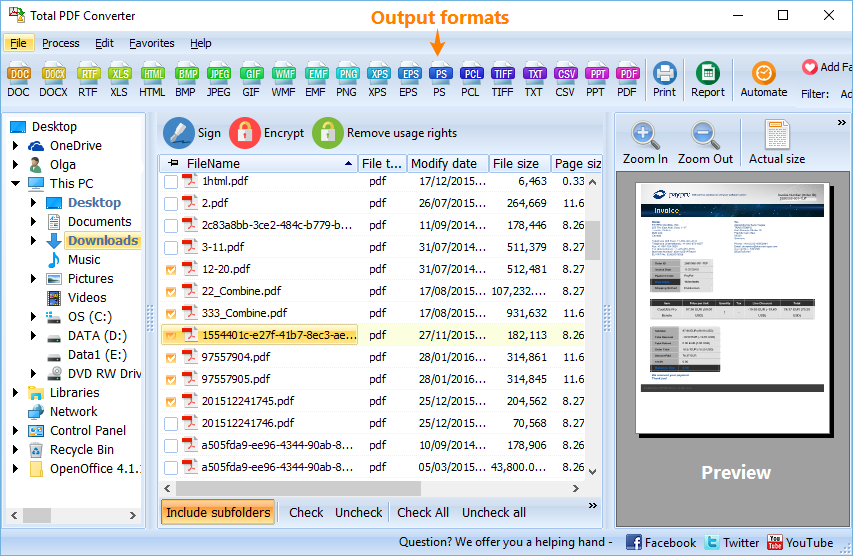
Total Image Converter 8.5.0 Build 360 full screenshots

Total Image Converter - Windows 7 Download awards

Total Image Converter 8.5.0 Build 360 full description
Total Image Converter by CoolUtils Development is a versatile and robust software solution designed to meet the diverse needs of users requiring image conversion capabilities. This tool stands out in the crowded market of image converters by offering a comprehensive suite of features that cater to both amateur photographers and professional graphic designers alike.
At its core, Total Image Converter supports a wide array of image formats, including popular ones like JPEG, PNG, TIFF, and BMP, as well as less common formats such as RAW and PSD. This extensive format compatibility ensures that users can convert virtually any image file they encounter, making it an invaluable tool for those who work with varied image types.
One of the standout features of Total Image Converter is its user-friendly interface. The software is designed with simplicity in mind, allowing users to navigate through its functionalities with ease. The intuitive layout ensures that even those with minimal technical expertise can perform complex conversions without a steep learning curve. The drag-and-drop functionality further enhances the user experience, enabling quick and effortless file handling.
Beyond basic conversion, Total Image Converter offers a range of additional features that add significant value. Users can resize, rotate, and crop images, providing essential editing capabilities without the need for additional software. The ability to apply filters and watermarks also makes it a practical choice for users looking to enhance or protect their images during the conversion process.
Batch processing is another key feature that sets Total Image Converter apart. This functionality allows users to convert multiple images simultaneously, saving time and effort, especially when dealing with large collections of images. The software's performance in handling batch processes is commendable, maintaining speed and efficiency without compromising on quality.
For those concerned about maintaining image quality, Total Image Converter excels in preserving the integrity of the original files. The software ensures that converted images retain their clarity and detail, a critical consideration for professional users who demand high standards in their work.
Total Image Converter also integrates seamlessly with Windows, offering command-line support for advanced users who prefer to automate their workflows. This feature is particularly beneficial for IT professionals and developers who need to incorporate image conversion into larger automated processes.
In summary, Total Image Converter by CoolUtils Development is a powerful, reliable, and user-friendly tool that caters to a wide range of image conversion needs. Its extensive format support, coupled with additional editing features and batch processing capabilities, make it a standout choice for anyone looking to streamline their image handling tasks. Whether you're a hobbyist looking to convert a few vacation photos or a professional managing a vast image library, Total Image Converter provides the tools necessary to achieve high-quality results with minimal hassle.
At its core, Total Image Converter supports a wide array of image formats, including popular ones like JPEG, PNG, TIFF, and BMP, as well as less common formats such as RAW and PSD. This extensive format compatibility ensures that users can convert virtually any image file they encounter, making it an invaluable tool for those who work with varied image types.
One of the standout features of Total Image Converter is its user-friendly interface. The software is designed with simplicity in mind, allowing users to navigate through its functionalities with ease. The intuitive layout ensures that even those with minimal technical expertise can perform complex conversions without a steep learning curve. The drag-and-drop functionality further enhances the user experience, enabling quick and effortless file handling.
Beyond basic conversion, Total Image Converter offers a range of additional features that add significant value. Users can resize, rotate, and crop images, providing essential editing capabilities without the need for additional software. The ability to apply filters and watermarks also makes it a practical choice for users looking to enhance or protect their images during the conversion process.
Batch processing is another key feature that sets Total Image Converter apart. This functionality allows users to convert multiple images simultaneously, saving time and effort, especially when dealing with large collections of images. The software's performance in handling batch processes is commendable, maintaining speed and efficiency without compromising on quality.
For those concerned about maintaining image quality, Total Image Converter excels in preserving the integrity of the original files. The software ensures that converted images retain their clarity and detail, a critical consideration for professional users who demand high standards in their work.
Total Image Converter also integrates seamlessly with Windows, offering command-line support for advanced users who prefer to automate their workflows. This feature is particularly beneficial for IT professionals and developers who need to incorporate image conversion into larger automated processes.
In summary, Total Image Converter by CoolUtils Development is a powerful, reliable, and user-friendly tool that caters to a wide range of image conversion needs. Its extensive format support, coupled with additional editing features and batch processing capabilities, make it a standout choice for anyone looking to streamline their image handling tasks. Whether you're a hobbyist looking to convert a few vacation photos or a professional managing a vast image library, Total Image Converter provides the tools necessary to achieve high-quality results with minimal hassle.
Total Image Converter 8.5.0 Build 360 download tags
Bookmark Total Image Converter
Total Image Converter for Windows 7 - Copyright information
All Total Image Converter reviews, submitted ratings and written comments become the sole property of Windows 7 download. You acknowledge that you, not windows7download, are responsible for the contents of your submission. However, windows7download reserves the right to remove or refuse to post any submission for any reason.
Windows 7 Download periodically updates pricing and software information of Total Image Converter full version from the publisher, but some information may be out-of-date. You should confirm all information.
Using warez version, crack, warez passwords, patches, serial numbers, registration codes, key generator, pirate key, keymaker or keygen for Total Image Converter license key is illegal and prevent future development of Total Image Converter. Download links are directly from our mirrors or publisher's website, Total Image Converter torrent or shared files from free file sharing and free upload services, including Rapidshare, MegaUpload, YouSendIt, SendSpace, DepositFiles, DivShare, HellShare, HotFile, FileServe or MediaFire, are not used.
Windows 7 Download periodically updates pricing and software information of Total Image Converter full version from the publisher, but some information may be out-of-date. You should confirm all information.
Using warez version, crack, warez passwords, patches, serial numbers, registration codes, key generator, pirate key, keymaker or keygen for Total Image Converter license key is illegal and prevent future development of Total Image Converter. Download links are directly from our mirrors or publisher's website, Total Image Converter torrent or shared files from free file sharing and free upload services, including Rapidshare, MegaUpload, YouSendIt, SendSpace, DepositFiles, DivShare, HellShare, HotFile, FileServe or MediaFire, are not used.
Post Total Image Converter review


Windows 7 Total Image Converter related downloads
Total Image Converter is a unique converter - it converts almost all popular image formats (JPEG, WebP, GIF, BMP, PCX, PNG, TGA, ...
If you're looking for an advanced image converter that can handle just about any format, look ...
My Account
Help
Windows 7 Software Coupons
-
FREE VPN PROXY by SEED4.ME WINDOWS
Free VPN by Seed4Me -
MacX DVD Video Converter
58% Off -
WinX HD Video Converter
56% Off -
WinX DVD Ripper
50% Off -
MacX DVD Ripper Pro
50% Off
My Saved Stuff
You have not saved any software.
Click "Save" next to each software.
Click "Save" next to each software.
Would you like to receive announcements of new versions of your software by email or by RSS reader? Register for FREE!
Windows 7 Downloads Picks
- PhotoFiltre 11.6.1
- XDepth Raw Converter 1.5.2
- PhotoFiltre 11.6.1
- Moo0 ImageThumbnailer 1.23
- Portable PhotoFiltre 11.6.1
- Vector Magic 1.15
- PhotoRescue for Windows 3.4.0.13436
- Portable PhotoFiltre 11.6.1
- restoreInpaint 006a2
- Potrace for Windows (x64 bit) 1.16
- Blender - 64 bit 4.1.1
- Any Image x64 5.2
- AZ Image 2.5.3.6
- Bixorama 6.2.2.0
- Moo0 ImageInColors 1.25
- Potrace for Windows 1.16
- Contenta SVG Converter 6.71
- Advanced Batch Converter 8.0
- Moo0 ImageTypeConverter 1.38
- Anaglyph Lab 1.2
Popular Tags
jpeg
images
bmp
freeware
convert
pdf converter
optimize
image resizer
watermark
resize
conversion
compress
photo
tif
converter
picture
dwg
image
photos
image converter
free
software
jpg
emf
gif
resizer
pdf
batch
tiff
png
Popular Windows 7 Software
- PSRemote 3.3
- CorelDRAW X7 (x32 bit) 17.4.0.887
- WizFlow Professional 7.58 Build 2228
- CorelDRAW 2017 19.1.0.419
- QCAD Portable 3.29.3
- Icecream Image Resizer 2.14
- FotoWorks XL 2026 26.2.6
- CorelDRAW X7 (x64 bit) 17.4.0.887
- Cut'n'Mix 6.0
- Inpaint 11.0
- DJV 3.7.5
- Contenta Converter PREMIUM 7.1
- PhotoFiltre 11.6.1
- FreeVimager 9.9.27
- Jsoft Easy ID Photo 6.1
© 2026 Windows7Download.com - All logos, trademarks, art and other creative works are and remain copyright and property of their respective owners. Microsoft Windows is a registered trademarks of Microsoft Corporation. Microsoft Corporation in no way endorses or is affiliated with windows7download.com.