


Tftpd32 for Windows 7 - TFTP transfers and network services - Windows 7 Download


Tftpd32 4.64
A Windows utility for TFTP transfers, DHCP, network time and Syslog services.
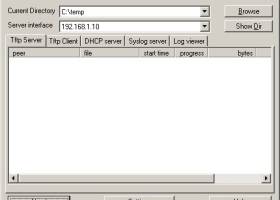
Tftpd32 combines a TFTP client and server with DHCP, SNTP and Syslog servers for Windows network administration. TFTP transfers support tsize, blocksize and timeout options, with progress bars and early acknowledgments to help manage transfers. Its DHCP server can assign addresses automatically or statically, while interface filtering and directory controls help tailor the setup.
Tftpd32 4.64 full details

| File Size: | 645 kB |
|---|---|
| License: | Open Source |
| Price: | FREE |
| Released: | 2019-02-28 |
| Downloads: | Total: 8849 | This Month: 2 |
| Publisher: | Philippe Jounin |
| Publisher URL: | https://pjo2.github.io/ |

Download Tftpd32 4.64
Save Tftpd32 to My Stuff
Tweet
Tftpd32 - Windows 7 Download awards



Tftpd32 4.64 full description
Tftpd32 is a Windows network utility for administrators and technicians who need lightweight file-transfer and network services on a local network. It combines TFTP client and server functions with DHCP, SNTP and Syslog servers in one application. These tools support tasks such as transferring files to network devices, assigning IP addresses to clients, providing time synchronization and receiving system log messages. Its compact collection of services can be useful in a lab, during device setup or when troubleshooting a network.
The TFTP client and server transfer files using the Trivial File Transfer Protocol. Both support the tsize, blocksize and timeout options, which let the connection negotiate transfer parameters; suitable settings can improve transfer speed. The directory facility helps manage the location used for file transfers, while progress bars make ongoing transfers easier to monitor. Early acknowledgments are also included to improve TFTP throughput. These features are particularly relevant when moving configuration files or firmware images to and from devices that support TFTP.
The integrated DHCP server can assign IP addresses automatically or use static assignments. This can help bring devices onto a test network or provide address configuration in a controlled environment. The SNTP server supplies network time synchronization, and the Syslog server receives log messages from compatible equipment. Keeping these services together can simplify temporary network setups, although each service should be enabled and configured according to the needs of the network.
Interface filtering lets an administrator limit which network interfaces the services use, and security tuning provides additional control over TFTP operation. These options matter on computers connected to more than one network, or where file-transfer access should be restricted to a particular interface or directory. Tftpd32 is intended for practical network administration rather than general-purpose file sharing: TFTP is a simple protocol commonly used by network equipment and does not replace a full FTP service for ordinary transfers.
Tftpd32 is open-source software and supports Windows versions from Windows XP through Windows 11, including 64-bit editions where listed. Its combined client and server tools suit users who need to test network equipment, stage configuration or firmware files, or provide basic services on a small private network. Administrators should check interface and directory settings before starting services, especially on a computer connected to networks they do not manage.
Tftpd32 4.64 download tags
Tftpd32 4.64 Windows 7 release notes
New Release
New icon (thanks to Marco !)
Add option to convert '//' into '/'
Add DNS relay advertisement in Settings windows
fix : crash on empty DNS request
[ Tftpd32 release history ]
New icon (thanks to Marco !)
Add option to convert '//' into '/'
Add DNS relay advertisement in Settings windows
fix : crash on empty DNS request
[ Tftpd32 release history ]
Bookmark Tftpd32
Tftpd32 for Windows 7 - Copyright information
All Tftpd32 reviews, submitted ratings and written comments become the sole property of Windows 7 download. You acknowledge that you, not windows7download, are responsible for the contents of your submission. However, windows7download reserves the right to remove or refuse to post any submission for any reason.
Windows 7 Download periodically updates pricing and software information of Tftpd32 full version from the publisher, but some information may be out-of-date. You should confirm all information.
Using warez version, crack, warez passwords, patches, serial numbers, registration codes, key generator, pirate key, keymaker or keygen for Tftpd32 license key is illegal and prevent future development of Tftpd32. Download links are directly from our mirrors or publisher's website, Tftpd32 torrent or shared files from free file sharing and free upload services, including Rapidshare, MegaUpload, YouSendIt, SendSpace, DepositFiles, DivShare, HellShare, HotFile, FileServe or MediaFire, are not used.
Post Tftpd32 review


Windows 7 Tftpd32 related downloads
Tftpd32 offers DHCP, TFTP, SNTP and Syslog servers as well as a TFTP client. The ...
My Account
Help
Windows 7 Software Coupons
-
MacX MediaTrans
63% Off -
WinX MediaTrans
63% Off -
MacX DVD Video Converter
58% Off -
WinX DVD Copy Pro
42% Off -
Media Player Morpher
85% Off
My Saved Stuff
You have not saved any software.
Click "Save" next to each software.
Click "Save" next to each software.
Would you like to receive announcements of new versions of your software by email or by RSS reader? Register for FREE!
Windows 7 Downloads Picks
- Xlight FTP Server Standart 3.9.4.2
- Portable WinSCP 6.3.5
- Cyberduck 9.0.1.41941
- Xlight FTP Server Standart x64 3.9.4.2
- Portable Xlight FTP Server 3.9.4.4
- FTPRush 3.5.8
- FileZilla Portable 3.67.0
- JaSFtp 13.10
- WS_FTP Professional 12.6.3
- Portable FlashFXP 5.4.0 B3970
- FileZilla 3.67.0
- CuteFTP Lite 8.3.4.0007
- Swish 0.8.2 Alpha
- BatchSync FTP 4.0
- Tftpd32 4.64
- Xlight FTP Server Professional x64 3.9.4.2
- jFtp 1.60-pre3
- FireFTP 2.0.32
- FlashFXP 5.4.0 B3970
- WS_FTP Server 7.6.3
Popular Tags
ftp client
ftp commands
ftp software
ftp command
website
secure
free ftp client
ftp
secure ftp
transfer
server
ftp transfer
download
ssl
auto ftp
ftp download
free ftp
upload
file transfer
ftprush
ftps
internet
client
fxp client
sftp
file
ftp program
resume
ssh
windows
Popular Windows 7 Software
- Network Traffic Generator and Monitor 12.6
- YouTube5 2.6.8
- Firefox 64bit x64 127.0.2
- Pale Moon 35.0.3
- LanFlow 7.58 Build 2228
- BlackHawk Web Browser 3.0.205
- AdBlocker Ultimate 5.5.6.0
- Free Download Manager 6.23.0.5754
- VaxVoIP SIP Server SDK 8.6.6.2
- chrlauncher 2.7
- NetProxy 3.2.0
- Free PC Audit 5.4.1
- MetaMask for Firefox 13.55.0
- Google Chrome 11 11.0.696.71
- Opera GX 138.0.6044.65
© 2026 Windows7Download.com - All logos, trademarks, art and other creative works are and remain copyright and property of their respective owners. Microsoft Windows is a registered trademarks of Microsoft Corporation. Microsoft Corporation in no way endorses or is affiliated with windows7download.com.