


SQLBackupAndFTP for Windows 7 - "Reliable SQL Backups Made Easy!" - Windows 7 Download


SQLBackupAndFTP 12.8.1
"Effortlessly backup SQL data" with this Windows 7 software.
If you're looking for an easy-to-use and reliable backup solution for your SQL Server database, SQLBackupAndFTP from Pranas.NET is worth checking out. This software allows you to schedule automatic backups, store them in various locations (such as FTP sites or cloud storage), and restore them with just a few clicks. With its simple interface and helpful tutorials, even novice users can set it up quickly and start protecting their data. Give SQLBackupAndFTP a try – you won't regret it!
SQLBackupAndFTP 12.8.1 full details

| File Size: | 34.40 MB |
|---|---|
| License: | Demo |
| Price: | $39.00 |
| Released: | 2026-05-29 |
| Downloads: | Total: 453 | This Month: 7 |
| Publisher: | Pranas.NET |
| Publisher URL: | https://sqlbackupandftp.com/ |

Download SQLBackupAndFTP 12.8.1
Save SQLBackupAndFTP to My Stuff
Tweet

SQLBackupAndFTP 12.8.1 full screenshots






SQLBackupAndFTP - Windows 7 Download awards

SQLBackupAndFTP 12.8.1 full description
SQLBackupAndFTP, developed by Pranas.NET, is the ultimate solution for all your SQL server backup needs. This powerful software provides a seamless and easy-to-use solution for backing up and restoring your SQL server databases. You no longer need to worry about data loss or system failure, as SQLBackupAndFTP provides a robust backup system that ensures your data is always safe and secure.
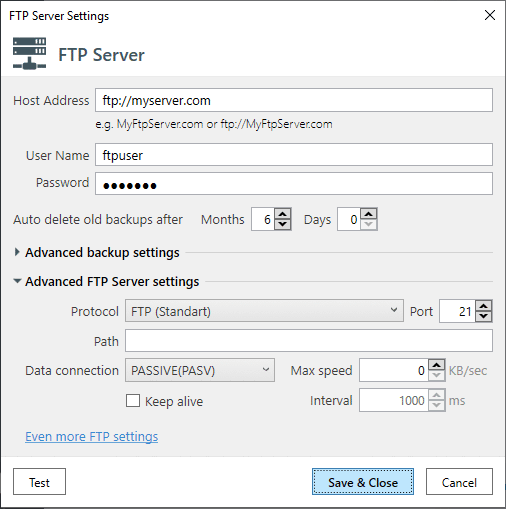
With SQLBackupAndFTP, you can schedule automated backups and securely store them on your preferred cloud storage platform, such as Google Drive, Dropbox, or Amazon S3. This software also enables you to select specific databases or tables to backup, reducing storage requirements and backup times. You can even choose to compress and encrypt your backups for added security.
SQLBackupAndFTP offers incredible flexibility and convenience, with the ability to restore backups to any SQL server instance or even transfer files between servers. Additionally, the software provides a monitoring feature that sends you notifications via email in case of failed backups or other issues.
Whether you're an IT professional or a business owner, SQLBackupAndFTP is a must-have tool for ensuring the safety and security of your SQL server databases. With its intuitive interface, advanced features, and exceptional performance, SQLBackupAndFTP is the ideal software for backing up and restoring your data with ease.
With SQLBackupAndFTP, you can schedule automated backups and securely store them on your preferred cloud storage platform, such as Google Drive, Dropbox, or Amazon S3. This software also enables you to select specific databases or tables to backup, reducing storage requirements and backup times. You can even choose to compress and encrypt your backups for added security.
SQLBackupAndFTP offers incredible flexibility and convenience, with the ability to restore backups to any SQL server instance or even transfer files between servers. Additionally, the software provides a monitoring feature that sends you notifications via email in case of failed backups or other issues.
Whether you're an IT professional or a business owner, SQLBackupAndFTP is a must-have tool for ensuring the safety and security of your SQL server databases. With its intuitive interface, advanced features, and exceptional performance, SQLBackupAndFTP is the ideal software for backing up and restoring your data with ease.
SQLBackupAndFTP 12.8.1 download tags
SQLBackupAndFTP 12.8.1 Windows 7 release notes
New Release
Main Window:
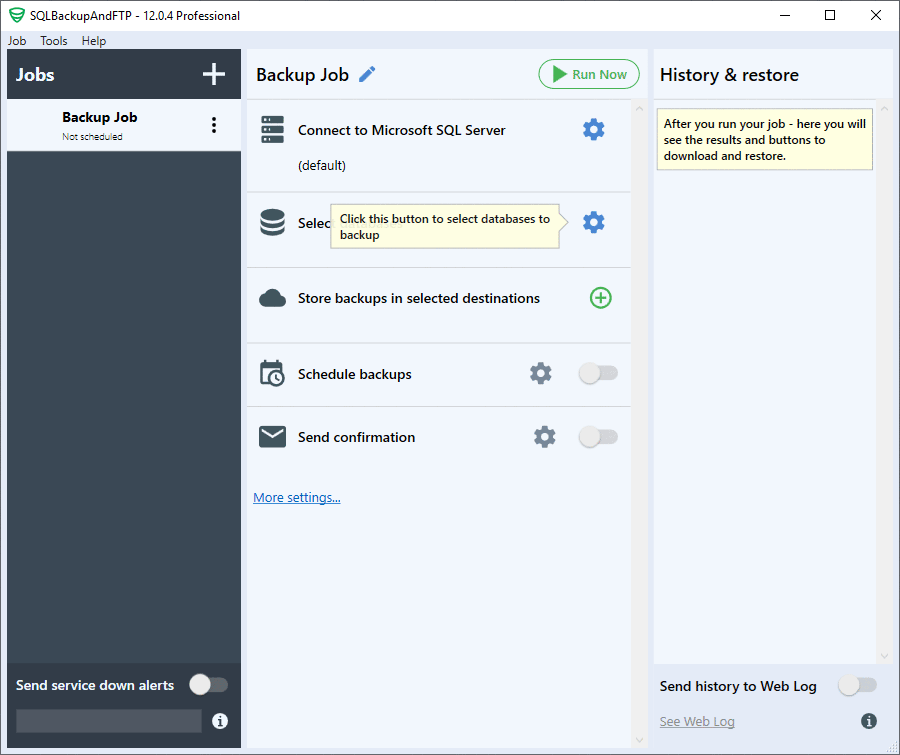
The main window is now divided into three sections: job list on the left, job execution history with restore on the right and job settings in the center.
Job List:
All backup jobs are now displayed in a single list as opposed to separate .jobx files for each job in previous versions. This allows you to manage all jobs in one screen instead of opening them one by one. The red exclamation mark to the left of job’s name indicates that the last backup has failed, while the green check mark indicates that everything went fine.
Job History and Restore:
When you select a job from the left panel you can see all its backups in the right panel. Moreover, there you can look at a detailed execution log, download or even restore the database from the selected backup wherever the backup is located. Previously you had to use a separate utility to restore backups, now you can restore your backups right from the application. This works with Full, Differential, and Transaction Log backups. They will be automatically downloaded from the destination folder, then unpacked, and restored on the database.
Job Settings:
In the middle panel you can see all backup job settings placed in step-by-step order. It makes the setup process easier especially for the new ones. Also, yellow tool tips guide you if you’re not sure what to do next.
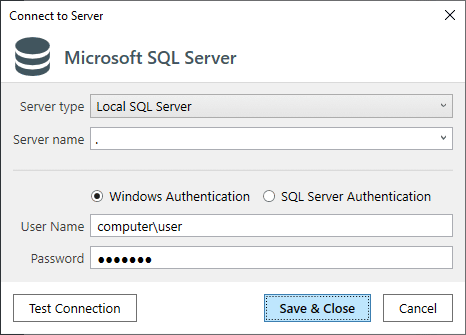
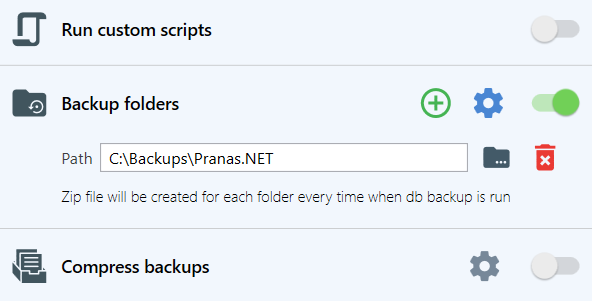
There are five main steps to follow: from connecting to SQL Server down to setting up email notifications. All other settings are optional and hidden under the “More settings…” link. So, there is no good old Advanced Settings dialog, all advanced settings are presented as job setup steps.
You can either set up each step by clicking the blue gear icon or turn some functionality off and on using a switch. But, of course, not all of the steps are optional. For example, you can’t skip connection to SQL Server or database selection step.
For those who prefer using “Backup all non-system databases” option, there is a surprise here. Now y
[ SQLBackupAndFTP release history ]
Main Window:
The main window is now divided into three sections: job list on the left, job execution history with restore on the right and job settings in the center.
Job List:
All backup jobs are now displayed in a single list as opposed to separate .jobx files for each job in previous versions. This allows you to manage all jobs in one screen instead of opening them one by one. The red exclamation mark to the left of job’s name indicates that the last backup has failed, while the green check mark indicates that everything went fine.
Job History and Restore:
When you select a job from the left panel you can see all its backups in the right panel. Moreover, there you can look at a detailed execution log, download or even restore the database from the selected backup wherever the backup is located. Previously you had to use a separate utility to restore backups, now you can restore your backups right from the application. This works with Full, Differential, and Transaction Log backups. They will be automatically downloaded from the destination folder, then unpacked, and restored on the database.
Job Settings:
In the middle panel you can see all backup job settings placed in step-by-step order. It makes the setup process easier especially for the new ones. Also, yellow tool tips guide you if you’re not sure what to do next.
There are five main steps to follow: from connecting to SQL Server down to setting up email notifications. All other settings are optional and hidden under the “More settings…” link. So, there is no good old Advanced Settings dialog, all advanced settings are presented as job setup steps.
You can either set up each step by clicking the blue gear icon or turn some functionality off and on using a switch. But, of course, not all of the steps are optional. For example, you can’t skip connection to SQL Server or database selection step.
For those who prefer using “Backup all non-system databases” option, there is a surprise here. Now y
[ SQLBackupAndFTP release history ]
Bookmark SQLBackupAndFTP
SQLBackupAndFTP for Windows 7 - Copyright information
All SQLBackupAndFTP reviews, submitted ratings and written comments become the sole property of Windows 7 download. You acknowledge that you, not windows7download, are responsible for the contents of your submission. However, windows7download reserves the right to remove or refuse to post any submission for any reason.
Windows 7 Download periodically updates pricing and software information of SQLBackupAndFTP full version from the publisher, but some information may be out-of-date. You should confirm all information.
Using warez version, crack, warez passwords, patches, serial numbers, registration codes, key generator, pirate key, keymaker or keygen for SQLBackupAndFTP license key is illegal and prevent future development of SQLBackupAndFTP. Download links are directly from our mirrors or publisher's website, SQLBackupAndFTP torrent or shared files from free file sharing and free upload services, including Rapidshare, MegaUpload, YouSendIt, SendSpace, DepositFiles, DivShare, HellShare, HotFile, FileServe or MediaFire, are not used.
Windows 7 Download periodically updates pricing and software information of SQLBackupAndFTP full version from the publisher, but some information may be out-of-date. You should confirm all information.
Using warez version, crack, warez passwords, patches, serial numbers, registration codes, key generator, pirate key, keymaker or keygen for SQLBackupAndFTP license key is illegal and prevent future development of SQLBackupAndFTP. Download links are directly from our mirrors or publisher's website, SQLBackupAndFTP torrent or shared files from free file sharing and free upload services, including Rapidshare, MegaUpload, YouSendIt, SendSpace, DepositFiles, DivShare, HellShare, HotFile, FileServe or MediaFire, are not used.
Post SQLBackupAndFTP review


Windows 7 SQLBackupAndFTP related downloads
Deniz SQL Processes Viewer is a lightweight and useful tool ... in order to help you view and manage SQL database connections. ...
Nucleon Database Master is a modern, powerful, intuitive and easy to use database query, administration, and management software with a consistent ...
A Java-based database connection pooling utility, which supports time-based expiry, connection ... and he is ready for the show. DatabasePooler can very well be used generically with any ...
EMS SQL Management Studio 2011 for Oracle is a complete solution for Oracle database administration and development. With components that focus on ...
Database Workbench offers features not found in vendor tools ... ADO or ODBC datasource Productivity tools: · SQL Insight · WorkSpace (including TODO lists and object ...
My Account
Help
Windows 7 Software Coupons
-
WinX HD Video Converter
56% Off -
WinX MediaTrans
63% Off -
MacX Video Converter Pro
56% Off -
Media Player Morpher
85% Off -
MacX MediaTrans
63% Off
My Saved Stuff
You have not saved any software.
Click "Save" next to each software.
Click "Save" next to each software.
Would you like to receive announcements of new versions of your software by email or by RSS reader? Register for FREE!
Windows 7 Downloads Picks
- MegaBrutal's SMTP Server 0.9r
- Database Pooler 0.1.6
- SQLite Expert Personel 5.5.14
- CyBlock for ISA 6.5.0
- ESF Database Migration Toolkit Standard 12.0.19
- SharePoint Text Size Zoom 1.4.508.0
- SharePoint Item Permission Batch 4.4.509.1
- Microsoft Security Compliance Manager 2.5.40.0
- SharePoint Search and Replace 1.0.0.58
- Proxy Log Explorer Professional Edition 5.8 B0651
- SharePoint AD Information Sync 3.2.228.0
- MySQL 8.0.34
- Cyfin Reporter 8.7.2a
- Microsoft Office Migration Planning Manager 2010 2.2
- Admin Report Kit for Exchange Server 7.2
- TIFF Viewer Server 14.86
- SharePoint Discussion Board Feature 15.1.05
- TeamDrive Personal Server 1.1.070
- FBClone 2.2.1
- Live Banner Web Part 1.5.27.10
Popular Tags
idisk
sharepoint server
pop3 server
client server
mail server
ipds printing
active directory reports
dscsi
file server
sharepoint component
web server
analysis
server
database
log analyzer
iscsi target
log analysis
log
sharepoint web part
software
web part
backup
network disk
virtualization
web
ftp server
sharepoint
active directory management
script
smtp server
Popular Windows 7 Software
- hMailServer 5.7.1 Build b3116
- DTK LPR Solution 3.6.8
- SoftPerfect TFTP Server 26.10
- Wing FTP Server For Linux(64bit) 8.2.7
- Wing FTP Server For Mac(i386) 8.2.7
- MegaBrutal's SMTP Server 0.9r
- Apache Tomcat 11.0.27
- Database Pooler 0.1.6
- Enterprise Mail Server 5.26
- Sysax Multi Server 7.20
- Wing FTP Server For Mac(Power PC) 4.0.2
- RaidenMAILD 5.0.2
- CyBlock for ISA 6.5.0
- Remote Utilities - Viewer Portable Edition 7.8.4.0
- SQLite Expert Personel 5.5.14
© 2026 Windows7Download.com - All logos, trademarks, art and other creative works are and remain copyright and property of their respective owners. Microsoft Windows is a registered trademarks of Microsoft Corporation. Microsoft Corporation in no way endorses or is affiliated with windows7download.com.