


SecureCRT for Windows 7 - "Experience Ultimate Security: SecureCRT for Windows 7" - Windows 7 Download


SecureCRT 9.5.2
"Enhance your Windows 7 experience with SecureCRT. Powerful, secure terminal emulation."
SecureCRT is a top-of-the-line terminal emulator that seamlessly integrates with Windows 7. Developed by VanDyke Software, SecureCRT boasts powerful encryption and data security features, making it a trusted choice for network administrators and IT professionals. With customizable sessions, easy script automation, and an intuitive interface, SecureCRT is the go-to software for managing remote servers and devices. Download SecureCRT now and take your network management to the next level.
SecureCRT 9.5.2 full details

| File Size: | 34.80 MB |
|---|---|
| License: | Trialware |
| Price: | $99.00 |
| Released: | 2024-05-07 |
| Downloads: | Total: 6116 | This Month: 158 |
| Publisher: | VanDyke Software |
| Publisher URL: | https://www.vandyke.com/ |

Download SecureCRT 9.5.2
Save SecureCRT to My Stuff
Tweet

SecureCRT 9.5.2 full screenshots


SecureCRT - Windows 7 Download awards


SecureCRT 9.5.2 full description
SecureCRT client for Windows, Mac, and Linux provides rock-solid terminal emulation for computing professionals, raising productivity with advanced session management and a host of ways to save time and streamline repetitive tasks. SecureCRT provides secure remote access, file transfer, and data tunneling for everyone in your organization.
Whether you are replacing Telnet or Terminal, or need a more capable secure remote access tool, SecureCRT is an application you can live in all day long. With the solid security of SSH, extensive session management, and advanced scripting, SecureCRT will help raise your productivity to the nth degree.
Keyword Highlighting:
Highlight individual words, phrases, or substrings in the session window to identify errors in log files or streaming output and to highlight prompts. Regular expressions are also supported, making it easier to highlight strings like IP addresses. Keyword display attributes (bold, reverse video, and color) can be combined.
Tabbed Sessions:
Tabs and tab groups allow you to organize sessions in a variety of ways so that you can get more done in less time. Tabs can be grouped vertically or horizontally, allowing you to compare the output of two sessions, group related sessions together, or work in one tab while monitoring the output from a command in another tab and then go back to a single tab group when the command has finished.
Command Manager:
Streamline repetitive tasks with the dockable Command Manager, which makes it easy to organize commands into named folders, filter commands by name, and launch them with a double click or by pressing Enter. Commands and command folders can also be shared with the button bar and vice versa.
Scripting:
Use Python and ActiveX scripts to save time and automate tasks. Python 3 is supported on Windows, macOS, Ubuntu Linux, and RHEL 8. On Windows, edit scripts directly in a tab without leaving SecureCRT.
Credentials Manager:
The Credentials Manager simplifies local password management within SecureCRT and SecureFX. Rather than specifying credentials for each saved session, sessions can reference an entry in the local Credentials Manager, making it easier to update stored passwords. This is especially helpful when monthly, weekly, or even daily password changes are required.
New In SecureCRT® 9.3:
Command-line utilities
Keyword highlighting enhancements
SSH2 algorithm support
Auto check for updates
Administrative options (Windows)
Preserve application window size
Specify saved credentials
Platform support
-Support has been added for Ubuntu 22.04 LTS 64-bit.
Whether you are replacing Telnet or Terminal, or need a more capable secure remote access tool, SecureCRT is an application you can live in all day long. With the solid security of SSH, extensive session management, and advanced scripting, SecureCRT will help raise your productivity to the nth degree.
Keyword Highlighting:
Highlight individual words, phrases, or substrings in the session window to identify errors in log files or streaming output and to highlight prompts. Regular expressions are also supported, making it easier to highlight strings like IP addresses. Keyword display attributes (bold, reverse video, and color) can be combined.
Tabbed Sessions:
Tabs and tab groups allow you to organize sessions in a variety of ways so that you can get more done in less time. Tabs can be grouped vertically or horizontally, allowing you to compare the output of two sessions, group related sessions together, or work in one tab while monitoring the output from a command in another tab and then go back to a single tab group when the command has finished.
Command Manager:
Streamline repetitive tasks with the dockable Command Manager, which makes it easy to organize commands into named folders, filter commands by name, and launch them with a double click or by pressing Enter. Commands and command folders can also be shared with the button bar and vice versa.
Scripting:
Use Python and ActiveX scripts to save time and automate tasks. Python 3 is supported on Windows, macOS, Ubuntu Linux, and RHEL 8. On Windows, edit scripts directly in a tab without leaving SecureCRT.
Credentials Manager:
The Credentials Manager simplifies local password management within SecureCRT and SecureFX. Rather than specifying credentials for each saved session, sessions can reference an entry in the local Credentials Manager, making it easier to update stored passwords. This is especially helpful when monthly, weekly, or even daily password changes are required.
New In SecureCRT® 9.3:
Command-line utilities
Keyword highlighting enhancements
SSH2 algorithm support
Auto check for updates
Administrative options (Windows)
Preserve application window size
Specify saved credentials
Platform support
-Support has been added for Ubuntu 22.04 LTS 64-bit.
SecureCRT 9.5.2 download tags
SecureCRT 9.5.2 Windows 7 release notes
New Release
New macOS platform support
SecureCRT now supports Sonoma (macOS 14).
Enhanced credentials management
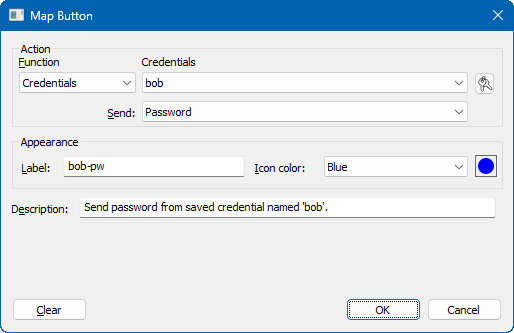
Map a set of saved credentials to buttons, commands, and keys, so that you can send a password or username to a session at the press of a button. A single click opens the dialog that allows a saved password to be modified.
Default RDP session (Windows)
Configure default settings for your RDP sessions so that RDP options can be set independently of SecureCRT’s Default session.
[ SecureCRT release history ]
New macOS platform support
SecureCRT now supports Sonoma (macOS 14).
Enhanced credentials management
Map a set of saved credentials to buttons, commands, and keys, so that you can send a password or username to a session at the press of a button. A single click opens the dialog that allows a saved password to be modified.
Default RDP session (Windows)
Configure default settings for your RDP sessions so that RDP options can be set independently of SecureCRT’s Default session.
[ SecureCRT release history ]
Bookmark SecureCRT
SecureCRT for Windows 7 - Copyright information
All SecureCRT reviews, submitted ratings and written comments become the sole property of Windows 7 download. You acknowledge that you, not windows7download, are responsible for the contents of your submission. However, windows7download reserves the right to remove or refuse to post any submission for any reason.
Windows 7 Download periodically updates pricing and software information of SecureCRT full version from the publisher, but some information may be out-of-date. You should confirm all information.
Using warez version, crack, warez passwords, patches, serial numbers, registration codes, key generator, pirate key, keymaker or keygen for SecureCRT license key is illegal and prevent future development of SecureCRT. Download links are directly from our mirrors or publisher's website, SecureCRT torrent or shared files from free file sharing and free upload services, including Rapidshare, MegaUpload, YouSendIt, SendSpace, DepositFiles, DivShare, HellShare, HotFile, FileServe or MediaFire, are not used.
Windows 7 Download periodically updates pricing and software information of SecureCRT full version from the publisher, but some information may be out-of-date. You should confirm all information.
Using warez version, crack, warez passwords, patches, serial numbers, registration codes, key generator, pirate key, keymaker or keygen for SecureCRT license key is illegal and prevent future development of SecureCRT. Download links are directly from our mirrors or publisher's website, SecureCRT torrent or shared files from free file sharing and free upload services, including Rapidshare, MegaUpload, YouSendIt, SendSpace, DepositFiles, DivShare, HellShare, HotFile, FileServe or MediaFire, are not used.
SecureCRT users' reviews
SecureCRT 6.5.2 B446
review by cedar xue (Mar 22, 2010)

It is a wonderful software.I like it !
Post SecureCRT review


Windows 7 SecureCRT related downloads
SecureCRT is a GUI-based SSH / Telnet client and ... encryption, to name the most important ones. SecureCRT features the most accessible user interface that we’ve ...
My Account
Help
Windows 7 Software Coupons
-
WinX DVD Ripper
50% Off -
MacX Media Management Bundle
70% Off -
WinX MediaTrans
63% Off -
WinX HD Video Converter
56% Off -
MacX DVD Ripper Pro
50% Off
My Saved Stuff
You have not saved any software.
Click "Save" next to each software.
Click "Save" next to each software.
Would you like to receive announcements of new versions of your software by email or by RSS reader? Register for FREE!
Windows 7 Downloads Picks
Popular Tags
dock
mozilla firefox
free vlc media player
spider solitaire
super mario
facebook
photo viewer
photo editor
java
windows 7
turbo c
javascript
internet explorer 10
service pack 3
visual basic
nero startsmart
chrome
operating system
solitaire
animated wallpaper
radio tuner
firefox
gadget
winrar
bangla keyboard
microsoft office
google chrome
search windows 7 downloads
sound equalizer
skype
Popular Windows 7 Software
- dbForge Unit Test for SQL Server 2026.1.39
- Windows 7 Firewall Control 8.4.0.84
- User Property Field 1.7.1
- eftepede for Windows
- RaidenMAILD 5.0.2
- PHPRunner 10.91 B42144
- XMail 1.27
- Free SQL Health Monitor 2.0
- CC Proxy Server 8.0
- UFO VPN for Windows 2.2.0
- Magic Winmail Server 7.2 Build 0524
- SQL Management Studio 2011 for Oracle 1.2.0.8
- AmoK pop2rss 1.0
- Wake-On-LAN Proxy Server 1.1.0
- Database Master 12.0.0
© 2026 Windows7Download.com - All logos, trademarks, art and other creative works are and remain copyright and property of their respective owners. Microsoft Windows is a registered trademarks of Microsoft Corporation. Microsoft Corporation in no way endorses or is affiliated with windows7download.com.