


R-Studio for Windows 7 - R-Studio: Powerful Data Recovery for Windows 7. - Windows 7 Download


R-Studio 9.5 build 191742
"Revive lost files with R-Studio - powerful data recovery software for Windows 7."
Looking for a reliable data recovery software? R-Studio by R-Tools Technology Inc. is the way to go! This powerful tool doesn't only recover data from simple deletions, but also from damaged or reformatted drives. With its user-friendly interface and advanced features, R-Studio promises to restore lost files accurately and efficiently. Whether you're a professional or an average user, give R-Studio a try and get your precious data back!
R-Studio 9.5 build 191742 full details

| File Size: | 68.90 MB |
|---|---|
| License: | Demo |
| Price: | $79.99 |
| Released: |
2026-04-08
 |
| Downloads: | Total: 4688 | This Month: 286 |
| Publisher: | R-Tools Technology Inc. |
| Publisher URL: | https://www.r-tt.com/ |

Download R-Studio 9.5 build 191742
Save R-Studio to My Stuff
Tweet

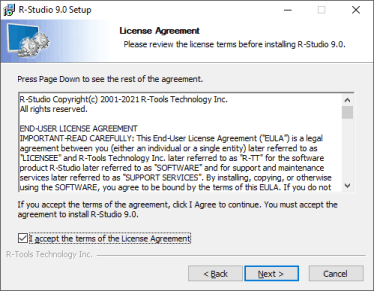
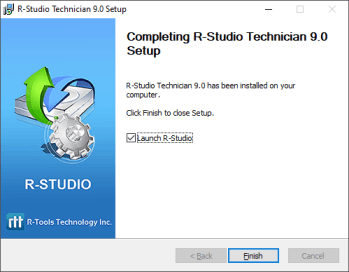
R-Studio 9.5 build 191742 full screenshots


R-Studio - Windows 7 Download awards


R-Studio 9.5 build 191742 full description
R-Studio is a family of powerful and cost-effective undelete and data recovery software. Empowered by the new unique data recovery technologies, it is the most comprehensive data recovery solution for recovery files from FAT12/16/32/exFAT, NTFS, NTFS5 (created or updated by Windows 2000/XP/2003/Vista/Win7), HFS/HFS+ (Macintosh), Little and Big Endian variants of UFS1/UFS2 (FreeBSD/OpenBSD/NetBSD/Solaris) and Ext2/Ext3/Ext4 FS (Linux) partitions. It functions on local and network disks, even if such partitions are formatted, damaged or deleted. Flexible parameter settings give you absolute control over data recovery. R-Studio is a data recovery application that allows you to retrieve files you deleted by mistake or that were removed due to virus attacks, partition formatting and corruption. With R-Studio, you can analyze the system structure in order to find the containing files. The drives' content is displayed in a tree-view, where you can select the folders and files you want to recover. You can refresh the drive content any time you want and the application displays the most recent content. With R-Studio you can create a virtual RAID, which is useful if your operating system does not recognize the real one. Another advantage available in the application is the built-in text / hexadecimal editor, which you can use to analyze file structure and edit NTFS file attributes.
R-Studio combines ease of use with powerful features that allow you to recover lost, deleted or corrupted files on logical / physical disks, as well as on remote computers.
All R-Studio and R-Studio Emergency features and capabilities can be evaluated and tested in the Demo mode. The only limitation the Demo mode has pertains to the maximum size of a file that can be recovered. The software running in the Demo mode can be registered on the fly at any time. No reinstallation is required.
To see how R-Studio can recover data in a specific case, you may download R-Studio free, install it on your computer, and run it in the Demo mode (for a nonbootable machine, an R-Studio Emergency CD can be created). If you do not have data recovery experience, we advise you to download and read our Data Recovery Manual before you start. You'll find step-by-step instructions and recommendations prepared by our data recovery specialists. For any additional questions you may always contact our technical support team even if you haven't purchased the software license yet. When lost files are found you may recover files with a size of less that 64KB each. Other files, supported by the pre-viewer built in the software, can be previewed to estimate chances for successful file recovery. If you are satisfied with the result, you may purchase an R-Studio license online right away. Upon receiving a registration key, you may register R-Studio on the fly without even closing the program. As soon as R-Studio is registered, you may continue recovering files.
Moreover, using R-Studio in the Demo mode you may create images of your logical disks or entire hard drives. Then you may perform all data recovery actions with those images to keep the source disks safe from accidental data corruption. These images are especially important when you are working with hard drives that start showing signs of dying, to prevent losing data from the drives for good.
R-Studio combines ease of use with powerful features that allow you to recover lost, deleted or corrupted files on logical / physical disks, as well as on remote computers.
All R-Studio and R-Studio Emergency features and capabilities can be evaluated and tested in the Demo mode. The only limitation the Demo mode has pertains to the maximum size of a file that can be recovered. The software running in the Demo mode can be registered on the fly at any time. No reinstallation is required.
To see how R-Studio can recover data in a specific case, you may download R-Studio free, install it on your computer, and run it in the Demo mode (for a nonbootable machine, an R-Studio Emergency CD can be created). If you do not have data recovery experience, we advise you to download and read our Data Recovery Manual before you start. You'll find step-by-step instructions and recommendations prepared by our data recovery specialists. For any additional questions you may always contact our technical support team even if you haven't purchased the software license yet. When lost files are found you may recover files with a size of less that 64KB each. Other files, supported by the pre-viewer built in the software, can be previewed to estimate chances for successful file recovery. If you are satisfied with the result, you may purchase an R-Studio license online right away. Upon receiving a registration key, you may register R-Studio on the fly without even closing the program. As soon as R-Studio is registered, you may continue recovering files.
Moreover, using R-Studio in the Demo mode you may create images of your logical disks or entire hard drives. Then you may perform all data recovery actions with those images to keep the source disks safe from accidental data corruption. These images are especially important when you are working with hard drives that start showing signs of dying, to prevent losing data from the drives for good.
R-Studio 9.5 build 191742 download tags
R-Studio 9.5 build 191742 Windows 7 release notes
New Release
Bugfixes:
The 'Bind as Drive Image' command did not work correctly when an image was bound from inside another bound image. Fixed.
[ R-Studio release history ]
Bugfixes:
The 'Bind as Drive Image' command did not work correctly when an image was bound from inside another bound image. Fixed.
[ R-Studio release history ]
Bookmark R-Studio
R-Studio for Windows 7 - Copyright information
All R-Studio reviews, submitted ratings and written comments become the sole property of Windows 7 download. You acknowledge that you, not windows7download, are responsible for the contents of your submission. However, windows7download reserves the right to remove or refuse to post any submission for any reason.
Windows 7 Download periodically updates pricing and software information of R-Studio full version from the publisher, but some information may be out-of-date. You should confirm all information.
Using warez version, crack, warez passwords, patches, serial numbers, registration codes, key generator, pirate key, keymaker or keygen for R-Studio license key is illegal and prevent future development of R-Studio. Download links are directly from our mirrors or publisher's website, R-Studio torrent or shared files from free file sharing and free upload services, including Rapidshare, MegaUpload, YouSendIt, SendSpace, DepositFiles, DivShare, HellShare, HotFile, FileServe or MediaFire, are not used.
Windows 7 Download periodically updates pricing and software information of R-Studio full version from the publisher, but some information may be out-of-date. You should confirm all information.
Using warez version, crack, warez passwords, patches, serial numbers, registration codes, key generator, pirate key, keymaker or keygen for R-Studio license key is illegal and prevent future development of R-Studio. Download links are directly from our mirrors or publisher's website, R-Studio torrent or shared files from free file sharing and free upload services, including Rapidshare, MegaUpload, YouSendIt, SendSpace, DepositFiles, DivShare, HellShare, HotFile, FileServe or MediaFire, are not used.
Post R-Studio review


Windows 7 R-Studio related downloads
Looking for an efficient and reliable file recovery tool? Look no further than File Undelete by ...
... powerful tool to retrieve lost or accidentally deleted data from your USB drive? Look no further than ...
Website www.recover.co.in offers highly interactive Recover Memory Card Data application that swiftly retrieves all intentionally erased official ...
... to the ultimate destination for downloading the finest data recovery software - Recover USB Drive Data! Developed ...
Discover the power of recovery with the "Digital Pictures Undelete Tool", a remarkable software developed by the experts at ...
iTop Data Recovery is a no-nonsense solution for recovering lost or deleted files from Windows Recycle Bin, ...
My Account
Help
Windows 7 Software Coupons
-
WinX DVD Ripper
50% Off -
Media Player Morpher
85% Off -
MacX Video Converter Pro
56% Off -
MacX DVD Ripper Pro
50% Off -
MacX DVD Video Converter
58% Off
My Saved Stuff
You have not saved any software.
Click "Save" next to each software.
Click "Save" next to each software.
Would you like to receive announcements of new versions of your software by email or by RSS reader? Register for FREE!
Windows 7 Downloads Picks
- iTop Data Recovery 6.1.0.936
- GoodSync2Go 12.9.29.9
- R-Studio for Windows x64 9.4 B191310
- StrongRecovery Portable 5.2.2.2
- DMDE 4.0.6.806
- BackUp Maker Standard Edition 8.405
- StrongRecovery 5.2.2.2
- KLS Backup Standard 2025 (14.0.0.2)
- Driver Genius Professional Edition 25.0.0.136
- R-Studio 9.5 build 191742
- Backup for Workgroups 4.3
- Backup To EMail 2.2 Build 252
- Mozy Remote Backup 2.36.5.646
- Virtos S.O.S Backup Enterprise 5.5.05
- Windows 7 USB/DVD Download Tool 1.0.24.0
- FreeFileSync 14.9
- Sync Breeze Ultimate 18.0.24
- Image 4.01
- A Bootable USB 0.9.6.508 beta
- Portable Recover Files 3.3.1.0
Popular Tags
rescue
audio
recover
disk
restore
corrupted
deleted
recovery
drive
utility
video
folder
salvage
formatted
undelete
media
damaged
usb
partition
windows
erased
pictures
card
picture
memory
file
digital
retrieve
backup
images
Popular Windows 7 Software
- Network Monitor II 31.7
- Avro Keyboard 5.6.0.0
- Media Creation Tool x64 22H2
- Ghostscript (x64 bit) 10.03.1
- Windows 7
- iTop Data Recovery 6.1.0.936
- Windows 7 Service Pack 1 7601.17514.1011
- iTop Easy Desktop 4.2.0.312
- Advanced SystemCare 19.3.0.200
- Smart Game Booster 5.3.1.692
- iTop PDF 3.6.0.4
- GoodSync2Go 12.9.29.9
- The Dude 7.22.2 Stable
- IObit Uninstaller 15.4.0.1
- Atlantis Word Processor 5.0.4
© 2026 Windows7Download.com - All logos, trademarks, art and other creative works are and remain copyright and property of their respective owners. Microsoft Windows is a registered trademarks of Microsoft Corporation. Microsoft Corporation in no way endorses or is affiliated with windows7download.com.